Oticon Xceed vs. Sennheiser Sonite Rise
Check out our comparison of the Oticon Xceed vs Sennheiser Sonite Rise. Listen to audio samples and see how the two hearing aids differ in terms of sound performance, features, accessories, and more.
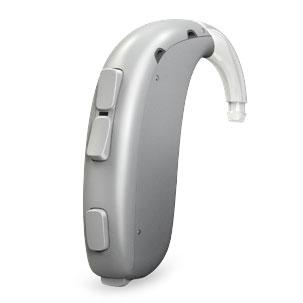
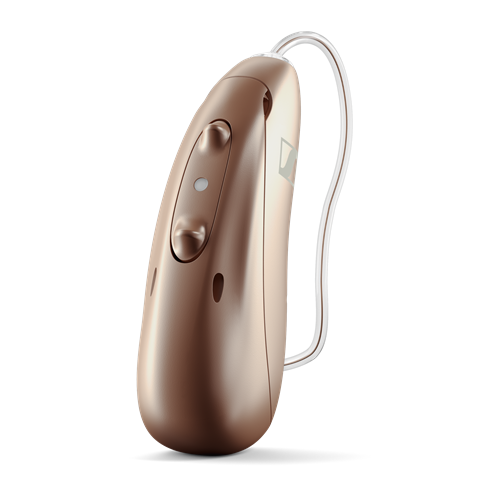
Product Overview
Accessories
Compatible accessories for each hearing aid
CROS
Oticon CROS sends a wireless signal via Near Field Magnetic Induction (NFMI) from the poorer ear to a receiver on the better ear.
CROS PX
The new Oticon CROS PX is rechargeable and offers TwinLink™ dual streaming technology, which provides access to more sounds in challenging listening environments and handles wireless streaming at the same time.
Phone Adapter 2.0
The Oticon Phone Adapter 2.0 enables hearing aid users to connect to their landline phones via the ConnectClip accessory. Wireless, hands-free phone conversations are enabled when the ConnectClip is worn on the body.
Remote Control 3.0
ConnectClip+3
Transmits audio to your hearing aids from a distance, lets you make hands-free phone calls, and adjusts your hearing aid volume and program settings.
Companion App+2
App that lets you adjust the volume, mute your hearing aids, and change listening programs. Includes streaming EQ and remote care.
Easy Line Remote Control
The Remote Control is a handheld accessory for compatible hearing aids that lets the user adjust volume and switch between hearing aid programs without using the hearing aids themselves or an app. It has separate volume up and down buttons, a program-change button, an on/off slider, an indicator light, and a battery door. It must be paired with the hearing aids before use, but pairing is only needed once; after that, it reconnects automatically. The remote uses a replaceable CR2032 lithium button-cell battery rather than a rechargeable battery. Each press of the program button moves the hearing aids to the next available program, while the plus and minus buttons raise or lower volume. Changes are applied to both hearing aids at the same time, and the hearing aids may play a confirmation beep depending on how they are configured. The guide also notes that its Bluetooth range is about 1 m, so it is meant for close-range control rather than long-distance operation.
Easy Line PartnerMic
The PartnerMic is a small clip-on microphone designed to be worn by a conversation partner so their voice can be streamed directly to compatible hearing aids. It is intended for situations where the listener wants clearer access to one person’s speech, especially when distance or background noise makes conversation harder. The microphone can be clipped to clothing or worn on a lanyard, with the guide recommending placement about 20 cm / 8 inches below the speaker’s mouth and no more than 50 cm / 20 inches away. The device has a built-in rechargeable battery, charges by USB-C, and typically takes about 2 hours to charge. It pairs once with the hearing aids and then reconnects after being turned off and on. Its streaming range is up to 25 m / 80 ft, though walls, furniture, and even the human body can reduce stability or cause dropouts. Volume is adjusted through the hearing aids or the companion app rather than directly on the microphone.
On App
Lets you control your hearing aids from your smartphone and interact with other Internet-connected devices and services.
Easy Line Remote app
The Easy Line Remote app is a smartphone app for compatible hearing aids that lets users adjust their hearing settings and view basic hearing-related health data. It can be used to change volume, switch listening programs, adjust features such as noise reduction and microphone directionality, and fine-tune sound using equalizer presets or manual bass, middle, and treble sliders. The app also supports remote appointments with a hearing care professional, allowing hearing aid adjustments to be made during a live video call. Depending on the hearing aid model, it may track health-related information such as step count, wearing time, goals, and activity levels. It can also show battery level and device status, configure touch controls, set cleaning reminders, and provide information about connected hearing aids and accessories.
TV Adapter 3.0
Streams TV audio directly to your hearing aids at the volume you choose with an effective range of up to 45 feet.
Easy Line TV Connector+1
The TV Connector is a small accessory that sends audio from a TV or other audio source directly to compatible hearing aids. It connects to the audio source using either an optical TOSLINK cable or a 3.5 mm analog cable, and it is powered through micro-USB. Once set up, it can stream audio wirelessly to paired hearing aids from up to about 15 m / 50 ft away, although walls, furniture, or other obstacles may reduce the range. In everyday use, the device is meant to work mostly in the background: when the TV or audio source is on, it transmits sound to the hearing aids; when no audio is detected, it goes into standby. Users can adjust the streamed audio volume using buttons on the device, and compatible hearing aids may also allow balancing TV sound against surrounding environmental sound. It supports Dolby Audio, stereo, and mono signals, but not DTS, so some TVs may require an audio-setting change or use of the analog cable instead.
Hardware
- Made for iPhone (MFi)
- Bluetooth® (A2DP)
- Bluetooth® Low Energy (LE)
- Auracast™ Ready
- Accessory required
- Bluetooth® (HFP)
- Bluetooth® Low Energy (LE)
- Program control
- Volume Control
- Mute control
- Program control
- Volume Control
- Audio Stream Mix
- Voice assistant
- Accept/end calls
- Pause/Resume
- Tinnitus program
- Siri