CaptionCall vs ClearCaptions: Which Phone is Right for You?
A comparison of two leading captioned telephone services, including their home phones, mobile apps, setup, support, and key features for people with hearing loss.
Hearing aid glossary
Looking that up…
Terms are matched automatically. A definition may not fit every context.
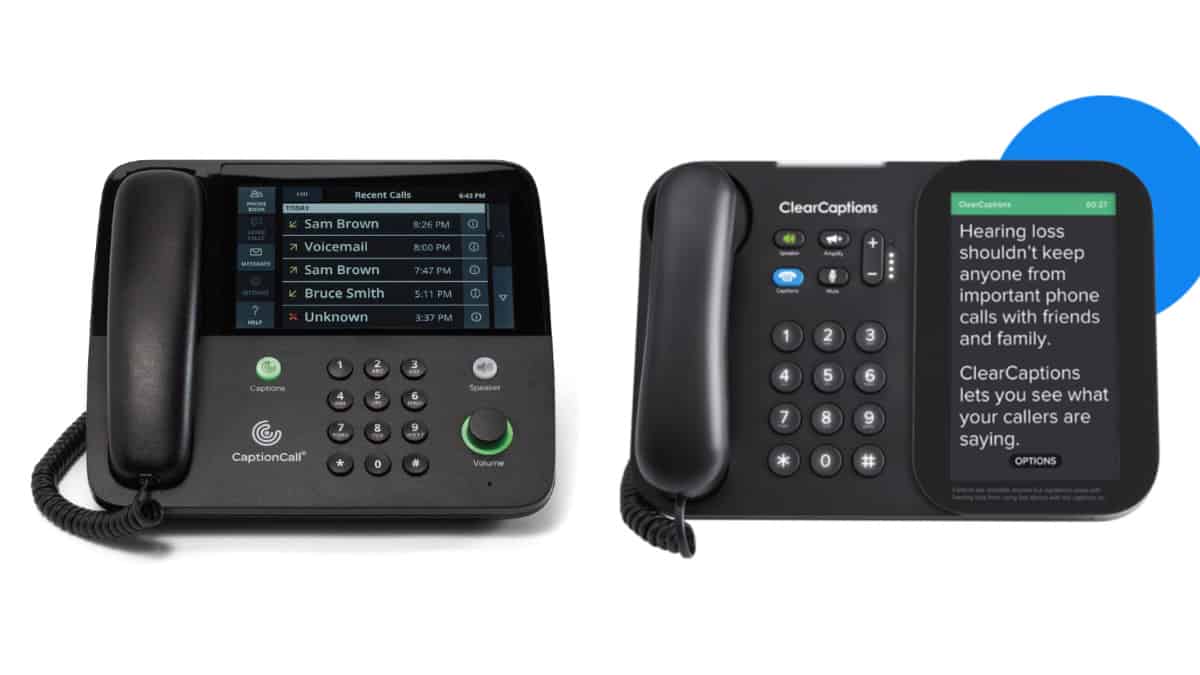
If you or a loved one struggles to hear conversations on the telephone, you have likely run into two of the biggest names in assistive telecommunications: CaptionCall and ClearCaptions.
Both companies specialize in IP CTS (Internet Protocol Captioned Telephone Service) and Telecommunications Relay Services (TRS), providing hardware and software that display real-time text of your phone conversations on an easy-to-read screen. Because these services are recognized as a vital accessibility right under the Americans with Disabilities Act (ADA), both are federally funded and provided at no cost to eligible users.


But when it comes down to CaptionCall vs. ClearCaptions, which captioned phone is actually the right fit for you and your home? In this 2026 comparison guide, we break down the hardware, mobile app features, and setup experiences to help you make an informed choice.
Core Similarities: How They Work and Eligibility Requirements
Before diving into the differences, it is important to understand the similarities. Neither service requires a monthly subscription, equipment fees, or a contract, and both operate under the same strict federal guidelines for CTS.
Additionally, both systems utilize a combination of Automated Speech Recognition (ASR) and live Captioning Agents (CA) to convert spoken words into text almost instantly. Because they are federally regulated, both companies guarantee strict confidentiality: your conversations are entirely private, protected by law, and never recorded.
To qualify for a CaptionCall or ClearCaptions phone, you must meet a standard 2-part eligibility requirement:
- Have a hearing loss that affects phone communication.
- Certify that your hearing loss necessitates the use of captions to communicate effectively over the phone.
These criteria apply whether or not you use hearing aids, cochlear implants, or other hearing devices. Your hearing care provider can help you through the certification process, and both CaptionCall and ClearCaptions have webpages to walk you through the process.
Hardware Comparison: Home Captioned Phones
For people who make most of their calls at home—particularly those who prefer a traditional telephone rather than relying exclusively on a smartphone—the physical captioned phone can be an important part of the experience.
CaptionCall: Customizable Listening and Captioning
CaptionCall’s home phone combines easy-to-read captioning and a touchscreen display with several features designed specifically for people with hearing loss.
:format(webp))
In addition to adjusting overall volume, users can customize amplification to boost frequencies where they have greater hearing loss. These settings can even be adjusted using information from an or recommendations from a hearing care professional.
The phone is hearing-aid compatible and also supports Bluetooth connectivity. Compatible Bluetooth hearing aids, hearing aid streamers, headphones, and other wireless devices can receive call audio directly from the CaptionCall phone, although compatibility varies by device. Users can adjust caption display settings and save captions from previous calls, which may be useful when reviewing important information such as appointment times, addresses, or instructions.

For people who want both captions and more control over how the caller’s voice sounds, these additional hearing-focused features may be particularly useful.
ClearCaptions: Straightforward Touchscreen Captioning
ClearCaptions also offers a dedicated home captioned phone with a touchscreen that displays the other caller’s words as text while the conversation is taking place.
:format(webp))
Its home phone emphasizes a straightforward captioning experience with an easy-to-read display and simple touchscreen controls. Like CaptionCall, the service is intended for people whose hearing loss makes telephone conversations difficult and who benefit from being able to listen and read at the same time.
Both services therefore provide the core functionality most users are seeking in a home captioned phone. The more important differences may come down to specific listening features, mobile access, and how each company provides setup and ongoing support.
Mobile Apps: Captions on the Go
Staying connected doesn’t stop when you leave home, and mobile captioning can be especially useful for people who increasingly rely on smartphones for everyday calls.
CaptionCall Mobile
CaptionCall Mobile brings live call captions to compatible iPhone and Android smartphones, allowing eligible users to make and receive captioned calls while connected through Wi-Fi or cellular data.


The app includes several useful features beyond basic captions. Users can adjust caption size, review saved call transcripts, export transcripts to other apps, and make three-way captioned calls. Bluetooth support can also help users connect compatible hearing aids and other audio devices.
:format(webp))
Users can configure call forwarding so calls made to an existing mobile number can be routed through CaptionCall Mobile, and caller-ID settings can help friends and family recognize outgoing calls.
For users who move between a home captioned phone and a smartphone—or who use an Android device—CaptionCall’s combination of home and mobile options may provide added flexibility.
ClearCaptions Mobile
ClearCaptions also offers a mobile captioning app that lets users make and receive captioned calls while away from their home phone.

The service provides users with a personalized ClearCaptions number and can display incoming and outgoing call captions on a mobile device. It also integrates with phone contacts and offers ongoing customer support.
:format(webp))
One distinction to consider is device compatibility. ClearCaptions’ current mobile service information specifies iPhone and iPad devices only, while CaptionCall Mobile is available for both iPhone and Android. Smartphone users should check current device and operating-system requirements before choosing a service.
Setup and Support: How the Services Compare
Because captioned phones involve internet or telephone connectivity—and because many users may not be comfortable setting up new technology on their own—the installation and support experience can be just as important as the phone itself.
CaptionCall’s Red Carpet Service
CaptionCall offers complimentary delivery, installation, training, and ongoing support.


With its Red Carpet Service, a CaptionCall representative can provide in-person installation and hands-on training, helping connect the phone and showing the user how to make calls, adjust settings, and use captions. HearingTracker reviewed this service in 2026 and found it to be exceptional. It is especially good for people who do not want to navigate their in-home WiFi setups, who currently have only a smartphone, or who may not even have internet access.
:format(webp))
CaptionCall also offers flexibility for people who prefer another approach. Users can choose self-installation with assistance from a virtual trainer rather than scheduling an in-home visit.
That choice may be especially helpful for people who are comfortable with technology or simply prefer to set up the phone on their own with guidance.
ClearCaptions In-Home Setup and Support
ClearCaptions likewise provides professional in-home setup rather than simply shipping a phone and leaving the user to figure it out.
The company advertises what it describes as “white-glove” service, with a setup specialist who comes to the home, installs the phone, and provides step-by-step instruction on making captioned calls. ClearCaptions also provides ongoing customer support.

Both companies offer professional in-home installation and training, as well as options for users who prefer to set up the phone themselves with assistance.
What Should You Look for in a Captioned Phone?
Before choosing a captioned telephone service, think about how you actually use the phone from day to day.
:format(webp))
Do you make most of your calls from home, or do you rely heavily on a smartphone? Do you wear hearing aids or need additional amplification beyond captions? Would you benefit from being able to adjust amplification for different frequencies, connect Bluetooth hearing aids, or save call transcripts to review important details later?
Your comfort with technology may matter, too. Some users may value having a specialist come into the home to install the phone and walk them through every feature. Others may prefer the convenience of setting up the phone themselves with remote assistance.


Vision and dexterity can also be considerations. Screen readability, caption size, touchscreen controls, and the physical layout of the phone may be just as important as the underlying captioning technology.
Thinking about these practical needs can help you choose a service that fits your hearing, vision, technology comfort level, and everyday communication habits.
What Do Real-life Users Say About CaptionCall and ClearCaptions?
Outside of HearingTracker’s positive review of CaptionCall’s Red Carpet service, neither CaptionCall nor ClearCaptions has been formally evaluated by HearingTracker or our partner company, the HearAdvisor lab, in a head-to-head real-world test.
However, online consumer feedback provides some clues about how users experience the two services. Overall, both receive many positive comments from people who say captioning has made phone conversations easier and restored confidence and independence. However, CaptionCall currently appears to have the edge in terms of ratings.
On Apple’s App Store, CaptionCall Mobile currently earns 4.8 out of 5 (4.8/5) stars from about 3,400 ratings, compared with 4.3/5 from roughly 2,000 ratings for ClearCaptions Mobile. CaptionCall also holds a 4.1/5 rating from more than 4,200 Google Play reviews. Feedback about ClearCaptions becomes more mixed on broader consumer review sites, where it averages 1.46/5 stars across 24 Better Business Bureau customer reviews and 2.0/5 stars across 20 Trustpilot reviews (July 2026), with complaints frequently involving installation scheduling, enrollment, callbacks, and customer support.
Comparable third-party review data for CaptionCall are much thinner, so those sites do not allow a true apples-to-apples comparison. CaptionCall has a 3.4/5 rating on Trustpilot from only 2 reviews. Still, considering the much larger app store samples alongside broader review patterns, CaptionCall appears to have somewhat stronger overall consumer sentiment.
But we’ll note that both services have users who describe captioned calling as an important or even life-changing communication tool.
:format(webp))
CaptionCall is a leading provider of Internet Protocol Captioned Telephone Service (IP CTS). The service is designed for individuals with hearing loss and who need captions to use the phone effectively. CaptionCall allows eligible participants to simultaneously listen to their caller and read real-time captions of the conversation on a large, high-resolution screen at no cost because it is a federally funded program.
- High-Resolution Touchscreen
- Custom Audio Tailoring
- Hearing Aid Compatibility
- Speakerphone & Voicemail
The Verdict: CaptionCall or ClearCaptions?
CaptionCall and ClearCaptions both provide federally supported captioned telephone services designed to help eligible people with hearing loss better understand phone conversations.

ClearCaptions offers a touchscreen home captioned phone, mobile captioning for compatible Apple devices, professional in-home setup, and ongoing support.
CaptionCall offers many of the same core benefits while adding several features that may appeal to people looking for greater flexibility and personalization. Its home phone allows users to customize amplification for different frequencies, supports compatible Bluetooth hearing aids and other devices, and lets users save call captions for later reference. CaptionCall Mobile is also available for both iPhone and Android and includes features such as saved and shareable transcripts and three-way captioned calling.
Both companies offer hands-on installation and training, and self-installation may also be available for users who prefer to set up the phone themselves with assistance. ClearCaptions primarily promotes its in-home “white-glove” setup, while CaptionCall gives users the option of in-home Red Carpet Service or assisted self-installation via its “Quick Start Guide” and/or with a virtual trainer.
:format(webp))
Neither service has been evaluated in a head-to-head HearingTracker or HearAdvisor test, so we can’t make a definitive performance comparison. However, based on available consumer ratings—particularly the much larger app-store samples—CaptionCall appears to have somewhat stronger overall user sentiment, while both services have many users who describe captioned calling as highly valuable or even life-changing.
For users who prioritize customizable amplification, hearing aid connectivity, broad smartphone compatibility, and flexible setup options, CaptionCall offers a particularly strong combination of features and support. ClearCaptions remains another good, established option, particularly for users seeking a straightforward home captioning experience with professional in-home installation.
Because both services are available at no cost to eligible users, the best choice ultimately depends on which phone features, mobile options, and support experience best fit your daily life.
Apply for a No-Cost Captioned Phone - Check your eligibility and request your professional home installation from CaptionCall by Sorenson.
Acknowledgement
This article is sponsored by CaptionCall. The content, perspectives, and recommendations were written by the author and reflect HearingTracker’s independent effort to provide practical guidance for people with hearing loss, caregivers, and their families.
CaptionCall by Sorenson is a program of the FCC and is provided at no cost to eligible users via the TRS Fund. Captions are generated by Automated Speech Recognition (ASR) and/or a live Captioning Agent (CA). All calls are strictly confidential and are never recorded. Eligibility requires a medically recognized hearing loss that necessitates the use of captions to use the phone effectively. No financial incentives, gift cards, or rewards are provided for registration. Captioning services are intended as a complementary technology to be used in conjunction with a user’s standard clinical hearing care.
Tony Schwartz
ContributorTony Schwartz is a marketing and sales leader with 15 years of experience spanning eCommerce, B2B, direct to consumer, and mass media industries. He represents HearingTracker, HearAdvisor, and Audiologists.org as clients.