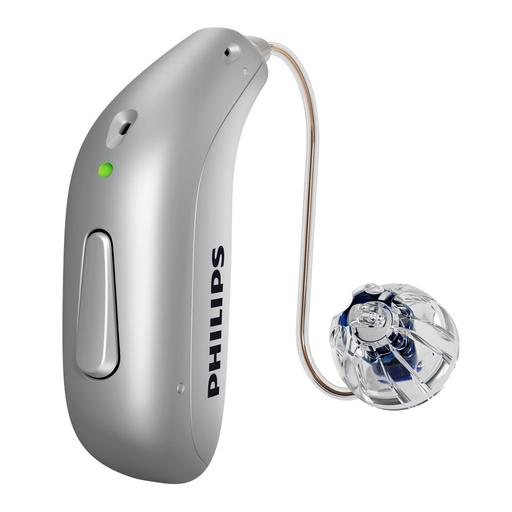
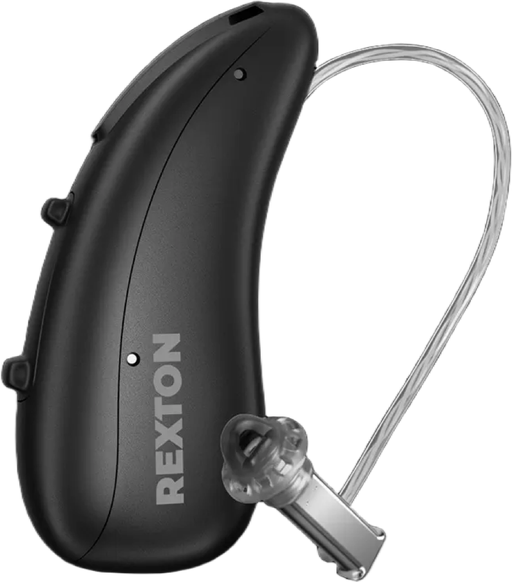
Philips HearLink 9050 vs. Rexton Reach R Plus
Check out our comparison of the Philips HearLink 9050 vs Rexton Reach R Plus. Listen to audio samples and see how the two hearing aids differ in terms of sound performance, features, accessories, and more.
Product Overview
Accessories
Compatible accessories for each hearing aid
Charger Plus miniRITE+1
A fast, portable charger for traveling light and charging on the go. Charge for a full day's power in 1 hour or get 4 hours of use from a quick 15-minute charge.
HearLink desk charger
A faster contact charger for a full day’s power in one hour, or up to four hours of hearing in only 15 minutes.
Charging Station
A plug-in charger for everyday use at home, with magnetic slots that hold your Reach R Plus hearing aids in place. It provides a full charge in around four hours and supports 30-minute top-ups. The hearing aids switch off when inserted and on when removed; the charging cable is fixed.
Travel Charger+1
A portable charging case with a built-in battery that provides up to three hearing aid charges away from a power outlet. It charges Reach R Plus in around four hours, supports 30-minute top-ups, and automatically switches the hearing aids off and on as you insert and remove them. The case recharges via USB-C.
Charging+ Station
A charger with built-in drying and UV cleaning to help care for your Reach R Plus hearing aids between uses. It supports 30-minute top-ups and automatically switches the hearing aids off when you insert them and back on when you remove them.
Universal Cable Charger
A compact, lightweight charger that connects directly to the charging contacts on your hearing aids. Removable sleeves make it easier to clean the contacts, and an optional stand helps keep the charger steady. Compatible with Reach R Plus and several other rechargeable Rexton models.
Reach CROS R-Li T BC
A rechargeable CROS transmitter designed to pair with Reach R Plus for people whose hearing in one ear cannot benefit from a conventional hearing aid. Worn on that side, it picks up sound and sends it wirelessly to the hearing aid on the better-hearing ear. In a BiCROS fitting, that hearing aid also amplifies sound to address hearing loss in the better ear.
AudioClip+3
The Philips AudioClip is a hearing aid accessory that serves as a remote microphone to help you better hear one-to-one conversations in noisy environments or when listening to someone speak from a distance.
Remote Control
To turn the volume up and down on your hearing aids you can use the Philips HearLink app. In case you prefer using the Philips Remote Control we have this option as well.
HearLink 2 app+2
App allows you to change programs, adjust the volume, mute your hearing aids, activate streaming options and personalize your sound. You can also use the app to connect with your hearing care specialist if you need to have your hearing aid settings adjusted remotely.
Smart Key
Smart Key is a pocket-sized remote with dedicated buttons for changing volume and listening programs without using a smartphone. A keyring keeps it handy, and a lock switch prevents accidental button presses in a pocket or bag. Rexton advises against pairing Smart Key and the Rexton App to the same hearing aids, because the app can erase the remote pairing.
Rexton App+1
The free Rexton App for iPhone and Android lets you adjust volume, switch listening programs, fine-tune sound balance, and check hearing aid battery levels from your phone. Rexton Assist offers personalized sound adjustments based on your feedback, while TeleCare enables remote support and adjustments from participating hearing care providers. Available controls depend on your hearing aid settings; Rexton Assist does not support CROS fittings.
TV Adapter
Connect the Philips TV Adapter to your TV so you hear the sound from the TV directly in your hearing aids. This allows you to watch TV at your preferred volume.
TV Sound
TV Sound sends stereo audio from a television or sound system directly to your Reach R Plus hearing aids. It connects to the audio source through an optical or analog output and supports several hearing aid users listening at once. LED indicators show pairing and streaming status, and the Rexton App lets you adjust streaming volume.
Hardware
- Made for iPhone (MFi)
- Android (ASHA)
- Bluetooth® Low Energy (LE)
- Bluetooth® Auracast™
- Bluetooth® (A2DP)
- Made for iPhone (MFi)
- Android (ASHA)
- Bluetooth® Low Energy (LE)
- Bluetooth® (A2DP)
- Program control
- Volume Control
- Mute control
- Power on/off
- Call accept/reject
- Tinnitus volume
- Airplane Mode
- Accept/end calls