Phonak Audéo Infinio Ultra vs. Yeasound RIC700

Check out our comparison of the Phonak Audéo Infinio Ultra vs Yeasound RIC700. Listen to audio samples and see how the two hearing aids differ in terms of sound performance, features, accessories, and more.
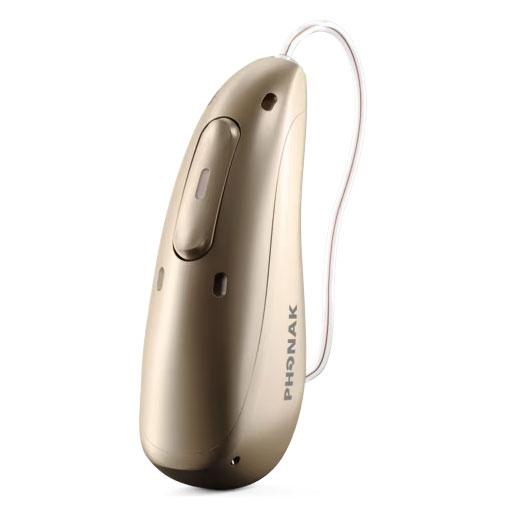
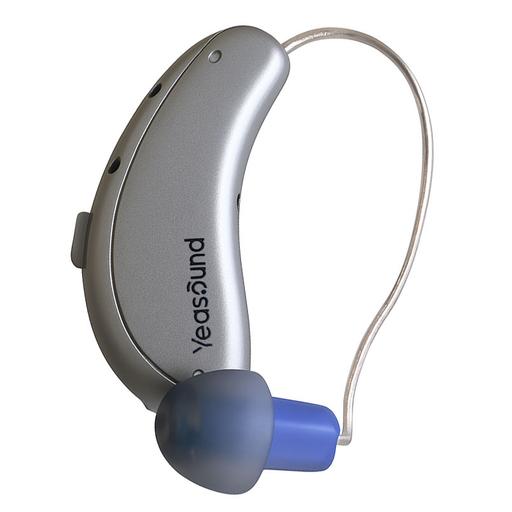
Score
4.4
Phonak Audéo Infinio Sphere I90
Add Product
Featured Products
SoundScore 4.6/5
$4,598 per pair
Shop Now
Score
4.2
Yeasound RIC700
Add Product
Featured Products
Yeasound

RIC700

SoundScore 4.1/5
$399 per pair
Shop Now
Audéo Infinio Ultra
$4,598 per pair
Shop Now
RIC700
$399 per pair
Shop Now

Product Overview

Audéo Infinio Ultra
RIC700
Form Factor
Form FactorThis type of hearing aid sits behind the ear. A wire runs along the top of the ear and down to a speaker sitting inside the ear canal. An custom-fitted mold may be required.
Expert Rating
Score
4.4
Score
4.2
User Rating
3.76 reviews
Hearing Loss LevelHearing Loss LevelThis represents HearingTracker's best guess on suitability. Please consult a licensed audiologist to confirm your own candidacy for this device.
MildModerateSevere
MildModerate
Product Features
Hands-freeRechargeableiPhoneAndroidIP68
Rechargeable

Expert Ratings

Compare comprehensive test results and expert opinions.

Audéo Infinio Ultra
RIC700

HearingTracker Score

Audéo Infinio Ultra
4.4ABOVE AVERAGE

Phonak’s Infinio Sphere delivers genuinely standout speech clarity in loud, noisy places thanks to its DEEPSONIC “Sphere mode,” but you’ll trade some discretion and may wrestle with fit or Bluetooth pairing to get that top-tier performance.

Read full review
RIC700
4.2ABOVE AVERAGE
Read full review

HearAdvisor SoundScore

Audéo Infinio Ultra
4.6EXCELLENT

Phonak Sphere Infinio Ultra achieved a SoundScore of 4.58/5 in HearAdvisor lab testing. The Prescription Hearing Aid category average SoundScore was 3.91/5.

RIC700
4.1ABOVE AVERAGE

Yeasound RIC700 achieved a SoundScore of 4.15/5 and a SoundGrade of A in HearAdvisor lab testing. It ranked #11 of 61 OTC Hearing Aid devices tested. The OTC Hearing Aid category average SoundScore was 3.47/5.

Build Quality

Audéo Infinio Ultra
5.0EXCELLENT

Phonak Audéo Sphere Ultra have an excellent build quality with a robust, portable charging case and a high ingress rating of IP68.

RIC700
4.1AVERAGE

Yeasound RIC700 Plus have an ingress protection rating of IPX8. They appear well-built and approach the feel of a prescription hearing aid.

Battery

Audéo Infinio Ultra
4.6EXCELLENT

Audéo Infinio Ultra offer around 17 hours of use per charge under normal use and streaming conditions. When using the new Sphere mode, battery life is around 10 hours which is an improvement over the original Sphere Infinio model. They take 3 to 4 hours to recharge, and a 30-minute quick charge can provide an additional 6 hours of use.

RIC700
4.6EXCELLENT

RIC700 Plus last up to 31 hours per charge and take around 3 hours to recharge. You can expect shorter battery life while streaming, although the batteries should still last all day.

Bluetooth

Audéo Infinio Ultra
5.0EXCELLENT

Phonak Infinio Ultra are compatible with both iOS and Android, offering wireless audio streaming and hands-free calls. Pairing is now easier directly from your phone's Bluetooth menu.

RIC700
4.5EXCELLENT

RIC700 Plus offer wireless control and streaming with Bluetooth. While we could not test this on Android, functionality was fairly good on iOS with a few noted drawbacks.

App Features

Audéo Infinio Ultra
5.0EXCELLENT

I found the MyPhonak Hearing Aid app easy to use with many useful features, including health and fitness tracking.

RIC700
3.3BELOW AVERAGE

RIC700 Plus offer fairly good sound customization for a preset-based OTC hearing aid. I liked the addition of a 3-band equalizer and access to controls over noise reduction and microphone settings.

Comfort

Audéo Infinio Ultra
5.0EXCELLENT

Phonak Audéo Sphere Infinio Ultra were extremely comfortable and lightweight in my ears. In general, hearing care providers can make numerous physical changes to prescription hearing aids to improve comfort.

RIC700
5.0EXCELLENT

I found RIC700 Plus very comfortable thanks to their small design and lightweight.

Design

Audéo Infinio Ultra
4.1AVERAGE

Phonak's new Audéo Sphere Infinio Ultra model shares the same notably larger size as the original Phonak Infinio Sphere. This is needed for its increased AI processing. While the larger size may be more noticeable, Sphere Ultra remains comfortable, and your provider should have no trouble adjusting the fit to your preference.

RIC700
5.0EXCELLENT

Yeasound RIC700 Plus look like modern receiver-in-canal hearing aids and could easily be mistaken for prescription devices.

Value

Audéo Infinio Ultra
3.4AVERAGE

Phonak Sphere Infinio Ultra has a value score of 3.4/5 based on lab performance and public display price.

RIC700
4.8EXCELLENT

Yeasound RIC700 has a value score of 4.8/5 based on lab performance and public display price.

Handling

Audéo Infinio Ultra
4.8EXCELLENT

Infinio Ultra are easy to use and adjust using either the large multi-function button or MyPhonak app. I had no issues making adjustments with either.

RIC700
4.5EXCELLENT

I experienced a few hiccups using the iYeasound mobile app. Otherwise, RIC700 Plus were easy to use and get in my ears, though you may need some practice if you have not worn receiver-in-canal devices before.

Pro Support

Audéo Infinio Ultra
5.0EXCELLENT

Prescription hearing aids like Infinio Sphere Ultra are fit by hearing care providers so you should receive quality care. The MyPhonak app also opens the possibility for remote programming and virtual follow-up appointments.

RIC700
1.0BELOW AVERAGE

Yeasound offers remote assistance from their technical support team. To our knowledge, they are not offering audiologic support from licensed providers at this time.

Lab Recordings

Listen to direct output recordings from our acoustic test lab.

Audéo Infinio Ultra
RIC700
Busy CafeBusy CafeSpeech intelligibility improvement in loud environments
Hear this scene unaided, for comparison
Audéo Infinio Ultra
RIC700
Quiet OfficeQuiet OfficeSpeech intelligibility improvement in quiet and moderate environments
Hear this scene unaided, for comparison
Audéo Infinio Ultra
RIC700
Streaming MusicStreaming MusicStreaming music provides a full range of bass and treble
Hear this scene unaided, for comparison
Audéo Infinio Ultra
RIC700

HearingTracker partners with HearAdvisor to provide recordings and performance data from an acoustic laboratory that follows standard scientific procedures. All hearing aids are fitted and performance-tested for mild sloping to moderate hearing loss. All audio samples cutoff above 10kHz.

Accessories

Compatible accessories for each hearing aid

Audéo Infinio Ultra
RIC700
Accessory Connectivity

RogerDirect™

As a break-through in hearing technology, Marvel hearing aids feature RogerDirect™ which allows the Roger technology to stream directly to Marvel hearing aids without having to attach an external receiver. This major innovation makes Roger technology easier to use and more attractive for a broader group ranging from mild to profound hearing loss. Roger technology makes use of intelligent and adaptive algorithms that continuously measure and precisely analyze noise levels to keep the Roger signal clearly audible above the background noise.

None
Battery Charger

ChargerGo RIC Sphere Infinio+1

Charger with integrated battery

None
Remote AdjustmentsRemote AdjustmentsAllows your hearing provider to make adjustments to your hearing aids remotely (from home, etc)

myPhonak App+2

The myPhonak app allows you to access remote support, information about their hearing aids, and a hearing diary. The app also allows you to adjust the volume and pitch of your hearing aids, and change program settings.

None
Remote Control

RemoteControl

The Phonak RemoteControl provides a discreet way to control your Phonak hearing aids.

None
Remote Microphone

Roger Table Mic II+1

Phonak Roger Table Mic II is a microphone dedicated for working adults who participate in various meetings. It selects the person who’s talking and switches automatically between the meeting participants.

PartnerMic™

Discreet remote microphone that helps to boost your partners voice in one-to-one conversations in noise.

None
TV Streamer

Roger Select™+4

Phonak Roger Select is a microphone specifically designed to help boost your hearing performance and keep you at the heart of the conversation.

TV Connector

The Phonak TV Connector is a wireless accessory that streams audio directly from your TV or stereo system to your Phonak hearing aids, transforming them into wireless stereo headsets. Enjoy high-quality sound, independent volume control, and a long transmission range of up to 15 meters.

Roger On+1

Phonak Roger On is an advanced remote mic accessory developed by Phonak. It is designed to improve speech understanding in noisy environments, over distance, and when many people are speaking simultaneously. Equipped with MultiBeam 2.0 Technology, it provides a boost in understanding by capturing voices from all directions. The Roger On can connect to a variety of multimedia devices and is fully compatible with almost all hearing aids and cochlear implants that have a T-coil or a Roger receiver.

None

Hardware

Audéo Infinio Ultra
RIC700
AccelerometerAccelerometerThis hearing aid is capable of measuring acceleration through an embedded sensor.
Yes
No
Bluetooth® AudioBluetooth® AudioThis hearing aid is capable of streaming Bluetooth® audio certain phones and/or devices.
  • Bluetooth® (A2DP)
  • Bluetooth® Low Energy (LE)
  • Auracast™ Ready
  • Made for iPhone (MFi)
Hands-Free CallingHands-Free CallingIt is possible to have a hands-free phone call with this hearing aid. You are not required to hold the phone up to your mouth.
  • Bluetooth® (HFP)
  • Bluetooth® Low Energy (LE)
No
IP RatingIP RatingIP Ratings rate sealing effectiveness of hearing aids against intrusion from foreign solid matter (dirt, dust) and moisture.
IP68
IPx8
Push ButtonPush ButtonThe hearing aid features a push button which allows toggling across different sound processing programs
  • Program control
  • Volume Control
  • Audio Stream Mix
No
Rechargeable BatteriesRechargeable BatteriesCharge your batteries overnight in a docking station and get a full day's use (in most cases) of battery life the following day.
Lithium-ion
Lithium-ion
Tap ControlsTap ControlsThe hearing aid may be controlled by physically tapping it with your fingers.
  • Voice assistant
  • Accept/end calls
  • Pause/Resume
  • Tinnitus program
No
Voice AssistantVoice AssistantCertain devices will allow you to interact with voice assistants using "Hey Siri", "Hey Google", "Hey Alexa", etc commands.
  • Siri
  • Google
No
Volume RockerVolume RockerA volume rocker or wheel to allows the adjustment of volume with a finger.
Yes
Yes

Software Features

Audéo Infinio Ultra
RIC700
Adjustment BandsAdjustment BandsThese are frequency-divided sections that can be adjusted in a hearing aid in order to amplify sounds. Although there are rarely more than 10 frequencies measured in a hearing assessment, having more bands that can be adjusted may allow for improved speech understanding and user comfort.
20
No
Adjustment SynchronizationAdjustment SynchronizationThis feature allows for a more pleasant listening experience by ensuring that both hearing aids process sound the same way. If one hearing aid changes its processing in response to noise or speech, it will send a wireless signal to the other hearing aid so both process sound in the same way.
QuickSyncQuickSyncOne touch on the program selection button or volume control results in instant identical change in the other instrument.
No
AI Noise RemovalAI Noise RemovalArtificial Intelligence is utilized to remove or modify background noise from the sound signal to help isolate speech for better speech understanding.
Spheric Speech Clarity: Medium strengthSpheric Speech ClarityThis feature will allow people to hear voices in and amongst background noise, no matter where those voices are coming from.
No
Audio Stream MixerAudio Stream MixerAllows the user to adjust the volume of the audio stream relative to the microphone input using the push button or volume control on the hearing aid unit.
Environmental BalanceEnvironmental BalanceEnvironmental balance is a volume modification capability in Phonak Audéo B-Direct hearing aids that allows clients to adjust the volume of the streamed signal versus the surrounding environmental sounds by the press of the volume control.
No
DirectionalityDirectionalityDepending on the types and number of microphones a hearing aid has, the hearing aid may be able to boost sounds from specific directions (by reducing sounds from other directions). This can be helpful to focus on a speaker directly in front of the hearing aid user, as well as to give the user information about where different sounds are coming from.
UltraZoom: Premium
Yes
Ear SimulationEar SimulationThe outer ear, or pinna, can have a significant effect on the frequency shape of sound arriving at your inner ear. Some hearing aids mimic the "pinna effect" when producing sound, to deliver more natural sound to the listener.
Real Ear SoundReal Ear SoundReal Ear Sound simulates the performance characteristics of the pinna. This restores localization and the ability to experience natural sound perception.
No
Environmental AdaptationEnvironmental AdaptationThe hearing aid can detect different acoustical environments, like speech in noise, and adjust the sound of the hearing aid accordingly to drive comfort or speech understanding, etc.
AutoSense OS: 6.0AutoSense OSHearing aids with AutoSense OS recognize and automatically adapt to more of your client’s listening situations than ever before. AutoSense OS accurately captures and analyzes the sound environment, then precisely blends feature elements from multiple programs in real time to provide a seamless listening experience.
No
Feedback SuppressionFeedback SuppressionIf any sound amplified by the hearing aid escapes the ear canal, it may reach the hearing aid’s own microphone and cause a harsh whistling noise. Some hearing aids are able to recognize when this feedback occurs and reduce or eliminate it.
WhistleBlockWhistleBlockWhistleBlock differentiates between naturally occurring feedback-like sounds and true feedback. This means increased audibility and sound quality that is free from annoying feedback.
No
Frequency LoweringFrequency LoweringUnderstanding certain speech sounds is dependent on the high frequency parts of these sounds. For individuals with high frequency hearing loss, this feature can take high frequency speech information and move it to lower frequencies where it will be audible.
SoundRecover2SoundRecover2The new SoundRecover2 algorithm aims to restore the audibility of relevant high frequency sounds while leaving intact the low frequency structures important for good sound quality. The new frequency lowering scheme retains the essence of the original SoundRecover, utilizes an adaptive algorithm and an additional cut-off frequency in order to successfully extend these benefits to those with more extreme severe-to-profound hearing loss.
No
Listening ProgramsListening ProgramsNumber of manually accessible listening programs (using push button, remote, app, or other switching method)
4
No
New User AdaptationNew User AdaptationProvider may set the hearing aid to gradually get louder over the first few weeks or months of a new hearing aid fitting. This can be convenient for new users who want to experience maximum benefit without making a lot of trips to the provider for tune ups.
auto Acclimatizationauto Acclimatizationauto Acclimatization is used to automatically increase the client's amplification, while the client is using the device.
No
Noise ReductionNoise ReductionThis feature uses modern hearing aids’ processing power to examine the incoming sound signal, determine if noise is present and reduce the volume of the troublesome sound to increase comfort.
NoiseBlockNoiseBlockHigh-resolution noise cancellation - NoiseBlock Processing is particularly effective at reducing uncomfortable environmental noises. It can recognize the subtle differences between speech and non-speech sounds, removing noise while maintaining audibility. more
Yes
Occlusion ReductionOcclusion ReductionWhen ears are plugged, or occluded, by hearing aids the low frequencies from one’s own voice are amplified and may be uncomfortable. This effect is typically reduced in hearing aids through venting or open-fit models. In some cases the perception of occlusion may also be reduced through software by adjusting the acoustic output of the hearing aid.
AOVAOVAcoustically Optimized Venting (AOV) reduces occlusion to the lowest level possible by optimizing the fitting calculation.
No
Phone in StereoPhone in StereoThis feature allows input from a phone presented to one hearing aid to be transmitted to both hearing aids at the same time, improving speech understanding.
DuoPhoneDuoPhoneWith DuoPhone, as soon as the phone is held to the ear the signal is heard in both ears. Background noise is reduced and clarity significantly improved.
No
Preference AdaptationPreference AdaptationIf a hearing aid user frequently adjusts the volume or program settings of their devices, some hearing aids will recognize when and where these changes are made and begin automatically making these changes in those settings.
User Preference TuningUser Preference TuningRemembers adjustments you make with FlexControl and FlexVolume and applies them automatically for a hearing aid more in tune with your preferences.
No
Spatial Noise CancellationSpatial Noise CancellationThis feature recognizes where sounds are coming from and can reduce noise coming from behind or to the side of the listener. This helps the listener focus on the speaker, usually in front of them.
Dynamic Noise CancellationDynamic Noise CancellationAn automated spatial noise cancellation system that works in combination with a directional beam-former microphone system.
No
Sudden Loud Noise ReductionSudden Loud Noise ReductionThis feature detects loud sounds and reduces their volume to a comfortable level. Though not a replacement for hearing protection, this technology can greatly improve listener comfort.
SoundRelaxSoundRelaxSoundRelax cushions otherwise unpleasant impulse sounds without affecting speech clarity or causing unnatural perception of other sounds.
No
Tinnitus ReliefTinnitus ReliefTinnitus, or ringing in the ears, can be addressed by hearing aids in several different ways, such as introducing a soft therapeutic signal or targeted notched noise.
Tinnitus BalanceTinnitus BalanceThe Tinnitus Balance noise generator generates a broadband sound for use in tinnitus management therapies.
No
Unique Amplification StrategyUnique Amplification StrategyHearing aids all process sounds a little bit differently. Sometimes it varies even within one model.
Motion Sensor HearingMotion Sensor HearingA new ultra-low power accelerometer detects when you move and adjusts the hearing aid microphones and noise cancellation settings.Speech EnhancerSpeech EnhancerAmplifies the peaks of soft speech to provide clearer speech when you’re in a quiet environment.
No
Wind Noise ReductionWind Noise ReductionAs wind blows against the microphones of hearing aids, unpleasant noise may be generated. Some hearing aids have the ability to recognize this wind noise and reduce its level. Such reductions may also affect the audibility of desired sounds, like speech.
WindBlockWindBlockWindBlock utilizes a wind identification and classification system. The powerful, adaptive algorithm automatically suppresses wind noise. It allows wearers to enjoy the outdoors without compromise.
No