LiveToka
Anders Lee
Also known as Live Toka
Live browser captions and translations for nearby speech, browser videos and web meetings, with optional saved text and TXT/SRT export.
What LiveToka does
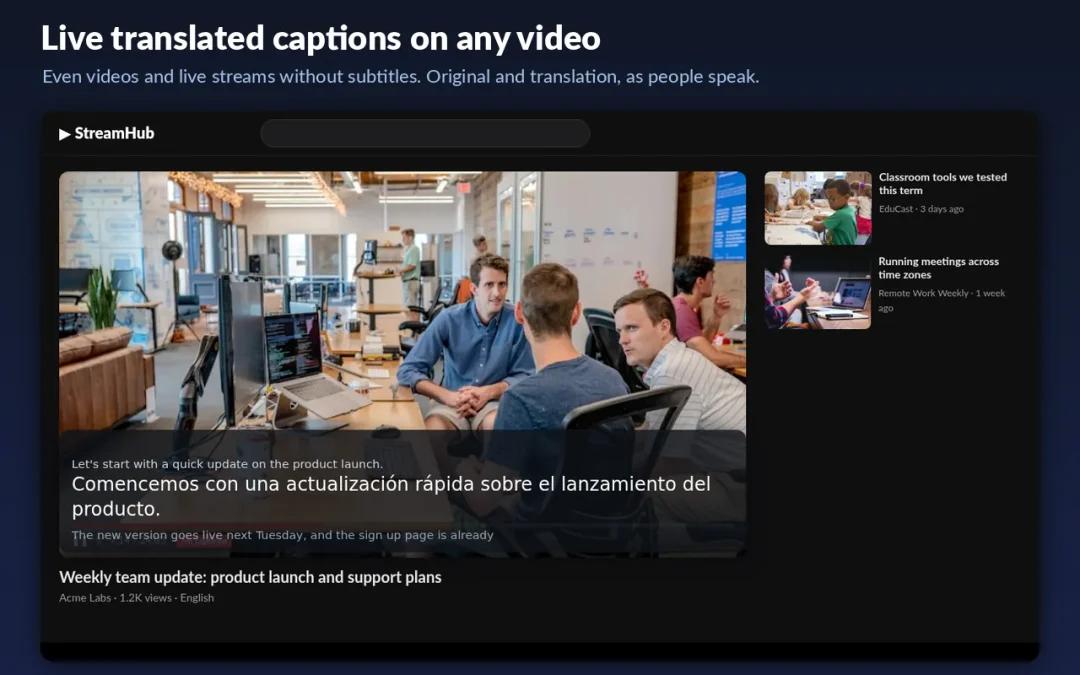
LiveToka turns nearby speech, browser videos and web meetings into live text in a desktop browser, with optional translations shown beside the original. Use the web app with a microphone or shared browser audio, or install its Chrome, Edge or Firefox extension for captions over a page. Firefox can capture only compatible media players. You can copy or export TXT and SRT text, and choose whether to save transcripts to your account history. Google sign-in and an internet connection are required. The new-account trial covers up to 10 minutes of captions or 5 minutes with translation; continued use needs paid credits or a plan. The publisher says audio is processed in the cloud and is not saved.
How it compares
A one-time trial alongside Ava’s ongoing free captions
LiveToka gives new accounts up to 10 minutes of captions or 5 minutes with translation, then charges through credit packs or subscriptions. Ava’s free tier offers caption sessions of up to 40 minutes, with unlimited restarts. The free allowances suit different amounts of regular use.
A separate browser tool alongside Meet’s built-in captions
Google Meet offers translated captions within Meet on eligible Workspace editions. LiveToka uses its own account and credits to caption audio from supported browser tabs, so the same tool can cover a web meeting, video or livestream. It does not join the meeting as a bot, and its captions stay on your screen unless you share them.
Features
Captions
Transcripts & notes
- Not supported: Audio recording14
- Not supported: Meeting assistant joins calls
- Supported: Transcript export
- Supported: Timed-caption export
- Supported: Export formatsTXT · SRT
Audio input & output
- Supported: Audio inputsDevice microphone · Device audio · Device microphone
- Supported: Live outputsOn-screen text
Availability & access
- Supported: Recognition languages1Mandarin & English bilingual · Malay & English bilingual · Tamil & English bilingual · Spanish & English bilingual · arabic · bashkir · basque · Belarusian · bengali · Bulgarian · Cantonese · catalan · croatian · czech · danish · dutch · english · Esperanto · estonian · finnish · french · galician · german · greek · hebrew · hindi · Hungarian · Indonesian · Interlingua · irish · italian · japanese · korean · latvian · Lithuanian · malay · maltese · Chinese (Mandarin) · marathi · Mongolian · Norwegian · persian · polish · Portuguese · romanian · russian · Slovakian · Slovenian · spanish · swahili · swedish · tagalog · tamil · Thai · turkish · Ukrainian · Urdu · uyghur · Vietnamese · welsh
- Supported: Account requirement2Required
- Supported: Service eligibilityAge requirement
- Not supported: Ongoing free core functionality3
- Supported: Trial access4Free Trial plan
- Supported: Internet required5
Accessibility
- Supported: Caption text size
- Supported: Caption placement
- Supported: Keyboard navigation6
- Supported: Caption display controlsText size · Placement
Privacy & data
- Publisher lists 56 individual recognition languages and four bilingual modes. Translation targets are a different list.
- A Google sign-in creates or connects the LiveToka account; the web app and extension share it.
- The documented free live service is a one-time new-account trial, not a resetting free allowance.
- One-time 10 shared credits after Google sign-in, without a payment card; translation consumes two credits per minute.
- Documented live workflow streams audio to LiveToka servers. This network requirement is entailed by the publisher’s stated processing route.
- Documents the start/stop shortcut only; comprehensive keyboard accessibility was not tested.
- Latest-session transcript is browser-local until the browser closes; optional server history is separate.
- Publisher policy statement; no independent privacy or infrastructure audit.
- Publisher states no retained voice audio after real-time processing; saved text has a separate retention policy.
- Policy documents deletion and a contact route for rights requests; deletion was not executed.
- Policy’s personal-data request process; distinct from paid instant CSV/JSON session export.
- Translation consumes two shared credits per minute; recognition and translation language lists differ.
- Caption overlay stays on the captured website tab, including full-screen video; this does not establish an OS-wide overlay above native apps.
- Live service does not save original audio; saved transcripts and captions are separate.
- Windows computer with Chrome or Edge screen sharing and system-audio sharing selected.
- Chrome or Edge on a computer; choose the playing tab and enable Share tab audio.
- For macOS desktop apps, install and configure BlackHole 2ch and route app output to it; use a Multi-Output Device to keep hearing audio. Not a native integration.