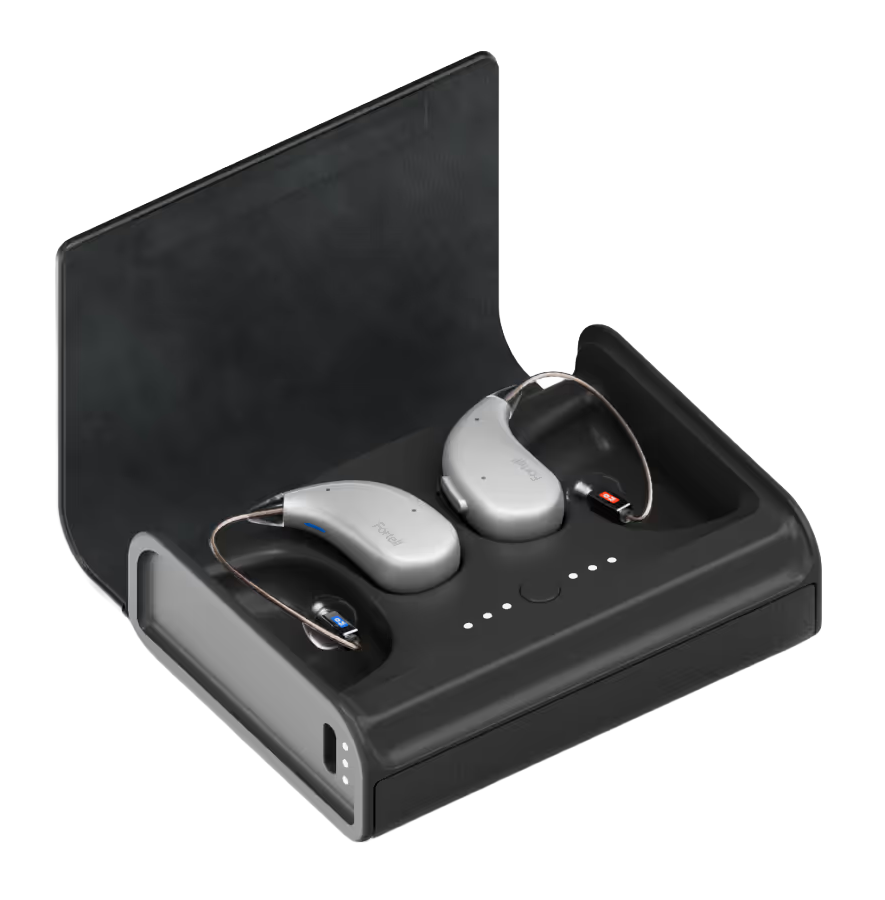
Fortell Charging Case
Laden und bewahren Sie kompatible Fortell AI Hearing Aids zu Hause und fernab einer Steckdose auf.
Was Fortell Charging Case kann
Halten Sie Ihre Fortell AI Hörgeräte zu Hause oder unterwegs geladen. Das Etui verfügt über einen Ladeplatz für jedes Ohr und einen eigenen wiederaufladbaren Akku. Ein vollständig geladenes Etui kann ein Paar außerhalb einer Steckdose bis zu dreimal aufladen. Separate Leuchten zeigen den Ladestand jedes Hörgeräts und des Etuis an.
Which hearing aids work with Fortell Charging Case?
Laden
- Fortell AI Hearing Aids
Supplied USB-C cable and wall power adapter: Use the designated CCUB-001-DGR case and matched blue left/red right wells. Seating and charging lights confirm physical fit.
Unplugged operation from the built-in case battery: Use the designated CCUB-001-DGR case and matched blue left/red right wells. Seating and charging lights confirm physical fit. Keep case battery charged.
Wählen Sie das genaue Modell auf Ihren Hörgeräten oder Unterlagen. Ein Treffer für eine Produktfamilie belegt nicht die Unterstützung jedes Modells dieser Familie.
Dokumentierte Geräte und Konfigurationen anzeigen
- Fortell AI Hearing Aids · Genaues Modell
Supplied USB-C cable and wall power adapter · Laden
Use the designated CCUB-001-DGR case and matched blue left/red right wells. Seating and charging lights confirm physical fit.
Unterstützung dokumentiertQuelle · 2026-11-18Use the designated CCUB-001-DGR case and matched blue left/red right wells. Seating and charging lights confirm physical fit.
- Fortell AI Hearing Aids · Genaues Modell
Unplugged operation from the built-in case battery · Laden
Use the designated CCUB-001-DGR case and matched blue left/red right wells. Seating and charging lights confirm physical fit. Keep case battery charged.
Unterstützung dokumentiertQuelle · 2026-11-18Use the designated CCUB-001-DGR case and matched blue left/red right wells. Seating and charging lights confirm physical fit. Keep case battery charged.
Dokumentierte Funktionen
Power and charging
- Automatic hearing-aid power
- Powered case turns the hearing aids off when seated. Removing the aids turns them back on.
If the case has no available power, inserted hearing aids stay on.
Dokumentation · 2026-11-18 - Akku der Ladebox nicht selbst austauschbar
No user replacement. Contact Fortell if battery service is needed.
Dokumentation · 2026-11-18- Charging-case recharge time
- 8 Stunden
Typical time to recharge the case from external power, with or without aids inside. Temperature can affect time.
Dokumentation · 2026-11-18 - Charge case and aids together
- Unterstützt
Both recharge while the case is attached to wall power.
Konfiguration: Supplied USB-C cable and wall power adapter
Dokumentation · 2026-11-18 - Unpowered storage behavior
- For storing the case for more than 14 days, start with a full case and top it up at least every three weeks.
No measured idle discharge rate. If storing the hearing aids with the case, Fortell directs you to leave the case connected.
Dokumentation · 2026-11-18 - Hearing-aid and receiver fit
- Fortell AI Hearing Aids in their designated left and right wells.
No cross-brand or generic Qi hearing-aid fit. Check with Fortell for earmold seating or replacement fit.
Dokumentation · 2026-11-18 - Charging indicators
- Pulsing white or orange for charging, three white aid lights for complete, solid red for moisture and three flashing red for incorrect seating. The side lights show the separate case reserve.
No lights can mean a drained device. Open the lid and verify case power.
Dokumentation · 2026-11-18 - Charging method
- Seat each aid in its matching dedicated well. The case can draw power from its USB-C supply or its stored battery.
Confirm each aid sits correctly by checking its lights.
Dokumentation · 2026-11-18 - Charging slots
- 2 aids
One blue-marked left well and one red-marked right well.
Dokumentation · 2026-11-18 - Charging temperature limits
- 41–104°F (5–40°C) in current revision H, with 15% to 90% noncondensing humidity.
Use the current narrower range. Original FCC-submitted revision A had a wider temperature specification.
Dokumentation · 2026-11-18 - Full hearing-aid charge time
- 2,5 Stunden
Current rev G and H IFUs give 150 minutes from empty, supported by the newer article. Earlier IFU/support figures were three hours. Treat as current guidance, not a universally verified hardware speed.
Dokumentation · 2026-11-18 - Electrical input requirements
- Use Fortell’s supplied USB-C cable and wall power adapter.
The written IFU did not establish a wattage or amp rating for this case. Use an original adapter.
Konfiguration: Supplied USB-C cable and wall power adapter
Dokumentation · 2026-11-18 - Lid behavior while charging
- Charging can continue with the lid closed. Fortell says closing it can reduce hearing-aid charge time.
With the lid open, separate lights show case and hearing-aid status. Unplugged case lights turn off shortly after closing.
Dokumentation · 2026-11-18 - Portable charger battery
- Built-in lithium-ion rechargeable case battery.
Fortell publishes the number of full pair charges, but no mAh or Wh capacity.
Dokumentation · 2026-11-18 - Charges away from a power outlet
- UnterstütztDokumentation · 2026-11-18
- Portable full pair charges
- Up to 3 full charges
Capacity can decline as the battery ages.
Dokumentation · 2026-11-18 - Power adapter included
- Unterstützt · Unter bestimmten Bedingungen
Supplied with the original hearing-aid kit. The exact replacement case box contents have not been established.
Konfiguration: Supplied USB-C cable and wall power adapter
Dokumentation · 2026-11-18 - Power bank use
- The case has an internal power bank for its matched hearing aids.
Charging the case itself is documented only with the supplied USB-C cable and wall adapter. External power banks are not verified.
Konfiguration: Unplugged operation from the built-in case battery
Dokumentation · 2026-11-18 - Power connector
- USB-C input on the side of the case.
Fortell directs owners to use its original approved power adapter and cable.
Konfiguration: Supplied USB-C cable and wall power adapter
Dokumentation · 2026-11-18 - Quick charge duration
- 15 Minuten
Current typical-from-empty estimate. Actual charge time and use vary.
Dokumentation · 2026-11-18 - Runtime after quick charge
- 3,2 Stunden
Typical use after 15 minutes in current revisions. Original rev A states 2.4 hours; mode, output and battery age affect use.
Dokumentation · 2026-11-18 - USB-C power input
- UnterstütztDokumentation · 2026-11-18
Care and fit
- Battery preparation for care
- Connect the case to its original adapter before initial use or fill its internal battery. Seat clean, dry aids in the matching wells.
No user-replaceable cell preparation.
Dokumentation · 2026-11-18 - Cleaning materials
- Use the supplied soft dry cloth to wipe moisture. Keep wells and connector free of dirt and chemicals.
If the case becomes wet or stops working contact Fortell.
Dokumentation · 2026-11-18 - Keine Trocknungsfunktion
Wipe aids dry before seating them. Moisture alarms request manual drying and the complete mode/controls documentation has no drying cycle.
Dokumentation · 2026-11-18- Kein UV-Reinigungszyklus
The mode and control reference describes charging, pairing and resets only. It has no UV function.
Dokumentation · 2026-11-18
Design and everyday use
- Control accessibility
- Left blue and right red wells, separate levels for both aids and the case, and differing flash patterns for moisture versus seating.
A user can check the case lights without opening an app. Use the visual diagram for control placement.
Dokumentation · 2026-11-18 - Included items
- Charging case, USB-C cord and wall power adapter in the Fortell AI Hearing Aids package
Fortell does not say whether a replacement case order includes a cable or adapter.
Dokumentation · 2026-11-18 - Routine maintenance
- Wipe moisture off before charging and keep the wells and case clean and dry. Disconnect the cable when carrying the case.
Keep the case plugged in if storing aids in it long term. For standalone storage recharge the case at least every three weeks.
Dokumentation · 2026-11-18 - Operating conditions
- 32–113°F (0–45°C) and 15% to 90% noncondensing humidity.
Actual charging temperatures are narrower in the current IFU.
Dokumentation · 2026-11-18 - Physische Bedienelemente
- Hinged lid, Two color-marked charging wells, Central case button, USB-C port, Aid and case status lights
Press once for hearing-aid pairing, hold five seconds to restart the aids, or hold for 15 seconds to reset the case.
Dokumentation · 2026-11-18 - Regional variants
- Dark gray CCUB-001-DGR, US registration DI 00860014635823.
No additional public charger model variant or cross-region fit was verified. The exact commercial dates of different written ratings are not established.
Dokumentation · 2026-11-18 - Replacement parts
- Replacement charging case sold directly by Fortell
Ask Fortell about an approved cable or adapter. No separate part prices or box contents verified.
Dokumentation · 2026-11-18 - Required extras
- Matching Fortell AI Hearing Aids, Original Fortell USB-C cable and adapter to refill the case
The case battery powers charging away from an outlet. No app is required for charging.
Dokumentation · 2026-11-18 - Repair and service options
- Contact Fortell to purchase a replacement charger, report charging faults, or discuss battery service.
Do not open the case or attempt to replace its battery.
Dokumentation · 2026-11-18 - Status indicators
- Separate left and right hearing-aid light groups, Separate case charge lights beside the USB-C connector, Pulsing orange or white for charging, Steady white for full hearing-aid charge, Solid red for moisture or flashing red for incorrect seating, Blue for pairing
See the figure and status table for percentages and the controls guide for pairing.
Dokumentation · 2026-11-18 - Storage conditions
- Store dry between 14°F and 113°F (−10 to 45°C), up to 90% noncondensing humidity.
The guide gives different transport conditions and instructs owners to disconnect the USB-C cable for transport.
Dokumentation · 2026-11-18 - Warranty terms
- The three-year hearing-aid warranty and loss coverage are not a three-year case warranty. Fortell excludes accessories from the relevant aid terms.
Request confirmed case-specific terms when ordering a replacement.
Dokumentation · 2026-11-18
How to set up Fortell Charging Case
Schließen Sie das mitgelieferte USB-C-Kabel und Netzteil an eine Steckdose an, um das Etui zu laden. Legen Sie das linke Hörgerät in das blaue Fach und das rechte Hörgerät in das rote Fach. Pulsierende weiße oder orangefarbene Lichter zeigen den Ladevorgang an. Schließen Sie während des Ladevorgangs den Deckel. Wenn drei rote Lichter blinken, entfernen Sie das betroffene Hörgerät und setzen Sie es erneut ein.
Vor dem Kauf prüfen
Use the designated case and the supplied USB-C cable and power adapter. The hearing aids stay on if the case is out of power and unplugged. Solid red lights tell you to dry the aid before charging it. Fortell sells replacement chargers directly. Confirm your exact case if ordering a replacement.
Holds up to three extra charges for a Fortell pair
If you’re comparing hearing-aid systems for travel, a full Fortell case can recharge its pair up to three times, compared with up to two charges for a Delight pair in the ELEHEAR Delight Charger. Those figures describe what each system can do with its own case.
QuelleAllow about eight hours to recharge the case itself
Before a trip, allow about eight hours to recharge the Fortell case itself. For comparison across hearing-aid systems, the ELEHEAR Beyond 2 Pro Charging Case takes up to 2½ hours to recharge. Each case powers its own pair of hearing aids.
QuelleMatch each hearing aid to its charging well
Schließen Sie das mitgelieferte USB-C-Kabel und Netzteil an eine Steckdose an, um das Etui zu laden. Legen Sie das linke Hörgerät in das blaue Fach und das rechte Hörgerät in das rote Fach. Pulsierende weiße oder orangefarbene Lichter zeigen den Ladevorgang an. Schließen Sie während des Ladevorgangs den Deckel. Wenn drei rote Lichter blinken, entfernen Sie das betroffene Hörgerät und setzen Sie es erneut ein.
QuelleCheck the lights before closing the case
If three lights turn solid red, remove the aid and wipe away moisture. If they flash red, reseat the aid. Check the case lights beside the USB-C port if neither hearing aid shows that it’s charging.
QuelleAn empty case leaves the hearing aids on
Plug the case into its original wall adapter or charge its battery before putting your hearing aids away. The hearing aids keep using their own charge when the case runs out of power.
QuelleVerwandtes Zubehör
Aktuelle Angebote werden geprüft…
Dokumentation geprüft am 18. Nov. 2026