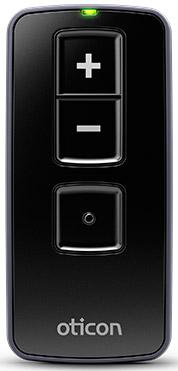
Oticon Remote Control 3.0
Passen Sie die Lautstärke an, wechseln Sie Programme und schalten Sie kompatible Oticon Hörgeräte mit drei physischen Tasten stumm.
Was Remote Control 3.0 kann
Verwenden Sie die Fernbedienung, um ein oder zwei kompatible Oticon Hörgeräte einzustellen. Sie funktioniert in einer Entfernung von etwa sechs Fuß und wird mit zwei AAAA-Batterien betrieben. Ein Tastenklick, grünes Licht und ein Ton aus den Hörgeräten bestätigen eine Änderung.
Which hearing aids work with Oticon Remote Control 3.0?
Fernbedienung
- Oticon Intent miniRITE R
- Oticon Reveal miniRITE R
- Oticon Zeal
- Oticon Opn miniRITE
- Oticon Opn miniRITE-T
- Oticon Opn BTE13 PP
Wählen Sie das genaue Modell auf Ihren Hörgeräten oder Unterlagen. Ein Treffer für eine Produktfamilie belegt nicht die Unterstützung jedes Modells dieser Familie.
Dokumentierte Geräte und Konfigurationen anzeigen
- Oticon Intent miniRITE R · Genaues Modell
Pair one set of compatible Oticon 2.4 GHz hearing aids · Fernbedienung
Unterstützung dokumentiertQuelle · 2026-11-17 - Oticon Reveal miniRITE R · Genaues Modell
Pair one set of compatible Oticon 2.4 GHz hearing aids · Fernbedienung
Unterstützung dokumentiertQuelle · 2026-11-17 - Oticon Zeal · Genaues Modell
Pair one set of compatible Oticon 2.4 GHz hearing aids · Fernbedienung
Unterstützung dokumentiertQuelle · 2026-11-17 - Oticon Opn miniRITE · Genaues Modell
Pair one set of compatible Oticon 2.4 GHz hearing aids · Fernbedienung
Unterstützung dokumentiertQuelle · 2026-11-17 - Oticon Opn miniRITE-T · Genaues Modell
Pair one set of compatible Oticon 2.4 GHz hearing aids · Fernbedienung
Unterstützung dokumentiertQuelle · 2026-11-17 - Oticon Opn BTE13 PP · Genaues Modell
Pair one set of compatible Oticon 2.4 GHz hearing aids · Fernbedienung
Unterstützung dokumentiertQuelle · 2026-11-17 - Oticon Opn S BTE PP · Genaues Modell
Pair one set of compatible Oticon 2.4 GHz hearing aids · Fernbedienung
Unterstützung dokumentiertQuelle · 2026-11-17 - Oticon Siya · Produktfamilie
Pair one set of compatible Oticon 2.4 GHz hearing aids · Fernbedienung
Confirm a compatible Oticon aid with the required built-in 2.4 GHz radio and pair it directly to the accessory.
Zusätzliche Einrichtung erforderlichQuelle · 2026-11-17Nachweis für die Produktfamilie. Bestätigen Sie vor dem Kauf die Kompatibilität Ihres genauen Hörgerätemodells.
Confirm a compatible Oticon aid with the required built-in 2.4 GHz radio and pair it directly to the accessory.
- Confirm the exact hearing aid has the required Oticon 2.4 GHz radio.
- Oticon Opn S · Produktfamilie
Pair one set of compatible Oticon 2.4 GHz hearing aids · Fernbedienung
Confirm a compatible Oticon aid with the required built-in 2.4 GHz radio and pair it directly to the accessory.
Zusätzliche Einrichtung erforderlichQuelle · 2026-11-17Nachweis für die Produktfamilie. Bestätigen Sie vor dem Kauf die Kompatibilität Ihres genauen Hörgerätemodells.
Confirm a compatible Oticon aid with the required built-in 2.4 GHz radio and pair it directly to the accessory.
- Confirm the exact hearing aid has the required Oticon 2.4 GHz radio.
- Oticon Xceed · Produktfamilie
Pair one set of compatible Oticon 2.4 GHz hearing aids · Fernbedienung
Confirm a compatible Oticon aid with the required built-in 2.4 GHz radio and pair it directly to the accessory.
Zusätzliche Einrichtung erforderlichQuelle · 2026-11-17Nachweis für die Produktfamilie. Bestätigen Sie vor dem Kauf die Kompatibilität Ihres genauen Hörgerätemodells.
Confirm a compatible Oticon aid with the required built-in 2.4 GHz radio and pair it directly to the accessory.
- Confirm the exact hearing aid has the required Oticon 2.4 GHz radio.
- Oticon Ruby · Produktfamilie
Pair one set of compatible Oticon 2.4 GHz hearing aids · Fernbedienung
Confirm a compatible Oticon aid with the required built-in 2.4 GHz radio and pair it directly to the accessory.
Zusätzliche Einrichtung erforderlichQuelle · 2026-11-17Nachweis für die Produktfamilie. Bestätigen Sie vor dem Kauf die Kompatibilität Ihres genauen Hörgerätemodells.
Confirm a compatible Oticon aid with the required built-in 2.4 GHz radio and pair it directly to the accessory.
- Confirm the exact hearing aid has the required Oticon 2.4 GHz radio.
- Oticon More · Produktfamilie
Pair one set of compatible Oticon 2.4 GHz hearing aids · Fernbedienung
Confirm a compatible Oticon aid with the required built-in 2.4 GHz radio and pair it directly to the accessory.
Zusätzliche Einrichtung erforderlichQuelle · 2026-11-17Nachweis für die Produktfamilie. Bestätigen Sie vor dem Kauf die Kompatibilität Ihres genauen Hörgerätemodells.
Confirm a compatible Oticon aid with the required built-in 2.4 GHz radio and pair it directly to the accessory.
- Confirm the exact hearing aid has the required Oticon 2.4 GHz radio.
- Oticon Zircon · Produktfamilie
Pair one set of compatible Oticon 2.4 GHz hearing aids · Fernbedienung
Confirm a compatible Oticon aid with the required built-in 2.4 GHz radio and pair it directly to the accessory.
Zusätzliche Einrichtung erforderlichQuelle · 2026-11-17Nachweis für die Produktfamilie. Bestätigen Sie vor dem Kauf die Kompatibilität Ihres genauen Hörgerätemodells.
Confirm a compatible Oticon aid with the required built-in 2.4 GHz radio and pair it directly to the accessory.
- Confirm the exact hearing aid has the required Oticon 2.4 GHz radio.
- Oticon Real · Produktfamilie
Pair one set of compatible Oticon 2.4 GHz hearing aids · Fernbedienung
Confirm a compatible Oticon aid with the required built-in 2.4 GHz radio and pair it directly to the accessory.
Zusätzliche Einrichtung erforderlichQuelle · 2026-11-17Nachweis für die Produktfamilie. Bestätigen Sie vor dem Kauf die Kompatibilität Ihres genauen Hörgerätemodells.
Confirm a compatible Oticon aid with the required built-in 2.4 GHz radio and pair it directly to the accessory.
- Confirm the exact hearing aid has the required Oticon 2.4 GHz radio.
- Oticon Own ITE FS · Genaues Modell
Pair one set of compatible Oticon 2.4 GHz hearing aids · Fernbedienung
Choose the original Oticon Own ITC, ITE half-shell or ITE full-shell with the optional 2.4 GHz radio.
Zusätzliche Einrichtung erforderlichQuelle · 2026-11-17Choose the original Oticon Own ITC, ITE half-shell or ITE full-shell with the optional 2.4 GHz radio.
- Confirm the exact hearing aid has the required Oticon 2.4 GHz radio.
- Oticon Own ITE HS · Genaues Modell
Pair one set of compatible Oticon 2.4 GHz hearing aids · Fernbedienung
Choose the original Oticon Own ITC, ITE half-shell or ITE full-shell with the optional 2.4 GHz radio.
Zusätzliche Einrichtung erforderlichQuelle · 2026-11-17Choose the original Oticon Own ITC, ITE half-shell or ITE full-shell with the optional 2.4 GHz radio.
- Confirm the exact hearing aid has the required Oticon 2.4 GHz radio.
- Oticon Own ITC · Genaues Modell
Pair one set of compatible Oticon 2.4 GHz hearing aids · Fernbedienung
Choose the original Oticon Own ITC, ITE half-shell or ITE full-shell with the optional 2.4 GHz radio.
Zusätzliche Einrichtung erforderlichQuelle · 2026-11-17Choose the original Oticon Own ITC, ITE half-shell or ITE full-shell with the optional 2.4 GHz radio.
- Confirm the exact hearing aid has the required Oticon 2.4 GHz radio.
- Oticon Own CIC · Genaues Modell
Pair one set of compatible Oticon 2.4 GHz hearing aids · Fernbedienung
Original Own IIC and CIC are absent from the wireless accessory rows because these styles do not have the required 2.4 GHz radio.
Als inkompatibel dokumentiertQuelle · 2026-11-17 - Oticon Own IIC · Genaues Modell
Pair one set of compatible Oticon 2.4 GHz hearing aids · Fernbedienung
Original Own IIC and CIC are absent from the wireless accessory rows because these styles do not have the required 2.4 GHz radio.
Als inkompatibel dokumentiertQuelle · 2026-11-17
Dokumentierte Funktionen
Listening and control
- Remote carry options
- Hand-strap hole
Buy a suitable hand strap separately if needed.
Dokumentation · 2026-11-18 - Independent ear control
- Both paired aids change together.
The documented controls do not offer a left/right selector.
Dokumentation · 2026-11-18 - Control confirmation
- Button click you can feel, a green status light, and audible confirmation in the aids.
The light turns off at the end of the ordinary mute command.
Dokumentation · 2026-11-17 - Mute hearing-aid microphones
- Unterstützt
Hold volume down about two seconds until the light turns off. Briefly press any button to unmute. In the TV program consult the TV Adapter instructions.
Dokumentation · 2026-11-18 - Change hearing-aid programs
- Unterstützt
Briefly press the dot button to cycle through available programs when the aids have more than one.
Dokumentation · 2026-11-18 - Remote control range
- 1,8 m
About six feet without a direct line of sight.
Dokumentation · 2026-11-17 - Remote pairing capacity
- One personal set of up to two hearing aids.
Pair together or one at a time.
Dokumentation · 2026-11-18 - Streaming controls
- Select or leave the TV program with the program button, Adjust hearing-aid TV volume with plus and minus, Hold volume down in the TV program to mute surrounding microphones · Unter bestimmten Bedingungen
Requires a compatible Oticon TV Adapter paired to the hearing aids.
Konfiguration: Remote commands in the hearing aids’ TV Adapter 3.0 program
Dokumentation · 2026-11-18 - Lautstärkeregelung
- Unterstützt
Briefly press plus for louder or minus for softer.
Dokumentation · 2026-11-18
Connections
- Bilateral and unilateral use
- The remote adjusts both paired aids simultaneously. You can also pair one hearing aid.
Compatibility of mixed-model pairs was not established.
Dokumentation · 2026-11-18 - Link to hearing aids
- Oticon 2.4 GHz hearing-aid radioDokumentation · 2026-11-17
- Accessory-to-hearing-aid range
- 1,8 m
Up to approximately six feet. Direct line of sight is unnecessary.
Dokumentation · 2026-11-18 - Hearing-aid pairing method
- Insert the two AAAA batteries. Hold all three buttons for five seconds. Restart the hearing aids to put them in pairing mode. Once they have started, bring one or both within eight inches of the remote and press any remote button briefly. A steady green light for about ten seconds confirms pairing.
The hearing aids remain in pairing mode for three minutes. Pair each separately or pair both together.
Dokumentation · 2026-11-18 - Receiver requirements
- Pairs directly to the built-in Oticon 2.4 GHz hearing-aid radio.
No audio receiver step is needed for remote control.
Dokumentation · 2026-11-18 - Remembered hearing-aid pairings
- 2 devices
One personal set with up to two individual hearing aids.
Dokumentation · 2026-11-18
Power and charging
- Replaceable accessory battery
- Unterstützt
Use two AAAA batteries and align the positive ends as shown.
Dokumentation · 2026-11-18 - Accessory battery type
- Two replaceable AAAA cells.
Oticon does not specify the chemistry in the US technical sheet.
Dokumentation · 2026-11-17 - Kein wiederaufladbarer Akku im Zubehör
The remote operates on replaceable AAAA batteries. The package and hardware diagram show no charger port.
Dokumentation · 2026-11-18- Battery status reporting
- Fast blinking after a button press indicates low battery.
Oticon estimates replacement about once a year with normal use. No percent display.
Dokumentation · 2026-11-18
Design and everyday use
- Control accessibility
- Three labeled physical buttons provide a click you can feel. The light and a sound from the paired hearing aids confirm button operation.Dokumentation · 2026-11-17
- Dimensions
- 75.3 × 35 × 12 mm in the manufacturer’s printed order.
The specification does not label the three axes.
Dokumentation · 2026-11-17 - Included items
- Remote Control 3.0, Two AAAA batteries, Instructions for useDokumentation · 2026-11-17
- Routine maintenance
- Clean with a soft, dry cloth. Hold the remote over a soft surface while replacing batteries.Dokumentation · 2026-11-18
- Operating conditions
- 41–104 °F, 15–93% noncondensing humidity, 700–1060 hPa.
Do not wash or immerse the remote.
Dokumentation · 2026-11-17 - Physische Bedienelemente
- Volume up, Volume down and hold to mute, Program selectDokumentation · 2026-11-18
- Replacement parts
- Two AAAA batteries
No exact battery-cover replacement part number was verified.
Dokumentation · 2026-11-18 - Required extras
- Compatible Oticon 2.4 GHz hearing aids, Replacement AAAA batteries as neededDokumentation · 2026-11-18
- Repair and service options
- The user can replace batteries. Take the remote to a hearing care professional for service.Dokumentation · 2026-11-18
- Status indicators
- Green light with button presses, Steady green after pairing, Fast blinking with a low batteryDokumentation · 2026-11-18
- Storage conditions
- −13–158 °F and 15–93% noncondensing humidity for storage and transport.Dokumentation · 2026-11-17
- Warranty terms
- 12 months from delivery for manufacturing and material defects. Manufacturer excludes batteries, improper handling and unauthorized repair.
Provider warranty terms may differ.
Dokumentation · 2026-11-18 - Wearing and placement options
- Strap hole for a compatible hand strap
A strap is not listed in the U.S. manufacturer package.
Dokumentation · 2026-11-18 - Weight
- 32,7 g
Includes both batteries.
Dokumentation · 2026-11-17
How to set up Oticon Remote Control 3.0
Legen Sie die zwei AAAA Batterien ein. Halten Sie alle drei Tasten fünf Sekunden lang gedrückt. Starten Sie die Hörgeräte neu, um sie in den Kopplungsmodus zu versetzen. Sobald sie gestartet sind, bringen Sie eines oder beide innerhalb von acht inches an die Fernbedienung und drücken Sie kurz eine beliebige Taste auf der Fernbedienung. Ein durchgehend grünes Licht für etwa zehn Sekunden bestätigt die Kopplung.
Vor dem Kauf prüfen
The remote works within about six feet of the hearing aids. It adjusts both paired aids together. Available programs depend on your hearing-aid settings.
Pair one hearing aid or both
Legen Sie die zwei AAAA Batterien ein. Halten Sie alle drei Tasten fünf Sekunden lang gedrückt. Starten Sie die Hörgeräte neu, um sie in den Kopplungsmodus zu versetzen. Sobald sie gestartet sind, bringen Sie eines oder beide innerhalb von acht inches an die Fernbedienung und drücken Sie kurz eine beliebige Taste auf der Fernbedienung. Ein durchgehend grünes Licht für etwa zehn Sekunden bestätigt die Kopplung.
QuelleAdjusts both paired hearing aids together
The remote works within about six feet of the hearing aids. It adjusts both paired aids together. Available programs depend on your hearing-aid settings.
QuelleTakes fresh batteries when power runs low
You can put two fresh AAAA batteries in the Remote Control 3.0 and carry on using it. If you use Oticon ConnectClip as your remote instead, its built-in battery needs time on the charger.
QuelleLacks hands-free calling
The Remote Control 3.0 adjusts volume, changes programs, and mutes compatible Oticon hearing aids. If you also want to hear phone calls through your hearing aids, Oticon ConnectClip works as a headset and can adjust the aids when it’s idle.
QuelleVerwandtes Zubehör
Weitere in der Dokumentation genannte Geräte
Diese Namen wurden noch keinem genauen Gerät in unserem Katalog zugeordnet. Sie erzeugen daher keine bestätigten Treffer in der Suche.
Aktuelle Angebote werden geprüft…
Dokumentation geprüft am 18. Nov. 2026