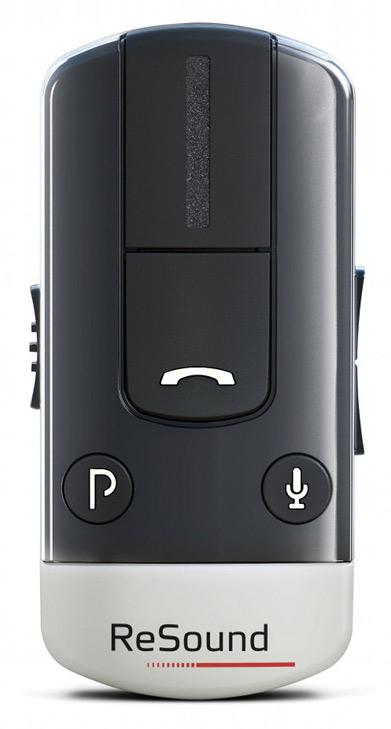
ReSound Unite Phone Clip+
Freihändige Telefonanrufe, Bluetooth-Medienstreaming und grundlegende Hörgerätesteuerung auf kompatiblen Geräten.
Was Unite Phone Clip+ kann
Befestigen Sie den ReSound Unite Phone Clip+ an Ihrer Kleidung, um Telefonanrufe und Medien über kompatible Hörgeräte zu hören. Ein Bluetooth-Telefon sendet die Stimme des Anrufers an den Clip, der sie an die Hörgeräte weiterleitet. Das eigene Mikrofon des Clips sendet Ihre Stimme zurück an das Telefon. Zwischen Anrufen kann der Clip außerdem die Lautstärke und Programme der Hörgeräte ändern.
Which hearing aids work with ReSound Unite Phone Clip+?
Fernbedienung
- ReSound ENZO 88-DW
Remote control is available between calls.
- ReSound ENZO 98-DW
Remote control is available between calls.
- ReSound ENZO2 98-DW
Remote control is available between calls.
- ReSound LiNX 61
Remote control is available between calls.
- ReSound LiNX2 BTE 77
Remote control is available between calls.
- ReSound LiNX2 BTE 88
Remote control is available between calls.
Wählen Sie das genaue Modell auf Ihren Hörgeräten oder Unterlagen. Ein Treffer für eine Produktfamilie belegt nicht die Unterstützung jedes Modells dieser Familie.
Dokumentierte Geräte und Konfigurationen anzeigen
- Cochlear Baha® 4 · Genaues Modell
Phone Clip+ and one Cochlear Baha processor · phone_calls
Pair to the Baha 4 sound processor for phone calls. Simultaneous bimodal phone calls with a ReSound aid are excluded.
Zusätzliche Einrichtung erforderlichQuelle · 2026-11-18Pair to the Baha 4 sound processor for phone calls. Simultaneous bimodal phone calls with a ReSound aid are excluded.
- Pair Phone Clip+ to the compatible wireless hearing aid or sound processor
- Pair a phone that supports Bluetooth Hands-Free or Headset profile
- ReSound ENZO 88-DW · Genaues Modell
Hands-free calls via Bluetooth phone · phone_calls
Pair the clip on both links and use a phone with Hands-Free or Headset profile.
Zusätzliche Einrichtung erforderlichQuelle · 2026-11-18Pair the clip on both links and use a phone with Hands-Free or Headset profile.
- Pair Phone Clip+ to the compatible wireless hearing aid or sound processor
- Pair a phone that supports Bluetooth Hands-Free or Headset profile
- ReSound ENZO 88-DW · Genaues Modell
Bluetooth media streaming through Phone Clip+ · bluetooth_media
Use a paired A2DP Bluetooth audio source. Stereo depends on compatible hearing-aid configuration.
Zusätzliche Einrichtung erforderlichQuelle · 2026-11-18Use a paired A2DP Bluetooth audio source. Stereo depends on compatible hearing-aid configuration.
- Pair Phone Clip+ to the compatible wireless hearing aid or sound processor
- Pair a Bluetooth audio source that supports A2DP
- ReSound ENZO 88-DW · Genaues Modell
Phone Clip+ as a hearing-aid remote · Fernbedienung
Remote control is available between calls.
Unterstützung dokumentiertQuelle · 2026-11-18Remote control is available between calls.
- ReSound ENZO 98-DW · Genaues Modell
Hands-free calls via Bluetooth phone · phone_calls
Pair the clip on both links and use a phone with Hands-Free or Headset profile.
Zusätzliche Einrichtung erforderlichQuelle · 2026-11-18Pair the clip on both links and use a phone with Hands-Free or Headset profile.
- Pair Phone Clip+ to the compatible wireless hearing aid or sound processor
- Pair a phone that supports Bluetooth Hands-Free or Headset profile
- ReSound ENZO 98-DW · Genaues Modell
Bluetooth media streaming through Phone Clip+ · bluetooth_media
Use a paired A2DP Bluetooth audio source. Stereo depends on compatible hearing-aid configuration.
Zusätzliche Einrichtung erforderlichQuelle · 2026-11-18Use a paired A2DP Bluetooth audio source. Stereo depends on compatible hearing-aid configuration.
- Pair Phone Clip+ to the compatible wireless hearing aid or sound processor
- Pair a Bluetooth audio source that supports A2DP
- ReSound ENZO 98-DW · Genaues Modell
Phone Clip+ as a hearing-aid remote · Fernbedienung
Remote control is available between calls.
Unterstützung dokumentiertQuelle · 2026-11-18Remote control is available between calls.
- ReSound ENZO2 98-DW · Genaues Modell
Hands-free calls via Bluetooth phone · phone_calls
Pair the clip on both links and use a phone with Hands-Free or Headset profile.
Zusätzliche Einrichtung erforderlichQuelle · 2026-11-18Pair the clip on both links and use a phone with Hands-Free or Headset profile.
- Pair Phone Clip+ to the compatible wireless hearing aid or sound processor
- Pair a phone that supports Bluetooth Hands-Free or Headset profile
- ReSound ENZO2 98-DW · Genaues Modell
Bluetooth media streaming through Phone Clip+ · bluetooth_media
Use a paired A2DP Bluetooth audio source. Stereo depends on compatible hearing-aid configuration.
Zusätzliche Einrichtung erforderlichQuelle · 2026-11-18Use a paired A2DP Bluetooth audio source. Stereo depends on compatible hearing-aid configuration.
- Pair Phone Clip+ to the compatible wireless hearing aid or sound processor
- Pair a Bluetooth audio source that supports A2DP
- ReSound ENZO2 98-DW · Genaues Modell
Phone Clip+ as a hearing-aid remote · Fernbedienung
Remote control is available between calls.
Unterstützung dokumentiertQuelle · 2026-11-18Remote control is available between calls.
- ReSound LiNX 61 · Genaues Modell
Hands-free calls via Bluetooth phone · phone_calls
Pair the clip on both links and use a phone with Hands-Free or Headset profile.
Zusätzliche Einrichtung erforderlichQuelle · 2026-11-18Pair the clip on both links and use a phone with Hands-Free or Headset profile.
- Pair Phone Clip+ to the compatible wireless hearing aid or sound processor
- Pair a phone that supports Bluetooth Hands-Free or Headset profile
- ReSound LiNX 61 · Genaues Modell
Bluetooth media streaming through Phone Clip+ · bluetooth_media
Use a paired A2DP Bluetooth audio source. Stereo depends on compatible hearing-aid configuration.
Zusätzliche Einrichtung erforderlichQuelle · 2026-11-18Use a paired A2DP Bluetooth audio source. Stereo depends on compatible hearing-aid configuration.
- Pair Phone Clip+ to the compatible wireless hearing aid or sound processor
- Pair a Bluetooth audio source that supports A2DP
- ReSound LiNX 61 · Genaues Modell
Phone Clip+ as a hearing-aid remote · Fernbedienung
Remote control is available between calls.
Unterstützung dokumentiertQuelle · 2026-11-18Remote control is available between calls.
- ReSound LiNX 3D · Produktfamilie
Bluetooth media streaming through Phone Clip+ · bluetooth_media
The 2019 chart documents the Phone Clip+ audio path for the named family and contemporary Android setups. Confirm current phone and Bluetooth profiles.
Zusätzliche Einrichtung erforderlichQuelle · 2026-11-18Nachweis für die Produktfamilie. Bestätigen Sie vor dem Kauf die Kompatibilität Ihres genauen Hörgerätemodells.
The 2019 chart documents the Phone Clip+ audio path for the named family and contemporary Android setups. Confirm current phone and Bluetooth profiles.
- Pair Phone Clip+ to the compatible wireless hearing aid or sound processor
- Pair a Bluetooth audio source that supports A2DP
- ReSound LiNX Quattro · Produktfamilie
Bluetooth media streaming through Phone Clip+ · bluetooth_media
The 2019 chart documents the Phone Clip+ audio path for the named family and contemporary Android setups. Confirm current phone and Bluetooth profiles.
Zusätzliche Einrichtung erforderlichQuelle · 2026-11-18Nachweis für die Produktfamilie. Bestätigen Sie vor dem Kauf die Kompatibilität Ihres genauen Hörgerätemodells.
The 2019 chart documents the Phone Clip+ audio path for the named family and contemporary Android setups. Confirm current phone and Bluetooth profiles.
- Pair Phone Clip+ to the compatible wireless hearing aid or sound processor
- Pair a Bluetooth audio source that supports A2DP
- ReSound LiNX2 BTE 77 · Genaues Modell
Hands-free calls via Bluetooth phone · phone_calls
Pair the clip on both links and use a phone with Hands-Free or Headset profile.
Zusätzliche Einrichtung erforderlichQuelle · 2026-11-18Pair the clip on both links and use a phone with Hands-Free or Headset profile.
- Pair Phone Clip+ to the compatible wireless hearing aid or sound processor
- Pair a phone that supports Bluetooth Hands-Free or Headset profile
- ReSound LiNX2 BTE 77 · Genaues Modell
Bluetooth media streaming through Phone Clip+ · bluetooth_media
Use a paired A2DP Bluetooth audio source. Stereo depends on compatible hearing-aid configuration.
Zusätzliche Einrichtung erforderlichQuelle · 2026-11-18Use a paired A2DP Bluetooth audio source. Stereo depends on compatible hearing-aid configuration.
- Pair Phone Clip+ to the compatible wireless hearing aid or sound processor
- Pair a Bluetooth audio source that supports A2DP
- ReSound LiNX2 BTE 77 · Genaues Modell
Phone Clip+ as a hearing-aid remote · Fernbedienung
Remote control is available between calls.
Unterstützung dokumentiertQuelle · 2026-11-18Remote control is available between calls.
- ReSound LiNX2 BTE 88 · Genaues Modell
Hands-free calls via Bluetooth phone · phone_calls
Pair the clip on both links and use a phone with Hands-Free or Headset profile.
Zusätzliche Einrichtung erforderlichQuelle · 2026-11-18Pair the clip on both links and use a phone with Hands-Free or Headset profile.
- Pair Phone Clip+ to the compatible wireless hearing aid or sound processor
- Pair a phone that supports Bluetooth Hands-Free or Headset profile
- ReSound LiNX2 BTE 88 · Genaues Modell
Bluetooth media streaming through Phone Clip+ · bluetooth_media
Use a paired A2DP Bluetooth audio source. Stereo depends on compatible hearing-aid configuration.
Zusätzliche Einrichtung erforderlichQuelle · 2026-11-18Use a paired A2DP Bluetooth audio source. Stereo depends on compatible hearing-aid configuration.
- Pair Phone Clip+ to the compatible wireless hearing aid or sound processor
- Pair a Bluetooth audio source that supports A2DP
- ReSound LiNX2 BTE 88 · Genaues Modell
Phone Clip+ as a hearing-aid remote · Fernbedienung
Remote control is available between calls.
Unterstützung dokumentiertQuelle · 2026-11-18Remote control is available between calls.
- ReSound LiNX2 RIE 61 · Genaues Modell
Hands-free calls via Bluetooth phone · phone_calls
Pair the clip on both links and use a phone with Hands-Free or Headset profile.
Zusätzliche Einrichtung erforderlichQuelle · 2026-11-18Pair the clip on both links and use a phone with Hands-Free or Headset profile.
- Pair Phone Clip+ to the compatible wireless hearing aid or sound processor
- Pair a phone that supports Bluetooth Hands-Free or Headset profile
- ReSound LiNX2 RIE 61 · Genaues Modell
Bluetooth media streaming through Phone Clip+ · bluetooth_media
Use a paired A2DP Bluetooth audio source. Stereo depends on compatible hearing-aid configuration.
Zusätzliche Einrichtung erforderlichQuelle · 2026-11-18Use a paired A2DP Bluetooth audio source. Stereo depends on compatible hearing-aid configuration.
- Pair Phone Clip+ to the compatible wireless hearing aid or sound processor
- Pair a Bluetooth audio source that supports A2DP
- ReSound LiNX2 RIE 61 · Genaues Modell
Phone Clip+ as a hearing-aid remote · Fernbedienung
Remote control is available between calls.
Unterstützung dokumentiertQuelle · 2026-11-18Remote control is available between calls.
- ReSound LiNX2 RIE 62 · Genaues Modell
Hands-free calls via Bluetooth phone · phone_calls
Pair the clip on both links and use a phone with Hands-Free or Headset profile.
Zusätzliche Einrichtung erforderlichQuelle · 2026-11-18Pair the clip on both links and use a phone with Hands-Free or Headset profile.
- Pair Phone Clip+ to the compatible wireless hearing aid or sound processor
- Pair a phone that supports Bluetooth Hands-Free or Headset profile
- ReSound LiNX2 RIE 62 · Genaues Modell
Bluetooth media streaming through Phone Clip+ · bluetooth_media
Use a paired A2DP Bluetooth audio source. Stereo depends on compatible hearing-aid configuration.
Zusätzliche Einrichtung erforderlichQuelle · 2026-11-18Use a paired A2DP Bluetooth audio source. Stereo depends on compatible hearing-aid configuration.
- Pair Phone Clip+ to the compatible wireless hearing aid or sound processor
- Pair a Bluetooth audio source that supports A2DP
- ReSound LiNX2 RIE 62 · Genaues Modell
Phone Clip+ as a hearing-aid remote · Fernbedienung
Remote control is available between calls.
Unterstützung dokumentiertQuelle · 2026-11-18Remote control is available between calls.
- ReSound Nexia 61 · Genaues Modell
Hands-free calls via Bluetooth phone · phone_calls
Pair the clip on both links and use a phone with Hands-Free or Headset profile.
Zusätzliche Einrichtung erforderlichQuelle · 2026-11-18Pair the clip on both links and use a phone with Hands-Free or Headset profile.
- Pair Phone Clip+ to the compatible wireless hearing aid or sound processor
- Pair a phone that supports Bluetooth Hands-Free or Headset profile
- ReSound Nexia 61 · Genaues Modell
Bluetooth media streaming through Phone Clip+ · bluetooth_media
Use a paired A2DP Bluetooth audio source. Stereo depends on compatible hearing-aid configuration.
Zusätzliche Einrichtung erforderlichQuelle · 2026-11-18Use a paired A2DP Bluetooth audio source. Stereo depends on compatible hearing-aid configuration.
- Pair Phone Clip+ to the compatible wireless hearing aid or sound processor
- Pair a Bluetooth audio source that supports A2DP
- ReSound Nexia 61 · Genaues Modell
Phone Clip+ as a hearing-aid remote · Fernbedienung
Remote control is available between calls.
Unterstützung dokumentiertQuelle · 2026-11-18Remote control is available between calls.
- ReSound Nexia 62 · Genaues Modell
Hands-free calls via Bluetooth phone · phone_calls
Pair the clip on both links and use a phone with Hands-Free or Headset profile.
Zusätzliche Einrichtung erforderlichQuelle · 2026-11-18Pair the clip on both links and use a phone with Hands-Free or Headset profile.
- Pair Phone Clip+ to the compatible wireless hearing aid or sound processor
- Pair a phone that supports Bluetooth Hands-Free or Headset profile
- ReSound Nexia 62 · Genaues Modell
Bluetooth media streaming through Phone Clip+ · bluetooth_media
Use a paired A2DP Bluetooth audio source. Stereo depends on compatible hearing-aid configuration.
Zusätzliche Einrichtung erforderlichQuelle · 2026-11-18Use a paired A2DP Bluetooth audio source. Stereo depends on compatible hearing-aid configuration.
- Pair Phone Clip+ to the compatible wireless hearing aid or sound processor
- Pair a Bluetooth audio source that supports A2DP
- ReSound Nexia 62 · Genaues Modell
Phone Clip+ as a hearing-aid remote · Fernbedienung
Remote control is available between calls.
Unterstützung dokumentiertQuelle · 2026-11-18Remote control is available between calls.
- ReSound Nexia BTE 77 · Genaues Modell
Hands-free calls via Bluetooth phone · phone_calls
Pair the clip on both links and use a phone with Hands-Free or Headset profile.
Zusätzliche Einrichtung erforderlichQuelle · 2026-11-18Pair the clip on both links and use a phone with Hands-Free or Headset profile.
- Pair Phone Clip+ to the compatible wireless hearing aid or sound processor
- Pair a phone that supports Bluetooth Hands-Free or Headset profile
- ReSound Nexia BTE 77 · Genaues Modell
Bluetooth media streaming through Phone Clip+ · bluetooth_media
Use a paired A2DP Bluetooth audio source. Stereo depends on compatible hearing-aid configuration.
Zusätzliche Einrichtung erforderlichQuelle · 2026-11-18Use a paired A2DP Bluetooth audio source. Stereo depends on compatible hearing-aid configuration.
- Pair Phone Clip+ to the compatible wireless hearing aid or sound processor
- Pair a Bluetooth audio source that supports A2DP
- ReSound Nexia BTE 77 · Genaues Modell
Phone Clip+ as a hearing-aid remote · Fernbedienung
Remote control is available between calls.
Unterstützung dokumentiertQuelle · 2026-11-18Remote control is available between calls.
- ReSound Nexia BTE 88 · Genaues Modell
Hands-free calls via Bluetooth phone · phone_calls
Pair the clip on both links and use a phone with Hands-Free or Headset profile.
Zusätzliche Einrichtung erforderlichQuelle · 2026-11-18Pair the clip on both links and use a phone with Hands-Free or Headset profile.
- Pair Phone Clip+ to the compatible wireless hearing aid or sound processor
- Pair a phone that supports Bluetooth Hands-Free or Headset profile
- ReSound Nexia BTE 88 · Genaues Modell
Bluetooth media streaming through Phone Clip+ · bluetooth_media
Use a paired A2DP Bluetooth audio source. Stereo depends on compatible hearing-aid configuration.
Zusätzliche Einrichtung erforderlichQuelle · 2026-11-18Use a paired A2DP Bluetooth audio source. Stereo depends on compatible hearing-aid configuration.
- Pair Phone Clip+ to the compatible wireless hearing aid or sound processor
- Pair a Bluetooth audio source that supports A2DP
- ReSound Nexia BTE 88 · Genaues Modell
Phone Clip+ as a hearing-aid remote · Fernbedienung
Remote control is available between calls.
Unterstützung dokumentiertQuelle · 2026-11-18Remote control is available between calls.
- ReSound Nexia ITC · Genaues Modell
Hands-free calls via Bluetooth phone · phone_calls
Pair the clip on both links and use a phone with Hands-Free or Headset profile.
Zusätzliche Einrichtung erforderlichQuelle · 2026-11-18Pair the clip on both links and use a phone with Hands-Free or Headset profile.
- Pair Phone Clip+ to the compatible wireless hearing aid or sound processor
- Pair a phone that supports Bluetooth Hands-Free or Headset profile
- ReSound Nexia ITC · Genaues Modell
Bluetooth media streaming through Phone Clip+ · bluetooth_media
Use a paired A2DP Bluetooth audio source. Stereo depends on compatible hearing-aid configuration.
Zusätzliche Einrichtung erforderlichQuelle · 2026-11-18Use a paired A2DP Bluetooth audio source. Stereo depends on compatible hearing-aid configuration.
- Pair Phone Clip+ to the compatible wireless hearing aid or sound processor
- Pair a Bluetooth audio source that supports A2DP
- ReSound Nexia ITC · Genaues Modell
Phone Clip+ as a hearing-aid remote · Fernbedienung
Remote control is available between calls.
Unterstützung dokumentiertQuelle · 2026-11-18Remote control is available between calls.
- ReSound Nexia ITE · Genaues Modell
Hands-free calls via Bluetooth phone · phone_calls
Pair the clip on both links and use a phone with Hands-Free or Headset profile.
Zusätzliche Einrichtung erforderlichQuelle · 2026-11-18Pair the clip on both links and use a phone with Hands-Free or Headset profile.
- Pair Phone Clip+ to the compatible wireless hearing aid or sound processor
- Pair a phone that supports Bluetooth Hands-Free or Headset profile
- ReSound Nexia ITE · Genaues Modell
Bluetooth media streaming through Phone Clip+ · bluetooth_media
Use a paired A2DP Bluetooth audio source. Stereo depends on compatible hearing-aid configuration.
Zusätzliche Einrichtung erforderlichQuelle · 2026-11-18Use a paired A2DP Bluetooth audio source. Stereo depends on compatible hearing-aid configuration.
- Pair Phone Clip+ to the compatible wireless hearing aid or sound processor
- Pair a Bluetooth audio source that supports A2DP
- ReSound Nexia ITE · Genaues Modell
Phone Clip+ as a hearing-aid remote · Fernbedienung
Remote control is available between calls.
Unterstützung dokumentiertQuelle · 2026-11-18Remote control is available between calls.
- ReSound Nexia microRIE · Genaues Modell
Hands-free calls via Bluetooth phone · phone_calls
Pair the clip on both links and use a phone with Hands-Free or Headset profile.
Zusätzliche Einrichtung erforderlichQuelle · 2026-11-18Pair the clip on both links and use a phone with Hands-Free or Headset profile.
- Pair Phone Clip+ to the compatible wireless hearing aid or sound processor
- Pair a phone that supports Bluetooth Hands-Free or Headset profile
- ReSound Nexia microRIE · Genaues Modell
Bluetooth media streaming through Phone Clip+ · bluetooth_media
Use a paired A2DP Bluetooth audio source. Stereo depends on compatible hearing-aid configuration.
Zusätzliche Einrichtung erforderlichQuelle · 2026-11-18Use a paired A2DP Bluetooth audio source. Stereo depends on compatible hearing-aid configuration.
- Pair Phone Clip+ to the compatible wireless hearing aid or sound processor
- Pair a Bluetooth audio source that supports A2DP
- ReSound Nexia microRIE · Genaues Modell
Phone Clip+ as a hearing-aid remote · Fernbedienung
Remote control is available between calls.
Unterstützung dokumentiertQuelle · 2026-11-18Remote control is available between calls.
- ReSound Nexia Wireless ITC · Genaues Modell
Hands-free calls via Bluetooth phone · phone_calls
The U.S./Canada/VA datasheet positively lists Phone Clip+ for 312-powered NX9ITC-DW, NX7ITC-DW and NX5ITC-DW. The product page’s shorter list omits it. Confirm the exact printed code. Pair the relevant Bluetooth profile and hearing-aid link.
Zusätzliche Einrichtung erforderlichQuelle · 2026-11-18The U.S./Canada/VA datasheet positively lists Phone Clip+ for 312-powered NX9ITC-DW, NX7ITC-DW and NX5ITC-DW. The product page’s shorter list omits it. Confirm the exact printed code. Pair the relevant Bluetooth profile and hearing-aid link.
- Pair Phone Clip+ to the compatible wireless hearing aid or sound processor
- Pair a phone that supports Bluetooth Hands-Free or Headset profile
- ReSound Nexia Wireless ITC · Genaues Modell
Bluetooth media streaming through Phone Clip+ · bluetooth_media
The U.S./Canada/VA datasheet positively lists Phone Clip+ for 312-powered NX9ITC-DW, NX7ITC-DW and NX5ITC-DW. The product page’s shorter list omits it. Confirm the exact printed code. Pair the relevant Bluetooth profile and hearing-aid link.
Zusätzliche Einrichtung erforderlichQuelle · 2026-11-18The U.S./Canada/VA datasheet positively lists Phone Clip+ for 312-powered NX9ITC-DW, NX7ITC-DW and NX5ITC-DW. The product page’s shorter list omits it. Confirm the exact printed code. Pair the relevant Bluetooth profile and hearing-aid link.
- Pair Phone Clip+ to the compatible wireless hearing aid or sound processor
- Pair a Bluetooth audio source that supports A2DP
- ReSound Nexia Wireless ITC · Genaues Modell
Phone Clip+ as a hearing-aid remote · Fernbedienung
The U.S./Canada/VA datasheet positively lists Phone Clip+ for 312-powered NX9ITC-DW, NX7ITC-DW and NX5ITC-DW. The product page’s shorter list omits it. Confirm the exact printed code. Pair the clip to the aids for between-call controls.
Zusätzliche Einrichtung erforderlichQuelle · 2026-11-18The U.S./Canada/VA datasheet positively lists Phone Clip+ for 312-powered NX9ITC-DW, NX7ITC-DW and NX5ITC-DW. The product page’s shorter list omits it. Confirm the exact printed code. Pair the clip to the aids for between-call controls.
- Pair Phone Clip+ to the compatible wireless hearing aid or sound processor
- ReSound OMNIA miniRIE · Genaues Modell
Hands-free calls via Bluetooth phone · phone_calls
The rechargeable miniRIE guide names RU960-DRWC, RU760-DRWC and RU560-DRWC. Pair the compatible aids and use the phone Bluetooth profile for calls or A2DP for media.
Zusätzliche Einrichtung erforderlichQuelle · 2026-11-18The rechargeable miniRIE guide names RU960-DRWC, RU760-DRWC and RU560-DRWC. Pair the compatible aids and use the phone Bluetooth profile for calls or A2DP for media.
- Pair Phone Clip+ to the compatible wireless hearing aid or sound processor
- Pair a phone that supports Bluetooth Hands-Free or Headset profile
- ReSound OMNIA miniRIE · Genaues Modell
Bluetooth media streaming through Phone Clip+ · bluetooth_media
The rechargeable miniRIE guide names RU960-DRWC, RU760-DRWC and RU560-DRWC. Pair the compatible aids and use the phone Bluetooth profile for calls or A2DP for media.
Zusätzliche Einrichtung erforderlichQuelle · 2026-11-18The rechargeable miniRIE guide names RU960-DRWC, RU760-DRWC and RU560-DRWC. Pair the compatible aids and use the phone Bluetooth profile for calls or A2DP for media.
- Pair Phone Clip+ to the compatible wireless hearing aid or sound processor
- Pair a Bluetooth audio source that supports A2DP
- ReSound OMNIA miniRIE · Genaues Modell
Phone Clip+ as a hearing-aid remote · Fernbedienung
Remote control is available between calls.
Unterstützung dokumentiertQuelle · 2026-11-18Remote control is available between calls.
- ReSound OMNIA RU61-DRW · Genaues Modell
Hands-free calls via Bluetooth phone · phone_calls
Pair the clip on both links and use a phone with Hands-Free or Headset profile.
Zusätzliche Einrichtung erforderlichQuelle · 2026-11-18Pair the clip on both links and use a phone with Hands-Free or Headset profile.
- Pair Phone Clip+ to the compatible wireless hearing aid or sound processor
- Pair a phone that supports Bluetooth Hands-Free or Headset profile
- ReSound OMNIA RU61-DRW · Genaues Modell
Bluetooth media streaming through Phone Clip+ · bluetooth_media
Use a paired A2DP Bluetooth audio source. Stereo depends on compatible hearing-aid configuration.
Zusätzliche Einrichtung erforderlichQuelle · 2026-11-18Use a paired A2DP Bluetooth audio source. Stereo depends on compatible hearing-aid configuration.
- Pair Phone Clip+ to the compatible wireless hearing aid or sound processor
- Pair a Bluetooth audio source that supports A2DP
- ReSound OMNIA RU61-DRW · Genaues Modell
Phone Clip+ as a hearing-aid remote · Fernbedienung
Remote control is available between calls.
Unterstützung dokumentiertQuelle · 2026-11-18Remote control is available between calls.
- ReSound OMNIA RU61-DRWC · Genaues Modell
Hands-free calls via Bluetooth phone · phone_calls
Pair the clip on both links and use a phone with Hands-Free or Headset profile.
Zusätzliche Einrichtung erforderlichQuelle · 2026-11-18Pair the clip on both links and use a phone with Hands-Free or Headset profile.
- Pair Phone Clip+ to the compatible wireless hearing aid or sound processor
- Pair a phone that supports Bluetooth Hands-Free or Headset profile
- ReSound OMNIA RU61-DRWC · Genaues Modell
Bluetooth media streaming through Phone Clip+ · bluetooth_media
Use a paired A2DP Bluetooth audio source. Stereo depends on compatible hearing-aid configuration.
Zusätzliche Einrichtung erforderlichQuelle · 2026-11-18Use a paired A2DP Bluetooth audio source. Stereo depends on compatible hearing-aid configuration.
- Pair Phone Clip+ to the compatible wireless hearing aid or sound processor
- Pair a Bluetooth audio source that supports A2DP
- ReSound OMNIA RU61-DRWC · Genaues Modell
Phone Clip+ as a hearing-aid remote · Fernbedienung
Remote control is available between calls.
Unterstützung dokumentiertQuelle · 2026-11-18Remote control is available between calls.
- ReSound Omnia RU62-DRW · Genaues Modell
Hands-free calls via Bluetooth phone · phone_calls
Pair the clip on both links and use a phone with Hands-Free or Headset profile.
Zusätzliche Einrichtung erforderlichQuelle · 2026-11-18Pair the clip on both links and use a phone with Hands-Free or Headset profile.
- Pair Phone Clip+ to the compatible wireless hearing aid or sound processor
- Pair a phone that supports Bluetooth Hands-Free or Headset profile
- ReSound Omnia RU62-DRW · Genaues Modell
Bluetooth media streaming through Phone Clip+ · bluetooth_media
Use a paired A2DP Bluetooth audio source. Stereo depends on compatible hearing-aid configuration.
Zusätzliche Einrichtung erforderlichQuelle · 2026-11-18Use a paired A2DP Bluetooth audio source. Stereo depends on compatible hearing-aid configuration.
- Pair Phone Clip+ to the compatible wireless hearing aid or sound processor
- Pair a Bluetooth audio source that supports A2DP
- ReSound Omnia RU62-DRW · Genaues Modell
Phone Clip+ as a hearing-aid remote · Fernbedienung
Remote control is available between calls.
Unterstützung dokumentiertQuelle · 2026-11-18Remote control is available between calls.
- ReSound One · Produktfamilie
Bluetooth media streaming through Phone Clip+ · bluetooth_media
The ReSound ONE fitting guide covers streamed sound from Phone Clip+ for the family. Confirm model and fitting before ordering.
Zusätzliche Einrichtung erforderlichQuelle · 2026-11-18Nachweis für die Produktfamilie. Bestätigen Sie vor dem Kauf die Kompatibilität Ihres genauen Hörgerätemodells.
The ReSound ONE fitting guide covers streamed sound from Phone Clip+ for the family. Confirm model and fitting before ordering.
- Pair Phone Clip+ to the compatible wireless hearing aid or sound processor
- Pair a Bluetooth audio source that supports A2DP
- ReSound Verso · Produktfamilie
Hands-free calls via Bluetooth phone · phone_calls
Pair the clip on both links and use a phone with Hands-Free or Headset profile.
Zusätzliche Einrichtung erforderlichQuelle · 2026-11-18Nachweis für die Produktfamilie. Bestätigen Sie vor dem Kauf die Kompatibilität Ihres genauen Hörgerätemodells.
Pair the clip on both links and use a phone with Hands-Free or Headset profile.
- Pair Phone Clip+ to the compatible wireless hearing aid or sound processor
- Pair a phone that supports Bluetooth Hands-Free or Headset profile
- ReSound Verso · Produktfamilie
Bluetooth media streaming through Phone Clip+ · bluetooth_media
Use a paired A2DP Bluetooth audio source. Stereo depends on compatible hearing-aid configuration.
Zusätzliche Einrichtung erforderlichQuelle · 2026-11-18Nachweis für die Produktfamilie. Bestätigen Sie vor dem Kauf die Kompatibilität Ihres genauen Hörgerätemodells.
Use a paired A2DP Bluetooth audio source. Stereo depends on compatible hearing-aid configuration.
- Pair Phone Clip+ to the compatible wireless hearing aid or sound processor
- Pair a Bluetooth audio source that supports A2DP
- ReSound Verso · Produktfamilie
Phone Clip+ as a hearing-aid remote · Fernbedienung
Pair the clip to the hearing aids. The clip changes hearing-aid volume and programs between calls.
Zusätzliche Einrichtung erforderlichQuelle · 2026-11-18Nachweis für die Produktfamilie. Bestätigen Sie vor dem Kauf die Kompatibilität Ihres genauen Hörgerätemodells.
Pair the clip to the hearing aids. The clip changes hearing-aid volume and programs between calls.
- Pair Phone Clip+ to the compatible wireless hearing aid or sound processor
- ReSound Alera · Produktfamilie
Remote control after one-time wireless Alera activation · Fernbedienung
Enable remote control with one prior pairing to a ReSound Unite Remote Control. This applies only to wireless Alera.
Zusätzliche Einrichtung erforderlichQuelle · 2026-11-18Nachweis für die Produktfamilie. Bestätigen Sie vor dem Kauf die Kompatibilität Ihres genauen Hörgerätemodells.
Enable remote control with one prior pairing to a ReSound Unite Remote Control. This applies only to wireless Alera.
- Pair Phone Clip+ to the compatible wireless hearing aid or sound processor
- One-time pairing of wireless Alera with a ReSound Unite Remote Control
- ReSound Alera · Produktfamilie
Wireless Alera with Phone Clip+ · phone_calls
Hands-free calling uses the wireless model and Bluetooth phone pairing; hearing-aid mic mute is unavailable.
Zusätzliche Einrichtung erforderlichQuelle · 2026-11-18Nachweis für die Produktfamilie. Bestätigen Sie vor dem Kauf die Kompatibilität Ihres genauen Hörgerätemodells.
Hands-free calling uses the wireless model and Bluetooth phone pairing; hearing-aid mic mute is unavailable.
- Pair Phone Clip+ to the compatible wireless hearing aid or sound processor
- Pair a phone that supports Bluetooth Hands-Free or Headset profile
- ReSound Alera · Produktfamilie
Wireless Alera with Phone Clip+ · bluetooth_media
The wireless Alera path lacks stereo streaming. Source audio needs a supported Bluetooth profile.
Zusätzliche Einrichtung erforderlichQuelle · 2026-11-18Nachweis für die Produktfamilie. Bestätigen Sie vor dem Kauf die Kompatibilität Ihres genauen Hörgerätemodells.
The wireless Alera path lacks stereo streaming. Source audio needs a supported Bluetooth profile.
- Pair Phone Clip+ to the compatible wireless hearing aid or sound processor
- Pair a Bluetooth audio source that supports A2DP
- Cochlear Baha® 5 · Produktfamilie
Phone Clip+ and one Cochlear Baha processor · phone_calls
The ordinary Baha 5 has a separate check in the cross-brand chart. The clip cannot serve both a Baha and a ReSound aid on a call.
Zusätzliche Einrichtung erforderlichQuelle · 2026-11-18Nachweis für die Produktfamilie. Bestätigen Sie vor dem Kauf die Kompatibilität Ihres genauen Hörgerätemodells.
The ordinary Baha 5 has a separate check in the cross-brand chart. The clip cannot serve both a Baha and a ReSound aid on a call.
- Pair Phone Clip+ to the compatible wireless hearing aid or sound processor
- Pair a phone that supports Bluetooth Hands-Free or Headset profile
Dokumentierte Funktionen
Listening and control
- Remote carry options
- Swivel clothing clip, LanyardDokumentation · 2026-11-18
- Independent ear control
- The clip adjusts both paired hearing aids together.
Konfiguration: Phone Clip+ as a hearing-aid remote
Dokumentation · 2026-11-18 - Control confirmation
- Hearing aids play a melody and the clip confirms pairing with a two-second yellow light. Control-tap feedback is unspecified.Dokumentation · 2026-11-18
- Mute hearing-aid microphones
- Unterstützt · Unter bestimmten Bedingungen
The U.S. Rev D guide documents mute on wireless LiNX2, LiNX and Verso. Confirm other models individually.
Konfiguration: Phone Clip+ as a hearing-aid remote
Dokumentation · 2026-11-18 - Hörgerätemikrofone lassen sich nicht stummschalten
Konfiguration: Remote control after one-time wireless Alera activation
Dokumentation · 2026-11-18- Change hearing-aid programs
- Unterstützt · Unter bestimmten Bedingungen
Cycles programs already available on the aids. Wireless Alera needs prior remote activation.
Konfiguration: Phone Clip+ as a hearing-aid remote
Dokumentation · 2026-11-18 - Remote control range
- 3 m
Up to 3 m in clear line of sight on the hearing-aid wireless link. No separate remote-button range is specified.
Konfiguration: Phone Clip+ as a hearing-aid remote
Dokumentation · 2026-11-18 - Remote pairing capacity
- The guided setup controls one fitting with one or two hearing aids. The guide does not describe switching among multiple stored aid pairs.
Konfiguration: Phone Clip+ as a hearing-aid remote
Dokumentation · 2026-11-18 - Lautstärkeregelung
- Unterstützt · Unter bestimmten Bedingungen
Between calls, the buttons adjust linked hearing aids together. Wireless Alera needs prior remote activation.
Konfiguration: Phone Clip+ as a hearing-aid remote
Dokumentation · 2026-11-18
Connections
- Companion app control
- ReSound Control historically used Phone Clip+ to change hearing-aid settings on supported legacy systems. Standard call and media pairing uses the phone’s Bluetooth menu.
Requires a supported installed version of ReSound Control and compatible wireless aids. Wireless Alera requires one-time remote activation.
Konfiguration: Legacy ReSound Control app through Phone Clip+
Dokumentation · 2026-11-18 - Bilateral and unilateral use
- The guide covers one or two fitted aids and describes joint volume adjustment for a pair. Output can be mono or stereo depending on the hearing-aid configuration.Dokumentation · 2026-11-18
- Connection priority
- A phone call takes priority over the documented ReSound Unite TV streamer program until the call ends.
Konfiguration: Hands-free calls via Bluetooth phone
Dokumentation · 2026-11-18 - Link to hearing aids
- ReSound proprietary 2.4 GHz wirelessDokumentation · 2026-11-18
- Accessory-to-hearing-aid range
- Up to 3 m (10 ft)
Up to 3 m in clear line of sight. Metal, electronics and obstructions can reduce range.
Dokumentation · 2026-11-18 - Hearing-aid pairing method
- Turn the clip on and the aids off. Remove the silver cap, press the white button, then turn the aids on within 20 seconds. Listen for the pairing melody.
Use the aid’s model-specific restart method. The Android guide describes removing compatible rechargeable aids from the charger.
Dokumentation · 2026-11-18 - Professional setup
- Users can pair compatible aids manually. A hearing professional can also pair the clip in ReSound fitting software and help activate remote control on wireless Alera aids.Dokumentation · 2026-11-18
- Receiver requirements
- Pairs to the compatible hearing aid or sound processor’s built-in wireless receiver.Dokumentation · 2026-11-18
- Reconnection behavior
- A phone may need to reconnect after power-off or leaving range. Automatic reconnection depends on the phone’s settings.Dokumentation · 2026-11-18
- Simultaneous listeners
- The documented setup serves one listener. A fitted wireless hearing-aid pair can receive the audio. Simultaneous call streaming to a ReSound aid and a Baha is explicitly excluded.
Konfiguration: Hands-free calls via Bluetooth phone
Dokumentation · 2026-11-18
Power and charging
- Akku des Zubehörs nicht selbst austauschbar
- Dokumentation · 2026-11-18
- Accessory battery type
- Built-in rechargeable batteryDokumentation · 2026-11-18
- Accessory charge time
- 3 Stunden
About 3 hours from empty. Charge for at least 3 hours before first use.
Konfiguration: Charging the Phone Clip+ itself through its Micro-USB port
Dokumentation · 2026-11-18 - Rechargeable accessory battery
- UnterstütztDokumentation · 2026-11-18
- Battery status reporting
- Yellow flash every two seconds when low, steady red while charging, and green with a red flash every two seconds when full and still connected.Dokumentation · 2026-11-18
- Power adapter included
- UnterstütztDokumentation · 2026-11-18
- Power connector
- Micro-USB charging port with a USB-to-Micro-USB cable
Konfiguration: Charging the Phone Clip+ itself through its Micro-USB port
Dokumentation · 2026-11-18 - Standby time
- 80 Stunden
Manufacturer specification. Connection and use conditions for this figure are unspecified.
Dokumentation · 2026-11-18
Design and everyday use
- Control accessibility
- Physical front and side controls, an audible hearing-aid pairing melody, and a two-second LED confirmation.Dokumentation · 2026-11-18
- Dimensions
- 69 × 32 × 13 mmDokumentation · 2026-11-18
- Included items
- Phone Clip+ with swivel clip, USB-to-Micro-USB charging cable, Wall power adapter, LanyardDokumentation · 2026-11-18
- Routine maintenance
- Wipe with a damp cloth. Keep debris out of the microphone and charging openings. Avoid water, household cleaners and alcohol.Dokumentation · 2026-11-18
- Operating conditions
- 32–113 °F (0–45 °C)
The guide gives the same limits for charging. Avoid rain and moisture.
Dokumentation · 2026-11-18 - Physische Bedienelemente
- Power slide switch, Call button, Program button, Hearing-aid microphone mute button, Volume rocker, White hearing-aid pairing button, Blue Bluetooth pairing buttonDokumentation · 2026-11-18
- Required extras
- Compatible wireless hearing aid or sound processor, Phone or audio source with the necessary Bluetooth profile, One-time ReSound Unite Remote Control pairing for wireless Alera remote functionsDokumentation · 2026-11-18
- Repair and service options
- ReSound directs users to a hearing care professional and limits repair to an authorized service center.Dokumentation · 2026-11-18
- Status indicators
- Power and normal use, Low battery, Charging and full charge, Hearing-aid pairing, Bluetooth pairing, Active Bluetooth callDokumentation · 2026-11-18
- Storage conditions
- −4–113 °F (−20–45 °C)
Keep out of direct sun.
Dokumentation · 2026-11-18 - Warranty terms
- The U.S. user guide describes a 12-month limited manufacturer warranty from original purchase. Damage from misuse, accidents, unauthorized repairs, corrosion and foreign objects is excluded.Dokumentation · 2026-11-18
- Wearing and placement options
- Swivel clothing clip, Lanyard
Face the microphone inlet upward and keep it 10–30 cm (about 4–12 in) from your mouth for calls.
Dokumentation · 2026-11-18 - Weight
- 25 gDokumentation · 2026-11-18
How to set up ReSound Unite Phone Clip+
Laden Sie den Clip vollständig auf. Schalten Sie ihn ein und entfernen Sie die silberne Kappe. Drücken Sie die weiße Taste und starten Sie Ihre Hörgeräte innerhalb von 20 Sekunden neu. Verwenden Sie bei kompatiblen wiederaufladbaren Hörgeräten die in deren Anleitung beschriebene Neustartmethode. Drücken Sie die blaue Taste und wählen Sie dann innerhalb von zwei Minuten Hearing Aid Phone im Bluetooth-Menü Ihres Telefons aus. Geben Sie 0000 ein, falls Sie dazu aufgefordert werden. Befestigen Sie ihn etwa 4–12 inches von Ihrem Mund entfernt, wobei das Mikrofon nach oben zeigt.
Vor dem Kauf prüfen
Compatibility varies by hearing-aid model and function. Wireless Alera needs one initial pairing to a ReSound Unite Remote Control for the clip’s remote functions. Alera does not support hearing-aid mic mute or stereo streaming through the clip. The clip microphone sends your voice back to the calling device. Phone Clip+ can pair with a compatible Cochlear Baha 4 for calls, but it cannot stream calls to a Baha and a ReSound hearing aid at the same time. ReSound lists Phone Clip+ under legacy accessory support.
Pair the hearing aids and phone separately
Power on the clip. Remove the silver cap and press the white button to pair the hearing aids. Restart the compatible aids within 20 seconds and listen for the pairing melody. Press the blue button for Bluetooth pairing, then choose Hearing Aid Phone in the phone’s Bluetooth menu. Enter 0000 if prompted. If the clip is paired but silent after a restart or leaving range, reconnect it from the phone’s list of paired devices.
QuelleChoose the Bluetooth profile for calls or media
The phone needs the Hands-Free or Headset profile for calls, and a media source needs A2DP for music. The clip remembers up to eight Bluetooth sources and connects to up to two at once. ReSound specifies up to 33 feet from the Bluetooth source and up to 10 feet from the hearing aids in clear line of sight. The clip button answers and ends calls. Redial, voice dialing and call handling depend on the phone.
QuelleCheck the hearing-aid style and function
ReSound’s detailed datasheet includes Phone Clip+ for the 312-powered Nexia Wireless ITC models NX9ITC-DW, NX7ITC-DW and NX5ITC-DW. The shorter Nexia product-page accessory list for this style omits the clip. Check the model code before ordering. The clip’s hearing-aid microphone mute feature also varies by model.
QuelleCalling and listening use different microphones
During calls, wear the clip about 4 to 12 inches from your mouth with its microphone facing up. The clip sends your voice to the other person’s phone. On supported hearing aids, the front mute button changes how much room sound enters through the hearing-aid microphones.
QuelleUses the clip microphone for calls
You wear the Unite Phone Clip+ yourself so the caller can hear you. Some phone clips also let a conversation partner wear the mic across a table. Oticon ConnectClip offers that second use for compatible Oticon hearing aids. The Phone Clip+ has no separate partner-microphone mode.
QuelleStreams calls as well as adjusting volume
The Unite Phone Clip+ can send a phone call to compatible ReSound hearing aids and has buttons for volume and programs. If seeing your settings matters more, the ReSound Unite Remote Control 2 shows them on a screen and lets you adjust each hearing aid separately.
QuelleVerwandtes Zubehör
Weitere in der Dokumentation genannte Geräte
Diese Namen wurden noch keinem genauen Gerät in unserem Katalog zugeordnet. Sie erzeugen daher keine bestätigten Treffer in der Suche.
Aktuelle Angebote werden geprüft…
Dokumentation geprüft am 18. Nov. 2026