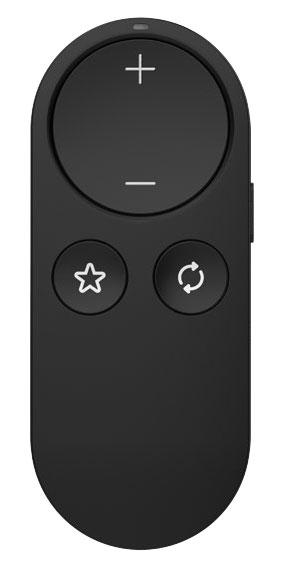
Starkey StarLink Remote Control 2.0
Ändern Sie die Lautstärke und das Hörprogramm Ihrer Hörgeräte mit einer taschengroßen Fernbedienung, ohne nach Ihrem Telefon greifen zu müssen.
Was StarLink Remote Control 2.0 kann
Die StarLink Remote Control 2.0 ist eine handliche Fernbedienung für kompatible drahtlose Starkey Hörgeräte. Die großen Plus- und Minus-Bedienelemente passen im normalen Gebrauch die Hörgerätelautstärke und während des Streamings den Audiopegel an. Die separate Programmtaste schaltet durch Ihre angepassten Hörprogramme. Ein Hörakustiker kann der Favorite-Taste eine Schnellfunktion zuweisen, beispielsweise die Rückkehr zu Ihrem normalen Programm oder das Starten bzw. Stoppen eines unterstützten Zubehör-Streams.
Which hearing aids work with Starkey StarLink Remote Control 2.0?
Fernbedienung
- Starkey Edge AI RIC RT
Exact StarkeyPro wireless accessory listing. Pair the compatible hearing aid or one fitting using the 2.0 setup.
- Starkey Edge AI RIC 312
Exact StarkeyPro wireless accessory listing. Pair the compatible hearing aid or one fitting using the 2.0 setup.
- Starkey Edge AI mRIC R
Exact StarkeyPro wireless accessory listing. Pair the compatible hearing aid or one fitting using the 2.0 setup.
- Starkey Omega AI+ mRIC R
Exact StarkeyPro wireless accessory listing. Pair the compatible hearing aid or one fitting using the 2.0 setup.
- Starkey Omega AI+ RIC RT
Exact StarkeyPro wireless accessory listing. Pair the compatible hearing aid or one fitting using the 2.0 setup.
- Starkey Omega AI+ RIC 312
Exact StarkeyPro wireless accessory listing. Pair the compatible hearing aid or one fitting using the 2.0 setup.
Wählen Sie das genaue Modell auf Ihren Hörgeräten oder Unterlagen. Ein Treffer für eine Produktfamilie belegt nicht die Unterstützung jedes Modells dieser Familie.
Dokumentierte Geräte und Konfigurationen anzeigen
- Starkey Edge AI RIC RT · Genaues Modell
Paired remote for everyday hearing-aid adjustments · Fernbedienung
Exact StarkeyPro wireless accessory listing. Pair the compatible hearing aid or one fitting using the 2.0 setup.
Unterstützung dokumentiertQuelle · 2026-11-18Exact StarkeyPro wireless accessory listing. Pair the compatible hearing aid or one fitting using the 2.0 setup.
- Starkey Edge AI RIC 312 · Genaues Modell
Paired remote for everyday hearing-aid adjustments · Fernbedienung
Exact StarkeyPro wireless accessory listing. Pair the compatible hearing aid or one fitting using the 2.0 setup.
Unterstützung dokumentiertQuelle · 2026-11-18Exact StarkeyPro wireless accessory listing. Pair the compatible hearing aid or one fitting using the 2.0 setup.
- Starkey Edge AI mRIC R · Genaues Modell
Paired remote for everyday hearing-aid adjustments · Fernbedienung
Exact StarkeyPro wireless accessory listing. Pair the compatible hearing aid or one fitting using the 2.0 setup.
Unterstützung dokumentiertQuelle · 2026-11-18Exact StarkeyPro wireless accessory listing. Pair the compatible hearing aid or one fitting using the 2.0 setup.
- Starkey Omega AI+ mRIC R · Genaues Modell
Paired remote for everyday hearing-aid adjustments · Fernbedienung
Exact StarkeyPro wireless accessory listing. Pair the compatible hearing aid or one fitting using the 2.0 setup.
Unterstützung dokumentiertQuelle · 2026-11-18Exact StarkeyPro wireless accessory listing. Pair the compatible hearing aid or one fitting using the 2.0 setup.
- Starkey Omega AI+ RIC RT · Genaues Modell
Paired remote for everyday hearing-aid adjustments · Fernbedienung
Exact StarkeyPro wireless accessory listing. Pair the compatible hearing aid or one fitting using the 2.0 setup.
Unterstützung dokumentiertQuelle · 2026-11-18Exact StarkeyPro wireless accessory listing. Pair the compatible hearing aid or one fitting using the 2.0 setup.
- Starkey Omega AI+ RIC 312 · Genaues Modell
Paired remote for everyday hearing-aid adjustments · Fernbedienung
Exact StarkeyPro wireless accessory listing. Pair the compatible hearing aid or one fitting using the 2.0 setup.
Unterstützung dokumentiertQuelle · 2026-11-18Exact StarkeyPro wireless accessory listing. Pair the compatible hearing aid or one fitting using the 2.0 setup.
- Starkey Omega AI+ CIC · Genaues Modell
Paired remote for everyday hearing-aid adjustments · Fernbedienung
Exact StarkeyPro wireless accessory listing. Pair the compatible hearing aid or one fitting using the 2.0 setup. This is the wireless CIC style. The CIC R NW, CIC NW and IIC NW styles are separate.
Unterstützung dokumentiertQuelle · 2026-11-18Exact StarkeyPro wireless accessory listing. Pair the compatible hearing aid or one fitting using the 2.0 setup. This is the wireless CIC style. The CIC R NW, CIC NW and IIC NW styles are separate.
- Starkey Omega AI+ ITC R · Genaues Modell
Paired remote for everyday hearing-aid adjustments · Fernbedienung
Exact StarkeyPro wireless accessory listing. Pair the compatible hearing aid or one fitting using the 2.0 setup.
Unterstützung dokumentiertQuelle · 2026-11-18Exact StarkeyPro wireless accessory listing. Pair the compatible hearing aid or one fitting using the 2.0 setup.
- Starkey Omega AI+ ITE R · Genaues Modell
Paired remote for everyday hearing-aid adjustments · Fernbedienung
Exact StarkeyPro wireless accessory listing. Pair the compatible hearing aid or one fitting using the 2.0 setup.
Unterstützung dokumentiertQuelle · 2026-11-18Exact StarkeyPro wireless accessory listing. Pair the compatible hearing aid or one fitting using the 2.0 setup.
- Starkey Omega AI RIC 312 · Genaues Modell
Paired remote for everyday hearing-aid adjustments · Fernbedienung
The exact original Omega AI RIC 312 technical sheet names support for the 2.0 remote.
Unterstützung dokumentiertQuelle · 2026-11-18The exact original Omega AI RIC 312 technical sheet names support for the 2.0 remote.
- Starkey Omega AI · Produktfamilie
Paired remote for everyday hearing-aid adjustments · Fernbedienung
Original Omega AI wireless lineup in the U.S. government guide. The guide names styles together, with the remote documented at family level.
Unterstützung dokumentiertQuelle · 2026-11-18Nachweis für die Produktfamilie. Bestätigen Sie vor dem Kauf die Kompatibilität Ihres genauen Hörgerätemodells.
Original Omega AI wireless lineup in the U.S. government guide. The guide names styles together, with the remote documented at family level.
- Starkey Edge AI · Produktfamilie
Paired remote for everyday hearing-aid adjustments · Fernbedienung
Wireless Edge AI styles. The family-level matrix does not extend to unpublished configurations or other Edge-branded generations.
Unterstützung dokumentiertQuelle · 2026-11-18Nachweis für die Produktfamilie. Bestätigen Sie vor dem Kauf die Kompatibilität Ihres genauen Hörgerätemodells.
Wireless Edge AI styles. The family-level matrix does not extend to unpublished configurations or other Edge-branded generations.
- Starkey Genesis AI · Produktfamilie
Paired remote for everyday hearing-aid adjustments · Fernbedienung
Compatible wireless Starkey Genesis AI styles in the Fall 2026 matrix.
Unterstützung dokumentiertQuelle · 2026-11-18Nachweis für die Produktfamilie. Bestätigen Sie vor dem Kauf die Kompatibilität Ihres genauen Hörgerätemodells.
Compatible wireless Starkey Genesis AI styles in the Fall 2026 matrix.
- Starkey Evolv AI · Produktfamilie
Paired remote for everyday hearing-aid adjustments · Fernbedienung
Earlier Starkey chart lists compatible wireless Starkey Evolv AI. The U.S. government guide also lists the 2.0 remote in the Evolv AI group.
Unterstützung dokumentiertQuelle · 2026-11-18Nachweis für die Produktfamilie. Bestätigen Sie vor dem Kauf die Kompatibilität Ihres genauen Hörgerätemodells.
Earlier Starkey chart lists compatible wireless Starkey Evolv AI. The U.S. government guide also lists the 2.0 remote in the Evolv AI group.
Dokumentierte Funktionen
Listening and control
- Customizable controls
- Hearing care professional assigns the Favorite shortcut in Pro Fit or Inspire X
Depending on the fitted aids, available choices include Home, accessory stream start/stop, Edge Mode+, Comfort Boost, Memory 4 or tinnitus stimulus. With no assignment, Favorite has no hearing-aid effect.
Dokumentation · 2026-11-18 - Remote carry options
- Included wrist lanyard, Lock for pocket or bag
Use the supplied wrist lanyard to keep the remote secure. Slide the lock down before carrying it where buttons could be pressed.
Dokumentation · 2026-11-18 - Independent ear control
- Controls the single paired aid or both aids in a fitted pair together
The 2.0 manual and labeled diagram specify a lock switch and two preset button roles. The earlier StarLink Remote Control has a dedicated ear-selection switch.
Dokumentation · 2026-11-18 - Control confirmation
- The light indicates a command was sent, and the wearer can confirm the hearing-aid response
During pairing check for the two-second solid light and then test a volume increase or decrease.
Dokumentation · 2026-11-18 - Control lock
- Unterstützt
Slide down to prevent accidental commands and up before making a hearing-aid adjustment.
Dokumentation · 2026-11-18 - Return to default settings
- Hold Program Change for two seconds for default program and volume
A long press returns to Personal and default volume. The QuickTIP specifically documents stopping a StarLink Edge TV Streamer stream on select hearing aids.
Konfiguration: Paired remote for everyday hearing-aid adjustments
Dokumentation · 2026-11-18 - Change hearing-aid programs
- Unterstützt
A short press cycles through the programs assigned to the hearing aids in fitting software.
Dokumentation · 2026-11-18 - Remote pairing capacity
- One compatible fitting with one or two hearing aids
Home pairing and fitting-software pairing both detect the current hearing-aid fitting. The quick guide specifies one remote paired to compatible aids and no switching among saved fittings.
Dokumentation · 2026-11-18 - Streaming controls
- Adjust active stream volume, Start or stop a supported 2.4 GHz accessory stream with assigned Favorite · Unter bestimmten Bedingungen
Start/stop is an optional Favorite assignment in fitting software. The exact accessory and hearing-aid configuration determine availability.
Konfiguration: Favorite shortcut assigned in fitting software
Dokumentation · 2026-11-18 - Lautstärkeregelung
- Unterstützt
The plus and minus buttons change fitted hearing-aid volume when no stream is playing.
Konfiguration: Paired remote for everyday hearing-aid adjustments
Dokumentation · 2026-11-18 - Lautstärkeregelung
- Unterstützt
During a compatible accessory or direct iOS or Android audio stream, the same buttons adjust stream volume.
Konfiguration: Paired remote while an audio stream is active
Dokumentation · 2026-11-18
Connections
- Companion app control
- No phone app needed for pairing or operation
The remote pairs only to the hearing aids. My Starkey can make overlapping adjustments on compatible hearing aids independently.
Dokumentation · 2026-11-18 - Bilateral and unilateral use
- One hearing aid or one fitted binaural pair
The device recognizes a monaural or binaural fitting. A CROS setup pairs the receiving hearing aid, with the transmitter off during pairing.
Dokumentation · 2026-11-18 - Link to hearing aids
- Direct Starkey 2.4 GHz control link with compatible Neuro Processor or Thrive Platform hearing aids
The quick guide specifies a direct link to compatible aids. The remote itself does not pair to the phone or app.
Dokumentation · 2026-11-18 - Hearing-aid pairing method
- Unlock, isolate from other wireless devices, restart aids, hold Favorite for five seconds within 6 inches
When pairing a fitted pair, have both aids present. In a CROS system, power on the receiving aid and leave the transmitter off until pairing is finished.
Dokumentation · 2026-11-18 - Professional setup
- Provider configures Favorite in Pro Fit or Inspire X
Home pairing works without fitting software. The professional sets Favorite and the programs the button can cycle through. Available shortcuts vary by aid.
Dokumentation · 2026-11-18 - Receiver requirements
- Compatible hearing aid’s built-in wireless hardware
The documented direct pairing path uses no separate receiver, phone or streamer for hearing-aid controls.
Dokumentation · 2026-11-18 - Reconnection behavior
- After initial pairing, the remote and hearing aids recognize each other
If the aids fail to respond after the remote is unlocked, allow about one second before pressing a button. Re-pair if needed, or power-cycle the aids if one aid misses a command.
Dokumentation · 2026-11-18 - Remembered hearing-aid pairings
- 2 devices
The remote recognizes either a monaural fitting or a binaural fitting of two hearing aids. It documents one fitting at a time, not two independent listeners.
Dokumentation · 2026-11-18
Power and charging
- Replaceable accessory battery
- Unterstützt
Release the battery door at the pinhole and install a new CR2032.
Dokumentation · 2026-11-18 - Accessory battery type
- CR2032 lithium coin cell
Starkey specifies a replaceable CR2032 and expects at least one year of normal use. That figure covers ordinary use, rather than standby alone.
Dokumentation · 2026-11-18 - Kein wiederaufladbarer Akku im Zubehör
Power comes from a disposable CR2032 coin cell. The manual says to replace the cell and instructs users not to connect the remote to external devices.
Dokumentation · 2026-11-18
Design and everyday use
- Control accessibility
- Large plus/minus rocker, distinct program and Favorite icons, side lock and command light
Manual diagram shows visible labels and a separate switch. Tactile differentiation and suitability for limited dexterity were not measured.
Dokumentation · 2026-11-18 - Included items
- Remote, CR2032 coin battery, Wrist lanyard
Starkey identifies a replaceable cell and lanyard as included. The manual specifies the battery type.
Dokumentation · 2026-11-18 - Ingress protection rating
- IP52 (IEC 60529)
Starkey rates the exact 2.0 remote IP52 and instructs users to keep it dry.
Dokumentation · 2026-11-18 - Routine maintenance
- Clean with a damp cloth moistened with soapy water, keep dry, and lock when carrying
Follow the manual’s cleaning instructions and lock the remote to avoid accidental commands and help preserve battery life.
Dokumentation · 2026-11-18 - Operating conditions
- −20 to 60 °C, 10% to 95% RH, 70 to 106 kPa
Operating limits apply to the remote hardware. The manual also instructs users to keep it dry.
Dokumentation · 2026-11-18 - Physische Bedienelemente
- Volume up, Volume down, Program Change, Favorite, Lock/Unlock switch
The manual diagram labels a shared plus/minus rocker, separate Program Change and Favorite buttons and the side lock.
Dokumentation · 2026-11-18 - Replacement parts
- CR2032 coin battery
The manual provides the exact replaceable battery specification. It gives no SKU for the lanyard or battery door.
Dokumentation · 2026-11-18 - Required extras
- Compatible wireless hearing aid or fitted pair, Pointed object for future battery changes
Pair to compatible aids directly. Open the battery latch with a pointed object when changing the cell.
Dokumentation · 2026-11-18 - Repair and service options
- Contact the hearing care professional first
Starkey directs service or repair inquiries to the hearing care professional. The user can replace the cell. The manual describes three years of expected device service life.
Dokumentation · 2026-11-18 - Status indicators
- Button command light, Rapid flashing during pairing, Two-second steady light for successful pairing
The indicator confirms transmission of a command or a successful pairing. Adjusting volume verifies the aids’ response.
Dokumentation · 2026-11-18 - Storage conditions
- Transport −40 to 60 °C, 10% to 95% RH, 70 to 106 kPa
The manual gives transport limits. A separate long-term storage range is unpublished.
Dokumentation · 2026-11-18 - Wearing and placement options
- Included wrist lanyard
The manual shows wearing the supplied lanyard around the wrist.
Dokumentation · 2026-11-18
How to set up Starkey StarLink Remote Control 2.0
Schieben Sie den Sperrschalter nach oben. Schalten Sie Bluetooth am Telefon und alle bereits gekoppelten Zubehörteile aus, schalten Sie dann die Hörgeräte aus und wieder ein. Bei CROS schalten Sie das empfangende Hörgerät ein und lassen den Sender während der Kopplung ausgeschaltet. Platzieren Sie das Hörgerät oder Paar innerhalb von 6 inches von der Fernbedienung. Halten Sie Favorite fünf Sekunden lang gedrückt, bis die Leuchte schnell blinkt. Ein dauerhaftes Leuchten für zwei Sekunden bestätigt die Kopplung. Prüfen Sie dies mit einer Lautstärketaste und schalten Sie Bluetooth am Telefon wieder ein.
Vor dem Kauf prüfen
The remote controls one compatible fitting, either a single hearing aid or a fitted pair. Both aids in a pair should be present during pairing. It has no ear-selection switch, and Favorite depends on what your provider assigns and what your hearing aids support.
Adds a button lock and a Favorite shortcut
If you mainly want to control compatible Starkey aids, the Remote Control 2.0 gives you a pocket lock and a Favorite button your provider can assign to a shortcut. The StarLink Edge Remote Microphone can also adjust volume and programs, but it combines those commands on its volume control. Its main job is picking up a speaker’s voice.
QuelleControls a stream but cannot pick up a speaker
The Remote Control 2.0 can adjust audio already streaming to your hearing aids. To hear a person across the table, you need a microphone to start with. With compatible Starkey aids, the StarLink Edge Remote Microphone can clip to that person and send their voice to you.
QuellePair both hearing aids together
For a two-aid fitting, restart both hearing aids and keep them close to the unlocked remote. Wait for the steady light, then test the volume buttons. If the hearing aids fall out of sync, hold Program Change for two seconds to return to the fitted default program and volume. Power-cycle the aids if needed.
QuelleAsk your provider to set Favorite
A provider can assign Home or the start/stop command for a compatible streaming accessory in fitting software. Other options can include Edge Mode+, Comfort Boost or tinnitus stimulus, depending on your hearing aids.
QuelleThe indicator shows a command was sent
If the light comes on without a change in the hearing aids, wait about a second after unlocking. Check whether both aids are paired and have enough power. The five-second pairing command and the two-second program reset use different buttons.
QuelleZugehörige Apps
Verwandtes Zubehör
Weitere in der Dokumentation genannte Geräte
Diese Namen wurden noch keinem genauen Gerät in unserem Katalog zugeordnet. Sie erzeugen daher keine bestätigten Treffer in der Suche.
Aktuelle Angebote werden geprüft…
Dokumentation geprüft am 18. Nov. 2026