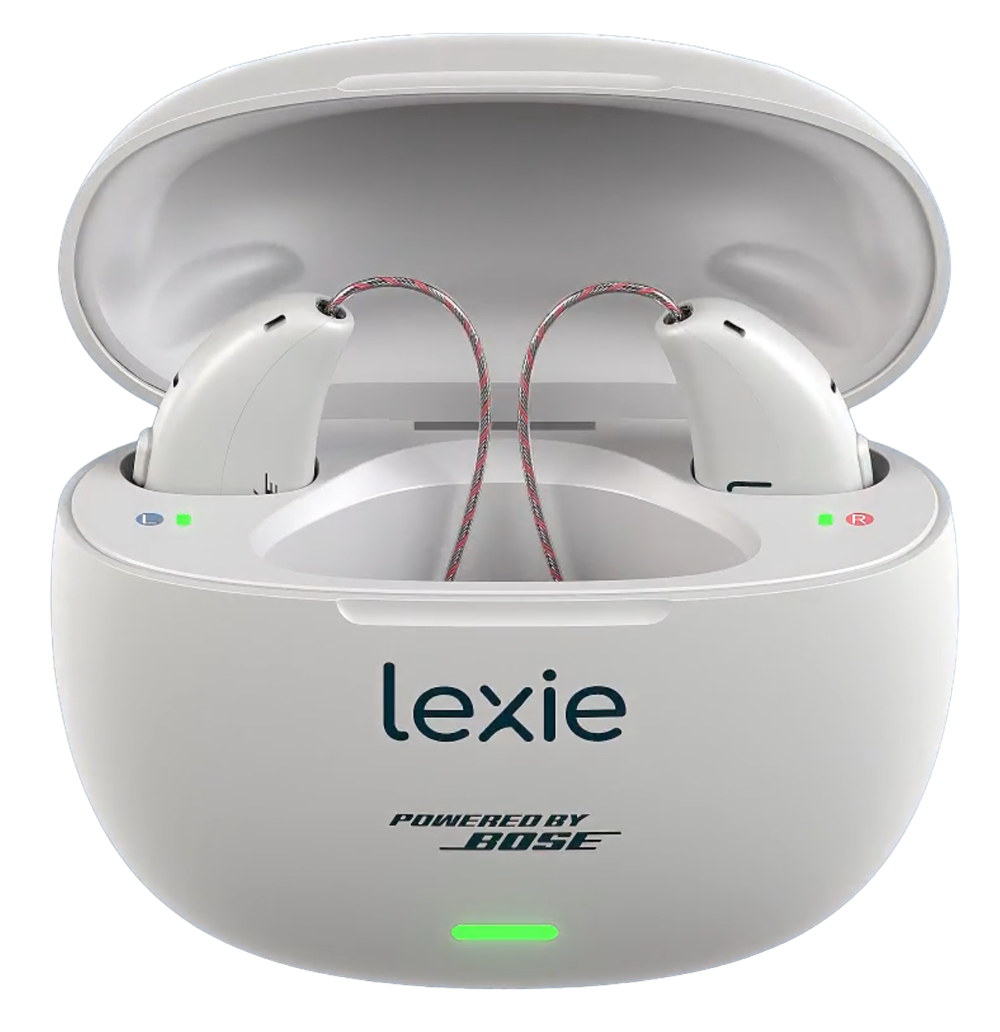
Lexie B3 Charger
Recharge and store a pair of Lexie B3 hearing aids.
What B3 Charger does
The Lexie B3 Charger is a portable case for Lexie B3 Powered by Bose hearing aids. It uses magnetic seating to line up each hearing aid with its charging contacts. A fully charged case holds up to three extra charges for the pair. Separate lights show the case battery and the charge of each hearing aid.
Which hearing aids work with Lexie B3 Charger?
Charging
- Lexie B3 Powered by Bose
Use case reference LB3C001 with the exact Lexie B3 Powered by Bose hearing aids.
Choose the exact model printed on your hearing aids or paperwork. A family match does not establish support for every model in that family.
View documented devices and setups
- Lexie B3 Powered by Bose · Exact model
Lexie B3 Powered by Bose hearing aids in the LB3C001 rechargeable case · charging
Use case reference LB3C001 with the exact Lexie B3 Powered by Bose hearing aids.
Documented supportSource · 2026-11-18Use case reference LB3C001 with the exact Lexie B3 Powered by Bose hearing aids.
Documented features
Power and charging
- Automatic hearing-aid power
- The hearing aids power off when you close the lid with them seated and power on a few seconds after you remove them.Documentation · 2026-11-18
- Case battery is not user-replaceable
The portable case has a built-in, nonremovable rechargeable battery.
Documentation · 2026-11-18- Charging-case recharge time
- 3 hours
Typical time for the case to recharge.
Documentation · 2026-11-18 - Charge case and aids together
- Supported
Place the hearing aids in the case while it is connected to USB power. Separate timing for simultaneous use remains unverified.
Documentation · 2026-11-18 - Unpowered storage behavior
- The case stops charging when its battery falls below 5%.
Power the case when the charge lights stay off. The manual gives no exact drain interval for an unpowered, depleted case.
Documentation · 2026-11-18 - Hearing-aid and receiver fit
- Lexie B3 Powered by Bose, hearing aid reference LB30001.
The red and blue slots correspond to right and left. Verify receiver and dome fit before closing the lid.
Documentation · 2026-11-18 - Charging indicators
- The two interior lights show hearing-aid battery. At full charge they appear solid green when you open the case. The front light shows the case separately.
When the case is connected to power its light stays solid green at 100%, pulses green at 50% or more, and pulses yellow below 50%. Below 5% disconnected, the charge lights can stay off.
Documentation · 2026-11-18 - Charging method
- Magnetic seating aligns the exposed charging contacts.
Point each hearing-aid body outward, with the receiver tips toward the center of the case.
Documentation · 2026-11-18 - Charging slots
- 2 aids
One labeled well for each hearing aid.
Documentation · 2026-11-18 - Charging temperature limits
- 41–104°F (5–40°C)
Lexie specifies dry contacts and 5–90% relative humidity without condensation.
Documentation · 2026-11-18 - Full hearing-aid charge time
- 3 hours
Typical full charge from depleted. The indicator turns green at full.
Documentation · 2026-11-18 - Electrical input requirements
- The case requires 5 V DC at 500 mA.
For a USB wall adapter, Lexie calls for an approved 5 V DC output of 500–1,000 mA within its stated tolerance.
Documentation · 2026-11-18 - Lid behavior while charging
- Close the lid with the aids seated to power them off and store or charge the pair.
The case lights can still report the charge state with the lid open. The exact minimum lid position required to initiate contact charging is not stated.
Documentation · 2026-11-18 - Charges away from a power outlet
- Supported
On a full case battery, up to three more charges of the pair.
Documentation · 2026-11-18 - Portable full pair charges
- 3 pair charges
One fully charged case holds three additional recharges of the matching pair.
Documentation · 2026-11-18 - Power connector
- USB-C input on the case.
Use the USB-A end of the supplied cable with the power source.
Documentation · 2026-11-18 - USB-C power input
- Supported
Use the supplied USB-C to USB-A cable with approved USB-A power.
Documentation · 2026-11-18
Care and fit
- No drying function
Lexie lists the electronic dryer separately from the B3 charger. The charger instructions call for dry hearing aids and contacts before charging.
Documentation · 2026-11-18- No UV cleaning cycle
The B3 case has two charging wells and status lights. The maker assigns care/drying to a separate device.
Documentation · 2026-11-18
Design and everyday use
- Control accessibility
- Red and blue slot markers, magnetic seating and separate status lights.
The manual does not specify an accessible alternative to the case light. The Lexie app can show the battery of the hearing aids.
Documentation · 2026-11-18 - Included items
- Rechargeable case, USB-C to USB-A cable
Included with the Lexie B3 hearing-aid set. Confirm what comes with a replacement case.
Documentation · 2026-11-18 - Routine maintenance
- Keep the case and charging contacts clean and dry. Use a soft, dry cloth and keep liquid or cleaning solution away.Documentation · 2026-11-18
- Operating conditions
- 41–104°F (5–40°C); 5–90% relative humidity, noncondensing; 700–1060 hPa
Shared operating conditions for the aids, receivers and charger.
Documentation · 2026-11-18 - Physical controls
- Hinged lid, USB-C charging port, Two color-marked charging slots
The case uses a lid and power cable for activation, with no separate button documented.
Documentation · 2026-11-18 - Regional variants
- The U.S. regulatory guide lists case reference LB3C001.
No alternate regional case code or interchangeable earlier Lexie charging case was verified.
Documentation · 2026-11-18 - Required extras
- Lexie B3 Powered by Bose hearing aids, Manufacturer supplied USB-C to USB-A cord, Approved USB power source
The Lexie app is used for the hearing aids’ setup and can display their battery levels. Ordinary case charging is done through the contacts.
Documentation · 2026-11-18 - Repair and service options
- Contact Lexie Hearing for charging problems or a matching replacement case.
The built-in case battery is nonremovable.
Documentation · 2026-11-18 - Status indicators
- Front light for the case, Two separate lights for the hearing aids
The lid opening shows remaining battery. Connected power shows charging state.
Documentation · 2026-11-18 - Storage conditions
- −4–113°F (−20–45°C); 10–70% relative humidity, noncondensing; 700–1060 hPa
For prolonged storage, the manual recommends 50–86°F (10–30°C) to protect battery performance.
Documentation · 2026-11-18
How to set up Lexie B3 Charger
To activate a new case, open and close the lid, leave your hearing aids inside, then connect the charging cable. Match the right hearing aid to the red slot and the left hearing aid to the blue slot. Keep the contacts clean and dry. Use the manufacturer’s USB-C to USB-A cable with an approved USB power source.
What to check before buying
Match the replacement case to Lexie B3 model LB3C001. A B2 or B2 Plus case is a separate design. If this case falls below 5% battery, it stops charging the aids until you restore power. A full charge for the case or the hearing aids takes about three hours under the manual’s stated conditions.
Allow about three hours to recharge the hearing aids
If you’re comparing hearing-aid systems for travel, a depleted Lexie B3 pair takes about three hours in its case, compared with about 90 minutes for a Beyond 2 Pro pair in the ELEHEAR Beyond 2 Pro Charging Case. A full B3 case holds three spare pair charges. ELEHEAR rates its case for up to four.
SourceActivate a new charging case
Open and close the lid, seat the hearing aids, then connect the USB-C end of the supplied cord. The lights turn on once the case is ready. For first-time hearing-aid setup, follow the Lexie app prompts.
SourceCheck the lights if charging stops
Start with clean, dry contacts and the red and blue slots matched to each hearing aid. If the case is below 5%, reconnect it to power. If a hearing aid still does not charge, remove it, wait 30 seconds and put it back.
SourceRelated accessories
Checking current offers…
Documentation checked Nov 18, 2026