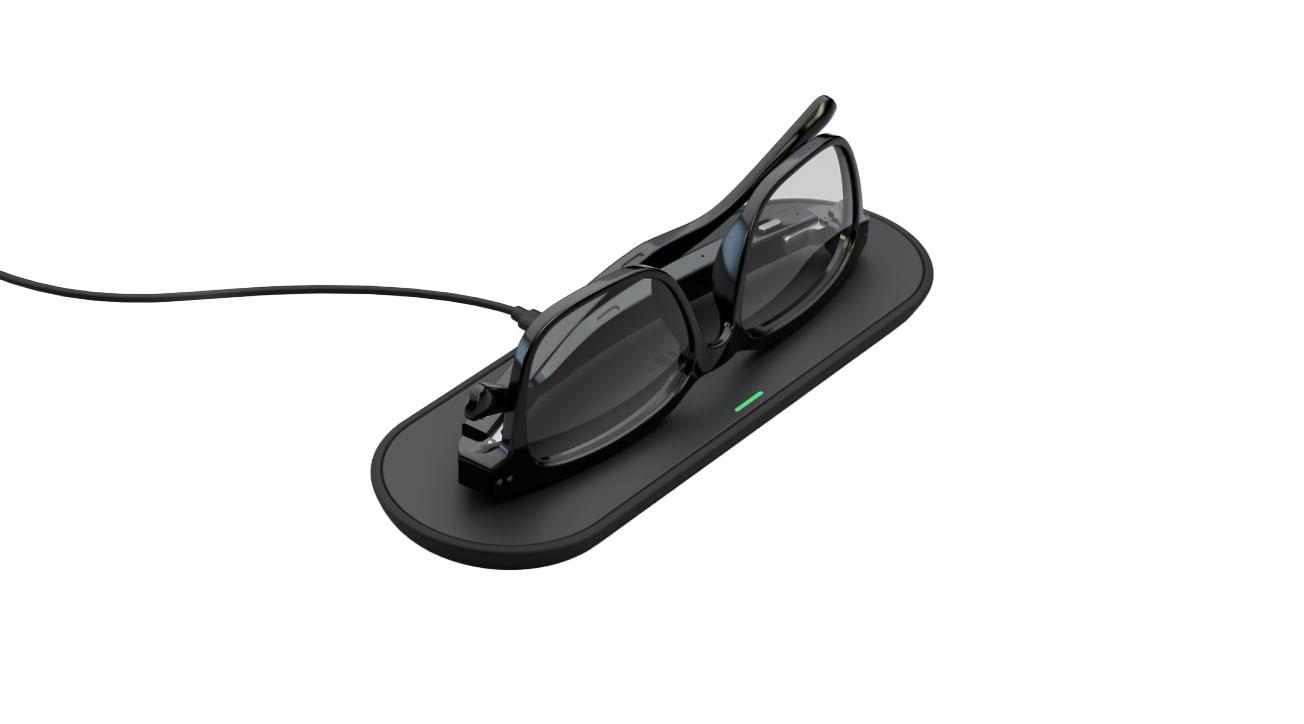
Nuance Audio Charging Pad
Recharges compatible Nuance Audio hearing glasses wirelessly while the pad is connected to USB-C power.
What Charging Pad does
The Nuance Audio Charging Pad recharges one pair of original Nuance Audio Glasses or Nuance Audio Plus. Put the pad on a nightstand or desk, plug it into USB-C power, then rest the folded glasses upside down on top. Magnets help line up the frame with the charging area. A light on the pad shows when charging starts and when the glasses are nearly full.
Which hearing aids work with Nuance Audio Charging Pad?
Charging
- Nuance Audio Hearing Glasses Square
Connect the pad to a certified USB-C wall adapter rated for 5 V DC and at least 1 A, then fold and align the original frames upside down. Connect the pad with a USB-C cable to a certified wall adapter rated for 5 V DC and at least 1 A. Fold the frames and place them upside down so the magnets align.
- Nuance Audio Hearing Glasses Panthos
Connect the pad to a certified USB-C wall adapter rated for 5 V DC and at least 1 A, then fold and align the original frames upside down. Connect the pad with a USB-C cable to a certified wall adapter rated for 5 V DC and at least 1 A. Fold the frames and place them upside down so the magnets align.
- Nuance Audio Hearing Glasses · Family-level evidence. Confirm your exact hearing-aid model before buying.
Connect the pad to a certified USB-C wall adapter rated for 5 V DC and at least 1 A, then fold and align the original frames upside down. Connect the pad with a USB-C cable to a certified wall adapter rated for 5 V DC and at least 1 A. Fold the frames and place them upside down so the magnets align.
Choose the exact model printed on your hearing aids or paperwork. A family match does not establish support for every model in that family.
View documented devices and setups
- Nuance Audio Hearing Glasses Square · Exact model
Original Nuance Audio Glasses on a powered pad · charging
Connect the pad to a certified USB-C wall adapter rated for 5 V DC and at least 1 A, then fold and align the original frames upside down.
Requires additional setupSource · 2026-11-18Connect the pad to a certified USB-C wall adapter rated for 5 V DC and at least 1 A, then fold and align the original frames upside down.
- Connect the pad with a USB-C cable to a certified wall adapter rated for 5 V DC and at least 1 A.
- Fold the frames and place them upside down so the magnets align.
- Nuance Audio Hearing Glasses Panthos · Exact model
Original Nuance Audio Glasses on a powered pad · charging
Connect the pad to a certified USB-C wall adapter rated for 5 V DC and at least 1 A, then fold and align the original frames upside down.
Requires additional setupSource · 2026-11-18Connect the pad to a certified USB-C wall adapter rated for 5 V DC and at least 1 A, then fold and align the original frames upside down.
- Connect the pad with a USB-C cable to a certified wall adapter rated for 5 V DC and at least 1 A.
- Fold the frames and place them upside down so the magnets align.
- Nuance Audio Hearing Glasses · Family
Original Nuance Audio Glasses on a powered pad · charging
Connect the pad to a certified USB-C wall adapter rated for 5 V DC and at least 1 A, then fold and align the original frames upside down.
Requires additional setupSource · 2026-11-18Family-level evidence. Confirm your exact hearing-aid model before buying.
Connect the pad to a certified USB-C wall adapter rated for 5 V DC and at least 1 A, then fold and align the original frames upside down.
- Connect the pad with a USB-C cable to a certified wall adapter rated for 5 V DC and at least 1 A.
- Fold the frames and place them upside down so the magnets align.
Documented features
Power and charging
- Automatic hearing-aid power
- Fold to sleep and unfold to wake when the Plus power slider is on.
This is glasses behavior. The manual does not attribute wake or sleep to connecting or disconnecting pad power.
Setup: Nuance Audio Plus on a powered pad
Documentation · 2026-11-18 - Hearing-aid and receiver fit
- Original Nuance Audio Glasses and Nuance Audio Plus
Fold the temples and place the glasses upside down so the magnets align.
Documentation · 2026-11-18 - Charging indicators
- Orange while charging. Green at 96% or higher.
After lifting original glasses, the pad and frame briefly show red at 0–20% or green above 20%.
Setup: Original Nuance Audio Glasses on a powered pad
Documentation · 2026-11-18 - Charging indicators
- Orange while charging. Green at 96% or higher.
After lifting Plus glasses, check the frame’s red, orange or green light for battery level. A flashing red pad light signals an error.
Setup: Nuance Audio Plus on a powered pad
Documentation · 2026-11-18 - Charging method
- Magnet-aligned NFC wireless charging at 13.56 MHzDocumentation · 2026-11-18
- Charging slots
- 1 pair of glassesDocumentation · 2026-11-18
- Charging temperature limits
- Nuance Audio recommends charging at room temperature.
The U.S. pad operating range is 14°F to 95°F (−10°C to 35°C). Nuance Audio does not specify an automatic charging cutoff.
Documentation · 2026-11-18 - Full hearing-aid charge time
- About 3 hours
Approximate full charge of original Nuance Audio Glasses. The original glasses FAQ does not specify test conditions.
Setup: Original Nuance Audio Glasses on a powered pad
Documentation · 2026-11-18 - Full hearing-aid charge time
- About 4 hours
Approximate full charge of Nuance Audio Plus. The shared pad specification gives 0–100% in 4 hours.
Setup: Nuance Audio Plus on a powered pad
Documentation · 2026-11-18 - Electrical input requirements
- 5 V DC, at least 1 A at the wall adapterDocumentation · 2026-11-18
- Charging requires external power
The pad needs power while charging the glasses. Manufacturer support for external power banks is unverified.
Documentation · 2026-11-18- Power adapter not included
- Documentation · 2026-11-18
- Power connector
- USB-C input with a USB-C to USB-C cableDocumentation · 2026-11-18
- Quick charge duration
- 30 minutes to 12%
Manufacturer figure from 0% to 12%. The pad table does not identify which frame generation was used.
Documentation · 2026-11-18 - USB-C power input
- SupportedDocumentation · 2026-11-18
Care and fit
- No drying function
- Documentation · 2026-11-18
- No UV cleaning cycle
- Documentation · 2026-11-18
Design and everyday use
- Control accessibility
- Magnets help position the frames. A top-facing light indicates charge status.Documentation · 2026-11-18
- Included items
- Charging Pad, USB-C charging cable
Both U.S. glasses bundles include the pad and cable. The separately sold spare listing does not itemize its box contents.
Documentation · 2026-11-18 - Routine maintenance
- Unplug before cleaning. Wipe with a damp cloth and mild neutral soap, then let the pad dry.
Avoid sprays, solvents, alcohol, ammonia and abrasive cloths. Check the pad and cable periodically for damage.
Documentation · 2026-11-18 - Operating conditions
- 14°F to 95°F (−10°C to 35°C). Keep dry and use on a flat, nonmetal surface.
U.S. IFU humidity qualification is 20–60% below 95°F (35°C). Avoid strong electrical or magnetic fields.
Documentation · 2026-11-18 - Physical controls
- Connect USB-C power, Place or lift the folded frame
Charging starts when the folded glasses align on the powered pad.
Documentation · 2026-11-18 - Regional variants
- A certified local USB-C wall adapter is supplied separately. Warranty terms and prices vary by market.
The U.S. limited warranty is one year. The pad IFU lists two years in the EU, UK and EFTA. Canadian support lists two years on Plus accessories.
Documentation · 2026-11-18 - Replacement parts
- Whole pad AAW0001EL, Whole pad spare REL0063A0, Compatible USB-C to USB-C cable
REL0063A0 is manufacturer-labeled as a spare. Confirm pack contents when ordering.
Documentation · 2026-11-18 - Required extras
- Compatible Nuance Audio hearing glasses, Certified USB-C wall adapter with 5 V DC / 1 A minimum outputDocumentation · 2026-11-18
- Repair and service options
- Contact Nuance Audio support or the authorized seller for service.Documentation · 2026-11-18
- Status indicators
- Top-facing LED on padDocumentation · 2026-11-18
- Storage conditions
- 14°F to 95°F (−10°C to 35°C)
Pad storage/transport range in the October 2026 U.S. IFU. Keep away from direct sun and excess heat.
Documentation · 2026-11-18 - Warranty terms
- One-year U.S. Luxottica limited warranty for defects or malfunctions, with eligible purchase and proof of purchase.
Damage from misuse, unauthorized changes, improper voltage or non-approved accessories is excluded. Local rights may vary.
Documentation · 2026-11-18 - Wearing and placement options
- Flat, stable nonmetal tabletopDocumentation · 2026-11-18
How to set up Nuance Audio Charging Pad
Set the pad on a flat, dry, nonmetal surface. Connect the included USB-C cable to a certified wall adapter rated for at least 5 V DC and 1 A. Fold the temples, place the glasses upside down, and adjust their position until the pad shows orange or green. The pad needs connected power for the full charge.
What to check before buying
The pad works with original Nuance Audio Glasses and Nuance Audio Plus. Generic wireless chargers will not charge these glasses. The pad needs external USB-C power and contains no battery. Keep it dry and away from metal surfaces or strong magnetic fields.
Charges the glasses as one folded frame
With a typical hearing-aid charger, such as the Phonak Charger Ease for compatible Audéo hearing aids, you place each aid in its own slot. With the Nuance pad, you fold the glasses and rest the whole frame upside down on the charging surface. Magnets help you line it up.
SourceCheck the light while the glasses are on the pad
Orange means the glasses are charging. Green means their battery is at least 96%. Use the light while the glasses are on the pad to tell when they are nearly full. Lifting the frames briefly shows a different battery-level indication.
SourceIf the pad fails to start
Check that both ends of the USB-C cable are seated and that the wall adapter is rated for at least 5 V and 1 A. When the pad starts normally, its light should be green for about three seconds. If the frame is on the pad without an orange or green charging light, adjust its position. Contact Nuance Audio support if the pad flashes red, stays dark at startup, or overheats.
SourcePacemakers and other medical devices
The pad contains magnets and emits radio waves. If you use a pacemaker, insulin pump or other implantable device, Nuance Audio directs you to consult your doctor or the device manufacturer before using the pad. Unplug the pad if you notice interference.
SourcePortable charging for Plus glasses
Nuance Audio separately documents a battery-powered Charging Case for Nuance Audio Plus. The desktop Charging Pad comes with the glasses and needs external power while you use it.
SourceCompanion apps
Other devices named in the documentation
These names have not been matched to an exact device in our catalog. They do not create verified matches in the finder.
Checking current offers…
Documentation checked Nov 18, 2026