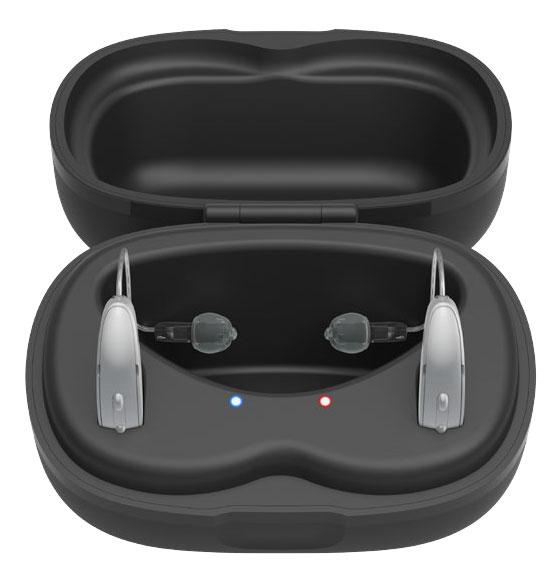
Starkey StarLink Charger 2.0
Choose the Starkey plug-in receiver-in-canal charging case for your hearing aid’s shell. The mRIC R and RIC RT versions have different wells.
What StarLink Charger 2.0 does
Starkey offers two versions of this plug-in charger. Match the well and order code to your hearing aid before buying. The mRIC R case holds the smaller shell. Starkey lists the RIC RT well separately.
Which hearing aids work with Starkey StarLink Charger 2.0?
Charging
- Starkey Genesis AI RIC RT
Genesis AI RIC RT requires the RIC RT well shape. U.S. commercial order code P00009112. Use the case with the matching RIC RT charging wells.
- Starkey Genesis AI mRIC R
Genesis AI mRIC R requires the mRIC R well shape. U.S. commercial order code P00009111. Use the case with the matching mRIC R charging wells.
- Starkey Edge AI RIC RT
Edge AI RIC RT requires the RIC RT well shape. U.S. commercial order code P00009112. Use the case with the matching RIC RT charging wells.
- Starkey Edge AI mRIC R
Edge AI mRIC R requires the mRIC R well shape. U.S. commercial order code P00009111. Use the case with the matching mRIC R charging wells.
- Starkey Omega AI mRIC R
Omega AI mRIC R requires the mRIC R well shape. U.S. commercial order code P00009111. Use the case with the matching mRIC R charging wells.
- Starkey Omega AI RIC RT
Omega AI RIC RT requires the RIC RT well shape. U.S. commercial order code P00009112. Use the case with the matching RIC RT charging wells.
Choose the exact model printed on your hearing aids or paperwork. A family match does not establish support for every model in that family.
View documented devices and setups
- Starkey Genesis AI RIC RT · Exact model
Case marked RIC RT or RIC R/RT · charging
Genesis AI RIC RT requires the RIC RT well shape. U.S. commercial order code P00009112.
Requires additional setupSource · 2026-11-18Genesis AI RIC RT requires the RIC RT well shape. U.S. commercial order code P00009112.
- Use the case with the matching RIC RT charging wells.
- Starkey Genesis AI mRIC R · Exact model
Case marked mRIC R · charging
Genesis AI mRIC R requires the mRIC R well shape. U.S. commercial order code P00009111.
Requires additional setupSource · 2026-11-18Genesis AI mRIC R requires the mRIC R well shape. U.S. commercial order code P00009111.
- Use the case with the matching mRIC R charging wells.
- Starkey Edge AI RIC RT · Exact model
Case marked RIC RT or RIC R/RT · charging
Edge AI RIC RT requires the RIC RT well shape. U.S. commercial order code P00009112.
Requires additional setupSource · 2026-11-18Edge AI RIC RT requires the RIC RT well shape. U.S. commercial order code P00009112.
- Use the case with the matching RIC RT charging wells.
- Starkey Edge AI mRIC R · Exact model
Case marked mRIC R · charging
Edge AI mRIC R requires the mRIC R well shape. U.S. commercial order code P00009111.
Requires additional setupSource · 2026-11-18Edge AI mRIC R requires the mRIC R well shape. U.S. commercial order code P00009111.
- Use the case with the matching mRIC R charging wells.
- Starkey Omega AI mRIC R · Exact model
Case marked mRIC R · charging
Omega AI mRIC R requires the mRIC R well shape. U.S. commercial order code P00009111.
Requires additional setupSource · 2026-11-18Omega AI mRIC R requires the mRIC R well shape. U.S. commercial order code P00009111.
- Use the case with the matching mRIC R charging wells.
- Starkey Omega AI RIC RT · Exact model
Case marked RIC RT or RIC R/RT · charging
Omega AI RIC RT requires the RIC RT well shape. U.S. commercial order code P00009112.
Requires additional setupSource · 2026-11-18Omega AI RIC RT requires the RIC RT well shape. U.S. commercial order code P00009112.
- Use the case with the matching RIC RT charging wells.
- Starkey Edge AI CIC · Exact model
Charging with external power · charging
The Edge AI CIC listed in this legacy link is not the rechargeable CIC R NW. The RIC charger has receiver-in-canal slots.
Documented as incompatibleSource · 2026-11-18 - Starkey Edge AI ITC R · Exact model
Charging with external power · charging
The Edge AI ITC R is a rechargeable custom in-ear aid and uses the separate Custom 2.0 format.
Documented as incompatibleSource · 2026-11-18 - Starkey Edge AI ITE R · Exact model
Charging with external power · charging
The Edge AI ITE R is a rechargeable custom in-ear aid and uses the separate Custom 2.0 format.
Documented as incompatibleSource · 2026-11-18 - Starkey Edge AI RIC 312 · Exact model
Charging with external power · charging
The Edge AI RIC 312 is not a rechargeable RIC RT aid. The portfolio assigns this charger to the rechargeable styles.
Documented as incompatibleSource · 2026-11-18
Documented features
Power and charging
- Automatic hearing-aid power
- When the charger has power, compatible aids turn off and start charging when seated. They turn on when removed.Documentation · 2026-11-18
- Hearing-aid and receiver fit
- StarLink 2.0 uses different charging wells for mRIC R and RIC RT. Select whichever is marked for your rechargeable hearing aid. The commercial chart includes G Series AI RIC R under the RIC RT/RIC R code. Compare the part number P00009111 or P00009112 with your hearing aids before ordering.Documentation · 2026-11-18
- Charging indicators
- The side lights blink during charging and stay lit when full. Rapid blinking calls for checking placement, contacts, and the power supply.Documentation · 2026-11-18
- Charging method
- Contact charging in separate left and right wells for the matching rechargeable RIC shell.Documentation · 2026-11-18
- Charging slots
- 2 aids
Separate left and right wells are shown in the manufacturer’s diagrams.
Documentation · 2026-11-18 - Charging temperature limits
- 50–104 °F (10–40 °C), 10–95% relative humidity, and 70–106 kPa.Documentation · 2026-11-18
- Full hearing-aid charge time
- 3.5 hours
Starkey’s 2.0 guide gives the figure for compatible rechargeable hearing aids. It does not specify individual model or remaining charge.
Documentation · 2026-11-18 - Lid behavior while charging
- Charging works with the lid open or closed. Let the domes or earmolds rest in the center space and close the lid for storage.Documentation · 2026-11-18
- Charging requires external power
Requires an external power source while charging the hearing aids.
Documentation · 2026-11-18- Power connector
- USB-C port on the case.
Use a power cable and adapter approved or listed by a recognized testing laboratory.
Documentation · 2026-11-18 - Quick charge duration
- 10 minutes
Turbo Charge starts automatically when the hearing-aid battery is low.
Documentation · 2026-11-18 - Runtime after quick charge
- About 3 hours after a 10-minute Turbo ChargeDocumentation · 2026-11-18
- USB-C power input
- SupportedDocumentation · 2026-11-18
Care and fit
- Cleaning materials
- Use the supplied cleaning tool on the contacts. Keep water, cleaning liquids, and solvents away from the contacts.Documentation · 2026-11-18
Design and everyday use
- Dimensions
- 92 × 63 × 56 mm in Starkey’s published order.
The manufacturer does not label the axes. A reseller reports approximate dimensions of 90 × 50 × 50 mm for its unit.
Documentation · 2026-11-18 - Included items
- Charging case, USB charging cable · With conditions
Item list for the observed retailer offer only. The maker’s user guide mentions a cleaning tool. Confirm the U.S. box with the seller.
Documentation · 2026-11-18 - Routine maintenance
- Use the supplied cleaning tool to clear debris from the charging contacts. Keep the lid closed for storage in a cool, dry place. Unplug the charger if storing it for more than a week.Documentation · 2026-11-18
- Operating conditions
- Charge within 50–104 °F (10–40 °C) and 10–95% relative humidity. Keep the contacts dry.Documentation · 2026-11-18
- Regional variants
- U.S. commercial part P00009111 or P00009112. The May–October 2026 U.S. Government Services form uses P00008298 or P00008292. Other contract periods may use different codes.
Separate ordering channels. Confirm the actual part number and fit with the supplier.
Documentation · 2026-11-18 - Required extras
- External power source while charging aids, Approved cable and power adapter, Rechargeable hearing aids with the matching shell shapeDocumentation · 2026-11-18
- Repair and service options
- Contact your hearing care provider if reseating the aids or cleaning the contacts does not help. The manufacturer instructs owners to send a defective charger for repair and keep the case assembled.Documentation · 2026-11-18
- Status indicators
- Left and right hearing-aid lights
Both sides blink during charging and stay on when full. See case battery lights for the Premium model.
Documentation · 2026-11-18 - Storage conditions
- Store and transport at 14–113 °F (−10–45 °C), 10–95% relative humidity, and 70–106 kPa.Documentation · 2026-11-18
- Weight
- 117 g
Starkey lists 117 g for this RIC case type, without a different figure for each well shape.
Documentation · 2026-11-18
How to set up Starkey StarLink Charger 2.0
Connect the charger to a wall outlet with a suitable USB-C power cable and adapter. Place the left and right aids in their matching slots. Lay the domes or earmolds in the middle. The side lights blink during charging and stay on when the aids are full. Removing the aids turns them on.
What to check before buying
StarLink 2.0 uses different charging wells for mRIC R and RIC RT. Select whichever is marked for your rechargeable hearing aid. The commercial chart includes G Series AI RIC R under the RIC RT/RIC R code. The RIC and custom in-ear chargers have different wells. Match the exact order code and style before buying. Requires an external power source while charging the hearing aids.
Match the charging wells to your hearing aids
StarLink 2.0 uses different charging wells for mRIC R and RIC RT. Select whichever is marked for your rechargeable hearing aid. The commercial chart includes G Series AI RIC R under the RIC RT/RIC R code. Compare the part number P00009111 or P00009112 with your hearing aids before ordering.
SourceCheck the charging lights
Connect the charger to a wall outlet with a suitable USB-C power cable and adapter. Place the left and right aids in their matching slots. Lay the domes or earmolds in the middle. The side lights blink during charging and stay on when the aids are full. Removing the aids turns them on.
SourceNeeds external power each time you charge
If you’re choosing between Starkey’s two 2.0 cases, charging away from home is the main difference. The StarLink Charger 2.0 needs external power, while the StarLink Premium Charger 2.0 can recharge your aids from its built-in battery. Both come in different well shapes for mRIC R and RIC RT aids.
SourceRelated accessories
Other devices named in the documentation
These names have not been matched to an exact device in our catalog. They do not create verified matches in the finder.
Checking current offers…
Documentation checked Nov 18, 2026