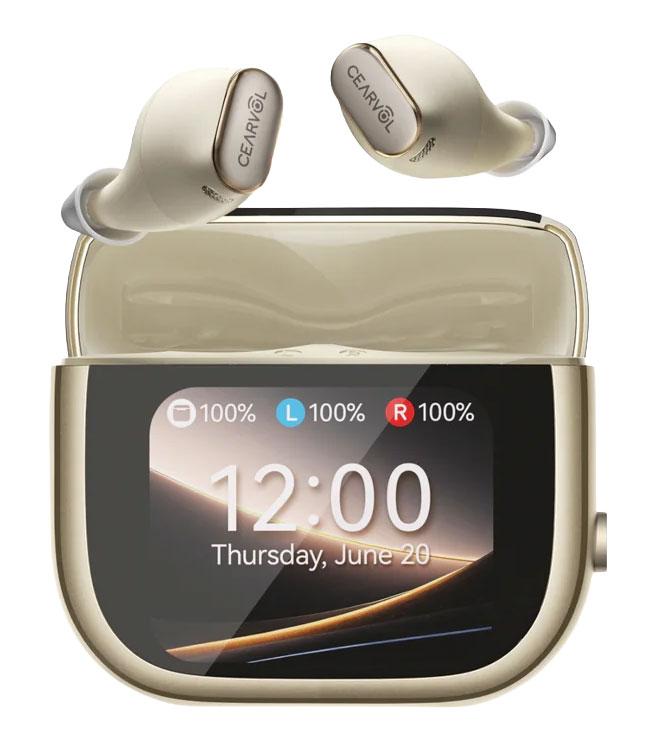
Cearvol Wave Charger
TV-StreamerFernbedienungenLadegeräte
Laden Sie Wave Hörgeräte auf, passen Sie deren Lautstärke und Hörmodus an oder übertragen Sie Sprache in der Nähe oder kabelgebundenen Fernsehton an sie.
Was Wave Charger kann
Laden Sie Ihre Cearvol Wave Hörgeräte im Etui auf und prüfen Sie den Akku jedes Hörgeräts auf dem Bildschirm. Der Touchscreen passt außerdem Lautstärke und Hörmodi an, während Sie die Hörgeräte tragen. Stellen Sie das Etui in die Nähe eines Lautsprechers, um es als Mikrofon zu verwenden, oder schließen Sie es an den 3.5 mm-Analog-Audioausgang Ihres Fernsehers an.
Which hearing aids work with Cearvol Wave Charger?
Mikrofonton
TV-Ton
- Cearvol Wave
Wear both matching Wave hearing aids and connect the included cable to the TV’s active 3.5 mm analog output. Wired audio switches off the case microphone. Connect the supplied 3.5 mm cable from the TV’s active analog audio output to AUX-IN on the case.
Fernbedienung
Laden
Wählen Sie das genaue Modell auf Ihren Hörgeräten oder Unterlagen. Ein Treffer für eine Produktfamilie belegt nicht die Unterstützung jedes Modells dieser Familie.
Dokumentierte Geräte und Konfigurationen anzeigen
- Cearvol Wave · Genaues Modell
Wave hearing aids seated in the charging case · Laden
Unterstützung dokumentiertQuelle · 2026-11-18 - Cearvol Wave · Genaues Modell
Wear the Wave aids and place the case close to the talker · Mikrofonton
Unterstützung dokumentiertQuelle · 2026-11-18 - Cearvol Wave · Genaues Modell
Wear the Wave aids and wire the case to a TV or other 3.5 mm analog audio source · TV-Ton
Wear both matching Wave hearing aids and connect the included cable to the TV’s active 3.5 mm analog output. Wired audio switches off the case microphone.
Zusätzliche Einrichtung erforderlichQuelle · 2026-11-18Wear both matching Wave hearing aids and connect the included cable to the TV’s active 3.5 mm analog output. Wired audio switches off the case microphone.
- Connect the supplied 3.5 mm cable from the TV’s active analog audio output to AUX-IN on the case.
- Cearvol Wave · Genaues Modell
Adjust the Wave hearing aids through the case touchscreen · Fernbedienung
Unterstützung dokumentiertQuelle · 2026-11-18 - Cearvol Wave · Genaues Modell
Wave aids paired to a phone with call controls on the case · phone_calls
Phone audio connects to the Wave aids; the touchscreen controls calls.
Zusätzliche Einrichtung erforderlichQuelle · 2026-11-18Phone audio connects to the Wave aids; the touchscreen controls calls.
- Pair matching Wave hearing aids to a compatible phone.
Dokumentierte Funktionen
Listening and control
- Automatic mode switching
- Plugging in the audio cable automatically switches from remote microphone to AUX.
Unplug the cable to exit AUX. The manual does not say whether remote microphone mode resumes automatically.
Konfiguration: Wear the Wave aids and wire the case to a TV or other 3.5 mm analog audio source
Dokumentation · 2026-11-18 - Remote carry options
- Built-in lanyard hole
The case has an attachment hole. A lanyard is not in the published box contents.
Dokumentation · 2026-11-18 - Independent ear control
- Use the case touchscreen to adjust left and right hearing-aid volume separately.
The manufacturer describes this as a hearing-aid control. Separate volume by ear for every audio input was not confirmed.
Konfiguration: Adjust the Wave hearing aids through the case touchscreen
Dokumentation · 2026-11-18 - Control confirmation
- The hearing aids announce when the microphone or AUX mode starts or stops.
The exact touchscreen volume or program control confirmation is not separately described.
Dokumentation · 2026-11-18 - Return to default settings
- With both Wave hearing aids in the open case, press the case multifunction button three times to clear the hearing aids’ pairing records.
The manual labels this factory reset. It explicitly documents clearing aid pairing records. Other settings that might reset are unspecified.
Konfiguration: Clear Wave hearing-aid pairings with both aids seated and the case lid open
Dokumentation · 2026-11-18 - Microphone modes
- Remote microphone mode with the case near the talker
The hearing aids announce when the mic is on or off.
Dokumentation · 2026-11-18 - Microphone placement
- Place the powered case near the person you want to hear.
Konfiguration: Wear the Wave aids and place the case close to the talker
Dokumentation · 2026-11-18 - Change hearing-aid programs
- Unterstützt
Pick the hearing-aid listening mode on the touchscreen.
Dokumentation · 2026-11-18 - Remote microphone
- UnterstütztDokumentation · 2026-11-18
- Streaming controls
- Double-press the side microphone button to start or stop the case microphone, Insert the 3.5 mm cable to switch to wired TV audio, Unplug the audio cable to exit AUX
Wear the matched hearing aids. The hardware instructions describe AUX input switching through the cable. No touchscreen shortcut for toggling the wired stream was verified.
Dokumentation · 2026-11-18 - Table microphone mode
- Unterstützt · Unter bestimmten Bedingungen
You can set the case near a speaker across a table. An array or group beamforming mode was not confirmed.
Konfiguration: Wear the Wave aids and place the case close to the talker
Dokumentation · 2026-11-18 - Lautstärkeregelung
- Unterstützt
The touchscreen changes left and right hearing-aid volume. Exact range and individual stream-volume controls are unverified.
Dokumentation · 2026-11-18
Connections
- Analog audio input
- Unterstützt
Connecting the 3.5 mm cable turns off the case microphone.
Dokumentation · 2026-11-18 - Companion app control
- Touchscreen controls volume and mode. The optional Cearvol app configures supported hearing-aid fitting and personalization.
No exact Cearvol app identity is present in the local app snapshot.
Dokumentation · 2026-11-18 - Keine Audiodurchleitung
The diagram shows one 3.5 mm analog audio input and no wired output for a soundbar, receiver, or second device.
Dokumentation · 2026-11-18- Automatic streaming start
- When you wear the Wave aids and plug in the 3.5 mm cable, the case switches to AUX and the aids announce “AUX IN ON.”
Konfiguration: Wear the Wave aids and wire the case to a TV or other 3.5 mm analog audio source
Dokumentation · 2026-11-18 - Bilateral and unilateral use
- Separate left and right contacts and charge indicators. The touchscreen can adjust aid volume by ear.
Mixing generations or using a different left/right pair is unverified.
Dokumentation · 2026-11-18 - Call controls
- Answer or end phone calls from the touchscreen
Konfiguration: Wave aids paired to a phone with call controls on the case
Dokumentation · 2026-11-18 - Kein koaxialer Digitaleingang
The exact case identifies 3.5 mm analog AUX as its audio input. It does not show a coaxial digital socket.
Dokumentation · 2026-11-18- Computer audio
- Use the case’s analog input with a computer that supplies compatible 3.5 mm audio, or pair supported computers to the aids wirelessly. · Unter bestimmten Bedingungen
The analog cable establishes a listening path. A return microphone path to the computer was not documented.
Konfiguration: Wear the Wave aids and wire the case to a TV or other 3.5 mm analog audio source
Dokumentation · 2026-11-18 - Connection priority
- Inserting the analog cable switches off the case microphone and starts AUX input.
Phone call handling is documented for the Wave hearing aids; behavior when calls interrupt the case mic or AUX stream is not established.
Konfiguration: Wear the Wave aids and wire the case to a TV or other 3.5 mm analog audio source
Dokumentation · 2026-11-18 - Firmware updates
- Manufacturer lists wireless updates through the Cearvol app for the Wave system.
The sources do not distinguish case firmware from hearing-aid firmware or list a minimum version.
Dokumentation · 2026-11-18 - Kein HDMI-ARC-Eingang
The exact case diagram shows an analog AUX input and a USB-C power port. There is no HDMI port.
Dokumentation · 2026-11-18- Kein HDMI-eARC-Eingang
There is no HDMI port for eARC on the documented case.
Dokumentation · 2026-11-18- Link to hearing aids
- Wireless link from the Wave case to the matching Wave hearing aids
The analog source connects to the case by cable. The downstream profile and codec are not separately documented.
Dokumentation · 2026-11-18 - Accessory-to-hearing-aid range
- Up to 10 m
Cearvol specifies this range for remote-microphone use.
Konfiguration: Wear the Wave aids and place the case close to the talker
Dokumentation · 2026-11-18 - Audio input selection
- Wear the hearing aids. Double-press the mic button for remote mic. Connect a 3.5 mm cable for AUX, which turns the microphone mode off.Dokumentation · 2026-11-18
- Analog input details
- 3.5 mm AUX input with supplied cable for an analog source.
No exact signal-level, impedance or pinout is documented.
Dokumentation · 2026-11-18 - Kein optischer Audioeingang
The case diagram labels a 3.5 mm analog AUX input. There is no dedicated optical audio port.
Dokumentation · 2026-11-18- Hearing-aid pairing method
- For ordinary remote mic and AUX, wear the paired Wave hearing aids and choose the case mode. For phone streaming, pair the hearing aids with the phone.
The physical case multifunction button puts the hearing aids into second-source pairing while they sit in the open case.
Dokumentation · 2026-11-18 - Hands-free phone calls
- Unterstützt · Unter bestimmten Bedingungen
The hearing aids pair with the phone. The case touchscreen answers or ends the call. The case-microphone role in calls is not established.
Konfiguration: Wave aids paired to a phone with call controls on the case
Dokumentation · 2026-11-18 - Phone requirements
- Pair the Wave hearing aids with a compatible phone over Bluetooth. · Unter bestimmten Bedingungen
The current U.S. product page describes the touchscreen as call control. Exact handset profiles and a return-audio path through the case are unverified.
Konfiguration: Wave aids paired to a phone with call controls on the case
Dokumentation · 2026-11-18 - Receiver requirements
- Use the matching Wave hearing aids with the case. A separate audio receiver is not shown.
Bluetooth connection from a phone to the hearing aids is a different source path.
Dokumentation · 2026-11-18 - Reconnection behavior
- After a hearing aid loses phone wireless connection, the manual says it can stay discoverable for about five minutes. Reseat the aids and remove them to restart discovery. · Unter bestimmten Bedingungen
This describes the hearing aids’ phone discovery rather than case-mic range-loss behavior.
Konfiguration: Wave aids paired to a phone with call controls on the case
Dokumentation · 2026-11-18 - Simultaneous source connections
- Wave aids accept two paired wireless sources with multipoint. A wired source connected to the case takes precedence over its remote mic.
Connection is not a claim that simultaneous audio streams can be heard together.
Dokumentation · 2026-11-18 - Stopping TV streaming
- Unplug the 3.5 mm cable to exit AUX. The hearing aids announce “AUX IN OFF.”
The guide does not say whether the previous microphone mode resumes automatically.
Konfiguration: Wear the Wave aids and wire the case to a TV or other 3.5 mm analog audio source
Dokumentation · 2026-11-18 - TV audio streaming
- Unterstützt · Unter bestimmten Bedingungen
Wear the Wave hearing aids and connect the supplied 3.5 mm cable from a compatible analog audio output on the TV to AUX-IN on the case. Inserting the cable ends the case’s remote-microphone mode.
Konfiguration: Wear the Wave aids and wire the case to a TV or other 3.5 mm analog audio source
Dokumentation · 2026-11-18 - Required TV settings
- Use an active 3.5 mm analog TV audio output. Check that both cable ends are seated if there is no sound.
The specific TV determines its output menu and volume behavior. No PCM or Dolby setting is specified for this analog connection.
Konfiguration: Wear the Wave aids and wire the case to a TV or other 3.5 mm analog audio source
Dokumentation · 2026-11-18
Power and charging
- Accessory battery type
- Rechargeable case battery holds 400 mAh (1520 mWh) in the FCC-filed manual.
Exact manufacturer chemistry for the case battery was not identified.
Dokumentation · 2026-11-18 - Rechargeable accessory battery
- Unterstützt
Recharge the case through its USB-C power port.
Dokumentation · 2026-11-18 - Automatic hearing-aid power
- The hearing aids turn off after seating and shutting the lid, and turn on when removed.Dokumentation · 2026-11-18
- Battery status reporting
- View charge percentages for the case and both hearing aids on the display.Dokumentation · 2026-11-18
- Charge case and aids together
- Unterstützt
The official display chart shows the hearing aids charging while the case is plugged in. It does not specify combined timing.
Dokumentation · 2026-11-18 - Hearing-aid and receiver fit
- Use this charger and its listening modes with the matching Cearvol Wave hearing aids. The Wave Lite has a separate product and support entry.
The case and accessory modes share one exact Wave identity.
Dokumentation · 2026-11-18 - Charging indicators
- The case screen shows the charge percentage for each aid and the case. Each aid shows 100% when full.Dokumentation · 2026-11-18
- Charging method
- Physical contacts in the two molded Wave wells.Dokumentation · 2026-11-18
- Charging slots
- 2 aids
Matched left and right contact wells.
Dokumentation · 2026-11-18 - Lid behavior while charging
- Place each hearing aid in its matching slot and close the lid.
Hearing aids switch off when stored in the closed case.
Dokumentation · 2026-11-18 - Portable charger battery
- 400 mAh (1520 mWh).
Capacity of the case, separate from hearing-aid runtime.
Dokumentation · 2026-11-18 - Charges away from a power outlet
- UnterstütztDokumentation · 2026-11-18
- Netzteil nicht im Lieferumfang enthalten
The original manufacturer box contains a USB cable. The case guide specifies a separate power adapter.
Dokumentation · 2026-11-18- Power connector
- USB-C inlet for power. Separate 3.5 mm analog audio input.Dokumentation · 2026-11-18
- Quick charge duration
- 15 MinutenDokumentation · 2026-11-18
- Runtime after quick charge
- Up to 3 hours after a 15-minute chargeDokumentation · 2026-11-18
- USB-C power input
- Unterstützt
The case drawing labels a Type-C port for power. The wall power adapter is supplied separately.
Dokumentation · 2026-11-18
Design and everyday use
- Control accessibility
- Shows separate charger and aid battery levels. The aids announce remote microphone and AUX on or off.
No spoken touchscreen menu or dedicated tactile screen controls were verified.
Dokumentation · 2026-11-18 - Included items
- Wave charging case, USB charging cable, 3.5 mm audio cable, Instructions
Charger-related contents of the original complete U.S. Wave system.
Dokumentation · 2026-11-18 - Routine maintenance
- Store the case dry and check power, seating and contact cleanliness if charging fails. Recharge the system every one to three months when stored.Dokumentation · 2026-11-18
- Operating conditions
- System operating limits 32–104 °F, 30–75% relative humidity and 70–110 kPa.
These are system instructions. No separate charger-only limit was established.
Dokumentation · 2026-11-18 - Physische Bedienelemente
- Color LCD touchscreen, Side microphone button, Multifunction button, USB-C inlet, 3.5 mm analog input, Hinged lid
The touchscreen handles volume, mode and call controls. The side switches have distinct functions.
Dokumentation · 2026-11-18 - Regional variants
- The U.S. case is identified by FCC ID 2ADTV-WAVEC. Midnight and Starlight are color options for Wave.
Do not transfer a Wave Lite hardware claim or apply the FCC manual warranty to current US replacement terms.
Dokumentation · 2026-11-18 - Required extras
- Compatible Cearvol Wave hearing aids, Suitable USB wall power adapter, Audio source with a compatible 3.5 mm output for wired listening
The audio cable is included. Wall power adapter is acquired separately.
Dokumentation · 2026-11-18 - Repair and service options
- If the case will not charge after reseating the aids and checking the power connection, contact the manufacturer or original seller.
Check purchase-specific terms for repair or replacement.
Dokumentation · 2026-11-18 - Status indicators
- Case, left aid and right aid battery percentages on the LCD, Charging icons, Spoken remote microphone and AUX input on/off prompts in the hearing aidsDokumentation · 2026-11-18
- Storage conditions
- System storage/transport range 14–131 °F. Keep dry and away from heat and direct sun.Dokumentation · 2026-11-18
- Wearing and placement options
- Lanyard hole
The package list does not include a lanyard. For remote listening, the maker shows placing the case near the speaker.
Dokumentation · 2026-11-18
How to set up Cearvol Wave Charger
Ziehen Sie vor der ersten Verwendung die Schutzfolie von den Hörgeräten ab. Setzen Sie sie in die passenden Vertiefungen, schließen Sie den Deckel und verwenden Sie das mitgelieferte USB-C-Kabel, um das Etui aufzuladen. Um das Etui als Mikrofon zu verwenden, tragen Sie die Hörgeräte, platzieren Sie das Etui in der Nähe des Lautsprechers und drücken Sie die Mikrofontaste zweimal. Für TV-Audio tragen Sie die Hörgeräte und schließen Sie das mitgelieferte 3.5 mm-Kabel an den analogen Kopfhörerausgang des TV und an das Etui an. Die Hörgeräte geben bei Verbindung „AUX IN ON“ aus.
Vor dem Kauf prüfen
The TV setup requires a 3.5 mm analog audio output. Check your TV’s sound settings if you want other people to listen through its speakers at the same time. Plugging in the 3.5 mm cable switches off the case’s microphone mode. The case’s charging, TV audio, and touchscreen controls are documented for Cearvol Wave hearing aids.
Seat the aids or turn on the case microphone
Ziehen Sie vor der ersten Verwendung die Schutzfolie von den Hörgeräten ab. Setzen Sie sie in die passenden Vertiefungen, schließen Sie den Deckel und verwenden Sie das mitgelieferte USB-C-Kabel, um das Etui aufzuladen. Um das Etui als Mikrofon zu verwenden, tragen Sie die Hörgeräte, platzieren Sie das Etui in der Nähe des Lautsprechers und drücken Sie die Mikrofontaste zweimal. Für TV-Audio tragen Sie die Hörgeräte und schließen Sie das mitgelieferte 3.5 mm-Kabel an den analogen Kopfhörerausgang des TV und an das Etui an. Die Hörgeräte geben bei Verbindung „AUX IN ON“ aus.
QuelleWired audio switches off the case microphone
The TV setup requires a 3.5 mm analog audio output. Check your TV’s sound settings if you want other people to listen through its speakers at the same time. Plugging in the 3.5 mm cable switches off the case’s microphone mode. The case’s charging, TV audio, and touchscreen controls are documented for Cearvol Wave hearing aids.
QuelleTurns the charging case into a conversation microphone
With a conventional case such as the ELEHEAR Delight Charger, you put the hearing aids in to charge and take them out to listen. With the Wave Charger, the case also has a job while you’re wearing your Wave aids. Set it near the person across the table and its microphone sends their voice to you.
QuelleTakes TV sound through a headphone jack
To hear the TV through your Wave aids, connect its 3.5 mm analog output to the Wave case. Compared with a dedicated streamer such as the Oticon TV Adapter 3.0 for compatible Oticon aids, you have fewer ways to connect the TV. The Oticon adapter also takes an optical cable and can pass optical sound on to a soundbar.
QuelleChange settings on the case
Use the touchscreen to adjust left and right volume or choose a listening mode. The case can answer and end calls while your phone is connected to the Wave hearing aids.
QuelleVerwandtes Zubehör
Aktuelle Angebote werden geprüft…
Dokumentation geprüft am 18. Nov. 2026