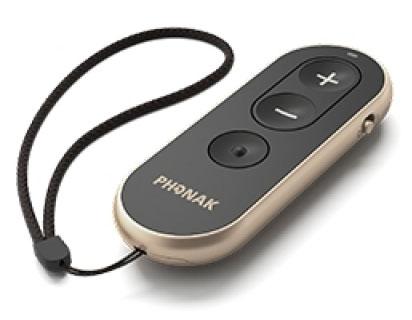
Phonak RemoteControl
Passen Sie die Lautstärke an und wechseln Sie Hörprogramme mit physischen Tasten.
Was RemoteControl kann
Diese Taschenfernbedienung verfügt über drei physische Tasten, mit denen Sie die Lautstärke der Hörgeräte erhöhen oder verringern und die angepassten Programme durchschalten können. Verwenden Sie sie nach dem Koppeln kompatibler Phonak Hörgeräte eigenständig. Eine kleine Anzeige zeigt an, wenn die Fernbedienung einen Tastendruck angenommen hat, eine Batterie benötigt oder zum Koppeln bereit ist.
Which hearing aids work with Phonak RemoteControl?
Fernbedienung
- Phonak Audéo EON R
Use an edition verified to support this exact Infinio/EON model. Phonak excludes some older RemoteControl hardware and does not publish a complete serial cutoff. Have Phonak or your provider verify that the exact remote edition supports these hearing aids.
- Phonak Audéo EON Sphere
Use an edition verified to support this exact Infinio/EON model. Phonak excludes some older RemoteControl hardware and does not publish a complete serial cutoff. Have Phonak or your provider verify that the exact remote edition supports these hearing aids.
- Phonak Audéo Infinio Ultra R
Use an edition verified to support this exact Infinio/EON model. Phonak excludes some older RemoteControl hardware and does not publish a complete serial cutoff. Have Phonak or your provider verify that the exact remote edition supports these hearing aids.
- Phonak Audéo Infinio Ultra Sphere
Use an edition verified to support this exact Infinio/EON model. Phonak excludes some older RemoteControl hardware and does not publish a complete serial cutoff. Have Phonak or your provider verify that the exact remote edition supports these hearing aids.
- Phonak Audéo Lumity L-312
Use the wireless model and pair the correct accessory directly to the hearing aids.
- Phonak Audéo Lumity Life
Use the wireless model and pair the correct accessory directly to the hearing aids.
Wählen Sie das genaue Modell auf Ihren Hörgeräten oder Unterlagen. Ein Treffer für eine Produktfamilie belegt nicht die Unterstützung jedes Modells dieser Familie.
Dokumentierte Geräte und Konfigurationen anzeigen
- Phonak Audéo EON R · Genaues Modell
Phonak-confirmed RemoteControl edition for Infinio or EON · Fernbedienung
Use an edition verified to support this exact Infinio/EON model. Phonak excludes some older RemoteControl hardware and does not publish a complete serial cutoff.
Zusätzliche Einrichtung erforderlichQuelle · 2026-11-18Use an edition verified to support this exact Infinio/EON model. Phonak excludes some older RemoteControl hardware and does not publish a complete serial cutoff.
- Have Phonak or your provider verify that the exact remote edition supports these hearing aids.
- Phonak Audéo EON Sphere · Genaues Modell
Phonak-confirmed RemoteControl edition for Infinio or EON · Fernbedienung
Use an edition verified to support this exact Infinio/EON model. Phonak excludes some older RemoteControl hardware and does not publish a complete serial cutoff.
Zusätzliche Einrichtung erforderlichQuelle · 2026-11-18Use an edition verified to support this exact Infinio/EON model. Phonak excludes some older RemoteControl hardware and does not publish a complete serial cutoff.
- Have Phonak or your provider verify that the exact remote edition supports these hearing aids.
- Phonak Audéo Infinio Ultra R · Genaues Modell
Phonak-confirmed RemoteControl edition for Infinio or EON · Fernbedienung
Use an edition verified to support this exact Infinio/EON model. Phonak excludes some older RemoteControl hardware and does not publish a complete serial cutoff.
Zusätzliche Einrichtung erforderlichQuelle · 2026-11-18Use an edition verified to support this exact Infinio/EON model. Phonak excludes some older RemoteControl hardware and does not publish a complete serial cutoff.
- Have Phonak or your provider verify that the exact remote edition supports these hearing aids.
- Phonak Audéo Infinio Ultra Sphere · Genaues Modell
Phonak-confirmed RemoteControl edition for Infinio or EON · Fernbedienung
Use an edition verified to support this exact Infinio/EON model. Phonak excludes some older RemoteControl hardware and does not publish a complete serial cutoff.
Zusätzliche Einrichtung erforderlichQuelle · 2026-11-18Use an edition verified to support this exact Infinio/EON model. Phonak excludes some older RemoteControl hardware and does not publish a complete serial cutoff.
- Have Phonak or your provider verify that the exact remote edition supports these hearing aids.
- Phonak Audéo Lumity L-312 · Genaues Modell
Three-button remote paired directly to compatible aids · Fernbedienung
Use the wireless model and pair the correct accessory directly to the hearing aids.
Unterstützung dokumentiertQuelle · 2026-11-18Use the wireless model and pair the correct accessory directly to the hearing aids.
- Phonak Audéo Lumity Life · Genaues Modell
Three-button remote paired directly to compatible aids · Fernbedienung
Use the wireless model and pair the correct accessory directly to the hearing aids.
Unterstützung dokumentiertQuelle · 2026-11-18Use the wireless model and pair the correct accessory directly to the hearing aids.
- Phonak Audéo Lumity R · Genaues Modell
Three-button remote paired directly to compatible aids · Fernbedienung
Use the wireless model and pair the correct accessory directly to the hearing aids.
Unterstützung dokumentiertQuelle · 2026-11-18Use the wireless model and pair the correct accessory directly to the hearing aids.
- Phonak Audéo Lumity RT · Genaues Modell
Three-button remote paired directly to compatible aids · Fernbedienung
Use the wireless model and pair the correct accessory directly to the hearing aids.
Unterstützung dokumentiertQuelle · 2026-11-18Use the wireless model and pair the correct accessory directly to the hearing aids.
- Phonak Bolero M M · Genaues Modell
Three-button remote paired directly to compatible aids · Fernbedienung
Use the wireless model and pair the correct accessory directly to the hearing aids.
Unterstützung dokumentiertQuelle · 2026-11-18Use the wireless model and pair the correct accessory directly to the hearing aids.
- Phonak Bolero M PR · Genaues Modell
Three-button remote paired directly to compatible aids · Fernbedienung
Use the wireless model and pair the correct accessory directly to the hearing aids.
Unterstützung dokumentiertQuelle · 2026-11-18Use the wireless model and pair the correct accessory directly to the hearing aids.
- Phonak Naída Lumity P-PR · Genaues Modell
Three-button remote paired directly to compatible aids · Fernbedienung
Use the wireless model and pair the correct accessory directly to the hearing aids.
Unterstützung dokumentiertQuelle · 2026-11-18Use the wireless model and pair the correct accessory directly to the hearing aids.
- Phonak Naída Lumity P-UP · Genaues Modell
Three-button remote paired directly to compatible aids · Fernbedienung
Use the wireless model and pair the correct accessory directly to the hearing aids.
Unterstützung dokumentiertQuelle · 2026-11-18Use the wireless model and pair the correct accessory directly to the hearing aids.
- Phonak Naída M SP · Genaues Modell
Three-button remote paired directly to compatible aids · Fernbedienung
Use the wireless model and pair the correct accessory directly to the hearing aids.
Unterstützung dokumentiertQuelle · 2026-11-18Use the wireless model and pair the correct accessory directly to the hearing aids.
- Phonak Naída Paradise P-PR · Genaues Modell
Three-button remote paired directly to compatible aids · Fernbedienung
Use the wireless model and pair the correct accessory directly to the hearing aids.
Unterstützung dokumentiertQuelle · 2026-11-18Use the wireless model and pair the correct accessory directly to the hearing aids.
- Phonak Naída Paradise P-UP · Genaues Modell
Three-button remote paired directly to compatible aids · Fernbedienung
Use the wireless model and pair the correct accessory directly to the hearing aids.
Unterstützung dokumentiertQuelle · 2026-11-18Use the wireless model and pair the correct accessory directly to the hearing aids.
- Phonak Virto Infinio R · Genaues Modell
Phonak-confirmed RemoteControl edition for Infinio or EON · Fernbedienung
Use an edition verified to support this exact Infinio/EON model. Phonak excludes some older RemoteControl hardware and does not publish a complete serial cutoff.
Zusätzliche Einrichtung erforderlichQuelle · 2026-11-18Use an edition verified to support this exact Infinio/EON model. Phonak excludes some older RemoteControl hardware and does not publish a complete serial cutoff.
- Have Phonak or your provider verify that the exact remote edition supports these hearing aids.
- Phonak Virto M M-312 · Genaues Modell
Three-button remote paired directly to compatible aids · Fernbedienung
Use the wireless model and pair the correct accessory directly to the hearing aids.
Unterstützung dokumentiertQuelle · 2026-11-18Use the wireless model and pair the correct accessory directly to the hearing aids.
- Phonak Virto Paradise 312 · Genaues Modell
Three-button remote paired directly to compatible aids · Fernbedienung
Use the wireless model and pair the correct accessory directly to the hearing aids.
Unterstützung dokumentiertQuelle · 2026-11-18Use the wireless model and pair the correct accessory directly to the hearing aids.
Dokumentierte Funktionen
Listening and control
- Remote carry options
- Pocket or purse, Included lanyard
Body dimensions and weight are in the technical data; there is no clip in the standard diagram.
Dokumentation · 2026-11-18 - Independent ear control
- Volume controls are shared for the paired fitting.
No separate left/right selector is shown. Independent ear adjustment is not a documented remote function.
Dokumentation · 2026-11-18 - Control confirmation
- Brief green light after a button press. A green light and an available hearing-aid beep confirm successful pairing.
No screen shows the selected program or volume level.
Dokumentation · 2026-11-18 - Keine Tastensperre
There is an on/off slider but no separate lock state or lock button.
Dokumentation · 2026-11-18- Return to default settings
- Hold plus and the program button together for more than 10 seconds.
Reset removes the pairing. The indicator turns green to confirm reset.
Dokumentation · 2026-11-18 - Hörgerätemikrofone lassen sich nicht stummschalten
The three documented buttons change volume or program. No dedicated aid-microphone mute action is available on these controls.
Dokumentation · 2026-11-18- Change hearing-aid programs
- Unterstützt
The round program button advances to the next available hearing-aid program.
Dokumentation · 2026-11-18 - Remote pairing capacity
- One or two aids in a single fitting
Does not document switching between multiple fittings.
Dokumentation · 2026-11-18 - Streaming controls
- Select the hearing-aid program for a paired Phonak TV Connector
Check how the TV program was fitted. The remote does not directly power the TV Connector.
Dokumentation · 2026-11-18 - Lautstärkeregelung
- Unterstützt
Use the plus and minus buttons to adjust paired hearing aids.
Dokumentation · 2026-11-18
Connections
- Companion app control
- myPhonak is an optional way to control supported hearing aids alongside the physical remote.
Disable Stay Connected if the remote becomes unresponsive. The app controls the aids, not this remote’s hardware.
Dokumentation · 2026-11-18 - Bilateral and unilateral use
- Controls one hearing aid or a paired set of two.
Press minus after the first aid pairs to stop the search for a second aid. The hardware has no dedicated left/right selector.
Dokumentation · 2026-11-18 - Connection priority
- If the physical remote becomes unresponsive while using myPhonak, turn off Stay Connected under Devices > Connection Management.
This applies when keeping both physical remote and app in use. Straightforward use of the physical remote does not require an app.
Dokumentation · 2026-11-18 - Link to hearing aids
- Digitally coded 2.4 GHz wireless control
Sonova gives 2.4–2.48 GHz GFSK. Support is model and remote-edition specific.
Dokumentation · 2026-11-18 - Hearing-aid pairing method
- Restart compatible aids. Within three minutes, hold plus while switching the remote on. Release plus at the blue blink.
Pairing is automatic after the devices enter pairing mode. Solid green and an optional aid beep confirm success.
Dokumentation · 2026-11-18 - Professional setup
- Directly pair at home. Ask Phonak or your provider to check an older RemoteControl edition if Infinio or EON will not pair.
A provider sets the available listening programs in the hearing aids.
Dokumentation · 2026-11-18 - Receiver requirements
- Built-in compatible Phonak wireless control receiver
Direct pairing. No separate receiver, streamer or phone is in the basic setup.
Dokumentation · 2026-11-18 - Reconnection behavior
- Automatically connects to already paired hearing aids after the initial pairing.
After a reset, pair it again.
Dokumentation · 2026-11-18 - Remembered hearing-aid pairings
- 2 devices
Counts individual aids in one fitting, not multiple pairs.
Dokumentation · 2026-11-18
Power and charging
- Replaceable accessory battery
- Unterstützt
Open the sliding battery compartment and replace the CR2032 with correct polarity.
Dokumentation · 2026-11-18 - Accessory battery type
- One replaceable 3 V CR2032 lithium coin cell
Manufacturer technical data claims 12 months at average use. Exact duty cycle is not given.
Dokumentation · 2026-11-18 - Kein wiederaufladbarer Akku im Zubehör
The remote uses a replaceable CR2032 primary cell.
Dokumentation · 2026-11-18- Battery status reporting
- Solid orange warns of a low battery. The remote may show no light if the cell is empty.
If there is no indicator, check the power slider before replacing the battery.
Dokumentation · 2026-11-18
Design and everyday use
- Control accessibility
- Three large marked buttons, distinct program button shape, a slide power switch and confirmation light.
A confirmation beep can play through the aids after pairing. No dexterity or one-handed rating.
Dokumentation · 2026-11-18 - Dimensions
- 32 × 84 × 11.5 mm (W × H × D)
Sonova lists 84 × 32 × 11.5 mm in length × width × height order for the handheld remote.
Dokumentation · 2026-11-18 - Included items
- Lanyard, CR2032 coin cell
Remove the insulating tab on first use. Confirm the package if buying used.
Dokumentation · 2026-11-18 - Ingress protection rating
- IP52
Manufacturer technical data. Keep the remote dry and follow its care guide.
Dokumentation · 2026-11-18 - Routine maintenance
- Use a lint-free cloth. The guide prefers dry cleaning. Protect the battery compartment from dirt and moisture.
Remove the battery if the remote is stored for a long period.
Dokumentation · 2026-11-18 - Operating conditions
- 32–104°F (0–40°C) in the user guide
The 2019 technical sheet instead gives 0–45°C and 0–95% noncondensing humidity. Use the more conservative current user-guide temperature range.
Dokumentation · 2026-11-18 - Physische Bedienelemente
- Volume up button, Volume down button, Round program button, On/off slider, Battery door
The manual identifies labeled tactile controls without a settings screen.
Dokumentation · 2026-11-18 - Regional variants
- Phonak retail 076-0065-P5 and documented OGA 076-0067-P500070
Different published order codes and an older-hardware exception require confirmation of the actual remote edition. The cutoff is not given.
Dokumentation · 2026-11-18 - Replacement parts
- CR2032 lithium coin cell
Install the replacement following the marked polarity. A separate lanyard part number was not verified.
Dokumentation · 2026-11-18 - Required extras
- Compatible Phonak hearing aids, Replacement CR2032 cell as needed
A phone or app is not needed for the basic volume or program functions.
Dokumentation · 2026-11-18 - Repair and service options
- Replace the CR2032 cell at home. Contact a hearing care professional or manufacturer representative for repairs.
The guide gives an expected service life of five years. The documented pairing reset is separate from repairs.
Dokumentation · 2026-11-18 - Status indicators
- Green readiness, pairing or button feedback, Blinking blue pairing, Solid orange battery warning, Solid red device error or temporary pairing failure, Optional hearing-aid pairing beep
The duration and pattern distinguish startup, pairing and a button press.
Dokumentation · 2026-11-18 - Storage conditions
- −4–140°F (−20–60°C); the technical sheet states 0–70% noncondensing storage humidity.
Keep dry in transport. Remove battery for long storage.
Dokumentation · 2026-11-18 - Warranty terms
- One-year limited international Phonak warranty for manufacturer and material defects with proof of purchase
Local terms vary. The U.S. OGA form specifies a separate three-year channel warranty.
Dokumentation · 2026-11-18 - Wearing and placement options
- Included lanyard
Lanyard attaches at the end of the handheld remote.
Dokumentation · 2026-11-18 - Weight
- 26,4 g
Published gram value includes the battery. The adjacent ounce conversion is inconsistent.
Dokumentation · 2026-11-18
How to set up Phonak RemoteControl
Ziehen Sie bei der ersten Verwendung die Batterieschutzlasche heraus. Starten Sie die kompatiblen Hörgeräte neu. Halten Sie innerhalb von drei Minuten die Plus-Taste gedrückt, während Sie die Fernbedienung einschalten. Lassen Sie die Plus-Taste los, wenn die Anzeige blau blinkt. Ein grünes Licht und, falls aktiviert, ein Bestätigungston zeigen die Kopplung an. Drücken Sie die runde Programmtaste einmal, um zum nächsten angepassten Programm zu wechseln.
Vor dem Kauf prüfen
Check the exact remote edition if you use Infinio or EON. Phonak says some older RemoteControl units cannot pair with those aids. In the myPhonak app, turn off Stay Connected if the remote stops responding while you use the app. The remote reports button presses by a light and does not show settings on a screen.
Confirms a button press with a light
The Phonak RemoteControl gives you three tactile buttons and a light to confirm a press. For comparison, a screen-equipped remote such as the ReSound Unite Remote Control 2 can also show the current volume and program. That model works with compatible ReSound aids.
QuellePair the three-button remote
Ziehen Sie bei der ersten Verwendung die Batterieschutzlasche heraus. Starten Sie die kompatiblen Hörgeräte neu. Halten Sie innerhalb von drei Minuten die Plus-Taste gedrückt, während Sie die Fernbedienung einschalten. Lassen Sie die Plus-Taste los, wenn die Anzeige blau blinkt. Ein grünes Licht und, falls aktiviert, ein Bestätigungston zeigen die Kopplung an. Drücken Sie die runde Programmtaste einmal, um zum nächsten angepassten Programm zu wechseln.
QuelleUse the remote alongside myPhonak
If the remote stops responding while the app is connected, go to Devices, choose Connection Management and turn off Stay Connected. If it still will not connect to Infinio or EON, check the exact remote edition with your provider.
QuelleZugehörige Apps
Verwandtes Zubehör
Weitere in der Dokumentation genannte Geräte
Diese Namen wurden noch keinem genauen Gerät in unserem Katalog zugeordnet. Sie erzeugen daher keine bestätigten Treffer in der Suche.
Aktuelle Angebote werden geprüft…
Dokumentation geprüft am 18. Nov. 2026