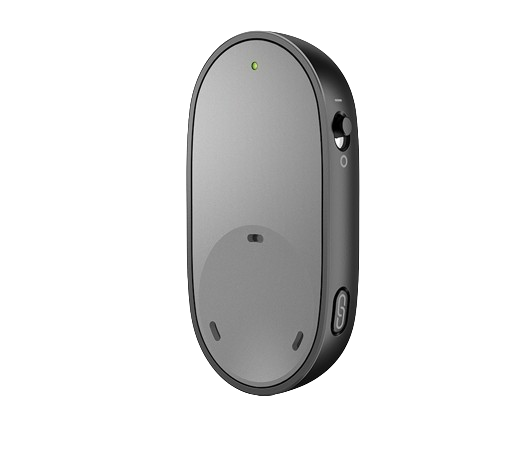
Sennheiser Easy Line PartnerMic
Hören Sie die Person, die das Mikrofon trägt, über kompatible Sennheiser Sonite Hörgeräte.
Was Easy Line PartnerMic kann
Geben Sie dieses Ansteckmikrofon der Person, die Sie hören möchten. Es überträgt ihre Stimme direkt an kompatible Sonite Hörgeräte. Es funktioniert raumübergreifend, wenn Sie das Mikrofon in Reichweite halten können, und setzt den Stream automatisch fort, wenn Ihre Hörgeräte wieder in Reichweite kommen.
Which hearing aids work with Sennheiser Easy Line PartnerMic?
Mikrofonton
- Sennheiser Sonite Rise
Exact Sonite Rise model named in the US Sennheiser accessory chart.
Wählen Sie das genaue Modell auf Ihren Hörgeräten oder Unterlagen. Ein Treffer für eine Produktfamilie belegt nicht die Unterstützung jedes Modells dieser Familie.
Dokumentierte Geräte und Konfigurationen anzeigen
- Sennheiser Sonite Rise · Genaues Modell
Pair compatible Sennheiser Sonite hearing aids directly · Mikrofonton
Exact Sonite Rise model named in the US Sennheiser accessory chart.
Unterstützung dokumentiertQuelle · 2026-11-18Exact Sonite Rise model named in the US Sennheiser accessory chart.
Dokumentierte Funktionen
Listening and control
- Microphone modes
- Single speaking partner worn microphone
There is no documented table setting in the available controls and use descriptions.
Dokumentation · 2026-11-18 - Microphone placement
- Clip about 8 inches below the speaker’s mouth, no more than 20 inches away. Keep it uncovered and avoid tilts beyond 45°.
Use the lanyard if the clip cannot attach.
Dokumentation · 2026-11-18 - Remote microphone
- Unterstützt
The speaking partner wears the microphone, and the paired Sonite aids receive the voice.
Dokumentation · 2026-11-18 - Stream/environment balance
- Ambient balance for supported hearing-aid programs in the Easy Line Remote app.
Dependent on the hearing-aid fitting.
Dokumentation · 2026-11-18 - Stream volume control
- Adjust listening level on the hearing aids, or use compatible controls in Easy Line Remote.
The microphone has no dedicated volume control.
Dokumentation · 2026-11-18 - Kein Tischmikrofonmodus
The documented pickup mode requires one person to clip or wear the microphone about eight inches below the mouth.
Dokumentation · 2026-11-18- Lautstärkeregelung
- Unterstützt
Set streamed level from the hearing aids or rated app controls. No volume button on the mic.
Dokumentation · 2026-11-18
Connections
- Kein analoger Audioeingang
The complete connector diagram shows a USB-C charging socket and no analog audio input.
Dokumentation · 2026-11-18- Companion app control
- Use Easy Line Remote to adjust compatible hearing-aid listening controls, including available stream balance.
App use is optional. No separate mic setup app is described.
Dokumentation · 2026-11-18 - Keine Auracast-Übertragung
The product uses directly paired AirStream.
Dokumentation · 2026-11-18- Bilateral and unilateral use
- Sends the speaker’s voice to both hearing aids in one compatible paired fitting.
A single hearing aid is also documented.
Dokumentation · 2026-11-18 - Link to hearing aids
- Sonova AirStream direct wireless audio
The exact Sonite charts list the named accessory.
Dokumentation · 2026-11-18 - Accessory-to-hearing-aid range
- 25 m
About 80 feet in favorable conditions. The speaker’s body, wall and furniture can limit range.
Dokumentation · 2026-11-18 - Hearing-aid pairing method
- Bring switched-on hearing aids within 4 inches. Pair via initial flashing-blue mode or press the pairing button.
A green light and tone confirm connection. Successful re-pairing clears prior hearing aids.
Dokumentation · 2026-11-18 - Kein Freisprechen über dieses Zubehör
The accessory sends its speaker microphone to the aids in AirStream mode. The Sonite aids’ separate Bluetooth call capability is independent.
Dokumentation · 2026-11-18- Professional setup
- Pair the mic at home or ask your provider to supply a pre-paired set.
The hearing aids must be fitted and configured for the available stream controls.
Dokumentation · 2026-11-18 - Receiver requirements
- Compatible hearing aids with an integrated receiver for AirStream.
The documented Sonite setup does not require an external accessory receiver.
Dokumentation · 2026-11-18 - Reconnection behavior
- Resumes automatically when the paired hearing aids are back in range.Dokumentation · 2026-11-18
- Remembered hearing-aid pairings
- 2 devices
Counts individual aids in one fitting. Re-pairing replaces the previously paired hearing fitting.
Dokumentation · 2026-11-18 - Simultaneous listeners
- One listener per paired fitting, using one or two compatible hearing aids.
A new fitting overwrites the existing pair.
Dokumentation · 2026-11-18 - Kein USB-Audioeingang
USB-C is documented for charging only and disables the microphone while connected.
Dokumentation · 2026-11-18
Power and charging
- Akku des Zubehörs nicht selbst austauschbar
- Dokumentation · 2026-11-18
- Accessory battery type
- Internal nonremovable rechargeable battery.
The exact cell chemistry and capacity are not named in the Sennheiser guide.
Dokumentation · 2026-11-18 - Accessory charge time
- 2 Stunden
Typical charge time. The manual directs a first charge of at least 2 hours.
Dokumentation · 2026-11-18 - Rechargeable accessory battery
- UnterstütztDokumentation · 2026-11-18
- Battery status reporting
- Green while full. At about 30 minutes remaining, the aid plays a beep every 10 minutes and the mic blinks red.Dokumentation · 2026-11-18
- Power connector
- USB-C on the microphone.Dokumentation · 2026-11-18
- Während des Ladens nicht nutzbar
The microphone turns off while connected to a charger.
Dokumentation · 2026-11-18
Design and everyday use
- Control accessibility
- Physical power slider, pairing button, visible indicator, and tone feedback through the aids.Dokumentation · 2026-11-18
- Included items
- USB-C charging cable, Lanyard, Protective bag
The list varies by country. A 12 V car adapter is optional.
Dokumentation · 2026-11-18 - Routine maintenance
- Keep the device dry and keep debris out of the microphone openings and charging socket. Avoid alcohol and household cleaner.Dokumentation · 2026-11-18
- Operating conditions
- 32–113°F (0–45°C), under 95% noncondensing humidity
Keep dry. The manual gives atmospheric pressure as 50 to 106 kPa.
Dokumentation · 2026-11-18 - Physische Bedienelemente
- On/off slider, Pairing button, Status light, Clothing clip
The USB-C socket is for charging.
Dokumentation · 2026-11-18 - Regional variants
- Sennheiser US Sonite listing links Sonova guide 029-6387-02. Brio separately lists its Easy Line item 1427639.
Exterior appearance and brand alone do not establish an interchangeable SKU.
Dokumentation · 2026-11-18 - Replacement parts
- Approved USB-C cable, Clip-compatible lanyard
No exact replacement part numbers are specified.
Dokumentation · 2026-11-18 - Required extras
- Sonite Rise or Sonite R hearing aids, Sonova-approved charger
Confirm what the retailer includes in the actual box.
Dokumentation · 2026-11-18 - Repair and service options
- Contact the original hearing care provider or an authorized Sonova service center.
The internal battery is not user replaceable.
Dokumentation · 2026-11-18 - Status indicators
- Blinking blue for pairing, Green to confirm pairing or full charge, Red for unsuccessful pairing or low battery, Audible pairing and low-battery feedback in aidsDokumentation · 2026-11-18
- Storage conditions
- −4–140°F (−20–60°C), under 90% noncondensing humidityDokumentation · 2026-11-18
- Warranty terms
- One-year limited international Sonova warranty for manufacturing and material defects with proof of purchase.
Ask the seller for US local terms.
Dokumentation · 2026-11-18 - Wearing and placement options
- Built-in clothing clip, Supplied lanyard
The talker wears the product.
Dokumentation · 2026-11-18
How to set up Sennheiser Easy Line PartnerMic
Laden Sie es mit dem USB-C-Kabel auf. Schalten Sie die Hörgeräte und das Mikrofon ein und halten Sie sie innerhalb von 4 inches. Wenn das Licht nicht blau blinkt, drücken Sie Pair. Warten Sie auf das grüne Licht und den Bestätigungston und befestigen Sie das Mikrofon dann etwa 8 inches unterhalb des Mundes des Lautsprechers.
Vor dem Kauf prüfen
Use this mic with one speaking partner at a time. It has no table mode or hands-free phone mode. It turns off while charging. A thick wall, furniture or the speaker’s body can shorten the 80-foot range.
Lacks a hands-free headset mode
The Easy Line PartnerMic helps you hear the person wearing it through compatible Sonite hearing aids. If you want a clip you can wear yourself for phone calls, Oticon ConnectClip also works as a headset for compatible Oticon hearing aids.
QuellePicks up the person wearing the mic
With compatible Sonite hearing aids, give the Easy Line PartnerMic to the person you want to hear. It stays with that speaker even when you’re sitting in a group. For comparison, the ReSound Multi Mic+ for compatible ReSound devices can sit in the middle of a table and pick up people on several sides.
QuelleClip it where it can pick up the speaker
Place the mic about 8 inches below the speaker’s mouth and keep the openings clear of clothing. If you need to use a lanyard, adjust it so the mic stays close to the same position.
QuelleSet volume from your hearing aids
Use the hearing-aid controls or Easy Line Remote where supported. The microphone has a power slider and pairing button.
QuelleZugehörige Apps
Verwandtes Zubehör
Weitere in der Dokumentation genannte Geräte
Diese Namen wurden noch keinem genauen Gerät in unserem Katalog zugeordnet. Sie erzeugen daher keine bestätigten Treffer in der Suche.
Aktuelle Angebote werden geprüft…
Dokumentation geprüft am 18. Nov. 2026