Signia StreamLine TV
Hören Sie Fernsehen über kompatible Signia Hörgeräte mit dem originalen StreamLine TV-Sender.
Was StreamLine TV kann
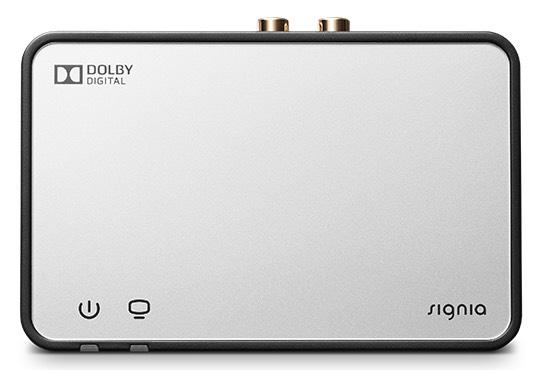
StreamLine TV ist Signias silberner rechteckiger TV-Sender. Er akzeptiert ein optisches oder analoges Audiokabel und sendet die ausgewählte Quelle direkt an kompatible Hörgeräte. Sein separater optischer Ausgang kann das TV-Signal an eine Soundbar oder einen Receiver weiterleiten, während die Hörgeräte streamen. Wenn mehrere kompatible Träger gekoppelt sind, hören sie dieselbe Quelle.
Which hearing aids work with Signia StreamLine TV?
TV-Ton
- Signia Pure Nx 312 Nx
- Signia Pure Nx 13 Nx
- Signia Pure Nx Charge&Go
- Signia Motion Nx 13 Nx
- Signia Motion Nx 13P Nx
- Signia Styletto Connect
Wählen Sie das genaue Modell auf Ihren Hörgeräten oder Unterlagen. Ein Treffer für eine Produktfamilie belegt nicht die Unterstützung jedes Modells dieser Familie.
Dokumentierte Geräte und Konfigurationen anzeigen
- Signia Pure Nx 312 Nx · Genaues Modell
Original StreamLine TV with paired compatible aids · TV-Ton
Unterstützung dokumentiertQuelle · 2026-11-18 - Signia Pure Nx 13 Nx · Genaues Modell
Original StreamLine TV with paired compatible aids · TV-Ton
Unterstützung dokumentiertQuelle · 2026-11-18 - Signia Pure Nx Charge&Go · Genaues Modell
Original StreamLine TV with paired compatible aids · TV-Ton
Unterstützung dokumentiertQuelle · 2026-11-18 - Signia Motion Nx 13 Nx · Genaues Modell
Original StreamLine TV with paired compatible aids · TV-Ton
Unterstützung dokumentiertQuelle · 2026-11-18 - Signia Motion Nx 13P Nx · Genaues Modell
Original StreamLine TV with paired compatible aids · TV-Ton
Unterstützung dokumentiertQuelle · 2026-11-18 - Signia Styletto Connect · Genaues Modell
Original StreamLine TV with paired compatible aids · TV-Ton
Unterstützung dokumentiertQuelle · 2026-11-18 - Signia Pure X Pure Charge&Go X · Genaues Modell
Original StreamLine TV with paired compatible aids · TV-Ton
Unterstützung dokumentiertQuelle · 2026-11-18 - Signia Pure X Pure 312 X · Genaues Modell
Original StreamLine TV with paired compatible aids · TV-Ton
Unterstützung dokumentiertQuelle · 2026-11-18 - Signia Styletto X · Genaues Modell
Original StreamLine TV with paired compatible aids · TV-Ton
Unterstützung dokumentiertQuelle · 2026-11-18 - Signia Motion X Charge&Go X · Genaues Modell
Original StreamLine TV with paired compatible aids · TV-Ton
Unterstützung dokumentiertQuelle · 2026-11-18 - Signia Motion X Charge&Go P X · Genaues Modell
Original StreamLine TV with paired compatible aids · TV-Ton
Unterstützung dokumentiertQuelle · 2026-11-18 - Signia Motion X Charge&Go SP X · Genaues Modell
Original StreamLine TV with paired compatible aids · TV-Ton
Unterstützung dokumentiertQuelle · 2026-11-18 - Signia Active · Genaues Modell
Original StreamLine TV with paired compatible aids · TV-Ton
Unterstützung dokumentiertQuelle · 2026-11-18 - Signia Pure AX Charge&Go AX · Genaues Modell
Original StreamLine TV with paired compatible aids · TV-Ton
Unterstützung dokumentiertQuelle · 2026-11-18 - Signia Pure AX Charge&Go T AX · Genaues Modell
Original StreamLine TV with paired compatible aids · TV-Ton
Unterstützung dokumentiertQuelle · 2026-11-18 - Signia Pure AX 312 · Genaues Modell
Original StreamLine TV with paired compatible aids · TV-Ton
Unterstützung dokumentiertQuelle · 2026-11-18 - Signia Styletto AX · Genaues Modell
Original StreamLine TV with paired compatible aids · TV-Ton
Unterstützung dokumentiertQuelle · 2026-11-18 - Signia Pure Charge&Go IX · Genaues Modell
Original StreamLine TV with paired compatible aids · TV-Ton
Unterstützung dokumentiertQuelle · 2026-11-18 - Signia Pure Charge&Go T IX · Genaues Modell
Original StreamLine TV with paired compatible aids · TV-Ton
Unterstützung dokumentiertQuelle · 2026-11-18 - Signia Styletto IX · Genaues Modell
Original StreamLine TV with paired compatible aids · TV-Ton
Unterstützung dokumentiertQuelle · 2026-11-18 - Signia Insio Charge&Go AX · Produktfamilie
Original StreamLine TV with paired compatible aids · TV-Ton
Manufacturer names the Insio Charge&Go AX family. This chart does not distinguish the ITC and ITE shells.
Unterstützung dokumentiertQuelle · 2026-11-18Nachweis für die Produktfamilie. Bestätigen Sie vor dem Kauf die Kompatibilität Ihres genauen Hörgerätemodells.
Manufacturer names the Insio Charge&Go AX family. This chart does not distinguish the ITC and ITE shells.
- Signia Pure Charge&Go BCT IX · Genaues Modell
Original StreamLine TV with paired compatible aids · TV-Ton
France IX feature table has no StreamLine TV support for Pure Charge&Go BCT IX across the displayed levels.
Als inkompatibel dokumentiertQuelle · 2026-11-18 - Signia Pure Charge&Go MaX · Genaues Modell
Original StreamLine TV with paired compatible aids · TV-Ton
France July 2026 MaX accessory table explicitly lists StreamLine TV as unavailable.
Als inkompatibel dokumentiertQuelle · 2026-11-18 - hear.com Horizon Go IX Go IX · Genaues Modell
Original StreamLine TV with paired compatible aids · TV-Ton
hear.com US documents the silver original transmitter and qualifies Bluetooth for behind-the-ear Horizon Go IX. This check covers the Go IX evidence in this US page.
Unterstützung dokumentiertQuelle · 2026-11-18hear.com US documents the silver original transmitter and qualifies Bluetooth for behind-the-ear Horizon Go IX. This check covers the Go IX evidence in this US page.
- Signia Pure primax 13 BT · Genaues Modell
Original StreamLine TV with Pure 13 BT primax · TV-Ton
Signia documents exact primax 13 BT fit with either historical myControl or a provider-configured TV listening program.
Zusätzliche Einrichtung erforderlichQuelle · 2026-11-18Signia documents exact primax 13 BT fit with either historical myControl or a provider-configured TV listening program.
- Use the historical myControl app or a TV program configured by a hearing care professional.
Dokumentierte Funktionen
Connections
- Analog audio input
- Unterstützt
The dedicated left/right RCA inputs take stereo analog.
Dokumentation · 2026-11-18 - Companion app control
- Use the Signia app where supported to select or adjust the audio stream
App support depends on the hearing-aid setup. The original guide also supports compatible hearing-aid controls.
Dokumentation · 2026-11-18 - Supported codecs
- Optical stereo PCM, Optical Dolby Digital
This is the optical input format list. The hearing-aid wireless codec is unspecified.
Dokumentation · 2026-11-18 - Manufacturer-stated audio latency
- 25 ms
Analog input. Manufacturer technical sheet gives audio delay for the indicated connection. No independent end-to-end test.
Konfiguration: Original StreamLine TV over analog RCA
Dokumentation · 2026-11-18 - Manufacturer-stated audio latency
- 28 ms
Digital optical PCM input. Manufacturer technical sheet gives audio delay for the indicated connection. No independent end-to-end test.
Konfiguration: Original StreamLine TV over digital optical PCM
Dokumentation · 2026-11-18 - Manufacturer-stated audio latency
- 45 ms
Optical Dolby Digital input. Manufacturer technical sheet gives audio delay for the indicated connection. No independent end-to-end test.
Konfiguration: Original StreamLine TV over optical Dolby Digital
Dokumentation · 2026-11-18 - Audio passthrough
- Dedicated buffered TOSLINK output repeats the TOSLINK input
No analog-to-optical conversion is specified.
Dokumentation · 2026-11-18 - Automatic streaming start
- The hardware can start transmitting when it detects a valid audio signal. Select the hearing-aid transmitter mode or dedicated program to listen.
AutoStream describes the transmitter behavior. The user guide still specifies the hearing-aid selection step.
Dokumentation · 2026-11-18 - Bilateral and unilateral use
- The original guide depicts a pair and also refers to pairing individual compatible hearing aids
No mixed left/right model matrix is provided.
Dokumentation · 2026-11-18 - Kein koaxialer Digitaleingang
The RCA pair is analog left/right. The digital input is optical.
Dokumentation · 2026-11-18- Computer audio
- Computer stereo line or headphone output can feed the analog input through the included mini-jack adapter
The documented path sends audio only. The manufacturer examples describe compatible electronic devices with analog output.
Dokumentation · 2026-11-18 - Connection priority
- Optical input takes priority if both original wired inputs are used
This establishes wired source selection. It gives no generalized TV-versus-phone priority rule across fitting configurations.
Dokumentation · 2026-11-18 - Connection priority
- An incoming phone call takes over from the TV. The TV stream returns after the call.
May 2017 manufacturer claim for Pure 13 BT only.
Konfiguration: Original StreamLine TV with Pure 13 BT primax
Dokumentation · 2026-11-18 - Kein HDMI-ARC-Eingang
The original complete rear port diagram shows RCA and TOSLINK only for audio input.
Dokumentation · 2026-11-18- Kein HDMI-eARC-Eingang
The original rear port diagram has no HDMI jack.
Dokumentation · 2026-11-18- Link to hearing aids
- Signia 2.4 GHz wireless audio
The 2021 claim concerns the then-current Signia radio and must be read with exact model charts.
Dokumentation · 2026-11-18 - Accessory-to-hearing-aid range
- 15 m
Up to 15 m with unobstructed line of sight to supported aids, per the original technical sheet.
Dokumentation · 2026-11-18 - Audio input selection
- Use either optical or analog. Optical takes priority if both are connected.
Do not assume the newer TV Sound’s fallback behavior.
Dokumentation · 2026-11-18 - Analog input details
- Left/right RCA, with supplied 3.5 mm adapter for a mini-jack source. Technical sheet specifies 10 kΩ input impedance.
The original guide also documents optional SCART with RCA cable.
Dokumentation · 2026-11-18 - Multiple TV adapters
- The legacy Signia instructions say to pair the aids again when switching between two units.
The manufacturer documents this with its Nx/primax-era product instructions.
Dokumentation · 2026-11-18 - Optical audio formats
- Digital stereo PCM, Dolby Digital
Input audio-format table.
Dokumentation · 2026-11-18 - Optical audio input
- Unterstützt
Use the dedicated TOSLINK IN.
Dokumentation · 2026-11-18 - Hearing-aid pairing method
- Power the transmitter. Restart the hearing aids and put them close to or on the unit to pair automatically.
Both front LEDs are blue for about 30 seconds after successful pairing.
Dokumentation · 2026-11-18 - Professional setup
- A provider can program the dedicated TV mode and adjust the mix of the TV stream and surroundings
Availability depends on the type and configuration of the hearing aids.
Dokumentation · 2026-11-18 - Receiver requirements
- Built-in compatible hearing-aid wireless receiver
Pair the supported hearing aid directly to the box.
Dokumentation · 2026-11-18 - Reconnection behavior
- Saved pairing is remembered by the hearing aids after restart
Removing a single user through the transmitter requires erasing and rebuilding all pairings.
Dokumentation · 2026-11-18 - Simultaneous listeners
- Multiple compatible hearing aids can receive the same signal without a published numeric ceiling
The technical sheet calls MultiConnect unlimited. No independent upper limit or mixed-generation test was supplied.
Dokumentation · 2026-11-18 - Simultaneous source connections
- Two wired inputs may be connected, with one audio stream at a time
TOSLINK has priority when both are in use.
Dokumentation · 2026-11-18 - Soundbar/receiver setup
- Connect TV optical to TOSLINK IN and a second TOSLINK cable from OUT to a compatible soundbar or receiver
The device buffers the optical input to the separate optical output.
Dokumentation · 2026-11-18 - Stereo streaming
- Unterstützt
10 kHz stereo transmission from supported inputs to compatible aids per the original sheet.
Dokumentation · 2026-11-18 - Stopping TV streaming
- Leave transmitter mode or select another hearing-aid program
The connected source can still send an audio signal to the powered box.
Dokumentation · 2026-11-18 - TV audio streaming
- Unterstützt
The original transmitter sends TV audio directly to supported aids.
Dokumentation · 2026-11-18 - Required TV settings
- Set the source for PCM or Dolby Digital optical out, or enable the analog output for RCA
Confirm the jack is an output and that the selected program accepts the stream.
Dokumentation · 2026-11-18 - Independent TV stream volume
- Adjust the hearing-aid stream with the aids or a supported app. The TV remote normally does not affect stream volume.
Analog headphone or variable-output behavior depends on the television.
Dokumentation · 2026-11-18 - TV speakers alongside streaming
- Depends on TV and connected output
The TV’s headphone output can mute its speakers. Enable parallel speaker output where the TV supports it.
Dokumentation · 2026-11-18 - TV/environment balance
- A hearing care professional can adjust the mix of stream and surrounding sound
Availability of on-device controls follows the hearing-aid fitting.
Dokumentation · 2026-11-18 - Kein USB-Audioeingang
The complete connection diagram labels USB power and shows audio separately on RCA and TOSLINK input.
Dokumentation · 2026-11-18
Power and charging
- Electrical input requirements
- 5 V DC, maximum 1 A from supplied 100–240 V AC, 47–63 Hz adapter
This is the included supply output rating.
Dokumentation · 2026-11-18 - Power adapter included
- Unterstützt
Included plug and country-specific adapter in the original Canadian manual.
Dokumentation · 2026-11-18 - Power connector
- Micro-USB
Original manufacturer power arrangement uses the supplied wall plug.
Dokumentation · 2026-11-18 - Kein USB-C-Stromanschluss
The supplied power connection is micro-USB.
Dokumentation · 2026-11-18
Design and everyday use
- Control accessibility
- Power and TV symbols identify the two indicators, with labeled rear sockets
No accessibility or dexterity assessment is documented.
Dokumentation · 2026-11-18 - Dimensions
- 124 × 21 × 80 mm
Width × height × depth. The manufacturer table prints overall body size as 124 × 80 × 21 mm.
Dokumentation · 2026-11-18 - Included items
- StreamLine TV, USB power cable and plug, Country-specific adapter, TOSLINK cable, RCA cable, Mini-jack adapter
Contents per the Canadian manufacturer manual. A SCART adapter is explicitly optional there.
Dokumentation · 2026-11-18 - Routine maintenance
- Clean with a soft dry tissue and keep liquid out
Follow the original handling and cleaning section.
Dokumentation · 2026-11-18 - Operating conditions
- 5–40 °C, 15–93% RH noncondensing, 700–1060 hPa
Canadian guide, operating conditions.
Dokumentation · 2026-11-18 - Physische Bedienelemente
- Setup button, Mode selector
Rear setup button triggers reset. The MODE selector is identified in the model diagram.
Dokumentation · 2026-11-18 - Regional variants
- The documented power plug uses a country-specific adapter
Retail bundles may differ. The SCART adapter is optional in the Canadian guide.
Dokumentation · 2026-11-18 - Required extras
- TV or other device with supported wired output, Optional SCART adapter for corresponding sources, Extra optical cable if using optical passthrough
The included cables cover common optical and RCA TV connections.
Dokumentation · 2026-11-18 - Repair and service options
- Contact a hearing care professional for repair or errors
The user guide directs owners to a hearing care professional.
Dokumentation · 2026-11-18 - Status indicators
- Power LED, TV signal LED, Both blue after pairing, Signal and error patterns
Original transmitter has two indicators with a separate status table.
Dokumentation · 2026-11-18 - Storage conditions
- −25 to 70 °C and 15–93% RH noncondensing
Extended transport and storage for this transmitter.
Dokumentation · 2026-11-18 - Weight
- 107 g
Manufacturer published unit weight without package contents.
Dokumentation · 2026-11-18
How to set up Signia StreamLine TV
Schließen Sie das mitgelieferte Netzkabel und den Stecker an und verbinden Sie dann einen optischen TV-Ausgang mit dem mit IN gekennzeichneten Anschluss oder verwenden Sie die roten und weißen RCA-Eingänge. Starten Sie die Hörgeräte neu und platzieren Sie sie in der Nähe des Senders oder darauf. Beide vorderen Anzeigen leuchten nach der Kopplung blau. Verwenden Sie den Sendermodus, das spezielle Programm oder eine unterstützte App, um mit dem Hören zu beginnen.
Vor dem Kauf prüfen
Compatibility follows the original rectangular model’s documentation. Signia’s French charts mark Pure Charge&Go BCT IX and Pure Charge&Go MaX as unavailable for StreamLine TV. At least one supported source and hearing-aid control method are required. Check current stock and included cables before buying an older unit.
Use the dedicated optical input and output
Run a TOSLINK cable from your TV to IN on the back of the transmitter. To pass the optical signal to a soundbar, connect a second optical cable to OUT. The original analog input uses the two RCA jacks.
QuelleTakes a standard optical cable for a soundbar
If your soundbar already uses a full-size optical cable, it plugs straight into StreamLine TV’s optical output. With the newer Signia TV Sound, the streamer end needs the smaller mini-TOSLINK plug. Check which streamer your hearing aids support before buying a cable.
QuelleCheck the full Pure model name before buying
Signia lists StreamLine TV for the standard Pure Charge&Go IX and Styletto IX. If your Pure aids say BCT IX or MaX, the streamer Signia documents for them is the newer TV Sound. Support for those two models with the original StreamLine TV is unverified.
QuelleZugehörige Apps
Verwandtes Zubehör
Weitere in der Dokumentation genannte Geräte
Diese Namen wurden noch keinem genauen Gerät in unserem Katalog zugeordnet. Sie erzeugen daher keine bestätigten Treffer in der Suche.
Aktuelle Angebote werden geprüft…
Dokumentation geprüft am 18. Nov. 2026