App-Verzeichnis
Signia App
Sivantos Pte. Ltd.
Controls Signia Pure, Styletto, Silk, Insio and Active hearing aids. Includes tinnitus sound controls and remote support.
Funktionen
Audioeingang und -ausgang
Hörsystemsteuerung
- Bedingt: Mute hearing devices13Auch auf iPad
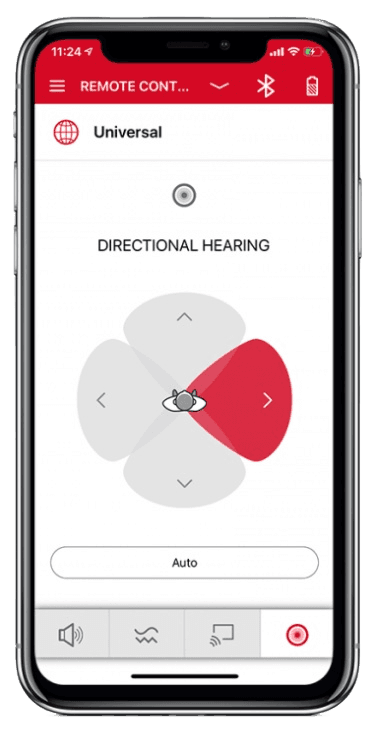
- Bedingt: Directional focus control15
- Bedingt: Hearing-device tinnitus controls16Auch auf iPad
- Bedingt: Hearing-device control17Auch auf iPad
- Bedingt: Listening-program selection17Auch auf iPad
- Bedingt: Hearing-device volume17Auch auf iPad
- Bedingt: Device battery status18
- Bedingt: Professionelle Fernunterstützung19Nur iPhone · iPad
- Bedingt: Remote fitting adjustments20
- Bedingt: Personalized hearing programs21
- Bedingt: Device-usage tracking19Nur iPhone · iPad
- Bedingt: Media streaming22
- Bedingt: Microphone streaming23
- Bedingt: Accessory control24
- Nicht unterstützt: Watch-based device control25Nur Apple Watch
Kompatibilität
Verfügbarkeit und Zugang
Datenschutz und Daten
- Applies to TeleCare only: the hearing care professional must activate the TeleCare account. The remote-control functions are documented as usable without TeleCare; no separate app account is described for them. Evidence: Connect to TeleCare, p. 48.
- Evidence: Important safety information - Intended purpose / Intended user, p. 61.
- Signia Assistant only: its neural network is cloud-based, so it does not work without an internet connection.
- TeleCare workflows (contacting the hearing care professional, hearing lessons, satisfaction rating) require an internet connection. Evidence: Contact your hearing care professional, p. 50.
- Height and weight entered for My WellBeing calorie calculation are stored only in the app. Requires My WellBeing-capable Bluetooth hearing aids. Evidence: Personalize calorie calculation, p. 46.
- Signia Assistant: data made available to the hearing care professional (configuration changes and the described problem) is stored by WSA for 5 years; other Assistant data is not stored. Research and development data (only with consent) is also stored for 5 years. TeleCare data is stated as not stored by WSA. Evidence: 11. Data retention - 11.3 Signia Assistant/Rexton Assist.
- TeleCare audio/video calls and chat: WSA states it transmits these between the user and the hearing care professional and does not store them. The professional's own handling is outside this notice. Evidence: 11. Data retention - 11.2 Telecare.
- Only during TeleCare audio/video sessions with a hearing care professional (requires TeleCare activation, user consent and availability for the hearing-aid type and country). Evidence: 4. Data processed if you use the Telecare feature - 4.2.1.
- TeleCare chat messages are transmitted to the hearing care professional (requires TeleCare activation and consent). Evidence: 4. Data processed if you use the Telecare feature - 4.2.1.
- By request to WSA (privacy@wsa.com or the DPO) under GDPR access and portability rights; no in-app export is documented. Portability applies where the legal requirements are met. Evidence: 12. Your rights.
- The phone microphone and camera are used only for TeleCare contact with a hearing care professional. Evidence: Open Signia app (permissions), p. 10.
- Bluetooth hearing aids only, with phone Bluetooth on. On Android, direct streaming uses LE Audio (Android 13+) or ASHA (Android 10+) on compatible phones. Evidence: Stream to hearing aids, p. 34.
- Requires compatible hearing devices and a supported phone. Functions vary with model, firmware and professional configuration.
- Sound balance (bass/treble) slider; applies to environment audio and, when connected via Bluetooth, streaming audio. Depends on hearing-aid model and fitting.
- Only for hearing-aid models that support directional hearing; also available over the manual (acoustic) connection. Evidence: Change the hearing direction, p. 32.
- Requires compatible hearing devices and a supported phone. Functions vary with model, firmware and professional configuration. Only where the hearing-care professional has enabled this feature.
- Signia app 2.7.30+ instructions: available controls depend on hearing-aid family, fitting and connection method.
- Bluetooth hearing aids show low/medium/high in the app; non-Bluetooth hearing aids report the level as beeps from the hearing aids. Evidence: Check battery status, p. 25.
- TeleCare and My WellBeing depend on hearing-aid model, firmware, participating provider and country availability.
- Through TeleCare only: the hearing care professional must use and activate TeleCare; availability depends on hearing-aid type and country. Evidence: Connect to TeleCare, p. 48.
- Via Signia Assistant: Bluetooth Signia X, AX or IX hearing aids (not CROS/BiCROS), enabled by the hearing care professional, internet connection required. Changes apply to the Universal program. Evidence: Fine-tune hearing aids with Signia Assistant, p. 38.
- Bluetooth hearing aids only. Android direct streaming needs a compatible phone: LE Audio on Android 13+ or ASHA on Android 10+. Evidence: Smartphone compatibility, p. 7.
- Streaming from an external StreamLine Mic accessory to Bluetooth hearing aids, managed from the app's Stream tab; the phone's own microphone is not documented as a source. Evidence: Stream to hearing aids, p. 34.
- Streaming level of accessories such as StreamLine TV, StreamLine Mic and CROS devices; shown only when the app is connected via Bluetooth. Accessories cannot be paired through the app.
- Evidence: Smartphone compatibility, p. 7.
- Evidence: Hearing aid compatibility and functionality, p. 6-7.
- Streaming requires Bluetooth hearing aids; remote support (TeleCare) needs separate activation by the hearing care professional. Features depend on hearing-aid type. Evidence: The Signia app, p. 2.
Bewertungen und Rezensionen im App Store
Kritik
- The recent sampled reviews describe slow loading or lost controls after updates, limited customization and difficult in-app help.
Bewertungen und Rezensionen im Google Play
Lob
- Some users value sound adjustments when working.
Kritik
- Connections, persistent settings and adjustment controls cause recurring problems.
- Newer reports describe internet errors in the assistant; one also reports overlapping text.
Hörsysteme
Enthält dokumentierte kompatible Produkte und Modelle, die in unserem Katalog verknüpft sind. Funktionen können von deinem Modell, Smartphone und der Firmware abhängen. Beachte mögliche Einschränkungen in den Kompatibilitätsangaben.
17 Modelle und Modellreihen
- Hear.com Horizon Go IX
- Signia Active
- Signia Active Mini IX
- Signia AX
- Signia binax
- Signia Insio Charge&Go AX ITC
- Signia IX
- Signia Nx
- Signia primax
- Signia Pure AX
- Signia Pure Charge&Go IX
- Signia Pure X
- Signia Pure X Pure 312 X
- Signia Pure X Pure Charge&Go X
- Signia Silk IX
- Signia Silk X
- Signia Styletto AX
- Signia Styletto X
- Signia X