Apple AirPods Pro 3 vs. hear.com Horizon Go IX

Check out our comparison of the Apple AirPods Pro 3 vs hear.com Horizon Go IX. Listen to audio samples and see how the two hearing aids differ in terms of sound performance, features, accessories, and more.
Score
4.1
Apple AirPods Pro 3
Add Product
Featured Products
SoundScore 3.4/5
$239.95 per pair
Shop Now
Score
4.2
hear.com Horizon Go IX 7 IX
Add Product
Featured Products
SoundScore 4.2/5
$4,950 per pair
Shop Now
AirPods Pro 3
$239.95 per pair
Shop Now
Horizon Go IX
$4,950 per pair
Shop Now

Product Overview

AirPods Pro 3
Horizon Go IX
Form Factor
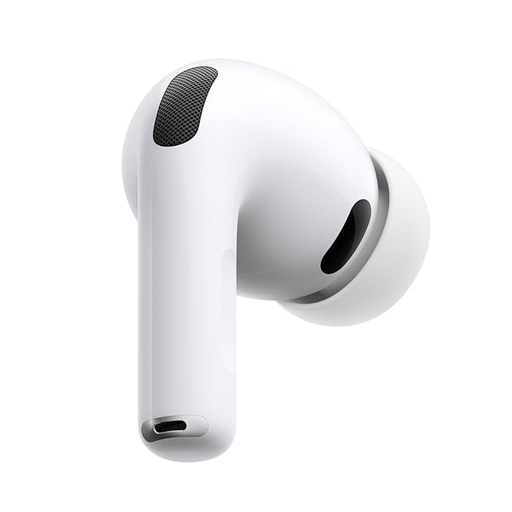
Form FactorNon-custom earbud style device.
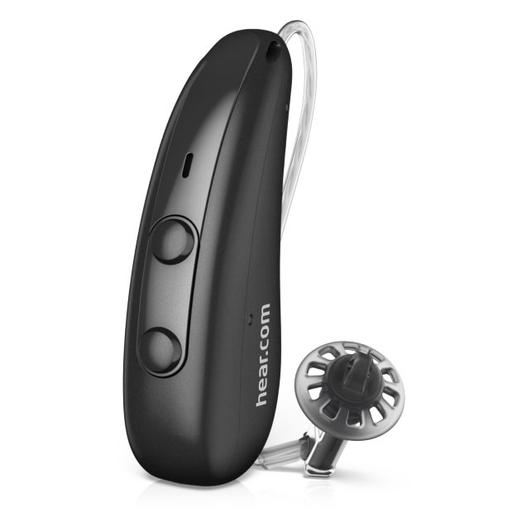
Form FactorThis type of hearing aid sits behind the ear. A wire runs along the top of the ear and down to a speaker sitting inside the ear canal. An custom-fitted mold may be required.
Expert Rating
Score
4.1
Score
4.2
Hearing Loss LevelHearing Loss LevelThis represents HearingTracker's best guess on suitability. Please consult a licensed audiologist to confirm your own candidacy for this device.
MildModerate
MildModerateSevere
Product Features
Hands-freeRechargeableiPhoneAndroidIP57
Hands-freeRechargeableAndroidIP68

Expert Ratings

Compare comprehensive test results and expert opinions.

AirPods Pro 3
Horizon Go IX

HearingTracker Score

AirPods Pro 3
4.1ABOVE AVERAGE

The Apple AirPods Pro 3 are wireless earbuds that offer hearing aid functionality. Our tests show they effectively amplify speech in everyday situations. While background noise can be challenging, proper tuning and reducing ambient noise reduction pushes the AirPods Pro 3 closer to being a truly competitive OTC hearing aid.

Read full review
Horizon Go IX
4.2ABOVE AVERAGE

Horizon Go IX is a top-tier, Signia-based rechargeable RIC that pairs excellent lab-verified speech performance with standout hands-free Bluetooth and a genuinely useful app suite, though its music streaming is only average for the open-fit form factor and many “unique” perks mirror what you can get from comparable WSA models.

Read full review

HearAdvisor SoundScore

AirPods Pro 3
3.4AVERAGE

Apple AirPods Pro 3 achieved a SoundScore of 3.38/5 and a SoundGrade of B in HearAdvisor lab testing. The OTC Hearing Aid category average SoundScore was 3.47/5.

Horizon Go IX
4.2ABOVE AVERAGE

Hear.com Horizon Go IX achieved a SoundScore of 4.16/5 and a SoundGrade of A in HearAdvisor lab testing. It ranked #14 of 35 Prescription Hearing Aid devices tested. The Prescription Hearing Aid category average SoundScore was 3.91/5.

Build Quality

AirPods Pro 3
4.8EXCELLENT

The build quality is solid with a pocket-worthy portable case. AirPods 3 also have a slightly improved IP57 rating meaning they should offer better protection from debris and moisture. AirPods commonly last around 2-3 years.

Horizon Go IX
4.9EXCELLENT

Horizon Go IX have an impressive build quality, featuring a top-of-the-line IP68 ingress rating. They also come with a robust portable charging case.

Battery

AirPods Pro 3
4.6EXCELLENT

Airpods Pro 3 offer around 10 hours of use per charge with their Hearing Aid feature. This is an improvement over the previous generation. While this still may not be enough for all-day use, recharge time is fast with several quick-charge options.

Horizon Go IX
4.4ABOVE AVERAGE

Horizon hearing aids offer an impressive 28 hours of use per charge, which is plenty to get you through the day. Recharging takes around 3 hours, but you can always get an addition 6 hours of use if needed with Horizon’s 30-minute quick charge feature.

Bluetooth

AirPods Pro 3
5.0EXCELLENT

I have found Bluetooth to work almost flawlessly on iPhones, offering a solid connection every time. I can't speak for Android devices though Apple reports they are fully compatible with other Bluetooth devices.

Horizon Go IX
5.0EXCELLENT

Horizon Go IX are Bluetooth compatible with both iOS and Android devices, allowing for audio streaming and hands-free calling.

App Features

AirPods Pro 3
4.0AVERAGE

AirPods Pro 3 offer impressive and useful features to aid speech clarity. I particularly like the ability to take an app based hearing test, or directly upload hearing thresholds. While the menu system is not user-friendly, you also have other options for personalizing your experience such as active noise cancellation.

Horizon Go IX
5.0EXCELLENT

The Horizon app has a user-friendly interface and modern, appealing design. It includes practical features like the ability to control the focus of your hearing aids and a tonal balance slider. Additionally, you will find preset modes which can help improve your listening experience depending on the environment you are in.

Comfort

AirPods Pro 3
4.0AVERAGE

AirPods Pro 3 are generally comfortable, though my initial impressions favor the fit of the previous Gen 2. With that said, Apple claims to have improved the overall fit with improved ergonomics and new foam-infused ear tips.

Horizon Go IX
5.0EXCELLENT

I found Horizon IX to be very comfortable thanks to their ergonomic shape and earwire design. Your hearing care provider should ensure they are fitted for optimal comfort and hearing benefit.

Design

AirPods Pro 3
5.0EXCELLENT

AirPods Pro are unmistakably Apple with their sleek, bright white, aesthetic. You will want to look elsewhere if you are searching for a discrete hearing solution. Furthermore, earbuds are commonly associated with being distracted or disconnected and people will not know that you are using them as hearing aids to stay present and engaged in conversation.

Horizon Go IX
4.2AVERAGE

Horizon IX features a modern, sleek design and is available in a variety of colors.

Value

AirPods Pro 3
5.0EXCELLENT

Apple AirPods Pro 3 has a value score of 5.0/5 based on lab performance and public display price.

Horizon Go IX
3.0BELOW AVERAGE

Hear.com Horizon Go IX has a value score of 3.0/5 based on lab performance and public display price.

Handling

AirPods Pro 3
4.0AVERAGE

I find Bluetooth pairing and general use exceptionally easy. However, navigating the deeper personalization features, and touch controls, could be more user friendly.

Horizon Go IX
4.8EXCELLENT

I did not run into any issues while using Horizon Go IX hearing aids. They are very easy to use once setup by your hearing care provider. First-time users may need some practice to get accustomed to inserting the receiver-in-ear style properly.

Pro Support

AirPods Pro 3
1.0BELOW AVERAGE

You can receive technical support from Apple, but no audiologic support is offered at this time. You may be able to find a hearing care provider willing to assist with programming your AirPods Pro based on your needs.

Horizon Go IX
5.0EXCELLENT

You should receive quality hearing care and support from your Hear.com provider. The Horizon app should further enhance your experience with easier access to useful setting adjustments.

Lab Recordings

Listen to direct output recordings from our acoustic test lab.

AirPods Pro 3
Horizon Go IX
Busy CafeBusy CafeSpeech intelligibility improvement in loud environments
Hear this scene unaided, for comparison
AirPods Pro 3
Horizon Go IX
Quiet OfficeQuiet OfficeSpeech intelligibility improvement in quiet and moderate environments
Hear this scene unaided, for comparison
AirPods Pro 3
Horizon Go IX
Streaming MusicStreaming MusicStreaming music provides a full range of bass and treble
Hear this scene unaided, for comparison
AirPods Pro 3
Horizon Go IX

HearingTracker partners with HearAdvisor to provide recordings and performance data from an acoustic laboratory that follows standard scientific procedures. All hearing aids are fitted and performance-tested for mild sloping to moderate hearing loss. All audio samples cutoff above 10kHz.

Accessories

Compatible accessories for each hearing aid

AirPods Pro 3
Horizon Go IX
Battery Charger
None

Pure Charger

This small desktop charger addresses basic needs when it comes to providing power to the hearing aids. 2 LEDs indicate the charging status (one per hearing aid). The Pure Charger can be plugged into the mains via USB to a power adapter.

Pure Portable Charger+1

This charger offers comfort and charging on the go. Its power bank allows for 3 full charges of a pair of hearing aids. A lid protects the hearing aids and prevents dust accumulating in the charger. 2 LEDs indicate the charging status (one per hearing aid) and one for the integrated power bank. All of the chargers are available with the power plug.

Pure Dry&Clean Charger+1

The Pure Dry&Clean Charger not only charges the hearing aids but also offers UVC cleaning and drying technology to keep the hearing aids in peak condition. The UVC cleaning starts automatically when the hearing aids are placed inside and is completed in just 15 minutes. 3 LEDs per hearing aid indicate their charging status and an additional LED indicates the cleaning status. The Pure Dry&Clean Charger also has a lid to ensure optimal cleaning and storage of the hearing aids.

Multi-Charger

Stationary Signia charger compatible with multiple hearing aids.

Bluetooth Streamer
None

StreamLine Mic+2

A wireless clip-on mic that streams audio to hearing aids from any Bluetooth device.

CROS System
None

CROS Pure Charge&Go T AX

Remote Control
None

miniPocket

Enables push-button remote control of hearing aid functions.

Signia App+2

The Signia App provides a remote control, directional hearing control, telecare access, and access to connectivity and streaming settings.

TV Streamer
None

StreamLine TV

Streams television sound to hearing aids over a distance of up to 30 feet (10 meters).

Hardware

AirPods Pro 3
Horizon Go IX
AccelerometerAccelerometerThis hearing aid is capable of measuring acceleration through an embedded sensor.
Yes
No
Bluetooth® AudioBluetooth® AudioThis hearing aid is capable of streaming Bluetooth® audio certain phones and/or devices.
  • Bluetooth® (A2DP)
  • LC3
  • Made for iPhone (MFi)
  • Android (ASHA)
GyroscopeGyroscopeThis hearing aid is able to determine orientation using embedded sensors.
Yes
No
Hands-Free CallingHands-Free CallingIt is possible to have a hands-free phone call with this hearing aid. You are not required to hold the phone up to your mouth.
  • Bluetooth® (HFP)
  • Made for iPhone (MFi)
  • Android (ASHA)
IP RatingIP RatingIP Ratings rate sealing effectiveness of hearing aids against intrusion from foreign solid matter (dirt, dust) and moisture.
IP57
IP68
Rechargeable BatteriesRechargeable BatteriesCharge your batteries overnight in a docking station and get a full day's use (in most cases) of battery life the following day.
Lithium-ion
Lithium-ion
Tap ControlsTap ControlsThe hearing aid may be controlled by physically tapping it with your fingers.
  • Play/Pause
  • Audio passthrough on/off
  • Accept/end calls
No
Voice AssistantVoice AssistantCertain devices will allow you to interact with voice assistants using "Hey Siri", "Hey Google", "Hey Alexa", etc commands.
  • Siri
No
Volume RockerVolume RockerA volume rocker or wheel to allows the adjustment of volume with a finger.
No
Yes

Software Features

AirPods Pro 3
Horizon Go IX
Active Noise Cancellation (ANC)Active Noise Cancellation (ANC)ANC is different than typical hearing aid noise reduction in that it reduces both steady state and dynamic background noise using sound wave inversion.
Yes
No
Active occlusion cancellation (AOC)Active occlusion cancellation (AOC)A microphone measures the sound of your own voice inside your ear canal and cancels the sound using phase inversion. This reduces the boominess that often occurs with closed-canal hearing aids.
Yes
No
Adjustment BandsAdjustment BandsThese are frequency-divided sections that can be adjusted in a hearing aid in order to amplify sounds. Although there are rarely more than 10 frequencies measured in a hearing assessment, having more bands that can be adjusted may allow for improved speech understanding and user comfort.
No
16
Adjustment SynchronizationAdjustment SynchronizationThis feature allows for a more pleasant listening experience by ensuring that both hearing aids process sound the same way. If one hearing aid changes its processing in response to noise or speech, it will send a wireless signal to the other hearing aid so both process sound in the same way.
No
e2e wireless 4.0e2e wireless 4.0Control coupling, synchronization, binaural directionality, Spatial Speech Focus, CROS/ BiCROS.
Direction SelectionDirection SelectionAllows the user to select one or more directions to focus their hearing aids on. For example, some hearing aids allow the listener to focus on sounds coming from in front or back, or from the right or left.
No
  • 5/5
DirectionalityDirectionalityDepending on the types and number of microphones a hearing aid has, the hearing aid may be able to boost sounds from specific directions (by reducing sounds from other directions). This can be helpful to focus on a speaker directly in front of the hearing aid user, as well as to give the user information about where different sounds are coming from.
Conversation BoostConversation BoostUses the dual beam-forming microphones to boost the volume of a person talking in front of you, making it easier to listen to someone who's chatting with you.
Binaural DirectionalityBinaural DirectionalityDirectionality provides scientifically proven enhanced speech understanding in noise. Available for bilateral fittings with directional microphones and e2e wireless link.Panorama EffectPanorama EffectWearers can effortlessly switch their hearing aid settings from focused speech comprehension to a 360° auditory experience, capturing the full soundscape of their surroundings.Spatial SpeechFocusSpatial SpeechFocusAvailable for bilateral fittings with Ultra HD e2e.Speech FocusSpeech FocusIn the Universal Program, SpeechFocus steers the directional beam either to surround mode for side speech or to the rear. In manual programs, microphone beam to the right/left/rear directions.
Ear SimulationEar SimulationThe outer ear, or pinna, can have a significant effect on the frequency shape of sound arriving at your inner ear. Some hearing aids mimic the "pinna effect" when producing sound, to deliver more natural sound to the listener.
No
TruEar 360TruEar 360Reproduces benefits of the natural pinna effect by highlighting the difference between front and back sources of sound.
Echo ReductionEcho ReductionThis feature improves speech audibility by reducing the “blurring” of speech sounds that can occur in the presence of echoes.
No
Auto EchoShieldAuto EchoShieldAutomatically creates a more comfortable hearing experience in high-reverb environments leading to increased speech clarity and natural room perceptions.
Environmental AdaptationEnvironmental AdaptationThe hearing aid can detect different acoustical environments, like speech in noise, and adjust the sound of the hearing aid accordingly to drive comfort or speech understanding, etc.
No
Conversation Dynamics AnalyzerConversation Dynamics AnalyzerPrecisely analyzing conversation dynamics 1,000 times per second including turntaking and timing, locations of pure noise without speech, and levels of background noise.Conversation Source AnalyzerConversation Source AnalyzerConstantly scouts the acoustic environment to identify number of talkers and their location, precisely analyzing 1,000 times per second.RealTime Conversation EnhancementRealTime Conversation EnhancementProvides uninterrupted engagement in noisy group conversations by seamlessly tracking the locations of all conversation partners and enhancing their speech.
Extended bandwidthExtended bandwidthHearing aid provides amplification at frequencies (pitches) higher than the typical hearing aid.
No
12kHz
Extended Dynamic RangeExtended Dynamic RangeExtended dynamic range typically makes louder sound clearer. This may help with the reproduction of loud music or loud speech in a very noisy environment.
No
Yes
Feedback SuppressionFeedback SuppressionIf any sound amplified by the hearing aid escapes the ear canal, it may reach the hearing aid’s own microphone and cause a harsh whistling noise. Some hearing aids are able to recognize when this feedback occurs and reduce or eliminate it.
No
Feedback cancellationFeedback cancellationHigh-speed monitoring and control of feedback risk in individual processing channels.
Listening ProgramsListening ProgramsNumber of manually accessible listening programs (using push button, remote, app, or other switching method)
No
4
Noise ReductionNoise ReductionThis feature uses modern hearing aids’ processing power to examine the incoming sound signal, determine if noise is present and reduce the volume of the troublesome sound to increase comfort.
No
SoundSmoothing™: 3SoundSmoothing™Reduces the sound of clattering cutlery and rustling newspaper, etc.
Own Voice ComfortOwn Voice ComfortAmplification is applied differently to your own voice versus the other voices around you. This allows adequate amplification of people you want to hear and no over-amplification of your own voice.
No
OVP™ 2.0OVP™ 2.0Processes the wearer's own voice independent from ambient sounds, providing improved speech clarity and a natural perception of their own voice as well as background noise.
Processing ChannelsProcessing ChannelsThese are all the frequency-divided sections the hearing aid is able to examine at a single time. The hearing aid uses this information to determine whether the contents of each section are noise, speech, or something else and amplify the sound in each section accordingly.
No
36
Resonance NormalizationResonance NormalizationMicrophones measure sound in the ear canal in order to adjust cancel the effects of individual resonance.
Adaptive EQAdaptive EQInward-facing microphones detect what you’re hearing, then adjust low and midrange frequencies to deliver the rich details in every song, customized for you in real time.
No
Self-fittingSelf-fittingThis hearing aid allows you to fit yourself without professional assistance. Typically found in OTC products.
  • Tuned based on hearing test through device
  • Tuned based on audio preference selections
  • Tuned by user directly
No
Spatial AudioSpatial AudioHead tracking is performed so that audio appears to originate from a static location as your head moves.
Yes
No
Tinnitus ReliefTinnitus ReliefTinnitus, or ringing in the ears, can be addressed by hearing aids in several different ways, such as introducing a soft therapeutic signal or targeted notched noise.
No
Yes
Unique Amplification StrategyUnique Amplification StrategyHearing aids all process sounds a little bit differently. Sometimes it varies even within one model.
Adaptive TransparencyAdaptive TransparencyProvides personalized amplification for everyday sounds, with improved handling for loud sounds like sirens and construction noise.Headphone AccommodationsHeadphone AccommodationsApple's terminology for personalized amplification. Options include audio preference selection, manual EQ, or audiogram input.
Conversation Booster: 5/5
Wind Noise ReductionWind Noise ReductionAs wind blows against the microphones of hearing aids, unpleasant noise may be generated. Some hearing aids have the ability to recognize this wind noise and reduce its level. Such reductions may also affect the audibility of desired sounds, like speech.
No
eWindScreen binauraleWindScreen binauralBinaural processing of the audio signal (using Ultra HD e2e) delivers superb performance in asymmetrical wind environments.