Only if invisibility matters more to you than lab performance or price. Active Pro IX actually scored higher in HearAdvisor lab testing (4.6/5 vs 4.3/5) for roughly $2,250 less, so Zeal's premium buys discretion, not better measured sound.
Oticon Zeal vs. Signia Active Pro IX
Check out our comparison of the Oticon Zeal vs Signia Active Pro IX. Listen to audio samples and see how the two hearing aids differ in terms of sound performance, features, accessories, and more.
Published Updated
Quick Verdict
AI summarizedSummarized with AI assistance from our human-researched product information, in-lab testing, objective sound measurements, and expert ratings.
The real choice here is discretion versus dollars: Zeal buys you a nearly invisible fit and ear-level tap controls for roughly $2,250 more, while Active Pro IX delivers slightly stronger measured sound quality and lower cost in a design that's plainly visible in the ear.
Zeal
Choose the Oticon Zeal if you want the most discreet, nearly invisible instant-fit design available with strong speech-in-noise performance (2.9/5, well above average) and don't mind paying roughly $2,250 more per pair.
Active Pro IX
Choose the Signia Active Pro IX if you want the stronger overall lab performance (4.6/5 SoundScore vs 4.3/5) and app-based wellness tracking at a meaningfully lower price, and you're comfortable with a visible earbud-style design rather than a hidden one.
What actually separates them
AI summarizedPrice gap
PriceActive Pro IX runs roughly $2,250 less per pair than Zeal, a large gap for two devices with broadly comparable lab performance.
Discretion vs visibility
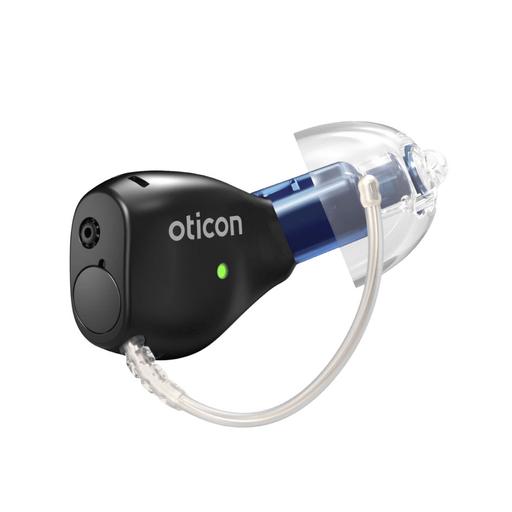
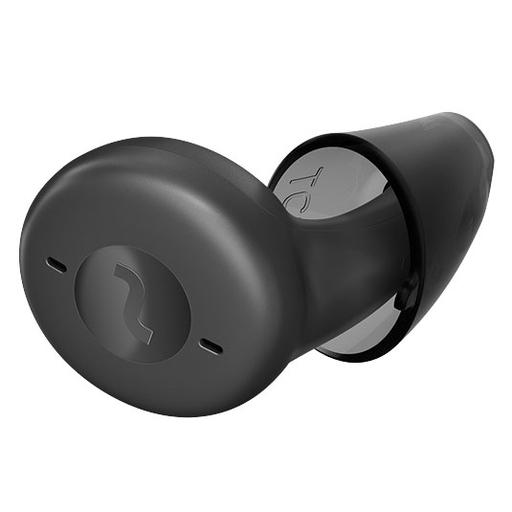
SpecZeal is a nearly invisible completely-in-canal style, while Active Pro IX is a visible earbud-like design (offered in six colors) — this is a cosmetic tradeoff, not a performance one.
Overall lab SoundScore
Lab measuredActive Pro IX scored 4.6/5 in HearAdvisor testing (ranked #3 of 35 prescription aids tested), edging out Zeal's 4.3/5, though both earned an A SoundGrade.
Ear-level physical controls
Hands-on reviewZeal offers tap controls for volume, program changes, calls and its tinnitus program, while our hands-on review of Active Pro IX notes it has no tap controls or buttons at all, requiring the app or an optional remote for adjustments.
Product Overview
Zeal
Active Pro IX
Form Factor
Expert Rating
Score
4.4
Score
4.5
User Rating
5.01 reviews
3.01 reviews
Hearing Loss Level
MildModerateSevere
MildModerate
Product Features
Hands-freeRechargeableiPhoneAndroidIP68
Hands-freeRechargeableiPhoneAndroidIP68
Expert Ratings
Compare comprehensive test results and expert opinions.
Zeal
Active Pro IX
HearingTracker Score
Zeal
4.4ABOVE AVERAGE
Oticon Zeal is an instant-fit, nearly invisible, rechargeable prescription hearing aid with AI-driven processing and modern Bluetooth LE Audio connectivity for Android and Apple iOS.
Read full reviewActive Pro IX
4.5EXCELLENT
The Signia Active Pro IX offers the functionality of a high-performance hearing aid in a sleek, earbud-like design, making it ideal for those who value both modern aesthetics and advanced hearing enhancement. Lab tests showed strong performance in speech clarity and music streaming, though its instant-fit design has some limitations, such as reduced feedback handling and lack of custom-fit personalization.
Read full reviewHearAdvisor SoundScore
Zeal
4.7EXCELLENT
Oticon Zeal achieved a SoundScore of 4.7/5 and a SoundGrade of A in HearAdvisor lab testing. It ranked #6 of 39 Prescription Hearing Aid devices tested. The Prescription Hearing Aid category average SoundScore was 4.19/5.
Active Pro IX
4.6EXCELLENT
Signia Active Pro IX achieved a SoundScore of 4.6/5 and a SoundGrade of A in HearAdvisor lab testing. It ranked #8 of 39 Prescription Hearing Aid devices tested. The Prescription Hearing Aid category average SoundScore was 4.19/5.
Build Quality
Zeal
5.0EXCELLENT
Zeal offer excellent moisture and dust protection with an ingress rating of IP68. Both the hearing aids and case are well build and ready for daily use.
Active Pro IX
4.9EXCELLENT
Active Pro IX has an IP rating of 68, meaning it has excellent protection against dust and moisture. This is consistent with my hands-on testing which suggested it is built well and will hold-up to daily use.
Battery
Zeal
4.2ABOVE AVERAGE
With a battery life of up to 20 hours, Zeal should last you all day.
Active Pro IX
4.4ABOVE AVERAGE
I love the all-day rechargeable battery life of Active Pro IX. Even with 5 hours of audio streaming, you can expect around 29 hours of user per charge.
Bluetooth
Zeal
5.0EXCELLENT
I found Zeal to offer easy and stable wireless connection. Their audio quality while streaming music, and during hands-free calling, was good and comparable to other prescription hearing aids.
Active Pro IX
5.0EXCELLENT
Signia Active Pro hearing aids are Bluetooth compatible with both iOS and Android devices, allowing for audio streaming and hands-free calling. While streamed audio quality is not the best, I did not run into any issues while testing.
App Features
Zeal
4.5EXCELLENT
I found the Companion app easy to navigate and use. Other prescription hearing aid companies offer more in-depth health features, but there is still plenty of opportunity to customize settings from your mobile device. The HearingFitness component is also a nice feature for those who like to actively track their progress.
Active Pro IX
5.0EXCELLENT
Signia's hearing aid app stands out with its user-friendly interface and modern, appealing design. It includes practical features like the ability to control the focus of your hearing aids and a mask mode to enhance speech clarity. Additionally, the app offers wellness features, utilizing hearing aid motion sensors for activity tracking.
Comfort
Zeal
4.8EXCELLENT
Oticon Zeal were extremely comfortable and lightweight in my ears. In general, hearing care providers can make numerous physical changes to prescription hearing aids like Zeal to improve comfort.
Active Pro IX
4.5EXCELLENT
I found the instant-fit comfort and retention of Active Pro good. Your hearing care provider can demo various ear tips to find the best fit for your ears and hearing needs.
Design
Zeal
5.0EXCELLENT
Zeal are sleek, easy to use, in-the-ear prescription hearing aids. They are nearly invisible in the ear which is extremely impressive given their battery life and wireless capabilities.
Active Pro IX
5.0EXCELLENT
Active Pro IX have a modern earbud-like look, which may be desirable depending on your preferences, and you can choose among 6 colors.
Value
Zeal
3.2BELOW AVERAGE
Oticon Zeal has a value score of 3.4/5 based on lab performance and public display price.
Active Pro IX
3.9AVERAGE
Signia Active Pro IX has a value score of 3.7/5 based on lab performance and public display price.
Handling
Zeal
5.0EXCELLENT
Zeal are easy to use and adjust with the Oticon Companion app. I had no issues making adjustments while testing them.
Active Pro IX
4.8EXCELLENT
I did not run into any issues while testing Active Pro IX. However, I do wish they offered ear-level controls such as buttons, or tap controls, as it would make the streaming features more user-friendly.
Pro Support
Zeal
5.0EXCELLENT
Prescription hearing aids like Zeal are fit by hearing care providers so you should receive quality care. The Oticon Companion app also opens the possibility for remote programming and virtual follow-up appointments.
Active Pro IX
5.0EXCELLENT
You should receive quality hearing care and support from your provider. The Signia App should enhance your experience with AI assistance and user-friendly virtual appointments, given your provider offers telehealth services.
Lab Recordings
Listen to direct output recordings from our acoustic test lab.
Zeal
Active Pro IX
Busy Cafe
Hear this scene unaided, for comparison
Zeal
Active Pro IX
Quiet Office
Hear this scene unaided, for comparison
Zeal
Active Pro IX
Streaming Music
Hear this scene unaided, for comparison
Zeal
Active Pro IX
HearingTracker partners with HearAdvisor to provide recordings and performance data from an acoustic laboratory that follows standard scientific procedures. All hearing aids are fitted and performance-tested for mild sloping to moderate hearing loss. All audio samples cutoff above 10kHz.
Hardware
Zeal
Active Pro IX
Accelerometer
No
Yes
Bluetooth® Audio
- Made for iPhone (MFi)
- Android (ASHA)
- Bluetooth® Low Energy (LE)
- Bluetooth® Auracast™
- Made for iPhone (MFi)
- Android (ASHA)
- Bluetooth® Low Energy (LE)
Hands-Free Calling
- Made for iPhone (MFi)
- Android (ASHA)
- Made for iPhone (MFi)
IP Rating
IP68
IP68
Rechargeable Batteries
Lithium-ion
Lithium-ion
Tap Controls
- Volume Control
- Change program
- Accept/end calls
- Tinnitus program
- Accept/end calls
Software Features
Zeal
Active Pro IX
Adjustment Bands
24
20
Adjustment Synchronization
No
e2e wireless 4.0
AI Noise Removal
Neural Noise Suppression: 12 dB / 6 dB
No
Better Ear Focus
Better-Ear Priority
No
Direction Selection
No
- 5/5
Directionality
No
Binaural DirectionalitySpatial SpeechFocus
Ear Simulation
Virtual Outer Ear: 3 configurations
TruEar 360
Echo Reduction
No
Auto EchoShield
Environmental Adaptation
No
Conversation Dynamics AnalyzerConversation Source Analyzer5/5RealTime Conversation Enhancement5/5
Extended bandwidth
Yes
12kHz
Extended Dynamic Range
Clear Dynamics
Yes
Feedback Suppression
Feedback ShieldMoreSound Optimizer™
Feedback cancellation
Frequency Lowering
Speech Rescue™
No
Handling noise reduction
Wind & Handling StabilizerAlso covers Wind Noise Reduction
No
Listening Programs
4
6
New User Adaptation
Adaptation Management
No
Noise Reduction
No
SoundSmoothing™: 3
Own Voice Comfort
No
OVP™ 2.0
Processing Channels
64
48
Soft Speech Boost
Soft Speech Booster
No
Spatial Awareness
Spatial Sound™: 4 estimators
No
Spatial Noise Cancellation
Spatial Balancer: 100%
No
Streaming Bass Boost
Power bass
No
Sudden Loud Noise Reduction
SuddenSound Stabilizer: 6 Configurations
No
Tinnitus Relief
Tinnitus SoundSupport™
Yes
Unique Amplification Strategy
Environment classifier5 configurationsMoreSound Amplifier 3.0MoreSound Intelligence 3.0Level 1Sound Enhancer3 configurations
Advanced Focus Streams3Augmented Focus™Conversation Booster5/5Dynamic Soundscape Processing 3.05/5Speech & Noise Management5/5SpeechStabilizer
Wind Noise Reduction
Wind & Handling StabilizerAlso covers Handling noise reduction
eWindScreen binaural
Bottom Line
AI summarizedThe Verdict
Zeal is the pick for buyers whose top priority is disappearing in the ear without sacrificing wireless features — you're paying a steep premium for that combination of size and discretion, and the lab data shows you're not gaining sound quality for it.
Active Pro IX is the stronger value case: it scored higher in HearAdvisor's own lab testing (4.6/5 vs 4.3/5) at a lower price, and its wellness tracking and Signia Assistant add real day-to-day usefulness, provided you're fine with an earbud-style aid that's visible rather than hidden.
Which is right for you?
If budget is a real constraint, Active Pro IX is hard to argue against given it measures at least as well as Zeal while costing substantially less. Zeal only makes sense once discretion becomes a non-negotiable requirement — otherwise you're spending extra for looks rather than performance.
What to ask at your fitting
AI summarizedAsk about earmold options for Zeal
Zeal's tiny size makes it more prone to feedback and gain limits at the edges of its mild-to-severe range, so ask your provider whether a custom earmold (at extra cost) is worth it for your loss.
Try on Active Pro IX in person first
Its earbud-like faceplate is visible in the ear, so handle a demo unit and check the six color options against your preference for a more hidden look.
Discuss real-ear measurement for both
Both devices show real gains from professional tuning in our lab data (Zeal's speech-in-noise jumped to 2.9/5, Active Pro IX's to 3.0/5), so confirm your clinic performs REM rather than relying on first-fit settings.