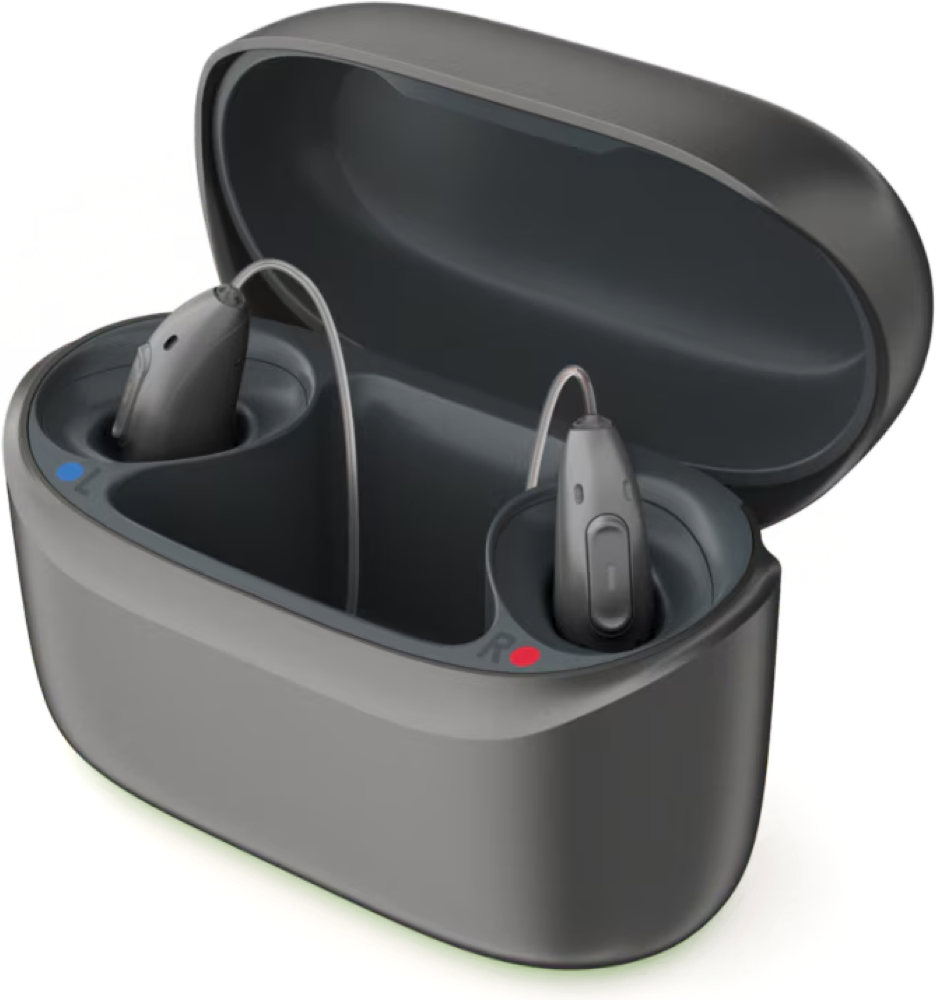
Phonak Charger RIC E
Recharge compatible Phonak EON hearing devices at a fixed charging spot.
What Charger RIC E does
This lidded case charges compatible Phonak Audéo EON R, EON Sphere, and CROS EON R devices. It gets its power from a USB-C cable and needs to stay plugged in during charging. The case has separate left and right wells and space for the earpieces. The lights on the hearing aids show when the charge is complete.
Which hearing aids work with Phonak Charger RIC E?
Choose the exact model printed on your hearing aids or paperwork. A family match does not establish support for every model in that family.
Documented features
Power and charging
- Automatic hearing-aid power
- Aids switch off when inserted for charging and can be set to turn on automatically when removed. Fully charged aids enter sleep after 15 minutes in the charger.
The manual’s default auto-on description refers to a powered charger. A provider can disable automatic startup.
Documentation · 2026-11-18 - Hearing-aid and receiver fit
- Phonak Audéo E-R, Audéo E-Sphere, CROS E-R, and documented Audéo E-R and E-Sphere Trial models
The EON wells have a cavity for earpieces. Check large custom molds individually. Earlier Infinio variants use different cases.
Documentation · 2026-11-18 - Charging indicators
- Green USB-C power light and blinking red/orange/green or solid green hearing-aid lights.
The case power light shows cable power. A solid green aid light indicates a full charge.
Documentation · 2026-11-18 - Charging method
- Contact charging in left and right slots
Align each device with its marked slot. The safety guide identifies powered contacts.
Documentation · 2026-11-18 - Charging slots
- 2 aids
One left and one right charging slot, with a space for earpieces.
Documentation · 2026-11-18 - Charging temperature limits
- Charge within 41–104°F (5–40°C).
Keep the case dry, out of direct heat, and within the published operating conditions.
Documentation · 2026-11-18 - Full hearing-aid charge time
- 2.5 hours
For compatible EON RIC styles from empty to full; the guide says times are representative and depend on the starting charge.
Documentation · 2026-11-18 - Electrical input requirements
- Charger rated 5 V DC (±5%) at 350 mA. Wall supply input 100–240 V AC, 50/60 Hz. Documented adapter output 5 V DC (±5%) at 0.5–1 A.
Use the certified external supply specified in the guide.
Documentation · 2026-11-18 - Lid behavior while charging
- The charger manual instructs users to close the lid while charging, especially in humid environments.
The hearing-aid manual says the lid can be closed during charging. Neither establishes fit of every custom mold.
Documentation · 2026-11-18 - Charging requires external power
The guide places this model in the cable-powered group without an internal battery.
Documentation · 2026-11-18- Power adapter included
- Supported · With conditions
For the US EPS-coded package only.
Setup: US retail package with external power supply
Documentation · 2026-11-18 - Power adapter not included
The separate NO EPS code ships as a package without a power supply.
Setup: Charger packaged without an external power supply
Documentation · 2026-11-18- Power connector
- USB-C receptacle on the rear, USB-A to USB-C cable rated for at least 1 A at 5 V, up to 3 m (about 10 ft)
Use the supplied cable and an approved USB power adapter.
Documentation · 2026-11-18 - Quick charge duration
- 30 minutes
The dedicated U.S. guides report about 25% after 30 minutes for compatible EON models. The time describes aid charging.
Documentation · 2026-11-18 - USB-C power input
- Supported
Use the rear USB-C port with the specified USB-A to USB-C cable.
Documentation · 2026-11-18
Care and fit
- Cleaning materials
- Soft, lint-free cloth
Unplug before cleaning. Keep the case dry and avoid household cleaners, soap, and rinsing.
Documentation · 2026-11-18
Design and everyday use
- Control accessibility
- The slots are labeled L and R and the earpieces rest in the middle cavity. Indicator lights show power and charging.
The manufacturer does not provide a dexterity assessment. Low-battery beeps come from the hearing aids.
Documentation · 2026-11-18 - Included items
- Charger, USB-A to USB-C cable, External power adapter in US EPS version
The USB supply and cable are shown in the guide. The US EPS listing confirms the package classification. Confirm replacement-box contents with the seller.
Setup: US retail package with external power supply
Documentation · 2026-11-18 - Ingress protection rating
- IP21
The rating applies with the lid closed. The guide tells owners to keep the charger dry.
Documentation · 2026-11-18 - Routine maintenance
- Unplug the charger and remove dust and dirt with a soft, lint-free cloth. Keep the charging slots, USB socket, and adapters dry.
Check the wells daily and clear dust from them weekly.
Documentation · 2026-11-18 - Operating conditions
- 41–104°F (5–40°C), 0–90% noncondensing humidity, 500–1,060 hPa
The charging temperature window is the same as the operating window.
Documentation · 2026-11-18 - Physical controls
- Hinged lid, Left/right charging slots, Rear USB-C power port
Unplug the cable to switch off the case.
Documentation · 2026-11-18 - Regional variants
- 075-0073-11 US EPS and 075-0073-10 NO EPS
The package code determines what power adapter comes with the case. No performance differences inferred from package codes.
Documentation · 2026-11-18 - Required extras
- Approved USB power supply if the selected package does not include one
Check the package label and use the manufacturer-specified certified power supply.
Setup: Charger packaged without an external power supply
Documentation · 2026-11-18 - Repair and service options
- Consult the hearing care provider for repairs or replacement. Only authorized personnel may open the charger.
The manual states a five-year expected service life and at least five years of repair service after phase-out.
Documentation · 2026-11-18 - Status indicators
- Green power light at USB-C port, Red/orange/green lights on the hearing aids
The USB-C light shows external power. The aid LEDs show their own charging progress.
Documentation · 2026-11-18 - Storage conditions
- Transport and storage: −4–140°F (−20–60°C), 0–93% noncondensing humidity, 500–1,060 hPa
After transport or storage outside the recommended use conditions, let the device acclimate for 15 minutes.
Documentation · 2026-11-18 - Warranty terms
- One-year Sonova limited international warranty for manufacturing and material defects from the purchase date with proof of purchase
Local terms come from the seller. Improper handling, chemical exposure and unauthorized servicing are excluded.
Documentation · 2026-11-18
How to set up Phonak Charger RIC E
Plug the USB-A end into a suitable wall power adapter and the USB-C end into the charger. The light at the power port turns green. Put each dry hearing device in its matching left or right well and close the lid. A full charge typically takes about 2.5 hours for the EON styles. Lift the devices out by their housings.
What to check before buying
The charger does not have its own battery and needs external power while it charges. Check that your device is an EON style listed in the guide. Other similarly named Infinio cases have different fit lists. Use the charger at 41–104°F, with the hearing devices and charging wells dry.
Needs external power for each charge
If your Phonak EON aids fit both chargers, the choice comes down to where you’ll charge. The Charger RIC E needs external power. For trips, the ChargerGo RIC I EON can recharge the same compatible pair up to three times from a full case battery.
SourceSet the hearing devices in the matching slots
Plug the USB-A end into a suitable wall power adapter and the USB-C end into the charger. The light at the power port turns green. Put each dry hearing device in its matching left or right well and close the lid. A full charge typically takes about 2.5 hours for the EON styles. Lift the devices out by their housings.
SourceCheck the charging lights
The green light at the USB-C port confirms the cable is supplying power. The lights on the aids change as they charge. A steady green light on an aid indicates a full charge. If an aid does not charge, reseat it in the marked well and reconnect the power cable.
SourceRelated accessories
Other devices named in the documentation
These names have not been matched to an exact device in our catalog. They do not create verified matches in the finder.
Checking current offers…
Documentation checked Nov 18, 2026