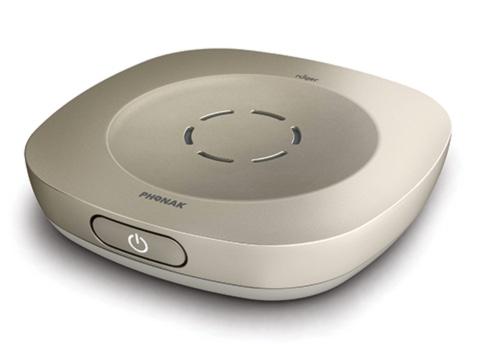
Phonak Roger Table Mic 3
Follow people around a meeting table or connect several microphones across a larger room.
What Roger Table Mic 3 does
Place Roger Table Mic 3 among the people you want to hear in a meeting. It follows the active speaker automatically. For a long conference table, connect several microphones and spread them among the participants. The remote lets you mute the microphone or shorten its pickup range when a nearby conversation matters more.
Which hearing aids work with Phonak Roger Table Mic 3?
Microphone audio
- Phonak Audéo EON R
A RogerDirect receiver must be installed in each hearing aid that will receive the microphone. Install or confirm the RogerDirect receiver in each hearing aid.
- Phonak Audéo EON Sphere
A RogerDirect receiver must be installed in each hearing aid that will receive the microphone. Install or confirm the RogerDirect receiver in each hearing aid.
- Phonak Audéo Lumity L-312
A RogerDirect receiver must be installed in each hearing aid that will receive the microphone. Install or confirm the RogerDirect receiver in each hearing aid.
- Phonak Audéo Lumity Life
A RogerDirect receiver must be installed in each hearing aid that will receive the microphone. Install or confirm the RogerDirect receiver in each hearing aid.
- Phonak Audéo Lumity R
A RogerDirect receiver must be installed in each hearing aid that will receive the microphone. Install or confirm the RogerDirect receiver in each hearing aid.
- Phonak Audéo Lumity RT
A RogerDirect receiver must be installed in each hearing aid that will receive the microphone. Install or confirm the RogerDirect receiver in each hearing aid.
Choose the exact model printed on your hearing aids or paperwork. A family match does not establish support for every model in that family.
View documented devices and setups
- Phonak Audéo EON R · Exact model
With a RogerDirect receiver installed in each compatible hearing aid · microphone_audio
A RogerDirect receiver must be installed in each hearing aid that will receive the microphone.
Requires additional setupSource · 2026-11-18A RogerDirect receiver must be installed in each hearing aid that will receive the microphone.
- Install or confirm the RogerDirect receiver in each hearing aid.
- Phonak Audéo EON Sphere · Exact model
With a RogerDirect receiver installed in each compatible hearing aid · microphone_audio
A RogerDirect receiver must be installed in each hearing aid that will receive the microphone.
Requires additional setupSource · 2026-11-18A RogerDirect receiver must be installed in each hearing aid that will receive the microphone.
- Install or confirm the RogerDirect receiver in each hearing aid.
- Phonak Audéo Lumity L-312 · Exact model
With a RogerDirect receiver installed in each compatible hearing aid · microphone_audio
A RogerDirect receiver must be installed in each hearing aid that will receive the microphone.
Requires additional setupSource · 2026-11-18A RogerDirect receiver must be installed in each hearing aid that will receive the microphone.
- Install or confirm the RogerDirect receiver in each hearing aid.
- Phonak Audéo Lumity Life · Exact model
With a RogerDirect receiver installed in each compatible hearing aid · microphone_audio
A RogerDirect receiver must be installed in each hearing aid that will receive the microphone.
Requires additional setupSource · 2026-11-18A RogerDirect receiver must be installed in each hearing aid that will receive the microphone.
- Install or confirm the RogerDirect receiver in each hearing aid.
- Phonak Audéo Lumity R · Exact model
With a RogerDirect receiver installed in each compatible hearing aid · microphone_audio
A RogerDirect receiver must be installed in each hearing aid that will receive the microphone.
Requires additional setupSource · 2026-11-18A RogerDirect receiver must be installed in each hearing aid that will receive the microphone.
- Install or confirm the RogerDirect receiver in each hearing aid.
- Phonak Audéo Lumity RT · Exact model
With a RogerDirect receiver installed in each compatible hearing aid · microphone_audio
A RogerDirect receiver must be installed in each hearing aid that will receive the microphone.
Requires additional setupSource · 2026-11-18A RogerDirect receiver must be installed in each hearing aid that will receive the microphone.
- Install or confirm the RogerDirect receiver in each hearing aid.
- Phonak Audéo Paradise 13T · Exact model
With a RogerDirect receiver installed in each compatible hearing aid · microphone_audio
A RogerDirect receiver must be installed in each hearing aid that will receive the microphone.
Requires additional setupSource · 2026-11-18A RogerDirect receiver must be installed in each hearing aid that will receive the microphone.
- Install or confirm the RogerDirect receiver in each hearing aid.
- Phonak Audéo Paradise 312 · Exact model
With a RogerDirect receiver installed in each compatible hearing aid · microphone_audio
A RogerDirect receiver must be installed in each hearing aid that will receive the microphone.
Requires additional setupSource · 2026-11-18A RogerDirect receiver must be installed in each hearing aid that will receive the microphone.
- Install or confirm the RogerDirect receiver in each hearing aid.
- Phonak Audéo Paradise R · Exact model
With a RogerDirect receiver installed in each compatible hearing aid · microphone_audio
A RogerDirect receiver must be installed in each hearing aid that will receive the microphone.
Requires additional setupSource · 2026-11-18A RogerDirect receiver must be installed in each hearing aid that will receive the microphone.
- Install or confirm the RogerDirect receiver in each hearing aid.
- Phonak Audéo Paradise RT · Exact model
With a RogerDirect receiver installed in each compatible hearing aid · microphone_audio
A RogerDirect receiver must be installed in each hearing aid that will receive the microphone.
Requires additional setupSource · 2026-11-18A RogerDirect receiver must be installed in each hearing aid that will receive the microphone.
- Install or confirm the RogerDirect receiver in each hearing aid.
- Phonak Naída M SP · Exact model
With a RogerDirect receiver installed in each compatible hearing aid · microphone_audio
A RogerDirect receiver must be installed in each hearing aid that will receive the microphone.
Requires additional setupSource · 2026-11-18A RogerDirect receiver must be installed in each hearing aid that will receive the microphone.
- Install or confirm the RogerDirect receiver in each hearing aid.
- Phonak Naída Paradise P-PR · Exact model
With a RogerDirect receiver installed in each compatible hearing aid · microphone_audio
A RogerDirect receiver must be installed in each hearing aid that will receive the microphone.
Requires additional setupSource · 2026-11-18A RogerDirect receiver must be installed in each hearing aid that will receive the microphone.
- Install or confirm the RogerDirect receiver in each hearing aid.
- Phonak Naída Paradise P-UP · Exact model
With a RogerDirect receiver installed in each compatible hearing aid · microphone_audio
A RogerDirect receiver must be installed in each hearing aid that will receive the microphone.
Requires additional setupSource · 2026-11-18A RogerDirect receiver must be installed in each hearing aid that will receive the microphone.
- Install or confirm the RogerDirect receiver in each hearing aid.
- Phonak Virto M M-312 · Exact model
With a RogerDirect receiver installed in each compatible hearing aid · microphone_audio
A RogerDirect receiver must be installed in each hearing aid that will receive the microphone.
Requires additional setupSource · 2026-11-18A RogerDirect receiver must be installed in each hearing aid that will receive the microphone.
- Install or confirm the RogerDirect receiver in each hearing aid.
- Phonak Bolero M M · Exact model
With a RogerDirect receiver installed in each compatible hearing aid · microphone_audio
A RogerDirect receiver must be installed in each hearing aid that will receive the microphone.
Requires additional setupSource · 2026-11-18A RogerDirect receiver must be installed in each hearing aid that will receive the microphone.
- Install or confirm the RogerDirect receiver in each hearing aid.
- Phonak Bolero M PR · Exact model
With a RogerDirect receiver installed in each compatible hearing aid · microphone_audio
A RogerDirect receiver must be installed in each hearing aid that will receive the microphone.
Requires additional setupSource · 2026-11-18A RogerDirect receiver must be installed in each hearing aid that will receive the microphone.
- Install or confirm the RogerDirect receiver in each hearing aid.
- Phonak Naída B B-R RIC · Exact model
Older hearing aid with a Roger X and compatible streamer · microphone_audio
Verify the eligible receiver path for this exact model. Active Roger X receiver matched to the older hearing-aid setup. Phonak ComPilot II with the Roger X connected.
Requires additional setupSource · 2026-11-18Verify the eligible receiver path for this exact model. Active Roger X receiver matched to the older hearing-aid setup. Phonak ComPilot II with the Roger X connected.
- Active Roger X receiver matched to the older hearing-aid setup.
- Phonak ComPilot II with the Roger X connected.
- Phonak Naída B B-SP · Exact model
Older hearing aid with matching external integrated Roger receiver · microphone_audio
Verify the eligible receiver path for this exact model. Fit a compatible Roger 18 external receiver.
Requires additional setupSource · 2026-11-18Verify the eligible receiver path for this exact model. Fit a compatible Roger 18 external receiver.
- Fit a compatible Roger 18 external receiver.
- Phonak Naída B B-SP · Exact model
Older hearing aid with a Roger X and compatible audio shoe · microphone_audio
Verify the eligible receiver path for this exact model. Active Roger X receiver matched to the older hearing-aid setup. Use Phonak audio shoe AS18 with the receiver.
Requires additional setupSource · 2026-11-18Verify the eligible receiver path for this exact model. Active Roger X receiver matched to the older hearing-aid setup. Use Phonak audio shoe AS18 with the receiver.
- Active Roger X receiver matched to the older hearing-aid setup.
- Use Phonak audio shoe AS18 with the receiver.
- Phonak Naída B B-UP · Exact model
Older hearing aid with matching external integrated Roger receiver · microphone_audio
Verify the eligible receiver path for this exact model. Fit a compatible Roger 19 external receiver.
Requires additional setupSource · 2026-11-18Verify the eligible receiver path for this exact model. Fit a compatible Roger 19 external receiver.
- Fit a compatible Roger 19 external receiver.
- Phonak Naída B B-UP · Exact model
Older hearing aid with a Roger X and compatible audio shoe · microphone_audio
Verify the eligible receiver path for this exact model. Active Roger X receiver matched to the older hearing-aid setup. Use Phonak audio shoe AS19 with the receiver.
Requires additional setupSource · 2026-11-18Verify the eligible receiver path for this exact model. Active Roger X receiver matched to the older hearing-aid setup. Use Phonak audio shoe AS19 with the receiver.
- Active Roger X receiver matched to the older hearing-aid setup.
- Use Phonak audio shoe AS19 with the receiver.
- Phonak Audéo Marvel R · Exact model
With a RogerDirect receiver installed in each compatible hearing aid · microphone_audio
Install or confirm Roger reception separately in each hearing device.
Requires additional setupSource · 2026-11-18Install or confirm Roger reception separately in each hearing device.
- Install or confirm the RogerDirect receiver in each hearing aid.
- Phonak Audéo Marvel RT · Exact model
With a RogerDirect receiver installed in each compatible hearing aid · microphone_audio
Install or confirm Roger reception separately in each hearing device.
Requires additional setupSource · 2026-11-18Install or confirm Roger reception separately in each hearing device.
- Install or confirm the RogerDirect receiver in each hearing aid.
- Phonak Audéo Marvel 312 · Exact model
With a RogerDirect receiver installed in each compatible hearing aid · microphone_audio
Install or confirm Roger reception separately in each hearing device.
Requires additional setupSource · 2026-11-18Install or confirm Roger reception separately in each hearing device.
- Install or confirm the RogerDirect receiver in each hearing aid.
- Phonak Audéo Marvel 312T · Exact model
With a RogerDirect receiver installed in each compatible hearing aid · microphone_audio
Install or confirm Roger reception separately in each hearing device.
Requires additional setupSource · 2026-11-18Install or confirm Roger reception separately in each hearing device.
- Install or confirm the RogerDirect receiver in each hearing aid.
- Phonak Audéo Marvel 13T · Exact model
With a RogerDirect receiver installed in each compatible hearing aid · microphone_audio
Install or confirm Roger reception separately in each hearing device.
Requires additional setupSource · 2026-11-18Install or confirm Roger reception separately in each hearing device.
- Install or confirm the RogerDirect receiver in each hearing aid.
- Phonak Virto Paradise 312 · Exact model
With a RogerDirect receiver installed in each compatible hearing aid · microphone_audio
Install or confirm Roger reception separately in each hearing device.
Requires additional setupSource · 2026-11-18Install or confirm Roger reception separately in each hearing device.
- Install or confirm the RogerDirect receiver in each hearing aid.
- Phonak Naída Lumity P-PR · Exact model
With a RogerDirect receiver installed in each compatible hearing aid · microphone_audio
Install or confirm Roger reception separately in each hearing device.
Requires additional setupSource · 2026-11-18Install or confirm Roger reception separately in each hearing device.
- Install or confirm the RogerDirect receiver in each hearing aid.
- Phonak Naída Lumity P-UP · Exact model
With a RogerDirect receiver installed in each compatible hearing aid · microphone_audio
Install or confirm Roger reception separately in each hearing device.
Requires additional setupSource · 2026-11-18Install or confirm Roger reception separately in each hearing device.
- Install or confirm the RogerDirect receiver in each hearing aid.
- Phonak Audéo Infinio Ultra R · Exact model
With a RogerDirect receiver installed in each compatible hearing aid · microphone_audio
Install or confirm Roger reception separately in each hearing device.
Requires additional setupSource · 2026-11-18Install or confirm Roger reception separately in each hearing device.
- Install or confirm the RogerDirect receiver in each hearing aid.
- Phonak Audéo Infinio Ultra Sphere · Exact model
With a RogerDirect receiver installed in each compatible hearing aid · microphone_audio
Install or confirm Roger reception separately in each hearing device.
Requires additional setupSource · 2026-11-18Install or confirm Roger reception separately in each hearing device.
- Install or confirm the RogerDirect receiver in each hearing aid.
- Phonak Virto Infinio R · Exact model
With a RogerDirect receiver installed in each compatible hearing aid · microphone_audio
Install or confirm Roger reception separately in each hearing device.
Requires additional setupSource · 2026-11-19Install or confirm Roger reception separately in each hearing device.
- Install or confirm the RogerDirect receiver in each hearing aid.
- Unitron Moxi Vivante RT · Exact model
With a RogerDirect receiver installed in each compatible hearing aid · microphone_audio
Install or confirm Roger reception separately in each hearing device.
Requires additional setupSource · 2026-11-19Install or confirm Roger reception separately in each hearing device.
- Install or confirm the RogerDirect receiver in each hearing aid.
- Unitron Moxi Vivante R · Exact model
With a RogerDirect receiver installed in each compatible hearing aid · microphone_audio
Install or confirm Roger reception separately in each hearing device.
Requires additional setupSource · 2026-11-19Install or confirm Roger reception separately in each hearing device.
- Install or confirm the RogerDirect receiver in each hearing aid.
- Phonak Virto Infinio 10 NW O · Exact model
Roger NeckLoop with the hearing device’s telecoil program · microphone_audio
Use a Roger NeckLoop with the optional fitted and enabled telecoil.
Requires additional setupSource · 2026-11-19Use a Roger NeckLoop with the optional fitted and enabled telecoil.
- The hearing device must have a telecoil fitted and its T or MT program enabled.
- Phonak Virto Infinio Titanium · Exact model
Roger NeckLoop with the hearing device’s telecoil program · microphone_audio
Use a Roger NeckLoop with the optional fitted and enabled telecoil.
Requires additional setupSource · 2026-11-19Use a Roger NeckLoop with the optional fitted and enabled telecoil.
- The hearing device must have a telecoil fitted and its T or MT program enabled.
- Phonak Audéo B 312T · Exact model
Roger NeckLoop with the hearing device’s telecoil program · microphone_audio
Use a personal Roger NeckLoop and select the hearing aid’s T or MT program.
Requires additional setupSource · 2026-11-18Use a personal Roger NeckLoop and select the hearing aid’s T or MT program.
- The hearing device must have a telecoil fitted and its T or MT program enabled.
- Phonak Audéo B 13 · Exact model
Roger NeckLoop with the hearing device’s telecoil program · microphone_audio
Use a personal Roger NeckLoop and select the hearing aid’s T or MT program.
Requires additional setupSource · 2026-11-18Use a personal Roger NeckLoop and select the hearing aid’s T or MT program.
- The hearing device must have a telecoil fitted and its T or MT program enabled.
- Phonak Audéo Marvel RT · Exact model
Roger NeckLoop with the hearing device’s telecoil program · microphone_audio
Use a personal Roger NeckLoop and select the hearing aid’s T or MT program.
Requires additional setupSource · 2026-11-18Use a personal Roger NeckLoop and select the hearing aid’s T or MT program.
- The hearing device must have a telecoil fitted and its T or MT program enabled.
- Phonak Audéo Marvel 312T · Exact model
Roger NeckLoop with the hearing device’s telecoil program · microphone_audio
Use a personal Roger NeckLoop and select the hearing aid’s T or MT program.
Requires additional setupSource · 2026-11-18Use a personal Roger NeckLoop and select the hearing aid’s T or MT program.
- The hearing device must have a telecoil fitted and its T or MT program enabled.
- Phonak Audéo Marvel 13T · Exact model
Roger NeckLoop with the hearing device’s telecoil program · microphone_audio
Use a personal Roger NeckLoop and select the hearing aid’s T or MT program.
Requires additional setupSource · 2026-11-18Use a personal Roger NeckLoop and select the hearing aid’s T or MT program.
- The hearing device must have a telecoil fitted and its T or MT program enabled.
- Phonak Bolero M M · Exact model
Roger NeckLoop with the hearing device’s telecoil program · microphone_audio
Use a personal Roger NeckLoop and select the hearing aid’s T or MT program.
Requires additional setupSource · 2026-11-18Use a personal Roger NeckLoop and select the hearing aid’s T or MT program.
- The hearing device must have a telecoil fitted and its T or MT program enabled.
- Phonak Naída M SP · Exact model
Roger NeckLoop with the hearing device’s telecoil program · microphone_audio
Use a personal Roger NeckLoop and select the hearing aid’s T or MT program.
Requires additional setupSource · 2026-11-18Use a personal Roger NeckLoop and select the hearing aid’s T or MT program.
- The hearing device must have a telecoil fitted and its T or MT program enabled.
- Phonak Audéo Paradise 13T · Exact model
Roger NeckLoop with the hearing device’s telecoil program · microphone_audio
Use a personal Roger NeckLoop and select the hearing aid’s T or MT program.
Requires additional setupSource · 2026-11-18Use a personal Roger NeckLoop and select the hearing aid’s T or MT program.
- The hearing device must have a telecoil fitted and its T or MT program enabled.
- Phonak Audéo Paradise RT · Exact model
Roger NeckLoop with the hearing device’s telecoil program · microphone_audio
Use a personal Roger NeckLoop and select the hearing aid’s T or MT program.
Requires additional setupSource · 2026-11-18Use a personal Roger NeckLoop and select the hearing aid’s T or MT program.
- The hearing device must have a telecoil fitted and its T or MT program enabled.
- Phonak Naída Paradise P-UP · Exact model
Roger NeckLoop with the hearing device’s telecoil program · microphone_audio
Use a personal Roger NeckLoop and select the hearing aid’s T or MT program.
Requires additional setupSource · 2026-11-18Use a personal Roger NeckLoop and select the hearing aid’s T or MT program.
- The hearing device must have a telecoil fitted and its T or MT program enabled.
- Phonak Audéo B R · Exact model
Roger X connected through a compatible ComPilot streamer · microphone_audio
A separate Roger X plugs into a compatible ComPilot or ComPilot II paired with the aids.
Requires additional setupSource · 2026-11-18A separate Roger X plugs into a compatible ComPilot or ComPilot II paired with the aids.
- Use a paired Phonak ComPilot II streamer. A model-compatible ComPilot is another documented option.
- Connect a Roger X receiver to the required accessory input.
- Phonak Audéo B 10 · Exact model
Roger X connected through a compatible ComPilot streamer · microphone_audio
A separate Roger X plugs into a compatible ComPilot or ComPilot II paired with the aids.
Requires additional setupSource · 2026-11-18A separate Roger X plugs into a compatible ComPilot or ComPilot II paired with the aids.
- Use a paired Phonak ComPilot II streamer. A model-compatible ComPilot is another documented option.
- Connect a Roger X receiver to the required accessory input.
- Phonak Audéo B 312 · Exact model
Roger X connected through a compatible ComPilot streamer · microphone_audio
A separate Roger X plugs into a compatible ComPilot or ComPilot II paired with the aids.
Requires additional setupSource · 2026-11-18A separate Roger X plugs into a compatible ComPilot or ComPilot II paired with the aids.
- Use a paired Phonak ComPilot II streamer. A model-compatible ComPilot is another documented option.
- Connect a Roger X receiver to the required accessory input.
- Phonak Audéo B 312T · Exact model
Roger X connected through a compatible ComPilot streamer · microphone_audio
A separate Roger X plugs into a compatible ComPilot or ComPilot II paired with the aids.
Requires additional setupSource · 2026-11-18A separate Roger X plugs into a compatible ComPilot or ComPilot II paired with the aids.
- Use a paired Phonak ComPilot II streamer. A model-compatible ComPilot is another documented option.
- Connect a Roger X receiver to the required accessory input.
- Phonak Audéo B 13 · Exact model
Model-specific external Roger receiver · microphone_audio
Attach the matching Roger 18 to this Audéo B-13.
Requires additional setupSource · 2026-11-18Attach the matching Roger 18 to this Audéo B-13.
- Use the Roger 18 receiver made for the Audéo B-13.
- Cochlear Baha® 5 · Exact model
Roger X connected through Cochlear Mini Microphone 2+ · microphone_audio
Connect a Roger X to a Cochlear Wireless Mini Microphone 2+ paired with the sound processor.
Requires additional setupSource · 2026-11-18Connect a Roger X to a Cochlear Wireless Mini Microphone 2+ paired with the sound processor.
- Connect a Roger X receiver to the required accessory input.
- Connect the Roger X to a Cochlear Wireless Mini Microphone 2+ paired with the sound processor.
- Cochlear Nucleus Kanso · Exact model
Roger X connected through Cochlear Mini Microphone 2+ · microphone_audio
Connect a Roger X to a Cochlear Wireless Mini Microphone 2+ paired with the sound processor.
Requires additional setupSource · 2026-11-18Connect a Roger X to a Cochlear Wireless Mini Microphone 2+ paired with the sound processor.
- Connect a Roger X receiver to the required accessory input.
- Connect the Roger X to a Cochlear Wireless Mini Microphone 2+ paired with the sound processor.
- Cochlear Nucleus® 7 · Exact model
Roger X connected through Cochlear Mini Microphone 2+ · microphone_audio
Connect a Roger X to a Cochlear Wireless Mini Microphone 2+ paired with the sound processor.
Requires additional setupSource · 2026-11-18Connect a Roger X to a Cochlear Wireless Mini Microphone 2+ paired with the sound processor.
- Connect a Roger X receiver to the required accessory input.
- Connect the Roger X to a Cochlear Wireless Mini Microphone 2+ paired with the sound processor.
- Cochlear Kanso® 2 · Exact model
Roger X connected through Cochlear Mini Microphone 2+ · microphone_audio
Connect a Roger X to a Cochlear Wireless Mini Microphone 2+ paired with the sound processor.
Requires additional setupSource · 2026-11-18Connect a Roger X to a Cochlear Wireless Mini Microphone 2+ paired with the sound processor.
- Connect a Roger X receiver to the required accessory input.
- Connect the Roger X to a Cochlear Wireless Mini Microphone 2+ paired with the sound processor.
- Cochlear Nucleus® 8 · Exact model
Roger X connected through Cochlear Mini Microphone 2+ · microphone_audio
Connect a Roger X to a Cochlear Wireless Mini Microphone 2+ paired with the sound processor.
Requires additional setupSource · 2026-11-18Connect a Roger X to a Cochlear Wireless Mini Microphone 2+ paired with the sound processor.
- Connect a Roger X receiver to the required accessory input.
- Connect the Roger X to a Cochlear Wireless Mini Microphone 2+ paired with the sound processor.
- Cochlear Osia® 2 · Exact model
Roger X connected through Cochlear Mini Microphone 2+ · microphone_audio
Connect a Roger X to a Cochlear Wireless Mini Microphone 2+ paired with the sound processor.
Requires additional setupSource · 2026-11-18Connect a Roger X to a Cochlear Wireless Mini Microphone 2+ paired with the sound processor.
- Connect a Roger X receiver to the required accessory input.
- Connect the Roger X to a Cochlear Wireless Mini Microphone 2+ paired with the sound processor.
- Cochlear Nucleus® 7 · Exact model
Model-specific external Roger receiver · microphone_audio
Use the Roger 20 receiver made for Nucleus 7 or 8.
Requires additional setupSource · 2026-11-18Use the Roger 20 receiver made for Nucleus 7 or 8.
- Configure Roger input on the processor with the model-specific Roger 20 attached.
- Cochlear Nucleus® 8 · Exact model
Model-specific external Roger receiver · microphone_audio
Use the Roger 20 receiver made for Nucleus 7 or 8.
Requires additional setupSource · 2026-11-18Use the Roger 20 receiver made for Nucleus 7 or 8.
- Configure Roger input on the processor with the model-specific Roger 20 attached.
- Cochlear Nucleus® 6 Sound Processor · Exact model
Model-specific external Roger receiver · microphone_audio
Fit a Roger 14 receiver to the Nucleus 6 processor.
Requires additional setupSource · 2026-11-18Fit a Roger 14 receiver to the Nucleus 6 processor.
- Configure the processor to receive sound through its attached Roger 14.
Documented features
Listening and control
- Mute accessory microphone
- SupportedDocumentation · 2026-11-19
- Adjustable microphone pickup range
- SupportedDocumentation · 2026-11-19
- Audio bandwidth
- 100 Hz to 7.3 kHzDocumentation · 2026-11-19
- Automatic mode switching
- An active analog input automatically mutes room pickup.Documentation · 2026-11-19
- Directional microphone
- SupportedDocumentation · 2026-11-19
- Remote-microphone runtime
- Rated operating time: 16 hoursDocumentation · 2026-11-19
- Built-in microphone count
- 3Documentation · 2026-11-19
- Microphone modes
- Automatic tableDocumentation · 2026-11-19
- Maximum microphones per network
- 10Documentation · 2026-11-19
- Multiple microphones
- Up to 10 compatible microphones. Place additional table units near the participants they cover.Documentation · 2026-11-19
- Table mode in a microphone network
- Supported
Setup: When several compatible Roger microphones share a network
Documentation · 2026-11-19 - Noise management
- MultiBeam Technology automatically selects the direction of the person speaking.Documentation · 2026-11-19
- Microphone placement
- Place it close to the meeting participants and away from laptop fans and projectors.Documentation · 2026-11-19
- Remote microphone
- SupportedDocumentation · 2026-11-19
- Stream/environment balance
- Starting a connected analog source mutes the Table Mic’s room microphone.
Setup: With a wired audio source
Documentation · 2026-11-19 - Stream volume control
- Adjust the volume on the connected audio source.
Setup: With a wired audio source
Documentation · 2026-11-19 - Table microphone mode
- SupportedDocumentation · 2026-11-19
Connections
- Analog audio input
- SupportedDocumentation · 2026-11-19
- Computer audio
- Connect a computer, tablet or conference phone’s analog output to the microphone’s audio input.Documentation · 2026-11-19
- Connection priority
- An active wired source takes priority over the room microphone.Documentation · 2026-11-19
- Firmware updates
- For an incompatible network microphone, Phonak directs users to Roger Upgrader or their hearing care professional.Documentation · 2026-11-19
- Link to hearing aids
- Roger 2.4 GHzDocumentation · 2026-11-19
- Accessory-to-hearing-aid range
- Up to 80 m in clear line of sight
Setup: With a RogerDirect receiver installed in each compatible hearing aid
Documentation · 2026-11-19 - Accessory-to-hearing-aid range
- Up to 40 m in clear line of sight
Setup: With a compatible personal Roger receiver
Documentation · 2026-11-19 - Audio input selection
- Start audio playback on the wired source to switch from room sound.Documentation · 2026-11-19
- Analog input details
- The supplied cable connects an analog line output to the auxiliary input.Documentation · 2026-11-19
- Hearing-aid pairing method
- Power on both devices. Bring them within 4 inches and press Connect. A green light confirms the connection.Documentation · 2026-11-19
- Professional setup
- A hearing care professional can check the receiver or configure the hearing aid’s Roger or telecoil program. Confirm the receiving path for the specific hearing device.Documentation · 2026-11-18
- Receiver licenses supplied
- unlimitedDocumentation · 2026-11-19
- Receiver requirements
- Install the included Roger receiver in each RogerDirect hearing aid, or use a compatible personal Roger receiver. SoundField is excluded.Documentation · 2026-11-19
- Reconnection behavior
- If a microphone loses the shared network, press Connect on a network microphone to reinitialize it.
Setup: When several compatible Roger microphones share a network
Documentation · 2026-11-19 - Simultaneous listeners
- Unlimited connected personal Roger receiversDocumentation · 2026-11-19
- Telecoil use
- A personal Roger NeckLoop receives the wireless signal and passes audio to the hearing device’s active telecoil program.
Setup: Roger NeckLoop with the hearing device’s telecoil program
Documentation · 2026-11-18
Power and charging
- Accessory battery is not user-replaceable
- Documentation · 2026-11-19
- Accessory battery type
- Rechargeable lithium polymer, 1,000 mAh at 3.7 VDocumentation · 2026-11-19
- Accessory charge time
- 4 hoursDocumentation · 2026-11-19
- Rechargeable accessory battery
- SupportedDocumentation · 2026-11-19
- Battery status reporting
- The indicator shows charging, full charge and low battery.Documentation · 2026-11-19
- Electrical input requirements
- 5 V DC. The supplied adapter accepts 100–240 V AC.Documentation · 2026-11-19
- Power adapter included
- SupportedDocumentation · 2026-11-19
- Power connector
- Micro-USBDocumentation · 2026-11-19
Design and everyday use
- Control accessibility
- The microphone shows a green light after a successful connection. The listener also hears a confirmation tone in the hearing device.Documentation · 2026-11-19
- Dimensions
- 69 × 69 × 14 mmDocumentation · 2026-11-19
- Included items
- Power adapter and USB charging cable, Audio cable, RCA adapter, Soft caseDocumentation · 2026-11-19
- Routine maintenance
- Clean with a damp cloth and protect the microphone openings from dirt.Documentation · 2026-11-19
- Operating conditions
- 0 to 40 °C, below 90% relative humidity without condensation.Documentation · 2026-11-19
- Physical controls
- Power and mute, Connect, Remote mute on/off, Remote short/long pickup rangeDocumentation · 2026-11-19
- Regional variants
- U.S. single unit 056-4012-P5011. Australia lists 056-4012-P5010 and a separate two-unit bundle.Documentation · 2026-11-19
- Replacement parts
- CR2032 battery for the remote controlDocumentation · 2026-11-19
- Required extras
- External receiver setup · With conditions
Required for hearing devices that receive Roger through an external interface.
Setup: With a compatible personal Roger receiver
Documentation · 2026-11-19 - Repair and service options
- Contact the hearing care professional who supplied the microphone for service.Documentation · 2026-11-19
- Status indicators
- Charge level, Connection confirmation, Mute and network statusDocumentation · 2026-11-19
- Storage conditions
- The data sheet gives −20 to 60 °C for transport and storage. Check the user guide for more specific humidity limits.Documentation · 2026-11-19
- Warranty terms
- One-year limited international warranty for manufacturing and material defects with proof of purchase. Local terms vary.Documentation · 2026-11-19
- Weight
- 103 gDocumentation · 2026-11-19
How to set up Phonak Roger Table Mic 3
Charge the microphone, switch it on, then press Connect within 4 inches of the Roger receiver. Center it near the people speaking and away from projectors or laptop fans. To extend coverage, power up another compatible microphone, bring it close and press Connect. Use the remote’s short-range button to reduce pickup of distant talkers.
What to check before buying
The remote adjusts how far the microphone listens. The longer wireless transmission range describes how far your hearing aids can be from the microphone. When a wired source plays, Table Mic 3 mutes its room microphone.
Keep table pickup across a long meeting table
For meetings spread across a long table, several Roger Table Mic 3 units can stay flat and follow the discussion. Roger Select 3 lets you tap a direction when it sits alone on a smaller table. Once you connect it to other microphones, Select 3 needs to be worn by a talker.
SourceReduce pickup from farther away
Use the short-range button on the remote when nearby voices matter more than conversations at the far end of the table. The microphone starts in long-range mode the next time you turn it on.
SourceRelated accessories
Other devices named in the documentation
These names have not been matched to an exact device in our catalog. They do not create verified matches in the finder.
Checking current offers…
Documentation checked Nov 19, 2026