Leo Speak
HonestDev (Thomas Oomens)
Also known as Leo Speak: Live Captions
Read nearby speech as large live text, with color-coded speakers and optional translation.
What Leo Speak does
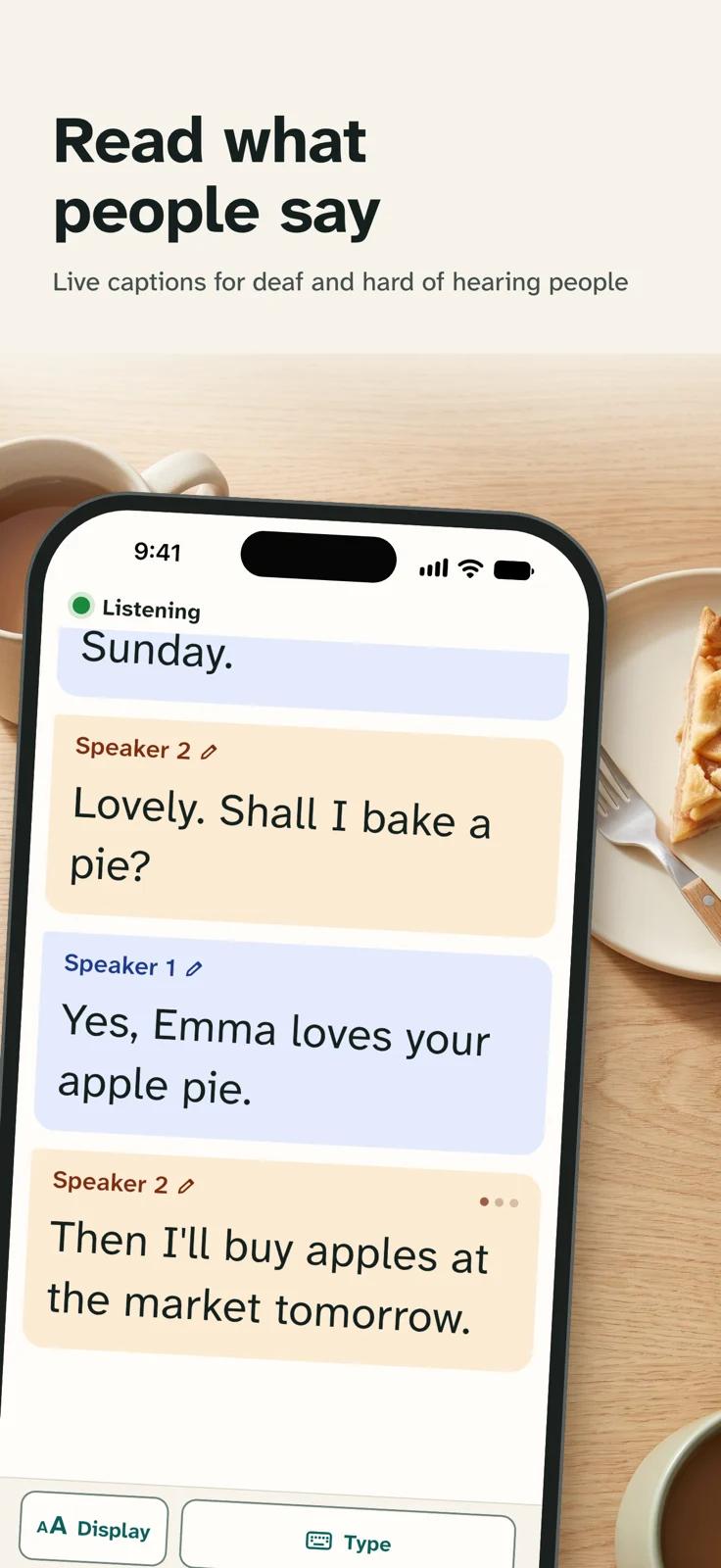
Leo Speak shows nearby speech in large text as people talk. On a phone or tablet it can color-code speakers, let you name them and show a two-way translation on a split screen. You can keep the transcript on the device and share it as PDF or text. Audio goes to Soniox for cloud transcription, so live captions require an internet connection. The phone and tablet apps include 60 free minutes a month. The browser offers one minute without signing in and 60 minutes a month with a free account.
How it compares
Speaker labels and translation with an internet connection
Leo Speak adds color-coded speakers and live translation for nearby speech, but needs a connection. Google Live Transcribe can caption nearby speech offline on eligible Android devices after you download a supported language.
Live text you can keep on your phone
Leo Speak can keep a conversation as text on the phone and share it as a PDF or text file. Otter can save the original audio too, so you can listen back alongside the transcript.
Features
Captions
- Supported: Live conversation captionsAlso on Mac · Windows · Browser
- Not supported: Live device-audio captionsAlso on Mac · Windows · Browser
- Not supported: Offline live captionsAlso on Mac · Windows · Browser
- Supported: Speaker labels
- Supported: Named speakers
- Supported: Translated captionsAlso on Mac · Windows · Browser
- Supported: Two-language caption display
- Conditional: Caption history6
- Supported: Typed replies
- Supported: Spoken typed replies
- Supported: Caption engineAutomatic speech recognitionAlso on Mac · Windows · Browser
- Supported: Speaker-label methodAutomatic speaker labels
Transcripts & notes
- Not supported: Audio recording
- Conditional: Summaries7
- Supported: Transcript export
- Supported: Export formatsPDF · TXT
Audio input & output
- Supported: Audio inputsDevice microphoneAlso on Mac · Windows · Browser
- Supported: Live outputsOn-screen textAlso on Mac · Windows · Browser
Availability & access
- Supported: Recognition languagesAfrikaans · albanian · arabic · Azerbaijani · basque · Belarusian · bengali · bosnian · Bulgarian · catalan · chinese · croatian · czech · danish · dutch · english · estonian · Filipino (Tagalog) · finnish · french · galician · german · greek · gujarati · hebrew · hindi · Hungarian · Indonesian · italian · japanese · kannada · kazakh · korean · latvian · Lithuanian · Macedonian · malay · Malayalam · marathi · Norwegian · persian · polish · Portuguese · punjabi · romanian · russian · serbian · slovak · Slovenian · spanish · swahili · swedish · tamil · telugu · Thai · turkish · Ukrainian · Urdu · Vietnamese · welshAlso on Mac · Windows · Browser
- Supported: Ongoing free core functionalityMobile free allowance plan
- Supported: Trial access2Browser only
- Supported: Internet requiredAlso on Mac · Windows · Browser
Accessibility
- Supported: Caption text sizeAlso on Mac · Windows · Browser
- Supported: System text scaling
- Supported: Dark appearance
- Supported: Caption display controlsText sizeAlso on Mac · Windows · Browser
Privacy & data
- Supported: Audio processingCloudAlso on Mac · Windows · Browser
- Supported: Summary processingCloud
- Conditional: Data storage3Device
- Supported: Model-training policy4Not used for model trainingAlso on Mac · Windows · Browser
- Supported: Outside processorsSonioxAlso on Mac · Windows · Browser
- Supported: Audio sent off deviceAlso on Mac · Windows · Browser
- Conditional: Text sent off device5
- Supported: Delete transcripts
- Supported: Delete accountAlso on Mac · Windows · Browser
- One-time browser trial only.
- Browser trial plan
- Local transcript storage only if you choose to keep conversations.
- Publisher reports Soniox does not use live transcription audio or text for training.
- When you request a summary, the conversation text and speaker names are sent to Scaleway in France.
- Keep the conversation to revisit it later.
- Uses one minute of your allowance for each 20 minutes of conversation.
Google Play ratings & reviews
Google Play did not publish an aggregate rating for this listing.
Praise
- One reviewer who previously used Google Live Transcribe preferred Leo Speak after trying it.