App-Verzeichnis
Elehear App
ELEHEAR INC.
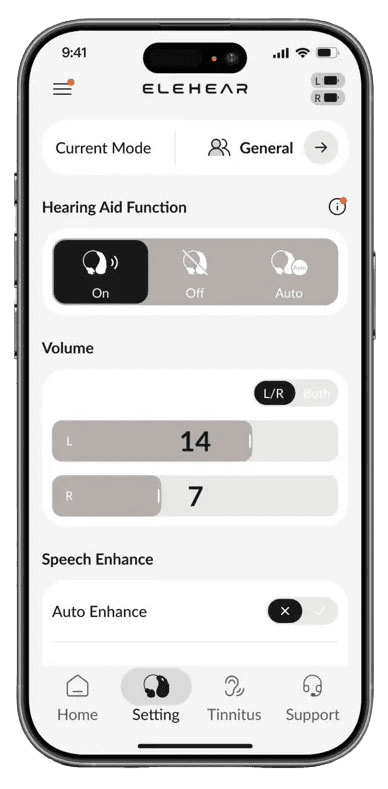
Controls Elehear Beyond and Delight hearing aids. Adjust volume, get remote adjustments and, with the Beyond family, use your phone as a remote microphone.
Funktionen
Audioeingang und -ausgang
- Bedingt: Audio inputs4Gerätemikrofon
Hörsystemsteuerung
- Bedingt: Mute hearing devices8
- Bedingt: Hearing-device tinnitus controls11
- Bedingt: Hearing-device control5
- Bedingt: Hearing-device volume5
- Bedingt: Device battery status14
- Bedingt: Remote fitting adjustments15
- Bedingt: Personalized hearing programs16
- Bedingt: Media streaming17
- Bedingt: Microphone streaming18Nur iPhone · iPad
- Bedingt: Auracast assistant19
- Bedingt: Device firmware updates20
Kompatibilität
- Unterstützt: Required hardwareELEHEAR Beyond · ELEHEAR Beyond Pro · ELEHEAR Beyond 2 Pro · ELEHEAR Delight
Verfügbarkeit und Zugang
- Documented for connecting ELEHEAR Delight hearing aids to the app; account requirement for the Beyond family is not documented.
- App download is free; core use requires purchased compatible ELEHEAR hearing aids. In-app ElePro Basic remote audiologist adjustment is also documented as free with eligible hearing aids.
- Only some features need internet: software update, online support and hearing-profile synchronization.
- Phone microphone capture for Remote Sound Capture and Translation, documented for the Beyond device family.
- The current FAQ documents app volume for Beyond Pro and Delight and independent or joined left/right volume. Not inferred from physical device-button instructions.
- Beyond 2 Pro only: Balanced Sound Control with separate bass, mid and treble bands.
- Beyond, Beyond Pro and Delight: a single bass-to-treble Tuning slider per ear; individual frequency bands are explicitly not adjustable.
- Beyond series: the app's hearing-function setting (On / Off / Auto) turns the hearing-aid amplification on or off.
- ELEHEAR Beyond. Beyond Pro has no separate control (directionality is tied to noise-reduction levels).
- ELEHEAR Beyond 2 Pro: Speech Focus setting (Front or 360) in the app.
- Delight: Serene masking sounds can be downloaded to the hearing aid (one sound at a time) and played without a Bluetooth connection. Developer states this is not medical-grade tinnitus therapy and not professionally prescribed.
- Beyond 2 Pro listening modes (e.g. Restaurant); Delight preset modes are also documented.
- ELEHEAR Delight preset modes.
- Documented for ELEHEAR Delight; battery display for the Beyond family is not documented.
- Beyond ElePro service: submit in-app test and preferences to the audiologist, who returns customized settings. Requires service availability.
- Beyond 2 Pro FAQ; personalized profile from the in-app hearing test, with optional audiologist fine-tuning via ElePro Basic.
- Classic Bluetooth streaming from iPhone and Android phones, documented for the Beyond series; Delight streams only in Headset Mode selected in the app.
- Remote Sound Capture is documented for the Beyond family; phone-microphone capture routes to compatible hearing aids.
- ELEHEAR Beyond 2 Pro only. In-app 'Auracast Broadcast Audio' joins a broadcast by QR code or nearby search; requires a venue broadcast; other app features and Bluetooth media audio are unavailable while connected, and an incoming call disconnects it.
- OTA updates through the app's My Device page for connected Beyond, Beyond Pro, Beyond 2 Pro and Delight hearing aids, when a new version is offered; needs internet.
- ELEHEAR Beyond 2 Pro with the ELEHEAR App (Auracast and media streaming are documented separately in the same FAQ).
- ELEHEAR Beyond 2 Pro; Auracast reception depends on a venue broadcast.
Bewertungen und Rezensionen im App Store
Lob
- One reviewer values creating programs for different listening situations.
Kritik
- Reviewers describe connection or saved-setting problems and request simpler volume and model selection.
- One reviewer finds repeated low-battery voice reminders intrusive.
Bewertungen und Rezensionen im Google Play
Kritik
- Requests concern finer sound controls, volume locking and clearer reminder choices.
- Some report heavy phone-battery use, including during tinnitus relief.
Gemischtes Echo
- Successful setup and pairing coexist with slow or failed device detection.
Hörsysteme
Enthält dokumentierte kompatible Produkte und Modelle, die in unserem Katalog verknüpft sind. Funktionen können von deinem Modell, Smartphone und der Firmware abhängen. Beachte mögliche Einschränkungen in den Kompatibilitätsangaben.