App-Verzeichnis
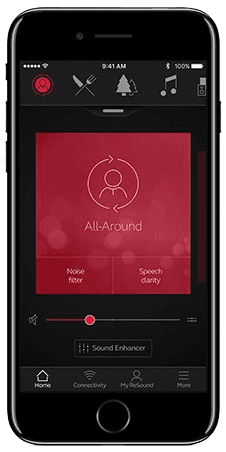
ReSound Smart 3D
GN Resound A/S
Controls ReSound hearing aids from LiNX 3D to Vivia, plus Jabra Enhance Pro 30 and Enhance Select. Includes tinnitus sound controls and remote adjustments.
Funktionen
Hörunterstützung
- Bedingt: Audio equalizer10
Hörsystemsteuerung
- Bedingt: Mute hearing devices10
- Bedingt: Directional focus control11
- Bedingt: Hearing-device tinnitus controls12
- Bedingt: Hearing-device control13
- Bedingt: Listening-program selection10
- Bedingt: Hearing-device volume10
- Bedingt: Device battery status14
- Bedingt: Find a hearing device15
- Bedingt: Professionelle Fernunterstützung16
- Bedingt: Remote fitting adjustments16
- Bedingt: Personalized hearing programs10
- Bedingt: Auracast assistant19
- Bedingt: Accessory control10
- Bedingt: Device firmware updates16
Kompatibilität
- Bedingt: Required hardware20ReSound ONE · ReSound Key · ReSound LiNX Quattro · ReSound ENZO Q · ReSound LiNX 3D · ReSound ENZO 3D
Verfügbarkeit und Zugang
Datenschutz und Daten
Forschung und Nachweise
- Unterstützt: App-specific study
- Unterstützt: Randomized app study
- Applies to the ReSound Assist remote-help service only: the hearing care professional must enable it, and it is offered in select markets. Basic hearing-aid control needs only compatible hearing aids.
- Only for ReSound Assist (remote help, new settings) and the Tinnitus Manager: the hearing care professional must enable these. Direct volume/program control works with paired compatible hearing aids.
- Evidence: Introduction > Intended purpose (p. 3).
- Required for ReSound Assist (requests, receiving new settings) and hearing-aid software updates; ReSound does not state that direct local control needs a connection.
- App data is held on the phone; GN cloud services store access attempts, crashes, erroneous usage and firmware downloads/updates. Cloud communication happens only with user consent and when hearing aids are paired. Evidence: Cybersecurity (pp. 12-13).
- Only during a ReSound Assist Live session with the hearing care professional (live audio/video call); ReSound Assist Live is documented for iOS and in selected countries. Evidence: Tinnitus management > Intended purpose (p. 8); ReSound Assist Live (p. 11).
- When sending a ReSound Assist request (optional personal message) or chatting during ReSound Assist Live; requires the service to be enabled by the hearing care professional and available in the country. Evidence: ReSound Assist Live > How to fill in your information / How to send your request (p. 10).
- By request to GN's Data Protection Officer under GN's general privacy policy; portability depends on applicable law and circumstances. No in-app export is documented. Evidence: 13. Your rights.
- GN states the system communicates with its cloud only if the user consents; cloud-dependent services such as ReSound Assist and remote updates need a network connection. Evidence: Cybersecurity (p. 13).
- Requires compatible hearing devices and a supported phone. Functions vary with model, firmware and professional configuration.
- Sound Enhancer speech focus requires a hearing-aid model and professional fitting that expose the control.
- Tinnitus Sound Generator must be supported and enabled by the hearing-care professional. Only where the hearing-care professional has enabled this feature.
- Compatible GN hearing aids and phone; adjustments depend on professional fitting. Remote services and updates require supported models and provider/market availability.
- Battery status is documented for compatible rechargeable hearing aids only.
- Requires compatible hearing devices and a supported phone. Functions vary with model, firmware and professional configuration. Location permissions and a previous connection may be required; last-known location is not live GPS in the hearing aid.
- Requires supported hearing aids, an enabled participating hearing-care provider, and service availability in the market.
- Requires Made-for-iPhone (MFi) ReSound hearing aids paired in iOS accessibility settings; otherwise a ReSound Phone Clip+ is needed. Streaming is handled by iOS, not by an in-app player.
- Direct Android streaming needs Android 10 or later, a phone model whose manufacturer implemented Android Streaming to Hearing Aids, supported hearing-aid firmware (e.g. LiNX Quattro 1.0.43+) and Smart 3D 1.5.0+, with pairing done through the app; otherwise use a Phone Clip+.
- Auracast-enabled ReSound Vivia, Enzo IA, Savi or Nexia; supported phone, hearing-aid firmware and app version are required. A local broadcast must be available.
- Models named in ReSound's Smart 3D FAQ; ReSound directs users to resound.com/compatibility for the current list, which also lists newer smartphone-compatible families (Sensia, Vivia, Enzo IA, Savi, Nexia, OMNIA).
- Remote support and remote fine-tuning (ReSound Assist) depend on the hearing-aid model, the professional enabling them and country availability; ReSound Assist Live is documented for iOS only. Evidence: Introduction > Intended purpose (p. 3).
- Direct streaming needs MFi hearing aids on iOS, or Android 10+ phones with Android Streaming to Hearing Aids plus supported firmware; a Phone Clip+ is the alternative.
Bewertungen und Rezensionen im App Store
Lob
- Reviewers value streaming controls; one reports that later iOS updates resolved earlier connection trouble.
Kritik
- Sampled complaints describe reconnection workarounds and watch battery drain, mostly in older software versions.
Bewertungen und Rezensionen im Google Play
Kritik
- Streaming, unwanted audio and notifications cause frustration for some users.
- Recent reports include lost programs, launch problems and difficult controls.
Gemischtes Echo
- Useful, sometimes intuitive controls coexist with pairing and reconnection problems.
Hörsysteme
Enthält dokumentierte kompatible Produkte und Modelle, die in unserem Katalog verknüpft sind. Funktionen können von deinem Modell, Smartphone und der Firmware abhängen. Beachte mögliche Einschränkungen in den Kompatibilitätsangaben.
16 Modelle und Modellreihen
- Jabra Enhance Pro 30
- Jabra Enhance Select 50R
- Jabra Enhance Select M1
- ReSound Custom Made by ReSound ITC
- ReSound ENZO 3D
- ReSound Enzo IA BTE
- ReSound ENZO Q
- ReSound Enzo Q BTE 88
- ReSound Enzo Q BTE 98
- ReSound Key
- ReSound LiNX 3D
- ReSound LiNX 3D RIE 61
- ReSound LiNX 3D RIE 62
- ReSound LiNX Quattro
- ReSound LiNX Quattro RIE 61
- ReSound LiNX Quattro RIE 62
- ReSound Nexia
- ReSound OMNIA
- ReSound OMNIA BTE/PBTE
- ReSound OMNIA ITC
- ReSound OMNIA miniRIE
- ReSound OMNIA RU61-DRW
- ReSound OMNIA RU61-DRWC
- ReSound Omnia RU62-DRW
- ReSound ONE
- ReSound One RT61-DRW
- ReSound One RT61-DRWC
- ReSound One RT62-DRW
- ReSound Savi
- ReSound Sensia
- ReSound Vivia
- Models named in ReSound's Smart 3D FAQ; ReSound directs users to resound.com/compatibility for the current list, which also lists newer smartphone-compatible families (Sensia, Vivia, Enzo IA, Savi, Nexia, OMNIA).