App-Verzeichnis
Fortell App
Fortell Research Inc.
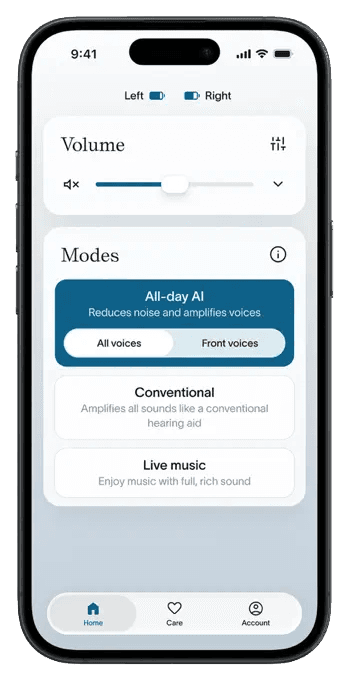
Controls Fortell AI hearing aids: volume, programs, remote care and joining Auracast broadcasts.
Funktionen
Audioeingang und -ausgang
- Bedingt: Live outputs14Audio über Hörsysteme
Hörsystemsteuerung
- Bedingt: Mute hearing devices17
- Bedingt: Directional focus control18
- Bedingt: Hearing-device control19Nur iPhone · Vereinigte Staaten
- Bedingt: Listening-program selection20Nur iPhone · Vereinigte Staaten
- Bedingt: Hearing-device volume19Nur iPhone · Vereinigte Staaten
- Bedingt: Device battery status21
- Bedingt: Professionelle Fernunterstützung22Nur iPhone · Vereinigte Staaten
- Bedingt: Remote fitting adjustments22Nur iPhone · Vereinigte Staaten
- Bedingt: Personalized hearing programs23Nur iPhone · Vereinigte Staaten · iOS 26 oder neuer
- Bedingt: Media streaming24iOS 26 oder neuer
- Bedingt: Microphone streaming25
- Bedingt: Auracast assistant19Nur iPhone · Vereinigte Staaten
- Bedingt: Device firmware updates28
Kompatibilität
- Unterstützt: Required hardwareFortell AI Hearing Aids · iPhone with iOS 26 or later, or iPad with iPadOS 26 or lateriOS 26 oder neuer
Verfügbarkeit und Zugang
Barrierefreiheit
- Unterstützt: System text scalingNur iPhone · iOS 26 oder neuer
Datenschutz und Daten
- Evidence: The Fortell app > Logging in (p. 40).
- Users must be 18+ (or under 18 with a parent or guardian agreeing and supervising) and the app is intended for United States residents. Evidence: 2. Eligibility.
- The app account is created by Fortell at the first audiology appointment. Evidence: The Fortell app > Logging in (p. 40).
- The hearing aids the app controls are prescription devices for adults with hearing loss, sold in the U.S. only.
- The app is free and included with the hearing-aid purchase; it only works with purchased Fortell AI Hearing Aids.
- Evidence: The Fortell app (p. 39).
- The Mobile App Terms require users to maintain an internet and Bluetooth connection for proper functionality; login uses an SMS code. Which individual controls work offline is not documented. Evidence: 7. User Responsibilities.
- Sound processing (Fortell AI) runs on the custom chip in the hearing aids themselves, not in the app or the cloud; the app adjusts settings.
- Applies to device-usage data (mode, duration, volume, streaming status) that Fortell collects through its services; the hosting provider is not named.
- Evidence: 12. Termination.
- A portable copy is offered depending on the user's state privacy rights; requests go to privacy@fortell.com or by phone, not through an in-app tool.
- Auracast broadcasts are joined from the app's Account tab; requires an Auracast transmitter or venue broadcast and current hearing-aid firmware. Evidence: Listening to Auracast broadcasts (p. 44).
- GN Multi-Mic+ remote microphone, set up first in the separate GN Auracast+ app, then joined as an Auracast broadcast in the Fortell app.
- Audio is delivered through paired Fortell AI Hearing Aids (Made for iPhone streaming or Auracast).
- Fortell AI Hearing Aids paired to the app; left/right volume and mute via the split button on the Home tab. Evidence: Adjusting volume (p. 42).
- Fortell AI Hearing Aids paired to the app; bass/mid/treble equalizer applies to all modes, with a separate streaming equalizer while streaming. Evidence: Equalizer (pp. 43–44).
- Fortell AI Hearing Aids paired to the app; both or one side at a time. Evidence: Adjusting volume (p. 42).
- Selecting the All-day AI Front voices mode (in the app or with the right hearing-aid button) suppresses voices behind the wearer; there is no documented control of beam direction or width.
- Fortell app and compatible hearing aids. Auracast must be selected from the app and requires an available broadcast; the app Home screen adjusts the stream volume.
- Fortell hearing aids configured by the audiologist; modes include All-Day AI, Front Voices, Conventional and Live Music.
- Shown per hearing aid on the Home tab when each aid is connected. Evidence: Checking battery (pp. 41–42).
- Requires compatible Fortell hearing aids and participating professional. The current listing restricts use to the United States.
- Wearer adjusts clarity, comfort and background noise on Fortell AI Hearing Aids; the base prescription is set by the Fortell audiologist.
- Made for iPhone streaming from a compatible iPhone (iOS 26+) or iPad (iPadOS 26+) via iOS hearing-device audio routing; the app adds a streaming volume control and streaming equalizer. Evidence: Device compatibility; Streaming phone calls and other media (pp. 37–39).
- Route is the GN Multi-Mic+ remote microphone over Auracast, paired in the GN Auracast+ app and joined from the Fortell app; telecoil, line-in and FM inputs go through the Multi-Mic+.
- On by default for paired Fortell AI Hearing Aids; can be turned off in the app under Account > Preferences to use the phone microphone.
- Direct Bluetooth hearing-aid use with a Mac running macOS Sequoia or later; this is not done through the Fortell app, which is iPhone/iPad only. Minimum OS: macOS Sequoia.
- Hearing aids paired and nearby; most updates install in the background, while critical updates may be required before certain features (e.g. Auracast) appear. A manual 'Firmware update available' prompt appears under Account. Evidence: Over-The-Air (OTA) updates (p. 47).
- Fortell AI Hearing Aids with a compatible iPhone (iOS 26+) or iPad (iPadOS 26+).
- Realtime remote fitting sessions and remote adjustments are initiated by the Fortell audiologist. Evidence: Remote fittings (p. 46).
- Made for iPhone streaming from a compatible iPhone or iPad. Evidence: Device compatibility (p. 37).
- Auracast menu requires current app and hearing-aid firmware; remote-microphone use is via the GN Multi-Mic+ joined as an Auracast broadcast.
Bewertungen und Rezensionen im App Store
Lob
- Two reviewers describe an intuitive app and straightforward setup.
Kritik
- One reviewer asks for saved profiles for different situations.
Hörsysteme
Enthält dokumentierte kompatible Produkte und Modelle, die in unserem Katalog verknüpft sind. Funktionen können von deinem Modell, Smartphone und der Firmware abhängen. Beachte mögliche Einschränkungen in den Kompatibilitätsangaben.