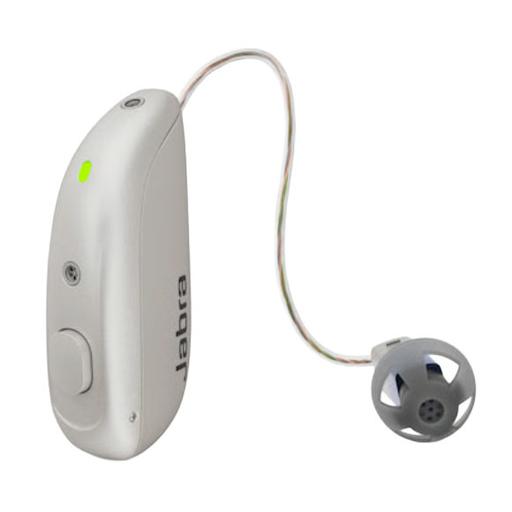
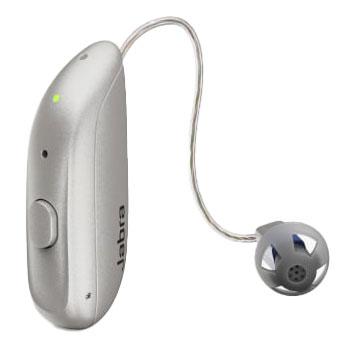
Not for sound quality alone — HearAdvisor's lab measured the Select 300 higher on both speech-in-quiet (4.0 vs 3.1) and speech-in-noise (1.8 vs 0.8). The 700's extra cost buys Auracast support, a smaller design, and built-in Android hands-free calling, not better hearing performance.
Jabra Enhance Select 700 vs. Jabra Enhance Select 300
Check out our comparison of the Jabra Enhance Select 700 vs Jabra Enhance Select 300. Listen to audio samples and see how the two hearing aids differ in terms of sound performance, features, accessories, and more.
Published Updated
Quick Verdict
AI summarizedSummarized with AI assistance from our human-researched product information, in-lab testing, objective sound measurements, and expert ratings.
The newer, pricier Select 700 adds Auracast and a smaller shell, but in HearAdvisor's lab it's the cheaper Select 300 that actually hears better in quiet and in noise.
Enhance Select 700
Choose the Jabra Enhance Select 700 if you want Jabra's most advanced noise processing, Auracast broadcast audio support, and the smallest Jabra RIC design, and you're comfortable paying roughly $100 more for it.
Enhance Select 300
Choose the Jabra Enhance Select 300 if you want the stronger lab performance in speech-in-quiet and speech-in-noise, a slightly wider fitting range that includes severe hearing loss, and a lower price.
What actually separates them
AI summarizedSpeech-in-noise lab performance
Lab measuredThe Select 300 scored 1.8/5 on HearAdvisor's speech-in-noise test versus 0.8/5 for the Select 700, and it also leads on speech-in-quiet (4.0/5 vs 3.1/5) — a real-world edge in restaurants and groups.
Price
PriceThe Select 300 runs about $100 less than the Select 700, which strengthens its case given it also tested better for speech in noise.
Connectivity extras on the 700
SpecThe Select 700 adds Bluetooth LE Audio and Auracast broadcast-audio support, plus Android hands-free calling built in (the 300 needs its Phone Clip+ accessory for that on Android) — both devices share iPhone hands-free calling and Android streaming.
Hearing loss range
SpecThe Select 300 is rated for mild, moderate, and severe hearing loss, while the Select 700 tops out at moderate, so buyers with more significant loss have only one option here.
Product Overview
Enhance Select 700
Enhance Select 300
Form Factor
Expert Rating
Score
4.1
Score
4.3
User Rating
—
1.01 reviews
Hearing Loss Level
MildModerate
MildModerateSevere
Product Features
Hands-freeRechargeableiPhoneAndroidIP68
Hands-freeRechargeableiPhoneAndroidIP68
Expert Ratings
Compare comprehensive test results and expert opinions.
Enhance Select 700
Enhance Select 300
HearingTracker Score
Enhance Select 700
4.1AVERAGE
Jabra’s flagship Enhance Select 700 offers premium sound, LE Audio, Auracast, and top-tier remote audiology care in a tiny, discreet design.
Read full reviewEnhance Select 300
4.3ABOVE AVERAGE
The Jabra Enhance Select 300 is a mid-level, over-the-counter (OTC) receiver-in-canal (RIC) hearing aid introduced in late 2023, designed for adults with mild to moderate hearing loss.
Read full reviewHearAdvisor SoundScore
Enhance Select 700
3.8AVERAGE
Jabra Enhance Select 700 achieved a SoundScore of 3.8/5 and a SoundGrade of B in HearAdvisor lab testing. It ranked #26 of 65 OTC Hearing Aid devices tested. The OTC Hearing Aid category average SoundScore was 3.68/5.
Enhance Select 300
4.1ABOVE AVERAGE
Jabra Enhance Select 300 achieved a SoundScore of 4.1/5 and a SoundGrade of A in HearAdvisor lab testing. It ranked #17 of 65 OTC Hearing Aid devices tested. The OTC Hearing Aid category average SoundScore was 3.68/5.
Build Quality
Enhance Select 700
5.0EXCELLENT
Jabra hearing aids share technology from GN Resound and generally have fantastic build quality. Select 700 is no exception with an ingress rating of IP68 and the standard robust portable charging case.
Enhance Select 300
4.9EXCELLENT
Quality is fantastic when it comes to Jabra hearing aids as they share technology from GN Resound. Select 300 have a solid ingress rating of IP68 and the portable charging case will have no problems handling daily use.
Battery
Enhance Select 700
4.0AVERAGE
Jabra 700 offer full-day 24 hour battery life. The case also holds enough power for 3 addition charges which is plenty for a weekend excursion.
Enhance Select 300
4.6EXCELLENT
Jabra have really stepped up their game with a 30 hour battery life, ensuring you get through the day even with streaming. The case also holds enough power for 3 addition charges which is plenty for a weekend excursion.
Bluetooth
Enhance Select 700
5.0EXCELLENT
Bluetooth was straightforward and reliable, working seamlessly without any issues. This is what I've come to expect with Jabra hearing aids.
Enhance Select 300
5.0EXCELLENT
Bluetooth was straightforward and reliable, working seamlessly without any issues. While the streamed audio quality has improved, it needs work before I'd consider it hi-fidelity.
App Features
Enhance Select 700
4.5EXCELLENT
The Jabra Enhance App mirrors the useful features available in Resounds prescription hearing aid app. I found it to offer plenty of options to personalize audio quality beyond the custom programming.
Enhance Select 300
4.5EXCELLENT
The Jabra Enhance App mirrors the useful features available in Resounds medical hearing aid app. I found it to offer plenty of options to personalize audio quality beyond the custom programming.
Comfort
Enhance Select 700
5.0EXCELLENT
Jabra Enhance 700 are very comfortable given their shockingly small and lightweight design. The button are also larger than many OTC products making setting changes easier.
Enhance Select 300
5.0EXCELLENT
I found 300 very comfortable given their smaller lightweight design. The button also has an improved ridge for easier use compared to previous generations.
Design
Enhance Select 700
5.0EXCELLENT
Jabra has done a nice job redesigning prescription technology for the direct-to-consumer market. Select 700 shares the same shockingly discrete size as the previous Select 500 model.
Enhance Select 300
4.8EXCELLENT
Jabra has done a nice job redesigning prescription technology for the direct-to-consumer market. Select 300 is sleek, with a range of stylish colors, and sat discretely behind my ear.
Value
Enhance Select 700
3.6BELOW AVERAGE
Jabra Enhance Select 700 has a value score of 3.7/5 based on lab performance and public display price.
Enhance Select 300
3.8AVERAGE
Jabra Enhance Select 300 has a value score of 3.9/5 based on lab performance and public display price.
Handling
Enhance Select 700
4.5EXCELLENT
I found Enhance 700 easy to use, though receiver-in-canal devices might take a bit of practice. Pro support can assist, and the easy charging case makes on-the-go charging a breeze.
Enhance Select 300
4.5EXCELLENT
300 are easy to use, though receiver-in-canal devices might take a bit of practice. Pro support can assist, and the easy charging case makes on-the-go charging a breeze.
Pro Support
Enhance Select 700
3.0ABOVE AVERAGE
Jabra has arguably the best pro support offering among OTC devices. They provide 3 years of telehealth audiologic services including remote programming and video appointments. While I'd prefer in-person appointments, Jabra continues to bridge the gap given the limitations of remote care.
Enhance Select 300
3.0ABOVE AVERAGE
Jabra has arguably the best pro support offering among OTC devices, providing telehealth with hearing care providers, remote programming, and tech support.
Lab Recordings
Listen to direct output recordings from our acoustic test lab.
Enhance Select 700
Enhance Select 300
Busy Cafe
Hear this scene unaided, for comparison
Enhance Select 700
Enhance Select 300
Quiet Office
Hear this scene unaided, for comparison
Enhance Select 700
Enhance Select 300
Streaming Music
Hear this scene unaided, for comparison
Enhance Select 700
Enhance Select 300
HearingTracker partners with HearAdvisor to provide recordings and performance data from an acoustic laboratory that follows standard scientific procedures. All hearing aids are fitted and performance-tested for mild sloping to moderate hearing loss. All audio samples cutoff above 10kHz.
Accessories
Compatible accessories for each hearing aid
Enhance Select 700
Enhance Select 300
Battery Charger
None
Premium Charger
Charges device when connected to power outlet, and also holds up to three full charges due to its onboard battery.
Remote Control
Unite Phone Clip++2
Small enough to clip onto your shirt collar, it streams phone calls and audio to your hearing aids from any Bluetooth-enabled mobile phone or smartphone.
Unite Phone Clip++2
Small enough to clip onto your shirt collar, it streams phone calls and audio to your hearing aids from any Bluetooth-enabled mobile phone or smartphone.
Remote Microphone
Multi Mic+3
A flexible remote microphone that can either be clipped to clothes or used as a tabletop mic for meetings. Use the mini-jack input for streaming audio from a music player to your hearing aids.
Multi Mic+3
A flexible remote microphone that can either be clipped to clothes or used as a tabletop mic for meetings. Use the mini-jack input for streaming audio from a music player to your hearing aids.
TV Streamer
Unite TV Streamer 2
Streams stereo sound from the television directly to your hearing aids from up to 22 feet away.
Unite TV Streamer 2
Streams stereo sound from the television directly to your hearing aids from up to 22 feet away.
Hardware
Enhance Select 700
Enhance Select 300
Bluetooth® Audio
- Made for iPhone (MFi)
- Android (ASHA)
- Bluetooth® Low Energy (LE)
- Bluetooth® Auracast™
- Made for iPhone (MFi)
- Android (ASHA)
Hands-Free Calling
- Made for iPhone (MFi)
- Android (ASHA)
- Made for iPhone (MFi)
- Accessory required (Android)
IP Rating
IP68
IP68
Mic + Speaker In Ear
Yes
Yes
Push Button
- Program control
- Volume Control
- Program control
- Volume Control
Rechargeable Batteries
Lithium-ion
Lithium-ion
Tap Controls
- Accept/end calls
No
Software Features
Enhance Select 700
Enhance Select 300
Adjustment Bands
12
14
Directionality
Binaural Directionality™ IIISynchronized SoftSwitching™
All Access DirectionalitySynchronized SoftSwitching™Ultra Focus
Environmental Adaptation
Environmental Optimizer
Environmental Optimizer
Expansion
3 settings
3 settings
Feedback Suppression
DFS Ultra II With Music Mode
DFS Ultra III
Frequency Lowering
No
Sound Shaper
Listening Programs
Fully flexible programs: 4
Fully flexible programs: 4
New User Adaptation
Synchronized Acceptance Manager
Synchronized Acceptance Manager
Noise Reduction
NoiseTracker™ II: 2 settings
NoiseTracker™ II: 3 settings
Spatial Awareness
No
Spatial Sense™
Sudden Loud Noise Reduction
Impulse Noise Reduction: On/Off
Impulse Noise Reduction: 3 settings
Tinnitus Relief
Tinnitus Sound Generator
Tinnitus Sound Generator
Wind Noise Reduction
Wind Guard: On/Off
Wind Guard: 2 settings
Bottom Line
AI summarizedThe Verdict
This is an unusual case where the flagship doesn't win on core performance: the Select 300 beat the Select 700 on both speech-in-quiet (4.0 vs 3.1) and speech-in-noise (1.8 vs 0.8) in HearAdvisor's lab, while also costing about $100 less.
That makes the 300 the sounder pick for most buyers focused on everyday speech clarity and value.
Which is right for you?
The 700 earns its premium through connectivity and fit, not sound: it's smaller, adds Auracast broadcast-audio support and Bluetooth LE Audio, and includes Android hands-free calling without an accessory. Pick it if those specific features matter to you and you're willing to accept weaker noise performance and a moderate-loss ceiling in exchange.
Before you buy
AI summarizedTry the 300 first if noise is your priority
Its 1.8/5 speech-in-noise lab score beats the 700's 0.8/5, so test it in your noisiest regular environment during the trial window before paying more for the 700.
Check your hearing loss severity
If your audiogram shows severe loss, the Select 700 isn't rated for it — the Select 300 is the only one of the two that fits that range.
Decide if Auracast matters now
Only the Select 700 supports Auracast broadcast audio; skip paying for it if you don't expect to use Auracast-enabled venues soon.