ReSound Enzo IA vs. ReSound Enzo Q

Check out our comparison of the ReSound Enzo IA vs ReSound Enzo Q. Listen to audio samples and see how the two hearing aids differ in terms of sound performance, features, accessories, and more.
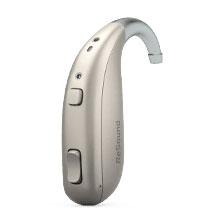
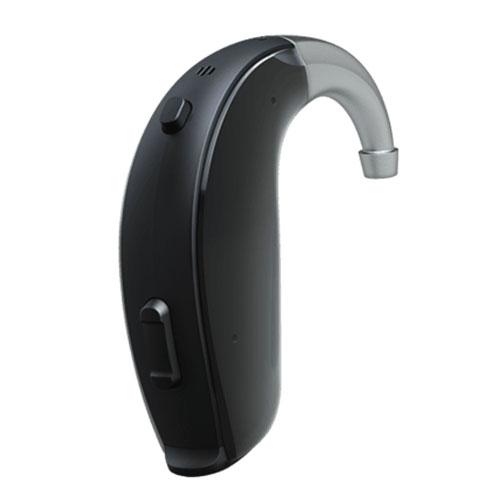
ReSound Enzo IA BTE 9
Add Product
Featured Products
$4,598 per pair
Shop Now
ReSound Enzo Q BTE 88 9
Add Product
Featured Products
$4,598 per pair
Shop Now
Enzo IA
$4,598 per pair
Shop Now
Enzo Q
$4,598 per pair
Shop Now

Product Overview

Enzo IA
Enzo Q
Form Factor
Form FactorThis super-powerful type of hearing aid is fitted behind the ear and connects via tubing to a custom-fitted mold inside the ear.
Form FactorThis type of powerful hearing aid is fitted behind the ear. Sound is channeled to the ear through either a thin or standard tube. A custom-fitted mold is likely required.
Expert Rating
User Rating
3.71 reviews
Hearing Loss LevelHearing Loss LevelThis represents HearingTracker's best guess on suitability. Please consult a licensed audiologist to confirm your own candidacy for this device.
ModerateSevereProfound
Product Features
Hands-freeRechargeableiPhoneAndroidTelecoilIP68
AndroidTelecoilIP68

Accessories

Compatible accessories for each hearing aid

Enzo IA
Enzo Q
Battery Charger

Desktop Charger (Enzo IA)

The Desktop Charger (CFF90) is a simple plug-and-play charging solution that comes with a USB-C cable and features LED status lights for easy monitoring.

None
Remote Control
None

Unite Remote Control 2

Gives you push-button control of volume and program settings on your hearing aids and lets you manage streaming accessories.

Unite Phone Clip++2

Small enough to clip onto your shirt collar, it streams phone calls and audio to your hearing aids from any Bluetooth-enabled mobile phone or smartphone.

Control++1

Remote Microphone

Multi Mic++3

The Multi-Mic+ is a versatile wireless accessory designed to help hearing aid users hear more clearly in challenging situations. It can be clipped onto clothing or worn on a lanyard to pick up a speaker’s voice and stream it directly to compatible hearing aids, or it can be placed on a table to capture group conversations in “table mode.” In addition to acting as a remote microphone, the Multi-Mic+ connects to other audio sources through a built-in telecoil, FM receiver (optional), or a standard 3.5 mm line-in cable, allowing users to stream sound from loop systems, FM transmitters, computers, TVs, or other devices. With a streaming range of up to 25 meters (82 feet), automatic mode switching, volume controls, and app integration, it provides flexible, high-quality sound input across a wide variety of listening environments

Multi Mic+3

A flexible remote microphone that can either be clipped to clothes or used as a tabletop mic for meetings. Use the mini-jack input for streaming audio from a music player to your hearing aids.

Micro Mic

A matchbook-sized remote wireless microphone that lets you hear from a distance up to 80 feet away.

Smartphone App
None

ReSound Smart 3D app+2

Adjusts sound, volume and balance settings, tinnitus settings, and allows your provider to make remote adjustments to your hearing aid programs.

Smartwatch App
None

ReSound Smart 3D app [Watch]+1

TV Streamer

ReSound TV Streamer+

The ReSound TV-Streamer+, which supports Bluetooth Auracast, streams high-quality sound with speech clarity directly to your hearing aids at the volume you prefer.

Unite TV Streamer 2

Streams stereo sound from the television directly to your hearing aids from up to 22 feet away.

Hardware

Enzo IA
Enzo Q
Bluetooth® AudioBluetooth® AudioThis hearing aid is capable of streaming Bluetooth® audio certain phones and/or devices.
  • Bluetooth® Low Energy (LE)
  • Bluetooth® Auracast™
  • Made for iPhone (MFi)
  • Android (ASHA)
Disposable BatteriesDisposable BatteriesCommon disposable batteries last anywhere from a few days to two weeks or more. For more information Google "how long do hearing aid batteries last" and click on the Hearing Tracker link.
No
13
Hands-Free CallingHands-Free CallingIt is possible to have a hands-free phone call with this hearing aid. You are not required to hold the phone up to your mouth.
  • Made for iPhone (MFi)
  • Bluetooth® Low Energy (LE)
  • Accessory required
IP RatingIP RatingIP Ratings rate sealing effectiveness of hearing aids against intrusion from foreign solid matter (dirt, dust) and moisture.
IP68
IP68
Push ButtonPush ButtonThe hearing aid features a push button which allows toggling across different sound processing programs
  • Program control
  • Program control
  • Volume Control
Rechargeable BatteriesRechargeable BatteriesCharge your batteries overnight in a docking station and get a full day's use (in most cases) of battery life the following day.
Lithium-ion
No
Tap ControlsTap ControlsThe hearing aid may be controlled by physically tapping it with your fingers.
  • Accept/end calls
No
TelecoilTelecoilThe hearing aid is able to pick up audio from landline telephones or public audio systems without using its acoustic microphones. This minimizes background noise and improves clarity and understanding, even over great distances. At performing arts venues, events, government meetings, etc., look for assistive listening systems (hearing loop, FM, and infrared systems), which must be provided at no cost under the Americans with Disabilities Act (ADA) and other international regulations.
Yes
Yes
Volume RockerVolume RockerA volume rocker or wheel to allows the adjustment of volume with a finger.
Yes
Yes

Software Features

Enzo IA
Enzo Q
Adjustment BandsAdjustment BandsThese are frequency-divided sections that can be adjusted in a hearing aid in order to amplify sounds. Although there are rarely more than 10 frequencies measured in a hearing assessment, having more bands that can be adjusted may allow for improved speech understanding and user comfort.
17
6
Adjustment SynchronizationAdjustment SynchronizationThis feature allows for a more pleasant listening experience by ensuring that both hearing aids process sound the same way. If one hearing aid changes its processing in response to noise or speech, it will send a wireless signal to the other hearing aid so both process sound in the same way.
No
Synchronized push buttonSynchronized push buttonThis feature allows for a more pleasant listening experience by ensuring that both hearing aids process sound the same way. If one hearing aid changes its processing in response to noise or speech, it will send a wireless signal to the other hearing aid so both process sound in the same way.Synchronized volume controlSynchronized volume controlThis feature allows for a more pleasant listening experience by ensuring that both hearing aids process sound the same way. If one hearing aid changes its processing in response to noise or speech, it will send a wireless signal to the other hearing aid so both process sound in the same way.
Automatic Phone ProgramAutomatic Phone ProgramHearing aids with this feature can detect when a phone is placed near them and automatically switch to a phone program. In this setting, the hearing aids will reduce background noise and increase the volume of the phone.
No
PhoneNow™PhoneNow™PhoneNow is a feature that automatically switches the hearing instrument to a phone program. If there is no telecoil in the hearing instrument, an acoustic phone program with a frequency response optimized for use with the phone is selected. If the hearing instrument also contains a telecoil, PhoneNow can be programmed to switch to inductive transmission of the phone signal through the telecoil. Regardless of the presence or absence of a telecoil in the hearing instrument, PhoneNow is activated through a small magnet that is affixed to the phone receiver.
Bass BoostBass BoostExtra amplification for lower tones.
No
Low Frequency Boost: UltimateLow Frequency BoostUP receiver only
DirectionalityDirectionalityDepending on the types and number of microphones a hearing aid has, the hearing aid may be able to boost sounds from specific directions (by reducing sounds from other directions). This can be helpful to focus on a speaker directly in front of the hearing aid user, as well as to give the user information about where different sounds are coming from.
Binaural beamformingBinaural beamformingBeamforming frequency range of 250-5000Hz.Clear FocusClear FocusFour-microphone binaural beamforming directionality with ReSound's Noise Tracker II for noise reduction.Synchronized SoftSwitching™Synchronized SoftSwitching™SoftSwitching (synchronized between ears) uses sound level and speech detection algorithms to decide when directionality is likely to be advantageous in a certain listening environment. It also offers the same four selections of MultiScope beamwidth settings: the default AutoScope, Narrow, Medium and Wide. The SoftSwitching mode differs from MultiScope Adaptive Directionality in that it uses slower transitions between directional settings and the omnidirectional setting, which is sometimes more comfortable and preferable among certain hearing aid users.
Adaptive Directionality™Adaptive Directionality™Adaptive Directionality slowly transitions between omnidirectional and directional settings based on an analysis of the acoustic environment.Adjustable directional mixAdjustable directional mixClinicians have the option of adjusting the Directional Mix (or crossover frequency) between omnidirectional and directional processingAutoscope Adaptive Directionality™Autoscope Adaptive Directionality™AutoScope monitors the relative levels of sounds coming from different directions to automatically adjust the width of the directional beam.Binaural Directionality™Binaural Directionality™Steers the microphone response of both devices to support patients’ awareness of the auditory environment, and to allow them to choose what is most salient in that environment.Binaural Directionality™ IIIBinaural Directionality™ IIIBinaural Directionality III provides the ultimate balance for supporting natural hearing: a signal-to-noise ratio improvement similar to bilateral directional microphones and a significant benefit in ease of listening compared to other directional microphone strategies.Directional Mix ProcessorDirectional Mix ProcessorDirectional Mix Processing gives hearing aid wearers rich overall sound quality, and helps people localize sound. It is the engine that enables us to provide all the benefits of directionality while maintaining natural-sounding voices.MultiScope Adaptive Directionality™MultiScope Adaptive Directionality™Allows the hearing care professional to set how wide the directional beam should be for each individual user.SoftSwitching™SoftSwitching™SoftSwitching uses sound level and speech detection algorithms to decide when directionality is likely to be advantageous in a certain listening environment. It also offers the same four selections of MultiScope beamwidth settings: the default AutoScope, Narrow, Medium and Wide. The SoftSwitching mode differs from MultiScope Adaptive Directionality in that it uses slower transitions between directional settings and the omnidirectional setting, which is sometimes more comfortable and preferable among certain hearing aid users.Synchronized SoftSwitching™Synchronized SoftSwitching™SoftSwitching (synchronized between ears) uses sound level and speech detection algorithms to decide when directionality is likely to be advantageous in a certain listening environment. It also offers the same four selections of MultiScope beamwidth settings: the default AutoScope, Narrow, Medium and Wide. The SoftSwitching mode differs from MultiScope Adaptive Directionality in that it uses slower transitions between directional settings and the omnidirectional setting, which is sometimes more comfortable and preferable among certain hearing aid users.
Environmental AdaptationEnvironmental AdaptationThe hearing aid can detect different acoustical environments, like speech in noise, and adjust the sound of the hearing aid accordingly to drive comfort or speech understanding, etc.
360 All Around360 All AroundA microphone steering system that selects the best listening mode even in unstable background noiseEnvironmental Optimizer IIEnvironmental Optimizer IIThe Environmental Optimizer II automatically adjusts both gain and Noise Tracker II’s speech-in-noise settings according to the listening environment.
Binaural Environmental Optimizer™ IIBinaural Environmental Optimizer™ IINoise reduction and gain adjustments are made based on environmental classification, and are synchronized and optimized between the two hearing aids. For optimal audibility and listening comfort in any sound environment.Environmental ClassifierEnvironmental ClassifierThe Environmental Classifier is the basis for precise noise reduction and exceptionally comfortable transitions between listening environments. It’s the only hearing aid system that analyzes patterns of energy to distinguish speech from other sounds.
ExpansionExpansionExpansion reduces audibility for very soft sounds. This can help to remove microphone noise, which is generated by soft environmental sounds.
3 settings
Basic
Feedback SuppressionFeedback SuppressionIf any sound amplified by the hearing aid escapes the ear canal, it may reach the hearing aid’s own microphone and cause a harsh whistling noise. Some hearing aids are able to recognize when this feedback occurs and reduce or eliminate it.
DFS Ultra IIIDFS Ultra IIIReduces feedback while preserving amplification without compromising sound quality.
DFS Ultra™ IIDFS Ultra™ IIDFS Ultra II analyzes and models the incoming sound and uses this information to prevent the feedback cancellation filters from attacking desired sounds. This results in excellent feedback cancellation performance without creating disturbing sound quality artifacts.Music Mode™Music Mode™The Music Mode feature in DFS Ultra II controls feedback while maintaining a more accurate representation of music. It provides excellent sound quality without tonal artifacts for hearing aid users who enjoy or play music, giving users a clearer, richer distortion-free music experience.
Frequency LoweringFrequency LoweringUnderstanding certain speech sounds is dependent on the high frequency parts of these sounds. For individuals with high frequency hearing loss, this feature can take high frequency speech information and move it to lower frequencies where it will be audible.
Sound ShaperSound ShaperSound Shaper is the only frequency compression technology that moves high-frequency sounds down in the spectrum while maintaining a proportional relationship between input and output frequencies. So Sound Shaper improves the audibility of speech cues that would otherwise be lost, while maintaining the best sound quality possible.
Listening ProgramsListening ProgramsNumber of manually accessible listening programs (using push button, remote, app, or other switching method)
Fully flexible programs: 4Fully flexible programsCustom listening programs
New User AdaptationNew User AdaptationProvider may set the hearing aid to gradually get louder over the first few weeks or months of a new hearing aid fitting. This can be convenient for new users who want to experience maximum benefit without making a lot of trips to the provider for tune ups.
Synchronized Acceptance ManagerSynchronized Acceptance ManagerSynchronized Acceptance Manager gives a gradual and automatic increase of the gain in the hearing aid over time.
Noise ReductionNoise ReductionThis feature uses modern hearing aids’ processing power to examine the incoming sound signal, determine if noise is present and reduce the volume of the troublesome sound to increase comfort.
NoiseTracker™ II: 5 settingsNoiseTracker™ IINoiseTracker II uses a technology called spectral subtraction. Spectral subtraction works by subtracting the short-term noise spectrum from the signal, leaving only the speech portion behind ... ReSound’s NoiseTracker II is able to use spectral subtraction successfully because the Environmental Classifier has identified speech and noise so precisely.
NoiseTracker™ II: AdvancedNoiseTracker™ IINoiseTracker II uses a technology called spectral subtraction. Spectral subtraction works by subtracting the short-term noise spectrum from the signal, leaving only the speech portion behind ... ReSound’s NoiseTracker II is able to use spectral subtraction successfully because the Environmental Classifier has identified speech and noise so precisely.
Phone Ear FocusPhone Ear FocusWhen on a phone call, some hearing aids can focus amplification on the phone ear and reduce amplification in the non-phone ear.
No
Comfort Phone™Comfort Phone™Comfort Phone utilizes the bilateral wireless synchronization between hearing instruments to identify the “phone ear” and the “non-phone ear.” The amplification for the non-phone ear is then attenuated by 6 dB.
Power On DelayPower On DelayWhen you close the battery door to turn on your hearing aid, the hearing aid won't start producing sound for a certain amount of time. This can alleviate whistling (feedback) sound that sometimes occurs while inserting your hearing aid.
No
SmartStart™SmartStart™The SmartStart delays the switch-on time of your hearing instrument 10 seconds after you have closed the battery compartment. As you insert the instrument in your ear, you may hear beeps at one second intervals. After the instrument beeps ten times, it will turn on.
Spatial AwarenessSpatial AwarenessListening to sound through hearing aids is not a natural experience, and your ability to tell where a sound is coming from may be impacted by the way sounds are amplified with hearing aids. Some hearing aids attempt to fix this problem by preserving cues to sound localization like between-ear level differences, etc.
No
Spatial Sense™Spatial Sense™Spatial Sense ... is modeled on natural processes in the peripheral auditory system in order to deliver the best signals to the brain, enhancing localization and sound quality.
Sudden Loud Noise ReductionSudden Loud Noise ReductionThis feature detects loud sounds and reduces their volume to a comfortable level. Though not a replacement for hearing protection, this technology can greatly improve listener comfort.
Impulse Noise Reduction: 3 settingsImpulse Noise ReductionReduces amplification for sudden, brief noises.
No
Tinnitus ReliefTinnitus ReliefTinnitus, or ringing in the ears, can be addressed by hearing aids in several different ways, such as introducing a soft therapeutic signal or targeted notched noise.
Tinnitus Sound GeneratorTinnitus Sound GeneratorThe tinnitus sound generator administers sounds that make the disturbing noise less noticeable and draw your attention away from the tinnitus.
Unique Amplification StrategyUnique Amplification StrategyHearing aids all process sounds a little bit differently. Sometimes it varies even within one model.
No
WARP compression: 14WARP compressionFrequency Warping is a technique to map the frequency analysis directly to a logarithmic scaling. By using appropriate warping parameters, we get a scaling that is very close to models of the critical bands of the human auditory system.
Wind Noise ReductionWind Noise ReductionAs wind blows against the microphones of hearing aids, unpleasant noise may be generated. Some hearing aids have the ability to recognize this wind noise and reduce its level. Such reductions may also affect the audibility of desired sounds, like speech.
Wind Guard: 3 settingsWind GuardWhen no wind noise is found, the hearing aid constantly updates and stores the sound input levels in each Warp band. Then, when wind is present, WindGuard calculates the amount of gain reduction needed to return to the stored level of the specific bands affected by wind noise.
Wind Guard: UltimateWind GuardWhen no wind noise is found, the hearing aid constantly updates and stores the sound input levels in each Warp band. Then, when wind is present, WindGuard calculates the amount of gain reduction needed to return to the stored level of the specific bands affected by wind noise.