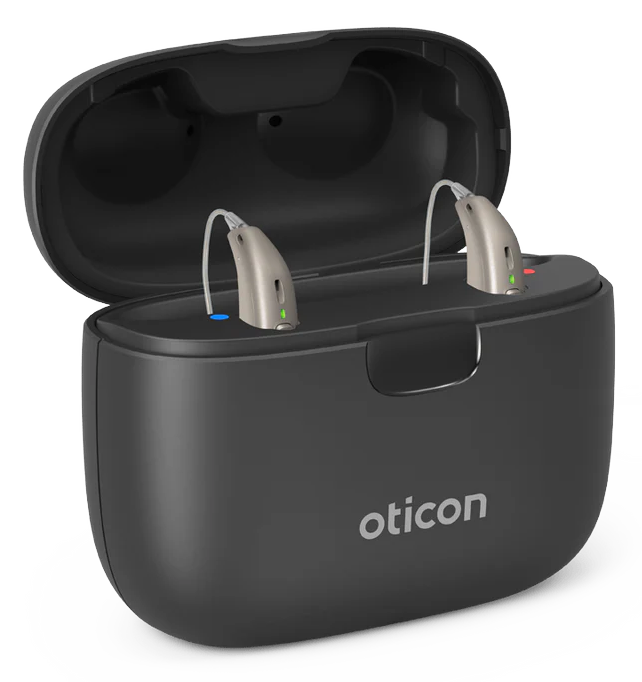
The Oticon Intent SmartCharger is a lidded charging case for rechargeable Intent miniRITE hearing aids. Charge the case before a trip and its built-in battery can recharge an empty pair at least three times. At home, one USB cable charges the case and both hearing aids together.
How it compares
Three full charges away from an outlet
Oticon’s Reveal desk charger needs USB power each time you charge. A fully charged Intent SmartCharger can recharge a pair of Intent miniRITE R hearing aids at least three times while unplugged.
How long a full charge takes
If you have a short charging window, Oticon rates the Intent miniRITE pair at up to two hours at room temperature. Phonak quotes up to three hours for its Audéo Life hearing aids in the Charger Case Go. Each case fits its own hearing aids.
Forum research
Features
Power and charging
Supported: Charges away from a power outlet1Recharge hearing aids with the built-in case battery.
Supported: USB-C power input2The USB-C port recharges the case.
Supported: Power connector3USB-C on the case with a detachable 150 cm USB-A to USB-C cable.
Supported: Electrical input requirements4Case input is 5 V DC at less than 0.5 A. The supplied wall adapter accepts 100–240 V AC, 50–60 Hz and outputs 5 V DC at 1 A.
Supported: Power adapter included5The US technical sheet lists an included AC adapter.
Supported: Power bank use6The internal battery powers the charging slots. A USB 2.0 supply rated at least 500 mA, such as a suitable computer or car port, can recharge the case.
Supported: Charging method7Metal contacts charge the hearing aids. Magnets align them with the contacts.
Supported: Hearing-aid and receiver fit8Made for Oticon Intent miniRITE hearing aids, with room for different speaker lengths and earpieces.
Supported: Charging slots9Two ports, red for the right hearing aid and blue for the left.
Supported: Full hearing-aid charge time10Up to 2 hours at 59–95°F (15–35°C).
Supported: Full hearing-aid charge time11Up to 6 hours at 41–59°F or 95–104°F (5–15°C or 35–40°C).
Supported: Quick charge duration1215 minutes from empty.
Supported: Runtime after quick charge13About 4 hours of use after 15 minutes from empty. Streaming and other use affect runtime.
Supported: Quick charge duration1430 minutes from empty.
Supported: Runtime after quick charge15About 8 hours of use after 30 minutes from empty. Streaming and other use affect runtime.
Supported: Quick charge duration1660 minutes from empty.
Supported: Runtime after quick charge17About 16 hours of use after 60 minutes from empty. Streaming and other use affect runtime.
Supported: Charging indicators18Open the lid to check the hearing aids. Pulsing orange indicates low charge, steady orange indicates at least four estimated hours of use, and green means full.
Supported: Automatic hearing-aid power19Charging stops when the aids are full. The charger turns them on when removed. A depleted, unplugged case leaves them on.
Supported: Portable full pair charges20At least three complete charges of a pair from a fully charged case.
Supported: Charging-case recharge time21Up to 4 hours to recharge the case alone.
Supported: Charging-case recharge time22Up to 6 hours to recharge the case and aids together.
Supported: Storage conditions30Transport and storage limits are −13 to 158°F (−25 to 70°C), 5–93% relative humidity without condensation and 700–1,060 hPa. For everyday storage, Oticon recommends a dry spot at 59–95°F.
Supported: Status indicators31Three lights show case charge. Each hearing aid has its own status light.
Supported: Physical controls32Open the lid to check the case battery level when unplugged.
Supported: Control accessibility33The ports are color-coded by side. Magnets help guide each hearing aid into place.
Supported: Included items34The manufacturer’s package includes the case, cable and a region-specific power adapter.
Supported: Warranty terms35Oticon’s limited international warranty covers manufacturing and material defects. Ask your supplier for local terms and duration.
Supported: Repair and service options36Contact your hearing care professional about a fault and return the case to the supplier for battery replacement.
Supported: Routine maintenance37Keep the ports dry and clear of dust. Wipe them with a dry cloth and keep liquids and cotton swabs out of the ports.
Supported: Regional variants38The supplied wall plug varies by country.
Care and fit
Supported: Cleaning materials39Use a dry cloth for the ports. Keep water, cleaning fluids and cotton swabs out.
Fully charge the case before first use. Connect the included USB cable to the back of the case and plug the adapter into a wall outlet. Place the right hearing aid in the red port and the left in the blue port. Close the lid. To check progress, open the lid and look at each aid’s light. A steady green light means it is fully charged.
Documentation checked Nov 23, 2026
Pros and cons, according to owners
1 forum post in 1 discussion.Jan 19, 2026
Owner observations
Overnight top-ups
One Intent wearer described using the unplugged case to top up both hearing aids after about 15 hours of daily wear. In that routine, they plugged the case back in about every ninth day. The aids still had charge left each night.
Individual experiences depend on hearing aids, devices and setup. This is not a customer satisfaction rating.