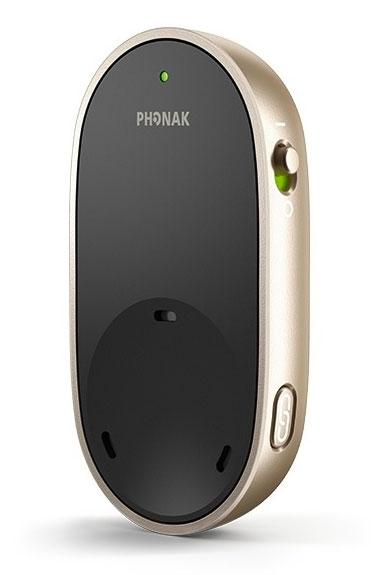
Phonak PartnerMic™
Hear one conversation partner through compatible Phonak hearing aids.
What PartnerMic™ does
Clip the PartnerMic to the person you want to hear. It sends their voice directly to compatible Phonak hearing aids. It focuses on speech near the person wearing it and has a built-in rechargeable battery. The clip starts sending audio after it is switched on and the paired hearing aids are in range.
Which hearing aids work with Phonak PartnerMic™?
Microphone audio
- Phonak Audéo EON R
Use the wireless model and pair the correct accessory directly to the hearing aids.
- Phonak Audéo EON Sphere
Use the wireless model and pair the correct accessory directly to the hearing aids.
- Phonak Audéo Infinio Ultra R
Use the wireless model and pair the correct accessory directly to the hearing aids.
- Phonak Audéo Infinio Ultra Sphere
Use the wireless model and pair the correct accessory directly to the hearing aids.
- Phonak Audéo Lumity L-312
Use the wireless model and pair the correct accessory directly to the hearing aids.
- Phonak Audéo Lumity Life
Use the wireless model and pair the correct accessory directly to the hearing aids.
Choose the exact model printed on your hearing aids or paperwork. A family match does not establish support for every model in that family.
View documented devices and setups
- Phonak Audéo EON R · Exact model
One speaker and one compatible hearing-aid fitting · microphone_audio
Use the wireless model and pair the correct accessory directly to the hearing aids.
Documented supportSource · 2026-11-18Use the wireless model and pair the correct accessory directly to the hearing aids.
- Phonak Audéo EON Sphere · Exact model
One speaker and one compatible hearing-aid fitting · microphone_audio
Use the wireless model and pair the correct accessory directly to the hearing aids.
Documented supportSource · 2026-11-18Use the wireless model and pair the correct accessory directly to the hearing aids.
- Phonak Audéo Infinio Ultra R · Exact model
One speaker and one compatible hearing-aid fitting · microphone_audio
Use the wireless model and pair the correct accessory directly to the hearing aids.
Documented supportSource · 2026-11-18Use the wireless model and pair the correct accessory directly to the hearing aids.
- Phonak Audéo Infinio Ultra Sphere · Exact model
One speaker and one compatible hearing-aid fitting · microphone_audio
Use the wireless model and pair the correct accessory directly to the hearing aids.
Documented supportSource · 2026-11-18Use the wireless model and pair the correct accessory directly to the hearing aids.
- Phonak Audéo Lumity L-312 · Exact model
One speaker and one compatible hearing-aid fitting · microphone_audio
Use the wireless model and pair the correct accessory directly to the hearing aids.
Documented supportSource · 2026-11-18Use the wireless model and pair the correct accessory directly to the hearing aids.
- Phonak Audéo Lumity Life · Exact model
One speaker and one compatible hearing-aid fitting · microphone_audio
Use the wireless model and pair the correct accessory directly to the hearing aids.
Documented supportSource · 2026-11-18Use the wireless model and pair the correct accessory directly to the hearing aids.
- Phonak Audéo Lumity R · Exact model
One speaker and one compatible hearing-aid fitting · microphone_audio
Use the wireless model and pair the correct accessory directly to the hearing aids.
Documented supportSource · 2026-11-18Use the wireless model and pair the correct accessory directly to the hearing aids.
- Phonak Audéo Lumity RT · Exact model
One speaker and one compatible hearing-aid fitting · microphone_audio
Use the wireless model and pair the correct accessory directly to the hearing aids.
Documented supportSource · 2026-11-18Use the wireless model and pair the correct accessory directly to the hearing aids.
- Phonak Audéo Paradise 13T · Exact model
One speaker and one compatible hearing-aid fitting · microphone_audio
Use the wireless model and pair the correct accessory directly to the hearing aids.
Documented supportSource · 2026-11-18Use the wireless model and pair the correct accessory directly to the hearing aids.
- Phonak Audéo Paradise 312 · Exact model
One speaker and one compatible hearing-aid fitting · microphone_audio
Use the wireless model and pair the correct accessory directly to the hearing aids.
Documented supportSource · 2026-11-18Use the wireless model and pair the correct accessory directly to the hearing aids.
- Phonak Audéo Paradise R · Exact model
One speaker and one compatible hearing-aid fitting · microphone_audio
Use the wireless model and pair the correct accessory directly to the hearing aids.
Documented supportSource · 2026-11-18Use the wireless model and pair the correct accessory directly to the hearing aids.
- Phonak Audéo Paradise RT · Exact model
One speaker and one compatible hearing-aid fitting · microphone_audio
Use the wireless model and pair the correct accessory directly to the hearing aids.
Documented supportSource · 2026-11-18Use the wireless model and pair the correct accessory directly to the hearing aids.
- Phonak Bolero M M · Exact model
One speaker and one compatible hearing-aid fitting · microphone_audio
Use the wireless model and pair the correct accessory directly to the hearing aids.
Documented supportSource · 2026-11-18Use the wireless model and pair the correct accessory directly to the hearing aids.
- Phonak Bolero M PR · Exact model
One speaker and one compatible hearing-aid fitting · microphone_audio
Use the wireless model and pair the correct accessory directly to the hearing aids.
Documented supportSource · 2026-11-18Use the wireless model and pair the correct accessory directly to the hearing aids.
- Phonak Naída Lumity P-PR · Exact model
One speaker and one compatible hearing-aid fitting · microphone_audio
Use the wireless model and pair the correct accessory directly to the hearing aids.
Documented supportSource · 2026-11-18Use the wireless model and pair the correct accessory directly to the hearing aids.
- Phonak Naída Lumity P-UP · Exact model
One speaker and one compatible hearing-aid fitting · microphone_audio
Use the wireless model and pair the correct accessory directly to the hearing aids.
Documented supportSource · 2026-11-18Use the wireless model and pair the correct accessory directly to the hearing aids.
- Phonak Naída M SP · Exact model
One speaker and one compatible hearing-aid fitting · microphone_audio
Use the wireless model and pair the correct accessory directly to the hearing aids.
Documented supportSource · 2026-11-18Use the wireless model and pair the correct accessory directly to the hearing aids.
- Phonak Naída Paradise P-PR · Exact model
One speaker and one compatible hearing-aid fitting · microphone_audio
Use the wireless model and pair the correct accessory directly to the hearing aids.
Documented supportSource · 2026-11-18Use the wireless model and pair the correct accessory directly to the hearing aids.
- Phonak Naída Paradise P-UP · Exact model
One speaker and one compatible hearing-aid fitting · microphone_audio
Use the wireless model and pair the correct accessory directly to the hearing aids.
Documented supportSource · 2026-11-18Use the wireless model and pair the correct accessory directly to the hearing aids.
- Phonak Virto Infinio R · Exact model
One speaker and one compatible hearing-aid fitting · microphone_audio
Use the wireless model and pair the correct accessory directly to the hearing aids.
Documented supportSource · 2026-11-18Use the wireless model and pair the correct accessory directly to the hearing aids.
- Phonak Virto M M-312 · Exact model
One speaker and one compatible hearing-aid fitting · microphone_audio
Use the wireless model and pair the correct accessory directly to the hearing aids.
Documented supportSource · 2026-11-18Use the wireless model and pair the correct accessory directly to the hearing aids.
- Phonak Virto Paradise 312 · Exact model
One speaker and one compatible hearing-aid fitting · microphone_audio
Use the wireless model and pair the correct accessory directly to the hearing aids.
Documented supportSource · 2026-11-18Use the wireless model and pair the correct accessory directly to the hearing aids.
Documented features
Listening and control
- No mute control for the accessory microphone
There is no labeled mute control. The speaker can use the power switch to end the stream.
Documentation · 2026-11-18- Audio bandwidth
- Manufacturer lists 120 Hz to 7.3 kHz for the accessory audio path.
Hearing-aid bandwidth and room performance are separate.
Documentation · 2026-11-18 - Automatic mode switching
- Selects a directional beam automatically close to the wearer’s voice.
This is a beam adjustment, not a change between worn and table modes.
Documentation · 2026-11-18 - Directional microphone
- Supported
Phonak describes automatic selection of a directional beam at the recommended clip distance.
Documentation · 2026-11-18 - Remote-microphone runtime
- 6 hours
Up to six hours of microphone streaming on a charge; a manufacturer claim.
Setup: One speaker and one compatible hearing-aid fitting
Documentation · 2026-11-18 - Microphone modes
- Directional clip-on microphone
Use close to the voice. There is no group table mode.
Documentation · 2026-11-18 - Noise management
- Phonak describes directional beam selection to improve the speaker-to-noise balance at the recommended placement.
Manufacturer claim for short distances and moderate noise. No independent performance test is recorded.
Documentation · 2026-11-18 - Microphone placement
- Wear vertically about 8 in (20 cm) below the mouth, no farther than 20 in (50 cm) and tilted no more than 45°.
Attach securely to clothing, keep uncovered and use the lanyard only where appropriate.
Documentation · 2026-11-18 - Cannot change hearing aid programs
The clip’s controls are power and pairing. Use compatible hearing-aid controls for program changes.
Documentation · 2026-11-18- Remote microphone
- Supported
The speaker wears the clip and the paired hearing aids receive their voice.
Documentation · 2026-11-18 - Stream volume control
- Adjust listening volume from the hearing-aid multifunction button or supported myPhonak remote-control functions.
The microphone itself has neither a volume button nor a gain dial.
Documentation · 2026-11-18 - No table microphone mode
Phonak specifies directional clip-on use in every orientation. No table mode is provided.
Documentation · 2026-11-18- Volume control
- Supported · With conditions
Use the hearing-aid multifunction button or the optional myPhonak app, rather than controls on the clip.
Setup: One speaker and one compatible hearing-aid fitting
Documentation · 2026-11-18
Connections
- No analog audio input
The input shown in the labeled device diagram is USB-C charging power.
Documentation · 2026-11-18- Companion app control
- Optional myPhonak remote-control function adjusts the accessory stream level on supported hearing aids.
Use the hearing-aid buttons if you do not use the app.
Documentation · 2026-11-18 - No Auracast broadcasting
This microphone sends over Phonak AirStream to one paired fitting.
Documentation · 2026-11-18- Bilateral and unilateral use
- Sends the speaker to both hearing aids in the supported pair.
The procedure refers to hearing aid(s). Mixed-model or independently routed fittings were not verified.
Documentation · 2026-11-18 - Firmware updates
- A qualified professional can use the Sonova Firmware Upgrader with a compatible computer and cable.
No minimum PartnerMic firmware is published in the checked hearing-aid compatibility tables.
Documentation · 2026-11-18 - Link to hearing aids
- Phonak AirStream, 2.4 GHz
Pair directly to compatible hearing aids. This is a dedicated accessory link.
Documentation · 2026-11-18 - Accessory-to-hearing-aid range
- 25 m
Phonak calls this up to 25 m, quoted as 80 ft. Walls, furniture and the wearer’s body can reduce range.
Documentation · 2026-11-18 - Hearing-aid pairing method
- Turn on the hearing aids, switch on PartnerMic and hold within 4 inches (10 cm). Press the pairing button if not already searching. Wait for green light and a confirmation beep.
A new successful pairing removes the previous hearing-aid pairing.
Documentation · 2026-11-18 - No hands-free calling through this accessory
The clip connects directly to the hearing aids as a conversation microphone. It has no Bluetooth phone-headset setup.
Documentation · 2026-11-18- Professional setup
- Documented home pairing. Seek professional help if troubleshooting or accessory firmware updates are needed.
No initial professional activation is described.
Documentation · 2026-11-18 - Receiver requirements
- Built-in direct-streaming receiver in supported Phonak hearing aids
The PartnerMic does not require a separate body-worn streamer.
Documentation · 2026-11-18 - Reconnection behavior
- Reconnects to the stored hearing aids. Streaming resumes when they return within range.
The manual describes retaining pairing through off/on cycles and resuming after range loss.
Documentation · 2026-11-18 - Remembered hearing-aid pairings
- 1 devices
Counting unit is one hearing-aid fitting, which can include a paired set. Re-pair to move to another wearer.
Documentation · 2026-11-18 - Simultaneous listeners
- One compatible hearing-aid fitting (one listener)
The specification lists one connected pair.
Documentation · 2026-11-18 - No telecoil input
The complete device and audio-path diagrams show direct microphone pickup with no hearing-loop input.
Documentation · 2026-11-18
Power and charging
- Accessory battery is not user-replaceable
Phonak describes the battery as embedded and nonremovable.
Documentation · 2026-11-18- Accessory battery type
- Embedded rechargeable 3.7 V lithium polymer, typical 230 mAh
This battery powers the microphone.
Documentation · 2026-11-18 - Accessory charge time
- 2 hours
Typical recharge time. Phonak advises at least two hours before first use.
Documentation · 2026-11-18 - Rechargeable accessory battery
- Supported
Recharge the microphone through its USB-C port.
Documentation · 2026-11-18 - Battery status reporting
- Blinking red at about 30 minutes remaining; the aids play two beeps at ten-minute intervals.
Charging flashes green and a full charge is solid green.
Documentation · 2026-11-18 - Electrical input requirements
- Stabilized 5 V DC, maximum 1 A, USB-C
Sonova specifies the original Phonak power supply.
Documentation · 2026-11-18 - Power connector
- USB-C charging input on the microphone
Use the supplied USB-C cable and correct Phonak supply.
Documentation · 2026-11-18 - Cannot be used while charging
The microphone switches off while connected for charging.
Documentation · 2026-11-18
Design and everyday use
- Control accessibility
- Power slides, the separate pairing button presses, and the hearing aids play a pairing confirmation beep.
Phonak does not rate one-handed or dexterity performance.
Documentation · 2026-11-18 - Dimensions
- 30 × 55 × 18 mm (W × H × D), upright orientation
Sonova gives 55 × 30 × 18 mm in length × width × height order. The sheet does not separately dimension the clip.
Documentation · 2026-11-18 - Included items
- USB-C cable, Lanyard, Protective bag
Contents may vary by country. The 12 V car adapter is optional.
Documentation · 2026-11-18 - Routine maintenance
- Protect from dirt, excess moisture, impact and heat, and get provider help when normal setup or charging checks fail.
Keep the microphone openings unobstructed during use.
Documentation · 2026-11-18 - Operating conditions
- 32–113°F (0–45°C), below 90% noncondensing humidity
Protect from moisture and strong heat as directed in the manual.
Documentation · 2026-11-18 - Physical controls
- On/off slide switch, Pairing button, Integrated clothing clip, Charge connection
There is no on-device stream-volume or hearing-aid program button.
Documentation · 2026-11-18 - Regional variants
- Champagne retail 076-4001-P511, VA/OGA ordering code 076-4001-P511070, and Australia order form 076-4001-P510
Verification is tied to the listed region and fit. Brio uses a separate Easy Line item.
Documentation · 2026-11-18 - Replacement parts
- Government Services protection pouch, 017-0073
This part is listed for PartnerMic in the U.S. Government Services stock table.
Documentation · 2026-11-18 - Required extras
- Compatible Phonak direct-streaming hearing aids, Original Phonak power supply
The standard listening setup does not use a smartphone. Ask the seller whether your regional box includes the wall adapter.
Documentation · 2026-11-18 - Repair and service options
- Ask the hearing care professional for repair advice. A qualified provider can check firmware with Sonova Firmware Upgrader.
The battery is embedded. Case opening and user replacement are not documented.
Documentation · 2026-11-18 - Status indicators
- Green operating and charge lights, Blue pairing light, Red low-battery or error light, Hearing-aid pairing and low-charge tones
Blinking red indicates low charge; steady green after charging indicates a completed charge. See manual for mode-specific meanings.
Documentation · 2026-11-18 - Storage conditions
- −4–140°F (−20–60°C), relative humidity below 95%
Use the transport and storage limits in the technical sheet.
Documentation · 2026-11-18 - Warranty terms
- One-year limited international Phonak warranty for manufacturing and material defects with proof of purchase
Local terms vary. Water damage, improper use and unauthorized service are excluded.
Documentation · 2026-11-18 - Wearing and placement options
- Integrated clothing clip, Included lanyard
Wear upright about 8 inches from the speaker’s mouth; keep it outside clothing. The lanyard is a fallback if the clip cannot be attached.
Documentation · 2026-11-18 - Weight
- 18.2 g
Published device weight. The battery is built in.
Documentation · 2026-11-18
How to set up Phonak PartnerMic™
Charge the microphone with its USB-C cable and Phonak power supply. For the first pairing, turn on the hearing aids and the PartnerMic and bring it within 4 inches of the aids. If needed, press the pairing button. A green light and an audible confirmation indicate a successful connection. Clip the microphone to the speaker’s clothing about 8 inches below their mouth, with the front uncovered.
What to check before buying
This microphone is designed for one speaker and one listener’s hearing aids at a time. It has no table mode or hands-free phone mode. ReSound and Oticon mics use different hearing-aid links. Even with compatible Phonak models, obstructions can shorten the claimed 25 m (about 80 ft) range. Confirm the exact model before buying an Easy Line-branded unit.
Lacks a hands-free headset mode
The PartnerMic is for hearing the person wearing it in the room with you. If you also want your clip to handle phone calls, the Oticon ConnectClip doubles as a headset with compatible Oticon hearing aids. Some Phonak hearing aids can handle phone calls directly, without the PartnerMic.
SourceStays with one speaker in a group
At dinner, the PartnerMic picks up the person wearing it. Other microphones can serve a different purpose in the same setting. For example, the ReSound Multi Mic+ can sit in the middle of the table and pick up voices from around it for compatible ReSound devices. The PartnerMic pairs with supported Phonak aids.
SourceStart with the clip near the speaker’s mouth
Charge the microphone with its USB-C cable and Phonak power supply. For the first pairing, turn on the hearing aids and the PartnerMic and bring it within 4 inches of the aids. If needed, press the pairing button. A green light and an audible confirmation indicate a successful connection. Clip the microphone to the speaker’s clothing about 8 inches below their mouth, with the front uncovered.
SourceAdjust the sound from the hearing aids
Use the hearing-aid multifunction button or use the Remote Control section of myPhonak on compatible hearing aids. If the link drops out, bring the speaker closer and move the clip out from under clothing.
SourceCompanion apps
Related accessories
Other devices named in the documentation
These names have not been matched to an exact device in our catalog. They do not create verified matches in the finder.
Checking current offers…
Documentation checked Nov 18, 2026