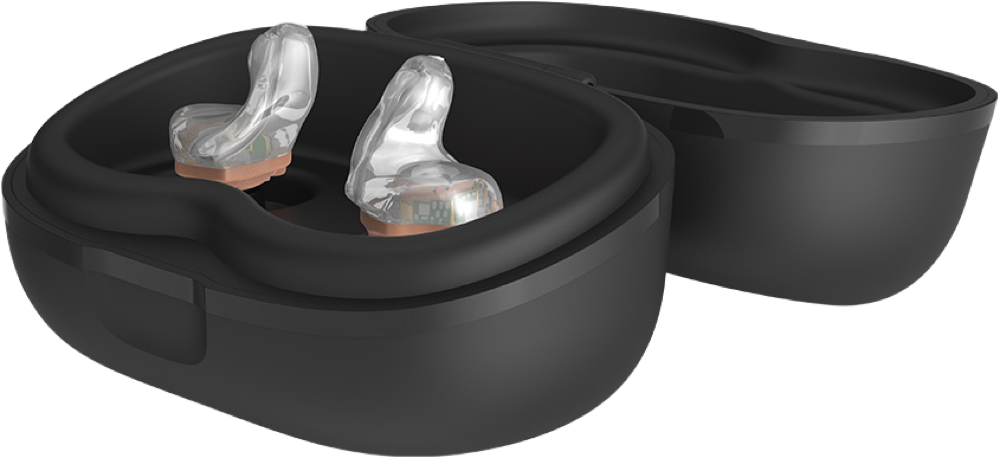
Starkey StarLink Custom Charger 2.0
Charge compatible Starkey hearing aids at a powered outlet and keep them in the same case for storage.
What StarLink Custom Charger 2.0 does
This lidded case charges two compatible Starkey hearing aids and gives you a place to store them. The charger needs external power throughout charging. When a compatible aid’s battery is low, Starkey says ten minutes of Turbo Charge can give about three hours of use.
Which hearing aids work with Starkey StarLink Custom Charger 2.0?
Charging
- Starkey Omega AI+ ITC R
Omega AI+ ITC R. Match the Custom 2.0 case to the exact rechargeable in-ear style and your supplier’s order code. Use an external power source during charging. Match the Custom 2.0 case to the exact rechargeable in-ear style and your supplier’s order code.
- Starkey Omega AI+ ITE R
Omega AI+ ITE R. Match the Custom 2.0 case to the exact rechargeable in-ear style and your supplier’s order code. Use an external power source during charging. Match the Custom 2.0 case to the exact rechargeable in-ear style and your supplier’s order code.
- Starkey Omega AI+ CIC R NW
Omega AI+ CIC R NW. Match the Custom 2.0 case to the exact rechargeable in-ear style and your supplier’s order code. Use an external power source during charging. Match the Custom 2.0 case to the exact rechargeable in-ear style and your supplier’s order code.
- Starkey Omega AI ITC R
original Omega AI ITC R. Match the Custom 2.0 case to the exact rechargeable in-ear style and your supplier’s order code. Use an external power source during charging. Match the Custom 2.0 case to the exact rechargeable in-ear style and your supplier’s order code.
- Starkey Omega AI ITE R
original Omega AI ITE R. Match the Custom 2.0 case to the exact rechargeable in-ear style and your supplier’s order code. Use an external power source during charging. Match the Custom 2.0 case to the exact rechargeable in-ear style and your supplier’s order code.
Choose the exact model printed on your hearing aids or paperwork. A family match does not establish support for every model in that family.
View documented devices and setups
- Starkey Omega AI+ ITC R · Exact model
Charging wells for compatible custom in-ear hearing aids · charging
Omega AI+ ITC R. Match the Custom 2.0 case to the exact rechargeable in-ear style and your supplier’s order code. Use an external power source during charging.
Requires additional setupSource · 2026-11-18Omega AI+ ITC R. Match the Custom 2.0 case to the exact rechargeable in-ear style and your supplier’s order code. Use an external power source during charging.
- Match the Custom 2.0 case to the exact rechargeable in-ear style and your supplier’s order code.
- Starkey Omega AI+ ITE R · Exact model
Charging wells for compatible custom in-ear hearing aids · charging
Omega AI+ ITE R. Match the Custom 2.0 case to the exact rechargeable in-ear style and your supplier’s order code. Use an external power source during charging.
Requires additional setupSource · 2026-11-18Omega AI+ ITE R. Match the Custom 2.0 case to the exact rechargeable in-ear style and your supplier’s order code. Use an external power source during charging.
- Match the Custom 2.0 case to the exact rechargeable in-ear style and your supplier’s order code.
- Starkey Omega AI+ CIC R NW · Exact model
Charging wells for compatible custom in-ear hearing aids · charging
Omega AI+ CIC R NW. Match the Custom 2.0 case to the exact rechargeable in-ear style and your supplier’s order code. Use an external power source during charging.
Requires additional setupSource · 2026-11-18Omega AI+ CIC R NW. Match the Custom 2.0 case to the exact rechargeable in-ear style and your supplier’s order code. Use an external power source during charging.
- Match the Custom 2.0 case to the exact rechargeable in-ear style and your supplier’s order code.
- Starkey Omega AI ITC R · Exact model
Charging wells for compatible custom in-ear hearing aids · charging
original Omega AI ITC R. Match the Custom 2.0 case to the exact rechargeable in-ear style and your supplier’s order code. Use an external power source during charging.
Requires additional setupSource · 2026-11-18original Omega AI ITC R. Match the Custom 2.0 case to the exact rechargeable in-ear style and your supplier’s order code. Use an external power source during charging.
- Match the Custom 2.0 case to the exact rechargeable in-ear style and your supplier’s order code.
- Starkey Omega AI ITE R · Exact model
Charging wells for compatible custom in-ear hearing aids · charging
original Omega AI ITE R. Match the Custom 2.0 case to the exact rechargeable in-ear style and your supplier’s order code. Use an external power source during charging.
Requires additional setupSource · 2026-11-18original Omega AI ITE R. Match the Custom 2.0 case to the exact rechargeable in-ear style and your supplier’s order code. Use an external power source during charging.
- Match the Custom 2.0 case to the exact rechargeable in-ear style and your supplier’s order code.
Documented features
Power and charging
- Automatic hearing-aid power
- When the charger has power, compatible aids turn off and start charging when seated. They turn on when removed.Documentation · 2026-11-18
- Hearing-aid and receiver fit
- Starkey lists this custom case for Omega AI+ ITC R, ITE R, and CIC R NW. The compatible custom styles listed in the commercial chart are ITC/HS R, ITE R and CIC R NW. Match the exact rechargeable aid and case before ordering.Documentation · 2026-11-18
- Charging indicators
- The side lights blink during charging and stay lit when full. Rapid blinking calls for checking placement, contacts, and the power supply.Documentation · 2026-11-18
- Charging method
- Physical charging contacts in two wells shaped for compatible rechargeable custom hearing aids.Documentation · 2026-11-18
- Charging slots
- 2 aids
Separate left and right wells are shown in the manufacturer’s diagrams.
Documentation · 2026-11-18 - Charging temperature limits
- 50–104 °F (10–40 °C), 10–95% relative humidity, and 70–106 kPa.Documentation · 2026-11-18
- Full hearing-aid charge time
- 3.5 hours
Starkey’s 2.0 guide gives the figure for compatible rechargeable hearing aids. It does not specify individual model or remaining charge.
Documentation · 2026-11-18 - Lid behavior while charging
- You can charge with the lid open or closed. Close it for storage to keep debris out of the wells.Documentation · 2026-11-18
- Charging requires external power
This version has no onboard battery. Keep the charger connected to external power.
Documentation · 2026-11-18- Power connector
- USB-C port on the case.
Use a power cable and adapter approved or listed by a recognized testing laboratory.
Documentation · 2026-11-18 - Quick charge duration
- 10 minutes
Turbo Charge starts automatically when the hearing-aid battery is low.
Documentation · 2026-11-18 - Runtime after quick charge
- About 3 hours after a 10-minute Turbo ChargeDocumentation · 2026-11-18
- USB-C power input
- SupportedDocumentation · 2026-11-18
Care and fit
- Cleaning materials
- Use the supplied cleaning tool on the contacts. Keep water, cleaning liquids, and solvents away from the contacts.Documentation · 2026-11-18
Design and everyday use
- Dimensions
- 92 × 63 × 56 mm in Starkey’s published order.
The table lists the same dimensions in both 2.0 columns and does not label the axes.
Documentation · 2026-11-18 - Routine maintenance
- Use the supplied cleaning tool to clear debris from the charging contacts. Keep the lid closed for storage in a cool, dry place. Unplug the charger if storing it for more than a week.Documentation · 2026-11-18
- Operating conditions
- Charge within 50–104 °F (10–40 °C) and 10–95% relative humidity. Keep the contacts dry.Documentation · 2026-11-18
- Regional variants
- U.S. commercial code P00009113. November 2026 government code P00010778. A May–October 2026 Government Services form shows an earlier channel-specific code.
Check the supplier’s current channel. These identifiers alone do not prove a design difference.
Documentation · 2026-11-18 - Required extras
- External power source while charging, An approved power cable and adapter, Compatible rechargeable custom hearing aidsDocumentation · 2026-11-18
- Repair and service options
- Contact your hearing care provider if reseating the aids or cleaning the contacts does not help. The manufacturer instructs owners to send a defective charger for repair and keep the case assembled.Documentation · 2026-11-18
- Status indicators
- Left and right hearing-aid lights
Both sides blink during charging and stay on when full. See case battery lights for the Premium model.
Documentation · 2026-11-18 - Storage conditions
- Store and transport at 14–113 °F (−10–45 °C), 10–95% relative humidity, and 70–106 kPa.Documentation · 2026-11-18
How to set up Starkey StarLink Custom Charger 2.0
Use the USB-C cable to plug the charger into an external power source. Seat each dry hearing aid in its own well without forcing it. The left and right lights blink during charging and stay lit when the aids are full. Remove both aids to turn them on.
What to check before buying
This case fits documented rechargeable custom styles. Earlier and current Starkey documents show different ordering numbers by channel. Ask the supplier to match your hearing aid style and order code.
Match the charger to your hearing aid
This is the case for compatible rechargeable custom in-ear hearing aids. Starkey sells separate cases for receiver-in-canal hearing aids. The U.S. commercial part number is P00009113.
SourceRead the lights while charging
Use the USB-C cable to plug the charger into an external power source. Seat each dry hearing aid in its own well without forcing it. The left and right lights blink during charging and stay lit when the aids are full. Remove both aids to turn them on.
SourceNeeds external power to charge custom aids
For compatible rechargeable Starkey custom aids, this case and the StarLink Premium Custom Charger 2.0 both offer Turbo Charge. The Premium adds a battery so you can recharge away from an outlet. With the standard case, you need external power every time.
SourceRelated accessories
Other devices named in the documentation
These names have not been matched to an exact device in our catalog. They do not create verified matches in the finder.
Checking current offers…
Documentation checked Nov 18, 2026