App directory
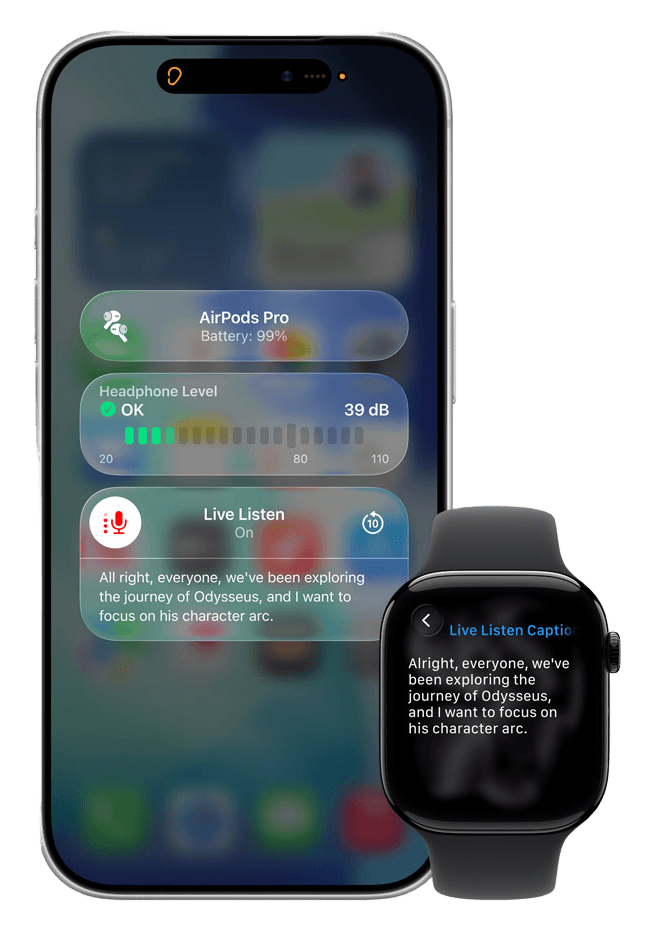
Apple Live Listen
Apple
Uses a phone or tablet microphone as a remote microphone for compatible ear-worn devices.
Features
Audio input & output
Listening assistance
Compatibility
- Conditional: Hardware functions9Microphone streaming
Availability & access
- Conditional: Recognition languages1Cantonese (China mainland) · Cantonese (Hong Kong) · English (Australia) · English (Canada) · English (India) · English (Singapore) · English (United Kingdom) · English (United States) · French (Canada) · French (France) · German (Germany) · japanese · korean · Mandarin Chinese (China mainland) · Mandarin Chinese (Taiwan) · Spanish (Mexico) · Spanish (Spain) · Spanish (United States)iOS 26 or later
- Not supported: Hearing device required
Privacy & data
- Conditional: Audio processing2On device
Research & evidence
- Applies to Live Captions shown during a Live Listen session (iOS/iPadOS 26 or later; Live Captions needs iPhone 11 or later or an iPad with A12 Bionic or later). The list is Apple's availability list for the Live Captions accessibility feature; Apple says Live Captions in Live Listen is not available in all languages, countries or regions and does not publish a separate Live Listen list.
- Applies to Live Captions transcription (used in Live Listen from iOS/iPadOS 26). Apple's statement is about Live Captions generally (2022 announcement); Apple does not document where Live Listen's audio amplification is processed beyond streaming from the device microphone to the paired listening device.
- Single-site self-controlled study (Taiwan, 21 adults with mild-to-moderate sensorineural hearing loss, Mandarin HINT) of AirPods 2 and AirPods Pro paired with iPhone XS Max on iOS 13.0, compared with a basic and a premium hearing aid; the introduction frames Live Listen as the evaluated feature but the device-methods section does not name it. Not randomized; no effectiveness claim implied.
- The 2022 iScience study publishes its electroacoustic (ANSI/CTA-2051 in Audioscan Verifit 2.0) and Mandarin HINT procedures for AirPods 2/AirPods Pro with iPhone XS Max on iOS 13.0; the protocol predates current iOS versions.
- Audio goes to paired MFi hearing devices or to supported AirPods/Beats; generic Bluetooth headphones are not documented.
- Live Captions in Live Listen needs iOS/iPadOS 26 or later and is not available in all languages, countries or regions; captions can also appear on a paired Apple Watch or another nearby Apple device signed in to the same Apple Account. Minimum OS: iOS 26 / iPadOS 26.
- Documented as amplification of sound picked up by the iPhone/iPad microphone (remote-microphone use), sent to supported AirPods/Beats or MFi hearing devices; Apple does not describe speech-specific processing.
- Requires a supported Apple listening device or documented hearing-device workflow.
- iPhone/iPad microphone streamed to paired MFi hearing devices or to supported AirPods/Beats (iOS/iPadOS 14.3 or later for AirPods/Beats).