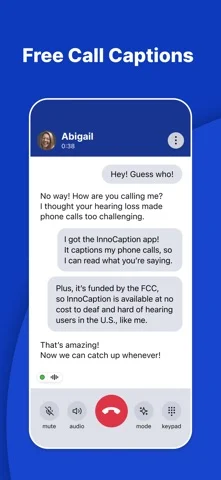
Features
Captions
- Not supported: Live conversation captionsAlso on Browser
- Not supported: Offline live captions
- Conditional: Speaker labels11Browser only
- Conditional: Named speakers12Browser only
- Not supported: Translated captions
- Not supported: Two-language caption display
- Supported: Custom vocabulary
- Supported: Caption history
- Conditional: Shared group captions13Browser only
- Conditional: Human captioning14
- Supported: Floating caption window
- Conditional: External caption display15Also on Browser
- Conditional: Caption engine16Automatic speech recognition · Human captionerUnited States
Calls
Transcripts & notes
- Conditional: Transcript after recording20Also on Browser
- Conditional: Audio recording21
- Conditional: Meeting assistant joins calls22Browser only
- Supported: SummariesAlso on Browser
- Conditional: Audio export23Browser only
- Supported: Shared notes
- Conditional: Personal-cloud sync24
- Supported: Export formatsTXTAlso on Browser
Audio input & output
- Supported: Audio inputsTelephone serviceAlso on Browser
- Supported: Live outputsOn-screen text
Availability & access
- Conditional: Recognition languages1english · danish · german · Spanish (Spain) · Spanish (US) · filipino · French (Canada) · French (France) · Indonesian · italian · Kiswahili (Kenya) · dutch · polish · Portuguese (Brazil) · Portuguese (Portugal) · swedish · Vietnamese · greek · russian · Ukrainian · hebrew · Arabic (Egypt) · Persian (Farsi) · Hindi (India) · Amharic (Ethiopia) · Chinese (Mandarin, Simplified) · Chinese (Cantonese, Traditional) · japanese · korean
- Supported: Account requirementRequiredAlso on Browser
- Conditional: Ongoing free core functionality2Also on Browser · United States
- Not supported: Professional enrollment requiredAlso on Browser
- Supported: Internet required
Accessibility
- Supported: Caption text sizeAlso on Browser
- Supported: Caption contrast controlsAlso on Browser
- Supported: System text scaling
- Supported: Caption display controlsText size · ColorAlso on Browser
Privacy & data
- Supported: Summary processingCloudAlso on Browser
- Supported: Model-training policy3Not used for model trainingAlso on Browser
- Conditional: Audio retention40 daysAlso on Browser
- Conditional: Audio sent off device5Also on Browser
- Supported: Delete account
- Conditional: Download personal data10Also on Browser
- Non-English languages are AI (ASR) captioning only, chosen as one secondary language in Settings; live stenographer (Human) captioning is English only. Captions follow the language actually spoken. Languages: English, Danish, German, Spanish (Spain), Spanish (US), Filipino, French (Canada), French (France), Indonesian, Italian, Kiswahili (Kenya), Dutch, Polish, Portuguese (Brazil), Portuguese (Portugal), Swedish, Vietnamese, Greek, Russian, Ukrainian, Hebrew, Arabic (Egypt), Persian (Farsi), Hindi (India), Amharic (Ethiopia), Chinese (Mandarin, Simplified), Chinese (Cantonese, Traditional), Japanese, Korean.
- No cost and no usage limit for registered eligible US users with hearing or speech disabilities; funded by the FCC TRS Fund. Cellular data use may apply.
- Evidence: 12. Use of AI-based features and data handling.
- Applies to live call audio, which is not retained after the call. Voicemail recordings are retained (no day limit stated) to provide voicemail. Evidence: 11. Call transcript privacy and storage.
- In Human (live stenographer) mode the other party's call audio is heard by a remote InnoCaption communication assistant. Where AI-mode recognition runs is not documented.
- Only when the user taps Summarize on a saved transcript; otherwise transcripts stay on the device.
- Only when the user clicks Summarize after a call.
- Applies to voicemail messages; locked voicemails must be unlocked first. Call audio itself is not recorded or retained.
- Applies to voicemail messages.
- By submitting a data subject access request; rights depend on the user's state law. Not an in-app export. Evidence: 18. How can you review, update, or delete the data we collect from you?.
- InnoCaption Bot meetings on InnoCaption Web only (Zoom, Google Meet, Microsoft Teams, Webex), AI caption mode only; host may need to admit the bot.
- InnoCaption Bot meetings on InnoCaption Web; on Webex names need a paid host account with closed captioning enabled.
- View-only shared link for InnoCaption Bot meeting captions on InnoCaption Web.
- Human stenographer mode is English, with AI fallback; service eligibility and US residency requirements apply.
- Phone captions are mirrored to a computer browser through InnoCaption Web, signed in to the same account.
- Human captions are English and can fall back to AI when a stenographer is unavailable.
- Eligible US residents with a US mobile number, residential address and identity verification.
- On InnoCaption Web. The bot gives AI captions only; Human captions need the meeting's telephone dial-in number. Hosts may need to admit the bot (Zoom also needs record permission). FaceTime is not supported.
- Some destination countries may not work because of carrier restrictions or costs.
- Voicemail messages only.
- Voicemail audio only (up to 200 messages). Live call audio is not retained after the call.
- InnoCaption Web; Zoom, Google Meet, Microsoft Teams and Webex; AI captions only; host admission may be needed.
- Voicemail audio files only, on InnoCaption Web.
- Auto backup must be turned on; iPhone uses iCloud and Android a chosen Google account. It is a backup and restore, not a live sync.
App Store ratings & reviews
Praise
- Sampled reviewers value more independent phone calls, a choice of captioning modes and straightforward setup.
Complaints
- One reviewer reports occasional transcription mistakes with numbers.
Google Play ratings & reviews
Praise
- Captions and saved transcripts help users follow and remember calls.
Complaints
- Call reliability, audio and caption delay or accuracy concern some users.
- Setup, readability and forwarding after uninstalling cause difficulties.