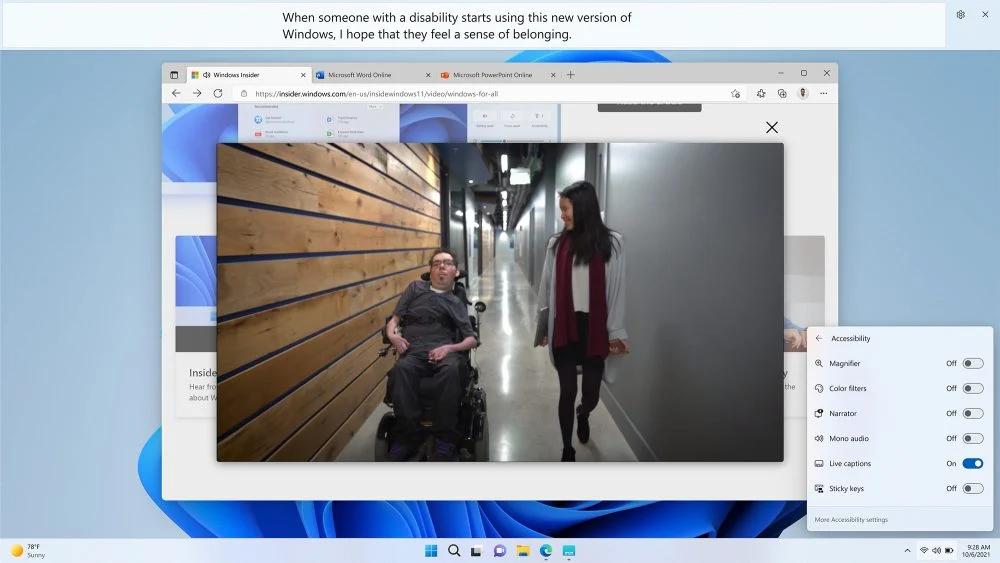
Windows Live Captions
Microsoft
Also known as Live Captions for Windows, Microsoft Windows Live Captions
Read live captions for speech playing on a Windows PC, with an option to caption the microphone.
What Windows Live Captions does
Windows Live Captions turns spoken audio from videos and other apps into text on your screen. Press Windows key + Ctrl + L and download the caption language files the first time you use it. You can dock captions above or below your apps or move them into a floating window. Turn on microphone captions for nearby speech. Audio already playing on the PC takes priority. Captions can run offline after setup, and Windows processes them on the PC without keeping a transcript. Translation into US English or Simplified Chinese requires a Copilot+ PC with Windows 11 version 24H2 or later.
How it compares
Built-in captions for audio across your PC
Windows Live Captions can caption speech playing in your Windows apps. Apple Live Captions is the comparable built-in option for audio on supported iPhones, iPads and Macs.
On-screen captions during meetings
Windows Live Captions shows meeting audio as text on your PC. Microsoft Teams Captions works inside Teams, where access to live captions can depend on the organization’s settings. Teams has a separate meeting transcript feature.
Features
Captions
Calls
- Supported: Video meeting captions4
Transcripts & notes
- Supported: Direct system-audio capture
Audio input & output
- Supported: Audio inputsDevice audio
- Supported: Live outputsOn-screen text
Compatibility
- Conditional: Required hardware3Copilot+ PC
Availability & access
- Supported: Recognition languagesChinese (Simplified, China) · Chinese (Traditional, Hong Kong SAR) · Chinese (Traditional, Taiwan) · danish · English (Australia) · English (Canada) · English (India) · English (Ireland) · English (New Zealand) · English (United Kingdom) · English (United States) · French (Canada) · French (France) · German (Germany) · Italian (Italy) · japanese · korean · Portuguese (Brazil) · Portuguese (Portugal) · Spanish (Mexico) · Spanish (Spain)
- Supported: Ongoing free core functionality
- Supported: Initial model download
Accessibility
- Supported: Caption placement
- Supported: Caption display controlsPlacement
Privacy & data
- Supported: Audio processingOn device
- Supported: Data storageNone
- Not supported: Audio sent off device
- Not supported: Text sent off device
- Turn on Include microphone audio. Sound playing on the PC takes priority over the microphone.
- Download the caption language files before using captions offline.
- Requires a Copilot+ PC with Windows 11 version 24H2 or later. Translation outputs are US English and Simplified Chinese.
- Windows captions meeting audio on your screen.