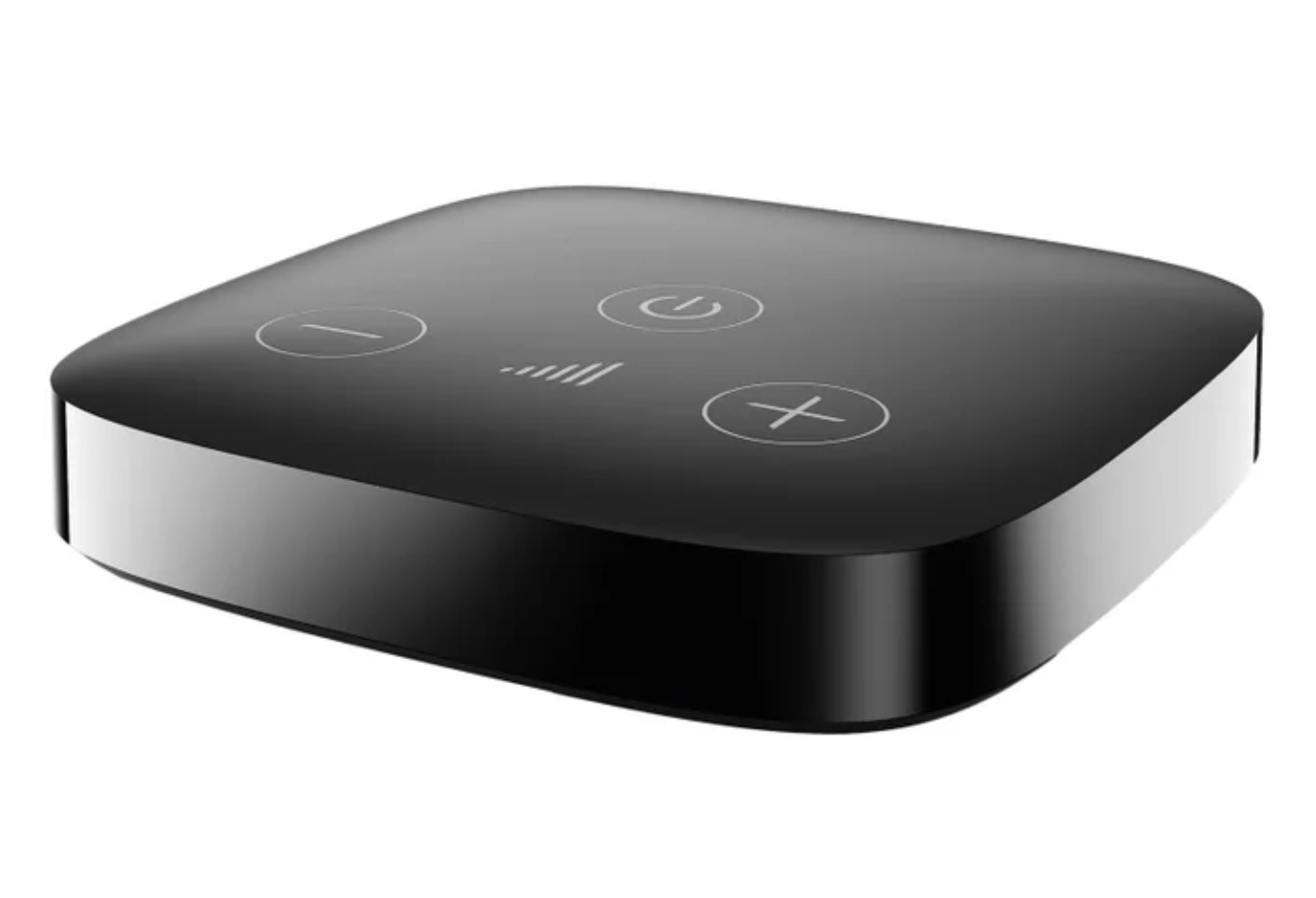
Sennheiser Easy Line TV Connector
Streamen Sie TV oder andere kabelgebundene Audiosignale direkt an kompatible Sennheiser Sonite Hörgeräte.
Was Easy Line TV Connector kann
Hören Sie den Ton Ihres Fernsehers über kompatible Sonite Hörgeräte, während andere Personen in ihrer eigenen Lautstärke fernsehen. Der Connector wird an den Fernseher angeschlossen und sendet den Ton kabellos an Ihre Hörgeräte. Sie können ihn mit kompatiblen Stereoanlagen oder Computern mit optischem oder 3.5 mm-Audioausgang verwenden.
Which hearing aids work with Sennheiser Easy Line TV Connector?
TV-Ton
- Sennheiser Sonite Rise
Exact Sonite Rise model named in the US Sennheiser accessory chart.
Wählen Sie das genaue Modell auf Ihren Hörgeräten oder Unterlagen. Ein Treffer für eine Produktfamilie belegt nicht die Unterstützung jedes Modells dieser Familie.
Dokumentierte Geräte und Konfigurationen anzeigen
- Sennheiser Sonite Rise · Genaues Modell
Pair compatible Sennheiser Sonite hearing aids directly · TV-Ton
Exact Sonite Rise model named in the US Sennheiser accessory chart.
Unterstützung dokumentiertQuelle · 2026-11-18Exact Sonite Rise model named in the US Sennheiser accessory chart.
Dokumentierte Funktionen
Connections
- Analog audio input
- Unterstützt
3.5 mm analog input shares the optical port.
Dokumentation · 2026-11-18 - Companion app control
- The optional Easy Line Remote app can start a manual TV program and adjust Ambient balance if supported.
The TV Connector’s top hardware volume is separate from the app.
Dokumentation · 2026-11-18 - Supported codecs
- Stereo PCM input, Mono input, Dolby Audio input
Input formats are not the AirStream transmission codec.
Dokumentation · 2026-11-18 - Keine Audiodurchleitung
No wired audio output is present.
Dokumentation · 2026-11-18- Keine Auracast-Übertragung
The supported radio path is direct proprietary AirStream. No broadcast mode appears among the complete port and audio paths.
Dokumentation · 2026-11-18- Automatic streaming start
- Powered TV Connector sends an active source signal automatically. Your hearing aids can accept automatically or when you select the manual TV program.
Depends on provider programming.
Dokumentation · 2026-11-18 - Bilateral and unilateral use
- Streams stereo to compatible paired Sonite hearing aids.
Accepts mono input too.
Dokumentation · 2026-11-18 - Kein koaxialer Digitaleingang
No digital coaxial input is present.
Dokumentation · 2026-11-18- Computer audio
- Connect a PC, laptop or stereo system with optical or analog audio output.Dokumentation · 2026-11-18
- Connection priority
- When the aids are paired to a phone, an incoming call pauses TV audio and the stream returns after the call.
The phone is paired to the hearing aids.
Dokumentation · 2026-11-18 - Kein HDMI-ARC-Eingang
Only optical and analog are listed and shown.
Dokumentation · 2026-11-18- Kein HDMI-eARC-Eingang
No HDMI input in the complete port diagram.
Dokumentation · 2026-11-18- Link to hearing aids
- Sonova AirStream direct streaming
Use the hearing aids named in the Sennheiser product chart.
Dokumentation · 2026-11-18 - Accessory-to-hearing-aid range
- 15 m
Up to approximately 50 feet. Walls and furniture can shorten the range.
Dokumentation · 2026-11-18 - Audio input selection
- Exchange optical and analog cables in the shared port.
Only one input can be wired at a time.
Dokumentation · 2026-11-18 - Analog input details
- Analog 3.5 mm audio input.
Use the source’s labeled audio output.
Dokumentation · 2026-11-18 - Optical audio formats
- Stereo PCM, Mono, Dolby Audio
DTS is not supported. Choose PCM if the status light blinks red.
Dokumentation · 2026-11-18 - Optical audio input
- Unterstützt
Preinstalled TOSLINK optical cable; unplug it to use analog.
Dokumentation · 2026-11-18 - Hearing-aid pairing method
- First-power automatic pairing or press rear Connect. Power on the aids and put them within 3 feet.
Wait up to 10 seconds for the confirmation beep. Hold Connect for seven seconds to clear pairings.
Dokumentation · 2026-11-18 - Professional setup
- Basic setup and pairing are user-controlled. A hearing care provider sets the TV program to manual or automatic.Dokumentation · 2026-11-18
- Receiver requirements
- Integrated compatible wireless receiving technology in the hearing aids.
No intermediary receiver in the Sonite setup.
Dokumentation · 2026-11-18 - Reconnection behavior
- Already paired hearing aids detect the TV Connector again when they return to range.
Fitted manual mode may still prompt selection.
Dokumentation · 2026-11-18 - Soundbar/receiver setup
- To keep a soundbar connected, use separate active TV outputs or an appropriate optical splitter.
The box does not pass optical audio to a second wired device.
Dokumentation · 2026-11-18 - Stereo streaming
- Unterstützt
Use an optical or analog stereo source.
Dokumentation · 2026-11-18 - Stopping TV streaming
- When source audio stops, the box goes to standby. To stop only your listening, switch back to a regular hearing-aid program.
The dedicated power button can stop the box for everyone.
Dokumentation · 2026-11-18 - TV audio streaming
- Unterstützt
Stream directly from a TV, stereo system or PC through a wired audio output.
Dokumentation · 2026-11-18 - Required TV settings
- Check that the TV audio output is enabled and switch optical audio to stereo PCM if it is incompatible.Dokumentation · 2026-11-18
- Independent TV stream volume
- Top plus and minus buttons change the streamed volume while audio is active. You can also adjust your own hearing-aid volume.
TV room volume remains separate.
Dokumentation · 2026-11-18 - TV speakers alongside streaming
- Depends on the television. Some TVs turn their speakers off when the 3.5 mm headphone port is in use.
Try optical and verify the TV’s speaker settings.
Dokumentation · 2026-11-18 - TV/environment balance
- Adjust TV and room sound using hearing-aid controls or the app’s Ambient balance for compatible fittings.
The app operates the hearing-aid stream program.
Dokumentation · 2026-11-18 - Kein USB-Audioeingang
Micro-USB is a power socket. Connect optical or analog for audio.
Dokumentation · 2026-11-18
Power and charging
- Electrical input requirements
- A stabilized 5 V DC supply rated at least 500 mA.
Check the label and use an approved supply.
Dokumentation · 2026-11-18 - Power adapter included
- Unterstützt
The documented complete box includes a power adapter.
Dokumentation · 2026-11-18 - Power connector
- Micro-USB on the TV Connector.
Use a wall power adapter or suitable USB port on the TV.
Dokumentation · 2026-11-18 - Kein USB-C-Stromanschluss
The power socket on the rear of the unit is micro-USB.
Dokumentation · 2026-11-18
Design and everyday use
- Control accessibility
- Three top buttons and a rear Connect button. Pairing and volume changes give audible feedback in the hearing aids.
The status light is on the back.
Dokumentation · 2026-11-18 - Included items
- TV Connector, Preinstalled optical cable, Micro-USB cable, Wall power adapter, 3.5 mm analog cable listed in package diagram
The setup section labels the analog route optional. Verify analog cable in the exact retail box.
Dokumentation · 2026-11-18 - Routine maintenance
- Clean the housing with a damp cloth, keep the ports clear and avoid alcohol, cleaning solutions and excess moisture.Dokumentation · 2026-11-18
- Operating conditions
- 32–104°F (0–40°C), under 90% noncondensing humidity
Keep the device dry. Manual lists 500–1,500 hPa.
Dokumentation · 2026-11-18 - Physische Bedienelemente
- Top power, plus and minus buttons, Rear Connect button, Rear status lightDokumentation · 2026-11-18
- Regional variants
- US Sennheiser Sonite listing links Sonova guide 029-6250-02. Brio’s separate retail listing names Easy Line item 1266799.
The Sennheiser chart does not equate its hardware SKU to every Brio/Kirkland or Phonak unit.
Dokumentation · 2026-11-18 - Replacement parts
- Approved micro-USB cable and 5 V supply, Optical TOSLINK or 3.5 mm analog audio cable
Part numbers for a replacement kit were not verified.
Dokumentation · 2026-11-18 - Required extras
- Compatible Sennheiser hearing aids, TV or audio device with available optical or 3.5 mm output
Separate soundbar routing may require a compatible splitter or a second TV output.
Dokumentation · 2026-11-18 - Repair and service options
- Contact your hearing care provider or manufacturer for service. Reset the saved connections if pairing fails.
Hold the rear Connect button for seven seconds.
Dokumentation · 2026-11-18 - Status indicators
- Solid green when streaming, Solid white in standby, Blinking blue while pairing, Blinking red for unsupported audio, No light when off
After the seven-second reset, the FAQ reports an orange light.
Dokumentation · 2026-11-18 - Storage conditions
- −4–140°F (−20–60°C), under 90% noncondensing humidityDokumentation · 2026-11-18
How to set up Sennheiser Easy Line TV Connector
Schließen Sie das optische Kabel an den optischen Audioausgang des TV an und schließen Sie dann das Stromkabel des Connectors an. Schalten Sie die Hörgeräte ein und bringen Sie sie innerhalb von 3 Fuß zum Connector. Ein Ton bestätigt die Kopplung. Drücken Sie Connect auf der Rückseite, wenn die erste Verbindung nicht startet. Wenn Ihr TV einen 3,5-mm-Audioausgang verwendet, schließen Sie ein analoges Kabel an denselben Eingang des Connectors an.
Vor dem Kauf prüfen
Use an optical or 3.5 mm audio output. The connector has one shared audio input and no optical output for a soundbar. Some TVs mute their speakers when you plug a cable into the headphone jack. Use optical if you need the TV speakers to stay on, and check your TV’s audio settings.
Streams directly to compatible Sonite hearing aids
The Easy Line TV Connector pairs directly with compatible Sonite hearing aids to send you the TV sound. If you’re comparing systems for a household that uses different hearing devices, a broadcast streamer such as the ReSound TV Streamer+ lets nearby listeners join through Auracast when their devices support it.
QuelleMay need a splitter to share TV audio with a soundbar
If your TV has just one optical output, you may need a splitter to feed both the Easy Line TV Connector and your soundbar. By comparison, a streamer with an optical output, such as the Oticon TV Adapter 3.0 for compatible Oticon hearing aids, can pass the signal straight on to the soundbar. The Easy Line unit serves compatible Sonite aids.
QuelleSet TV sound to start when you want it
Ask your hearing care provider whether the TV program starts automatically. If it’s manual, select it with your hearing-aid button or Easy Line Remote when the hearing aids signal that TV audio is available.
QuelleZugehörige Apps
Verwandtes Zubehör
Weitere in der Dokumentation genannte Geräte
Diese Namen wurden noch keinem genauen Gerät in unserem Katalog zugeordnet. Sie erzeugen daher keine bestätigten Treffer in der Suche.
Aktuelle Angebote werden geprüft…
Dokumentation geprüft am 18. Nov. 2026