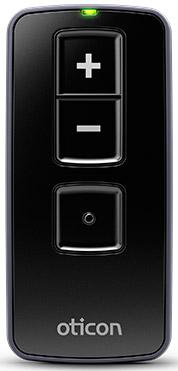
Oticon Remote Control 3.0
Adjust volume, change programs and mute compatible Oticon hearing aids with three physical buttons.
What Remote Control 3.0 does
Use the remote to adjust one or two compatible Oticon hearing aids. It works within about six feet and runs on two AAAA batteries. A button click, green light and sound from the aids confirm a change.
Which hearing aids work with Oticon Remote Control 3.0?
Remote control
- Oticon Intent miniRITE R
- Oticon Reveal miniRITE R
- Oticon Zeal
- Oticon Opn miniRITE
- Oticon Opn miniRITE-T
- Oticon Opn BTE13 PP
Choose the exact model printed on your hearing aids or paperwork. A family match does not establish support for every model in that family.
View documented devices and setups
- Oticon Intent miniRITE R · Exact model
Pair one set of compatible Oticon 2.4 GHz hearing aids · remote_control
Documented supportSource · 2026-11-17 - Oticon Reveal miniRITE R · Exact model
Pair one set of compatible Oticon 2.4 GHz hearing aids · remote_control
Documented supportSource · 2026-11-17 - Oticon Zeal · Exact model
Pair one set of compatible Oticon 2.4 GHz hearing aids · remote_control
Documented supportSource · 2026-11-17 - Oticon Opn miniRITE · Exact model
Pair one set of compatible Oticon 2.4 GHz hearing aids · remote_control
Documented supportSource · 2026-11-17 - Oticon Opn miniRITE-T · Exact model
Pair one set of compatible Oticon 2.4 GHz hearing aids · remote_control
Documented supportSource · 2026-11-17 - Oticon Opn BTE13 PP · Exact model
Pair one set of compatible Oticon 2.4 GHz hearing aids · remote_control
Documented supportSource · 2026-11-17 - Oticon Opn S BTE PP · Exact model
Pair one set of compatible Oticon 2.4 GHz hearing aids · remote_control
Documented supportSource · 2026-11-17 - Oticon Siya · Family
Pair one set of compatible Oticon 2.4 GHz hearing aids · remote_control
Confirm a compatible Oticon aid with the required built-in 2.4 GHz radio and pair it directly to the accessory.
Requires additional setupSource · 2026-11-17Family-level evidence. Confirm your exact hearing-aid model before buying.
Confirm a compatible Oticon aid with the required built-in 2.4 GHz radio and pair it directly to the accessory.
- Confirm the exact hearing aid has the required Oticon 2.4 GHz radio.
- Oticon Opn S · Family
Pair one set of compatible Oticon 2.4 GHz hearing aids · remote_control
Confirm a compatible Oticon aid with the required built-in 2.4 GHz radio and pair it directly to the accessory.
Requires additional setupSource · 2026-11-17Family-level evidence. Confirm your exact hearing-aid model before buying.
Confirm a compatible Oticon aid with the required built-in 2.4 GHz radio and pair it directly to the accessory.
- Confirm the exact hearing aid has the required Oticon 2.4 GHz radio.
- Oticon Xceed · Family
Pair one set of compatible Oticon 2.4 GHz hearing aids · remote_control
Confirm a compatible Oticon aid with the required built-in 2.4 GHz radio and pair it directly to the accessory.
Requires additional setupSource · 2026-11-17Family-level evidence. Confirm your exact hearing-aid model before buying.
Confirm a compatible Oticon aid with the required built-in 2.4 GHz radio and pair it directly to the accessory.
- Confirm the exact hearing aid has the required Oticon 2.4 GHz radio.
- Oticon Ruby · Family
Pair one set of compatible Oticon 2.4 GHz hearing aids · remote_control
Confirm a compatible Oticon aid with the required built-in 2.4 GHz radio and pair it directly to the accessory.
Requires additional setupSource · 2026-11-17Family-level evidence. Confirm your exact hearing-aid model before buying.
Confirm a compatible Oticon aid with the required built-in 2.4 GHz radio and pair it directly to the accessory.
- Confirm the exact hearing aid has the required Oticon 2.4 GHz radio.
- Oticon More · Family
Pair one set of compatible Oticon 2.4 GHz hearing aids · remote_control
Confirm a compatible Oticon aid with the required built-in 2.4 GHz radio and pair it directly to the accessory.
Requires additional setupSource · 2026-11-17Family-level evidence. Confirm your exact hearing-aid model before buying.
Confirm a compatible Oticon aid with the required built-in 2.4 GHz radio and pair it directly to the accessory.
- Confirm the exact hearing aid has the required Oticon 2.4 GHz radio.
- Oticon Zircon · Family
Pair one set of compatible Oticon 2.4 GHz hearing aids · remote_control
Confirm a compatible Oticon aid with the required built-in 2.4 GHz radio and pair it directly to the accessory.
Requires additional setupSource · 2026-11-17Family-level evidence. Confirm your exact hearing-aid model before buying.
Confirm a compatible Oticon aid with the required built-in 2.4 GHz radio and pair it directly to the accessory.
- Confirm the exact hearing aid has the required Oticon 2.4 GHz radio.
- Oticon Real · Family
Pair one set of compatible Oticon 2.4 GHz hearing aids · remote_control
Confirm a compatible Oticon aid with the required built-in 2.4 GHz radio and pair it directly to the accessory.
Requires additional setupSource · 2026-11-17Family-level evidence. Confirm your exact hearing-aid model before buying.
Confirm a compatible Oticon aid with the required built-in 2.4 GHz radio and pair it directly to the accessory.
- Confirm the exact hearing aid has the required Oticon 2.4 GHz radio.
- Oticon Own ITE FS · Exact model
Pair one set of compatible Oticon 2.4 GHz hearing aids · remote_control
Choose the original Oticon Own ITC, ITE half-shell or ITE full-shell with the optional 2.4 GHz radio.
Requires additional setupSource · 2026-11-17Choose the original Oticon Own ITC, ITE half-shell or ITE full-shell with the optional 2.4 GHz radio.
- Confirm the exact hearing aid has the required Oticon 2.4 GHz radio.
- Oticon Own ITE HS · Exact model
Pair one set of compatible Oticon 2.4 GHz hearing aids · remote_control
Choose the original Oticon Own ITC, ITE half-shell or ITE full-shell with the optional 2.4 GHz radio.
Requires additional setupSource · 2026-11-17Choose the original Oticon Own ITC, ITE half-shell or ITE full-shell with the optional 2.4 GHz radio.
- Confirm the exact hearing aid has the required Oticon 2.4 GHz radio.
- Oticon Own ITC · Exact model
Pair one set of compatible Oticon 2.4 GHz hearing aids · remote_control
Choose the original Oticon Own ITC, ITE half-shell or ITE full-shell with the optional 2.4 GHz radio.
Requires additional setupSource · 2026-11-17Choose the original Oticon Own ITC, ITE half-shell or ITE full-shell with the optional 2.4 GHz radio.
- Confirm the exact hearing aid has the required Oticon 2.4 GHz radio.
- Oticon Own CIC · Exact model
Pair one set of compatible Oticon 2.4 GHz hearing aids · remote_control
Original Own IIC and CIC are absent from the wireless accessory rows because these styles do not have the required 2.4 GHz radio.
Documented as incompatibleSource · 2026-11-17 - Oticon Own IIC · Exact model
Pair one set of compatible Oticon 2.4 GHz hearing aids · remote_control
Original Own IIC and CIC are absent from the wireless accessory rows because these styles do not have the required 2.4 GHz radio.
Documented as incompatibleSource · 2026-11-17
Documented features
Listening and control
- Remote carry options
- Hand-strap hole
Buy a suitable hand strap separately if needed.
Documentation · 2026-11-18 - Independent ear control
- Both paired aids change together.
The documented controls do not offer a left/right selector.
Documentation · 2026-11-18 - Control confirmation
- Button click you can feel, a green status light, and audible confirmation in the aids.
The light turns off at the end of the ordinary mute command.
Documentation · 2026-11-17 - Mute hearing-aid microphones
- Supported
Hold volume down about two seconds until the light turns off. Briefly press any button to unmute. In the TV program consult the TV Adapter instructions.
Documentation · 2026-11-18 - Change hearing-aid programs
- Supported
Briefly press the dot button to cycle through available programs when the aids have more than one.
Documentation · 2026-11-18 - Remote control range
- 1.8 m
About six feet without a direct line of sight.
Documentation · 2026-11-17 - Remote pairing capacity
- One personal set of up to two hearing aids.
Pair together or one at a time.
Documentation · 2026-11-18 - Streaming controls
- Select or leave the TV program with the program button, Adjust hearing-aid TV volume with plus and minus, Hold volume down in the TV program to mute surrounding microphones · With conditions
Requires a compatible Oticon TV Adapter paired to the hearing aids.
Setup: Remote commands in the hearing aids’ TV Adapter 3.0 program
Documentation · 2026-11-18 - Volume control
- Supported
Briefly press plus for louder or minus for softer.
Documentation · 2026-11-18
Connections
- Bilateral and unilateral use
- The remote adjusts both paired aids simultaneously. You can also pair one hearing aid.
Compatibility of mixed-model pairs was not established.
Documentation · 2026-11-18 - Link to hearing aids
- Oticon 2.4 GHz hearing-aid radioDocumentation · 2026-11-17
- Accessory-to-hearing-aid range
- 1.8 m
Up to approximately six feet. Direct line of sight is unnecessary.
Documentation · 2026-11-18 - Hearing-aid pairing method
- Insert the two AAAA batteries. Hold all three buttons for five seconds. Restart the hearing aids to put them in pairing mode. Once they have started, bring one or both within eight inches of the remote and press any remote button briefly. A steady green light for about ten seconds confirms pairing.
The hearing aids remain in pairing mode for three minutes. Pair each separately or pair both together.
Documentation · 2026-11-18 - Receiver requirements
- Pairs directly to the built-in Oticon 2.4 GHz hearing-aid radio.
No audio receiver step is needed for remote control.
Documentation · 2026-11-18 - Remembered hearing-aid pairings
- 2 devices
One personal set with up to two individual hearing aids.
Documentation · 2026-11-18
Power and charging
- Replaceable accessory battery
- Supported
Use two AAAA batteries and align the positive ends as shown.
Documentation · 2026-11-18 - Accessory battery type
- Two replaceable AAAA cells.
Oticon does not specify the chemistry in the US technical sheet.
Documentation · 2026-11-17 - No rechargeable accessory battery
The remote operates on replaceable AAAA batteries. The package and hardware diagram show no charger port.
Documentation · 2026-11-18- Battery status reporting
- Fast blinking after a button press indicates low battery.
Oticon estimates replacement about once a year with normal use. No percent display.
Documentation · 2026-11-18
Design and everyday use
- Control accessibility
- Three labeled physical buttons provide a click you can feel. The light and a sound from the paired hearing aids confirm button operation.Documentation · 2026-11-17
- Dimensions
- 75.3 × 35 × 12 mm in the manufacturer’s printed order.
The specification does not label the three axes.
Documentation · 2026-11-17 - Included items
- Remote Control 3.0, Two AAAA batteries, Instructions for useDocumentation · 2026-11-17
- Routine maintenance
- Clean with a soft, dry cloth. Hold the remote over a soft surface while replacing batteries.Documentation · 2026-11-18
- Operating conditions
- 41–104 °F, 15–93% noncondensing humidity, 700–1060 hPa.
Do not wash or immerse the remote.
Documentation · 2026-11-17 - Physical controls
- Volume up, Volume down and hold to mute, Program selectDocumentation · 2026-11-18
- Replacement parts
- Two AAAA batteries
No exact battery-cover replacement part number was verified.
Documentation · 2026-11-18 - Required extras
- Compatible Oticon 2.4 GHz hearing aids, Replacement AAAA batteries as neededDocumentation · 2026-11-18
- Repair and service options
- The user can replace batteries. Take the remote to a hearing care professional for service.Documentation · 2026-11-18
- Status indicators
- Green light with button presses, Steady green after pairing, Fast blinking with a low batteryDocumentation · 2026-11-18
- Storage conditions
- −13–158 °F and 15–93% noncondensing humidity for storage and transport.Documentation · 2026-11-17
- Warranty terms
- 12 months from delivery for manufacturing and material defects. Manufacturer excludes batteries, improper handling and unauthorized repair.
Provider warranty terms may differ.
Documentation · 2026-11-18 - Wearing and placement options
- Strap hole for a compatible hand strap
A strap is not listed in the U.S. manufacturer package.
Documentation · 2026-11-18 - Weight
- 32.7 g
Includes both batteries.
Documentation · 2026-11-17
How to set up Oticon Remote Control 3.0
Insert the two AAAA batteries. Hold all three buttons for five seconds. Restart the hearing aids to put them in pairing mode. Once they have started, bring one or both within eight inches of the remote and press any remote button briefly. A steady green light for about ten seconds confirms pairing.
What to check before buying
The remote works within about six feet of the hearing aids. It adjusts both paired aids together. Available programs depend on your hearing-aid settings.
Pair one hearing aid or both
Insert the two AAAA batteries. Hold all three buttons for five seconds. Restart the hearing aids to put them in pairing mode. Once they have started, bring one or both within eight inches of the remote and press any remote button briefly. A steady green light for about ten seconds confirms pairing.
SourceAdjusts both paired hearing aids together
The remote works within about six feet of the hearing aids. It adjusts both paired aids together. Available programs depend on your hearing-aid settings.
SourceTakes fresh batteries when power runs low
You can put two fresh AAAA batteries in the Remote Control 3.0 and carry on using it. If you use Oticon ConnectClip as your remote instead, its built-in battery needs time on the charger.
SourceLacks hands-free calling
The Remote Control 3.0 adjusts volume, changes programs, and mutes compatible Oticon hearing aids. If you also want to hear phone calls through your hearing aids, Oticon ConnectClip works as a headset and can adjust the aids when it’s idle.
SourceRelated accessories
Other devices named in the documentation
These names have not been matched to an exact device in our catalog. They do not create verified matches in the finder.
Checking current offers…
Documentation checked Nov 18, 2026