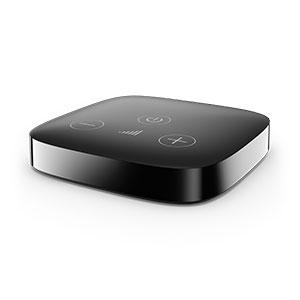
Phonak TV Connector
Hear TV, computer or stereo audio through compatible Phonak hearing aids.
What TV Connector does
Send TV sound directly to compatible Phonak hearing aids. You can set the volume in your hearing aids separately from the TV speakers. Several people can listen at once when each has compatible, paired hearing aids. This version has volume and power buttons on top.
Which hearing aids work with Phonak TV Connector?
TV audio
- Phonak Audéo EON R
TV Connector with top power and volume controls (TV Connector 2.0), connected to an optical or analog audio output.
- Phonak Audéo EON Sphere
TV Connector with top power and volume controls (TV Connector 2.0), connected to an optical or analog audio output.
- Phonak Audéo Infinio Ultra R
TV Connector with top power and volume controls (TV Connector 2.0), connected to an optical or analog audio output.
- Phonak Audéo Infinio Ultra Sphere
TV Connector with top power and volume controls (TV Connector 2.0), connected to an optical or analog audio output.
- Phonak Audéo Lumity L-312
TV Connector with top power and volume controls (TV Connector 2.0), connected to an optical or analog audio output.
- Phonak Audéo Lumity Life
TV Connector with top power and volume controls (TV Connector 2.0), connected to an optical or analog audio output.
Choose the exact model printed on your hearing aids or paperwork. A family match does not establish support for every model in that family.
View documented devices and setups
- Phonak Audéo EON R · Exact model
Optical or 3.5 mm analog audio, with direct wireless streaming to paired aids · tv_audio
TV Connector with top power and volume controls (TV Connector 2.0), connected to an optical or analog audio output.
Documented supportSource · 2026-11-18TV Connector with top power and volume controls (TV Connector 2.0), connected to an optical or analog audio output.
- Phonak Audéo EON Sphere · Exact model
Optical or 3.5 mm analog audio, with direct wireless streaming to paired aids · tv_audio
TV Connector with top power and volume controls (TV Connector 2.0), connected to an optical or analog audio output.
Documented supportSource · 2026-11-18TV Connector with top power and volume controls (TV Connector 2.0), connected to an optical or analog audio output.
- Phonak Audéo Infinio Ultra R · Exact model
Optical or 3.5 mm analog audio, with direct wireless streaming to paired aids · tv_audio
TV Connector with top power and volume controls (TV Connector 2.0), connected to an optical or analog audio output.
Documented supportSource · 2026-11-18TV Connector with top power and volume controls (TV Connector 2.0), connected to an optical or analog audio output.
- Phonak Audéo Infinio Ultra Sphere · Exact model
Optical or 3.5 mm analog audio, with direct wireless streaming to paired aids · tv_audio
TV Connector with top power and volume controls (TV Connector 2.0), connected to an optical or analog audio output.
Documented supportSource · 2026-11-18TV Connector with top power and volume controls (TV Connector 2.0), connected to an optical or analog audio output.
- Phonak Audéo Lumity L-312 · Exact model
Optical or 3.5 mm analog audio, with direct wireless streaming to paired aids · tv_audio
TV Connector with top power and volume controls (TV Connector 2.0), connected to an optical or analog audio output.
Documented supportSource · 2026-11-18TV Connector with top power and volume controls (TV Connector 2.0), connected to an optical or analog audio output.
- Phonak Audéo Lumity Life · Exact model
Optical or 3.5 mm analog audio, with direct wireless streaming to paired aids · tv_audio
TV Connector with top power and volume controls (TV Connector 2.0), connected to an optical or analog audio output.
Documented supportSource · 2026-11-18TV Connector with top power and volume controls (TV Connector 2.0), connected to an optical or analog audio output.
- Phonak Audéo Lumity R · Exact model
Optical or 3.5 mm analog audio, with direct wireless streaming to paired aids · tv_audio
TV Connector with top power and volume controls (TV Connector 2.0), connected to an optical or analog audio output.
Documented supportSource · 2026-11-18TV Connector with top power and volume controls (TV Connector 2.0), connected to an optical or analog audio output.
- Phonak Audéo Lumity RT · Exact model
Optical or 3.5 mm analog audio, with direct wireless streaming to paired aids · tv_audio
TV Connector with top power and volume controls (TV Connector 2.0), connected to an optical or analog audio output.
Documented supportSource · 2026-11-18TV Connector with top power and volume controls (TV Connector 2.0), connected to an optical or analog audio output.
- Phonak Audéo Marvel 13T · Exact model
Optical or 3.5 mm analog audio, with direct wireless streaming to paired aids · tv_audio
TV Connector with top power and volume controls (TV Connector 2.0), connected to an optical or analog audio output.
Documented supportSource · 2026-11-18TV Connector with top power and volume controls (TV Connector 2.0), connected to an optical or analog audio output.
- Phonak Audéo Marvel 312 · Exact model
Optical or 3.5 mm analog audio, with direct wireless streaming to paired aids · tv_audio
TV Connector with top power and volume controls (TV Connector 2.0), connected to an optical or analog audio output.
Documented supportSource · 2026-11-18TV Connector with top power and volume controls (TV Connector 2.0), connected to an optical or analog audio output.
- Phonak Audéo Marvel 312T · Exact model
Optical or 3.5 mm analog audio, with direct wireless streaming to paired aids · tv_audio
TV Connector with top power and volume controls (TV Connector 2.0), connected to an optical or analog audio output.
Documented supportSource · 2026-11-18TV Connector with top power and volume controls (TV Connector 2.0), connected to an optical or analog audio output.
- Phonak Audéo Marvel R · Exact model
Optical or 3.5 mm analog audio, with direct wireless streaming to paired aids · tv_audio
TV Connector with top power and volume controls (TV Connector 2.0), connected to an optical or analog audio output.
Documented supportSource · 2026-11-18TV Connector with top power and volume controls (TV Connector 2.0), connected to an optical or analog audio output.
- Phonak Audéo Marvel RT · Exact model
Optical or 3.5 mm analog audio, with direct wireless streaming to paired aids · tv_audio
TV Connector with top power and volume controls (TV Connector 2.0), connected to an optical or analog audio output.
Documented supportSource · 2026-11-18TV Connector with top power and volume controls (TV Connector 2.0), connected to an optical or analog audio output.
- Phonak Audéo Paradise 13T · Exact model
Optical or 3.5 mm analog audio, with direct wireless streaming to paired aids · tv_audio
TV Connector with top power and volume controls (TV Connector 2.0), connected to an optical or analog audio output.
Documented supportSource · 2026-11-18TV Connector with top power and volume controls (TV Connector 2.0), connected to an optical or analog audio output.
- Phonak Audéo Paradise 312 · Exact model
Optical or 3.5 mm analog audio, with direct wireless streaming to paired aids · tv_audio
TV Connector with top power and volume controls (TV Connector 2.0), connected to an optical or analog audio output.
Documented supportSource · 2026-11-18TV Connector with top power and volume controls (TV Connector 2.0), connected to an optical or analog audio output.
- Phonak Audéo Paradise R · Exact model
Optical or 3.5 mm analog audio, with direct wireless streaming to paired aids · tv_audio
TV Connector with top power and volume controls (TV Connector 2.0), connected to an optical or analog audio output.
Documented supportSource · 2026-11-18TV Connector with top power and volume controls (TV Connector 2.0), connected to an optical or analog audio output.
- Phonak Audéo Paradise RT · Exact model
Optical or 3.5 mm analog audio, with direct wireless streaming to paired aids · tv_audio
TV Connector with top power and volume controls (TV Connector 2.0), connected to an optical or analog audio output.
Documented supportSource · 2026-11-18TV Connector with top power and volume controls (TV Connector 2.0), connected to an optical or analog audio output.
- Phonak Bolero M M · Exact model
Optical or 3.5 mm analog audio, with direct wireless streaming to paired aids · tv_audio
TV Connector with top power and volume controls (TV Connector 2.0), connected to an optical or analog audio output.
Documented supportSource · 2026-11-18TV Connector with top power and volume controls (TV Connector 2.0), connected to an optical or analog audio output.
- Phonak Bolero M PR · Exact model
Optical or 3.5 mm analog audio, with direct wireless streaming to paired aids · tv_audio
TV Connector with top power and volume controls (TV Connector 2.0), connected to an optical or analog audio output.
Documented supportSource · 2026-11-18TV Connector with top power and volume controls (TV Connector 2.0), connected to an optical or analog audio output.
- Phonak Naída Lumity P-PR · Exact model
Optical or 3.5 mm analog audio, with direct wireless streaming to paired aids · tv_audio
TV Connector with top power and volume controls (TV Connector 2.0), connected to an optical or analog audio output.
Documented supportSource · 2026-11-18TV Connector with top power and volume controls (TV Connector 2.0), connected to an optical or analog audio output.
- Phonak Naída Lumity P-UP · Exact model
Optical or 3.5 mm analog audio, with direct wireless streaming to paired aids · tv_audio
TV Connector with top power and volume controls (TV Connector 2.0), connected to an optical or analog audio output.
Documented supportSource · 2026-11-18TV Connector with top power and volume controls (TV Connector 2.0), connected to an optical or analog audio output.
- Phonak Naída M SP · Exact model
Optical or 3.5 mm analog audio, with direct wireless streaming to paired aids · tv_audio
TV Connector with top power and volume controls (TV Connector 2.0), connected to an optical or analog audio output.
Documented supportSource · 2026-11-18TV Connector with top power and volume controls (TV Connector 2.0), connected to an optical or analog audio output.
- Phonak Naída Paradise P-PR · Exact model
Optical or 3.5 mm analog audio, with direct wireless streaming to paired aids · tv_audio
TV Connector with top power and volume controls (TV Connector 2.0), connected to an optical or analog audio output.
Documented supportSource · 2026-11-18TV Connector with top power and volume controls (TV Connector 2.0), connected to an optical or analog audio output.
- Phonak Naída Paradise P-UP · Exact model
Optical or 3.5 mm analog audio, with direct wireless streaming to paired aids · tv_audio
TV Connector with top power and volume controls (TV Connector 2.0), connected to an optical or analog audio output.
Documented supportSource · 2026-11-18TV Connector with top power and volume controls (TV Connector 2.0), connected to an optical or analog audio output.
- Phonak Virto M M-312 · Exact model
Optical or 3.5 mm analog audio, with direct wireless streaming to paired aids · tv_audio
TV Connector with top power and volume controls (TV Connector 2.0), connected to an optical or analog audio output.
Documented supportSource · 2026-11-18TV Connector with top power and volume controls (TV Connector 2.0), connected to an optical or analog audio output.
- Phonak Virto Paradise 312 · Exact model
Optical or 3.5 mm analog audio, with direct wireless streaming to paired aids · tv_audio
TV Connector with top power and volume controls (TV Connector 2.0), connected to an optical or analog audio output.
Documented supportSource · 2026-11-18TV Connector with top power and volume controls (TV Connector 2.0), connected to an optical or analog audio output.
- Phonak Virto Infinio R · Exact model
Optical or 3.5 mm analog audio, with direct wireless streaming to paired aids · tv_audio
Wireless rechargeable Virto I-R only. Uses the top-button TV Connector connected to an optical or analog output.
Documented supportSource · 2026-11-18Wireless rechargeable Virto I-R only. Uses the top-button TV Connector connected to an optical or analog output.
Documented features
Connections
- Analog audio input
- Supported
The 3.5 mm analog cable fits the same input as the optical cable. Use one cable at a time.
Documentation · 2026-11-18 - Companion app control
- myPhonak can select the TV program and, on supported fittings, adjust the TV-to-room sound balance.
The app controls hearing-aid programs. It is not required to pair the TV Connector.
Documentation · 2026-11-18 - Supported codecs
- Linear stereo PCM input, Mono input, Dolby Audio input
The named formats describe wired input handling, not the AirStream radio codec. Dolby subtype support is not documented.
Documentation · 2026-11-18 - No audio passthrough
The connector has one wired audio input and no documented wired audio output.
Documentation · 2026-11-18- No Auracast broadcasting
Phonak documents proprietary 2.4 GHz AirStream and direct pairing rather than a broadcast discovery mode.
Documentation · 2026-11-18- Automatic streaming start
- At a compatible signal the powered TV Connector transmits automatically. The fitted aid can enter the program automatically or prompt the listener to select it.
Use the aid’s program button or myPhonak in manual mode.
Documentation · 2026-11-18 - Bilateral and unilateral use
- Stereo to a compatible pair of hearing aids.
The reviewed generation also accepts mono input. No brand-mixed bilateral fitting is verified.
Documentation · 2026-11-18 - No coaxial digital input
The labeled audio socket accepts optical TOSLINK or analog 3.5 mm. No digital coaxial jack is supplied.
Documentation · 2026-11-18- Computer audio
- Connect a computer with a compatible optical or 3.5 mm analog audio output.
A computer USB port can supply power if suitable. It is not the documented audio path.
Documentation · 2026-11-18 - Connection priority
- A phone call pauses the TV audio on hearing aids connected to that phone. Once the call ends, the aids resume the TV stream.
The phone is paired with the hearing aids, not the TV Connector.
Documentation · 2026-11-18 - Firmware updates
- Qualified hearing care professionals can use Sonova Firmware Upgrader 3.0 for the TV Connector.
No consumer update method or verified minimum firmware for every hearing aid pairing.
Documentation · 2026-11-18 - No HDMI ARC input
Phonak documents no HDMI input.
Documentation · 2026-11-18- No HDMI eARC input
Phonak documents no HDMI input.
Documentation · 2026-11-18- Link to hearing aids
- Phonak AirStream proprietary 2.4 GHz direct streaming
TV-to-streamer audio uses a cable. The hearing aids must support the corresponding direct-streaming protocol.
Documentation · 2026-11-18 - Accessory-to-hearing-aid range
- 15 m
Up to about 50 feet; nearby metal, walls and furniture can reduce range. Initial pairing distance is about 3 feet.
Documentation · 2026-11-18 - Audio input selection
- Choose one wired audio input by unplugging the optical or analog cable and inserting the other.
No simultaneous inputs or source-switching button. Separate volume calibration is stored for each input type.
Documentation · 2026-11-18 - Analog input details
- One 3.5 mm analog input, shared with optical. Connect the source’s 3.5 mm audio out using a separate analog cable.
Source level and room-speaker behavior vary by TV.
Documentation · 2026-11-18 - Multiple TV adapters
- Hearing aids can remember two TV Connectors and receive one of them at a time.
Adding a third replaces the oldest pairing.
Documentation · 2026-11-18 - Optical audio formats
- Stereo PCM, Mono, Dolby Audio
The U.S. FAQ excludes DTS, DTS:X and Atmos. Change incompatible output to PCM stereo.
Documentation · 2026-11-18 - Optical audio input
- Supported
The only audio input accepts a compatible optical TOSLINK or analog 3.5 mm connector.
Documentation · 2026-11-18 - Hearing-aid pairing method
- On first power-up bring switched-on compatible hearing aids within 3 feet. Alternatively, press Connect on the rear until the light blinks blue.
Confirmation can take up to 10 seconds. Press and hold rear Connect for seven seconds to clear pairings when needed.
Documentation · 2026-11-18 - Professional setup
- Users can plug in the box and pair aids at home. A hearing care professional chooses automatic or manual hearing-aid program activation.
Provider help is also useful if the model, regional variant or firmware is uncertain.
Documentation · 2026-11-18 - Receiver requirements
- Compatible integrated Phonak wireless direct-streaming receiver.
No neck loop, direct audio shoe, or separate receiver is identified.
Documentation · 2026-11-18 - Reconnection behavior
- Returns to streaming when already-paired hearing aids come back into range and the source is active.
Hearing-aid fitting determines whether the wearer accepts the resumed stream manually.
Documentation · 2026-11-18 - Simultaneous listeners
- Phonak specifies no numeric limit for compatible aids that have already paired and are within range.
Each listener needs compatible hearing aids paired to the same TV Connector.
Documentation · 2026-11-18 - Soundbar/receiver setup
- Use separate active outputs or a compatible external splitter if both devices need the same optical feed.
Review TV and soundbar output settings. The TV Connector has no optical output for a downstream soundbar.
Documentation · 2026-11-18 - Stereo streaming
- Supported
Streams stereo to a compatible pair. Input format and provider setup affect actual playback.
Documentation · 2026-11-18 - Stopping TV streaming
- Turn off the TV or streamer. Quiet or absent input for 45 seconds enters standby, and restarting from standby can take up to 45 seconds.
Turning off the box with its top power button requires turning it back on. Out-of-range and phone-call behavior is documented separately.
Documentation · 2026-11-18 - TV audio streaming
- Supported
Connect the optical or analog audio output on the TV to the streamer, then pair compatible Phonak hearing aids.
Documentation · 2026-11-18 - Required TV settings
- Use stereo PCM if the status light blinks red or sound is missing. Verify the TV’s audio output is enabled.
Some TV sound systems also have independent speaker delay settings.
Documentation · 2026-11-18 - Independent TV stream volume
- Set your listening level on compatible hearing aids without changing the TV’s room-speaker volume. The TV Connector’s top plus and minus buttons adjust the input’s streamed level.
Device calibration is saved separately for the optical and analog modes.
Documentation · 2026-11-18 - TV speakers alongside streaming
- Depends on whether the TV can keep both its speakers and the chosen audio output active.
The headphone output mutes room speakers on some TVs. The hearing-aid listening volume can be set independently if the room speakers stay on.
Documentation · 2026-11-18 - TV/environment balance
- Adjust the streamed audio and surrounding sound balance on supported aids in the myPhonak TV program.
Available when the program and fitting expose Ambient balance.
Documentation · 2026-11-18 - No USB audio input
The micro-USB port is labeled power. The proprietary signal is transmitted from a wired optical or analog audio input.
Documentation · 2026-11-18- Wall mounting
- Phonak describes positioning the TV Connector behind the TV.
No included bracket, fastener or wall-mount pattern is established.
Documentation · 2026-11-18
Power and charging
- Electrical input requirements
- Stabilized 5 V DC, at least 500 mA supply.
Use a compatible Sonova supply or a powered TV USB port meeting the manual’s safety conditions.
Documentation · 2026-11-18 - Power adapter included
- Supported
The reviewed guide describes a wall power adapter and USB cable. Confirm the box contents for used or replacement kits.
Documentation · 2026-11-18 - Power connector
- Micro-USB power on the streamer.
The cable plugs into the wall adapter or a suitable USB port on the television.
Documentation · 2026-11-18 - No USB-C power input
The TV Connector has a micro-USB power socket.
Documentation · 2026-11-18
Design and everyday use
- Control accessibility
- Physical top power and volume buttons, rear pairing button, visible status light and pairing tone through the paired aids.
Hardware volume changes also play a confirmation tone.
Documentation · 2026-11-18 - Dimensions
- 63 × 12 × 63 mm (W × H × D)
Published as 63 mm long, 63 mm wide, and 12 mm high.
Documentation · 2026-11-18 - Included items
- Optical TOSLINK cable, Micro-USB power cable, Wall power adapter shown in manual
The analog 3.5 mm cable is labeled optional. Check exact kit contents with the seller.
Documentation · 2026-11-18 - Routine maintenance
- Clean the housing with a damp cloth. Keep debris out of the connectors and let the unit dry normally.
Do not use cleaning solutions or alcohol, heat or a microwave.
Documentation · 2026-11-18 - Operating conditions
- 32–104°F (0–40°C), under 90% noncondensing humidity, 500 to 1,500 hPa
Place the unit indoors and protect it from heat or excessive moisture.
Documentation · 2026-11-18 - Physical controls
- Top dedicated power button, Top plus and minus volume calibration buttons, Rear Connect button, Status light
A short volume tone through paired aids confirms a calibration change.
Documentation · 2026-11-18 - Regional variants
- US retail 076-3006-0611 and US OGA 076-3006-0611070 in the top-button 2.0 generation.
The original B-Direct-only guide and separately labeled Easy Line and Unitron editions are distinct evidence scopes.
Documentation · 2026-11-18 - Replacement parts
- Approved optical or 3.5 mm analog audio cable, Approved micro-USB cable and regulated 5 V supply
Check accessory and power labels for compatibility. No exact spare-part order number verified.
Documentation · 2026-11-18 - Required extras
- Compatible Phonak hearing aids, TV or audio source with an available optical or analog output, Optional 3.5 mm analog audio cable
If using the TV USB power option, use a suitable powered port. No phone or app is necessary for the basic connection.
Documentation · 2026-11-18 - Repair and service options
- A hearing care professional can troubleshoot setup or use Sonova’s accessory firmware updater.
Rear Connect button also resets the stored pairing. Repair terms vary.
Documentation · 2026-11-18 - Status indicators
- Solid green while streaming, Solid white in standby, Blinking blue while pairing, Blinking red when audio is incompatible, No light when powered off
The separate reset procedure ends with orange.
Documentation · 2026-11-18 - Storage conditions
- −4–140°F (−20–60°C), under 90% noncondensing humidity
Transport and store dry.
Documentation · 2026-11-18 - Warranty terms
- One-year limited international Phonak warranty for manufacturing and material defects with proof of purchase.
Local coverage can vary and the US government order form lists separate channel terms.
Documentation · 2026-11-18
How to set up Phonak TV Connector
Use the supplied optical cable to connect the TV Connector to your TV’s optical audio output. If the TV has an analog audio output instead, use a 3.5 mm audio cable in the same input on the connector. Plug the connector into power, turn on your hearing aids and bring them within about 3 feet. If they do not pair on first use, press Connect on the back. A tone in your hearing aids confirms pairing.
What to check before buying
Your TV or audio device needs an optical or analog audio output. If the connector blinks red, set the TV’s optical audio to stereo PCM. It does not accept HDMI or provide a soundbar pass-through. Check the exact hearing aid and streamer version, especially when buying used.
Each TV listener pairs with the connector
Several people with compatible Phonak hearing aids can listen to the same TV Connector once their aids are paired to it. Other TV streamers let guests join a broadcast. For example, the ReSound TV Streamer+ can share TV sound with nearby listeners whose hearing devices support Auracast.
SourceA soundbar needs a separate feed
If you want a soundbar to play while you listen through the Phonak TV Connector, the TV needs to feed them both. A TV with just one optical output may need a splitter. By comparison, the Oticon TV Adapter 3.0 for compatible Oticon aids can pass the signal straight on to an optical soundbar.
SourceConnect the TV and pair your hearing aids
Use the supplied optical cable to connect the TV Connector to your TV’s optical audio output. If the TV has an analog audio output instead, use a 3.5 mm audio cable in the same input on the connector. Plug the connector into power, turn on your hearing aids and bring them within about 3 feet. If they do not pair on first use, press Connect on the back. A tone in your hearing aids confirms pairing.
SourceChoose when TV sound starts
Ask your hearing care professional whether the TV program is set to start automatically. If it’s set to manual, select the TV program using the hearing-aid button or myPhonak when your hearing aids signal that TV audio is available.
SourceTroubleshoot the audio signal
If the light blinks red, switch your TV’s optical audio output to stereo PCM. If the light turns white when the TV is quiet, the box may have gone into standby. It can take up to 45 seconds to start streaming again.
SourceCompanion apps
Related accessories
Other devices named in the documentation
These names have not been matched to an exact device in our catalog. They do not create verified matches in the finder.
Checking current offers…
Documentation checked Nov 19, 2026