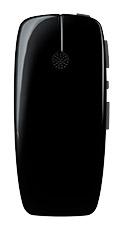
ReSound Micro Mic
Clip-on remote microphone for hearing one speaker through compatible hearing aids.
What Micro Mic does
Clip the ReSound Micro Mic onto the person you want to hear or ask them to wear it on the included lanyard. Its two microphones focus on the speaker’s voice and stream it directly to compatible hearing aids. Placing the microphone near the speaker can help when the person is across a café table or in another seat in the car. On the mic, the speaker can adjust the streamed volume or mute it for a private conversation.
Which hearing aids work with ReSound Micro Mic?
Microphone audio
- ReSound Nexia 61
GN’s U.S. Nexia sheet explicitly names Micro Mic for NX61-DRW. Pair the mic and select its streaming program. Pair the hearing aid or processor to the Micro Mic, then select its streaming program.
- ReSound Nexia 62
GN’s U.S. Nexia sheet explicitly names Micro Mic for NX62-DRW. Pair the mic and select its streaming program. Pair the hearing aid or processor to the Micro Mic, then select its streaming program.
- ReSound Nexia microRIE
GN’s U.S. Nexia sheet explicitly names Micro Mic for NX60S-DRWC. Pair the mic and select its streaming program. Pair the hearing aid or processor to the Micro Mic, then select its streaming program.
- ReSound Nexia BTE 77
GN’s U.S. Nexia sheet explicitly names Micro Mic for NX77-DWC. Pair the mic and select its streaming program. Pair the hearing aid or processor to the Micro Mic, then select its streaming program.
- ReSound Nexia BTE 88
GN’s U.S. Nexia sheet explicitly names Micro Mic for NX88-DWC. Pair the mic and select its streaming program. Pair the hearing aid or processor to the Micro Mic, then select its streaming program.
- ReSound Nexia ITC
GN’s U.S. Nexia sheet explicitly names Micro Mic for NXITC-DWC. Pair the mic and select its streaming program. Pair the hearing aid or processor to the Micro Mic, then select its streaming program.
Choose the exact model printed on your hearing aids or paperwork. A family match does not establish support for every model in that family.
View documented devices and setups
- ReSound Nexia 61 · Exact model
Paired clip-on microphone · microphone_audio
GN’s U.S. Nexia sheet explicitly names Micro Mic for NX61-DRW. Pair the mic and select its streaming program.
Requires additional setupSource · 2026-11-18GN’s U.S. Nexia sheet explicitly names Micro Mic for NX61-DRW. Pair the mic and select its streaming program.
- Pair the hearing aid or processor to the Micro Mic, then select its streaming program.
- ReSound Nexia 62 · Exact model
Paired clip-on microphone · microphone_audio
GN’s U.S. Nexia sheet explicitly names Micro Mic for NX62-DRW. Pair the mic and select its streaming program.
Requires additional setupSource · 2026-11-18GN’s U.S. Nexia sheet explicitly names Micro Mic for NX62-DRW. Pair the mic and select its streaming program.
- Pair the hearing aid or processor to the Micro Mic, then select its streaming program.
- ReSound Nexia microRIE · Exact model
Paired clip-on microphone · microphone_audio
GN’s U.S. Nexia sheet explicitly names Micro Mic for NX60S-DRWC. Pair the mic and select its streaming program.
Requires additional setupSource · 2026-11-18GN’s U.S. Nexia sheet explicitly names Micro Mic for NX60S-DRWC. Pair the mic and select its streaming program.
- Pair the hearing aid or processor to the Micro Mic, then select its streaming program.
- ReSound Nexia BTE 77 · Exact model
Paired clip-on microphone · microphone_audio
GN’s U.S. Nexia sheet explicitly names Micro Mic for NX77-DWC. Pair the mic and select its streaming program.
Requires additional setupSource · 2026-11-18GN’s U.S. Nexia sheet explicitly names Micro Mic for NX77-DWC. Pair the mic and select its streaming program.
- Pair the hearing aid or processor to the Micro Mic, then select its streaming program.
- ReSound Nexia BTE 88 · Exact model
Paired clip-on microphone · microphone_audio
GN’s U.S. Nexia sheet explicitly names Micro Mic for NX88-DWC. Pair the mic and select its streaming program.
Requires additional setupSource · 2026-11-18GN’s U.S. Nexia sheet explicitly names Micro Mic for NX88-DWC. Pair the mic and select its streaming program.
- Pair the hearing aid or processor to the Micro Mic, then select its streaming program.
- ReSound Nexia ITC · Exact model
Paired clip-on microphone · microphone_audio
GN’s U.S. Nexia sheet explicitly names Micro Mic for NXITC-DWC. Pair the mic and select its streaming program.
Requires additional setupSource · 2026-11-18GN’s U.S. Nexia sheet explicitly names Micro Mic for NXITC-DWC. Pair the mic and select its streaming program.
- Pair the hearing aid or processor to the Micro Mic, then select its streaming program.
- ReSound Nexia ITE · Exact model
Paired clip-on microphone · microphone_audio
GN’s U.S. Nexia sheet explicitly names Micro Mic for NXITE-DWC. Pair the mic and select its streaming program.
Requires additional setupSource · 2026-11-18GN’s U.S. Nexia sheet explicitly names Micro Mic for NXITE-DWC. Pair the mic and select its streaming program.
- Pair the hearing aid or processor to the Micro Mic, then select its streaming program.
- ReSound Nexia Wireless ITC · Exact model
Paired clip-on microphone · microphone_audio
GN’s U.S. Nexia sheet explicitly names Micro Mic for ITC 312–WL. Pair the mic and select its streaming program.
Requires additional setupSource · 2026-11-18GN’s U.S. Nexia sheet explicitly names Micro Mic for ITC 312–WL. Pair the mic and select its streaming program.
- Pair the hearing aid or processor to the Micro Mic, then select its streaming program.
- ReSound One RT61-DRW · Exact model
Paired clip-on microphone · microphone_audio
GN’s professional ONE brochure lists the Micro Mic with the wireless accessories for the RIE models, including RT61-DRW.
Requires additional setupSource · 2026-11-18GN’s professional ONE brochure lists the Micro Mic with the wireless accessories for the RIE models, including RT61-DRW.
- Pair the hearing aid or processor to the Micro Mic, then select its streaming program.
- ReSound One RT61-DRWC · Exact model
Paired clip-on microphone · microphone_audio
GN’s professional ONE brochure lists the Micro Mic with the wireless accessories for the RIE models, including RT61-DRWC.
Requires additional setupSource · 2026-11-18GN’s professional ONE brochure lists the Micro Mic with the wireless accessories for the RIE models, including RT61-DRWC.
- Pair the hearing aid or processor to the Micro Mic, then select its streaming program.
- ReSound One RT62-DRW · Exact model
Paired clip-on microphone · microphone_audio
GN’s professional ONE brochure lists the Micro Mic with the wireless accessories for the RIE models, including RT62-DRW.
Requires additional setupSource · 2026-11-18GN’s professional ONE brochure lists the Micro Mic with the wireless accessories for the RIE models, including RT62-DRW.
- Pair the hearing aid or processor to the Micro Mic, then select its streaming program.
- ReSound LiNX 3D RIE 61 · Exact model
Paired clip-on microphone · microphone_audio
GN’s Norwegian table names Micro Mic for ReSound’s wireless devices and lists LT961 (61 style). GN’s U.S. bimodal chart corroborates the family.
Requires additional setupSource · 2026-11-18GN’s Norwegian table names Micro Mic for ReSound’s wireless devices and lists LT961 (61 style). GN’s U.S. bimodal chart corroborates the family.
- Pair the hearing aid or processor to the Micro Mic, then select its streaming program.
- ReSound LiNX 3D RIE 62 · Exact model
Paired clip-on microphone · microphone_audio
GN’s Norwegian table names Micro Mic for ReSound’s wireless devices and lists LT962 (62 style). GN’s U.S. bimodal chart corroborates the family.
Requires additional setupSource · 2026-11-18GN’s Norwegian table names Micro Mic for ReSound’s wireless devices and lists LT962 (62 style). GN’s U.S. bimodal chart corroborates the family.
- Pair the hearing aid or processor to the Micro Mic, then select its streaming program.
- ReSound LiNX Quattro RIE 61 · Exact model
Paired clip-on microphone · microphone_audio
GN’s Norwegian table names Micro Mic for ReSound’s wireless devices and lists RE961 (61 style). GN’s U.S. bimodal chart corroborates the family.
Requires additional setupSource · 2026-11-18GN’s Norwegian table names Micro Mic for ReSound’s wireless devices and lists RE961 (61 style). GN’s U.S. bimodal chart corroborates the family.
- Pair the hearing aid or processor to the Micro Mic, then select its streaming program.
- ReSound LiNX Quattro RIE 62 · Exact model
Paired clip-on microphone · microphone_audio
GN’s Norwegian table names Micro Mic for ReSound’s wireless devices and lists RE962 (62 style). GN’s U.S. bimodal chart corroborates the family.
Requires additional setupSource · 2026-11-18GN’s Norwegian table names Micro Mic for ReSound’s wireless devices and lists RE962 (62 style). GN’s U.S. bimodal chart corroborates the family.
- Pair the hearing aid or processor to the Micro Mic, then select its streaming program.
- ReSound LiNX2 · Family
Paired clip-on microphone · microphone_audio
The GN chart names wireless LiNX2. Confirm the receiving hearing aids’ wireless designation.
Requires additional setupSource · 2026-11-18Family-level evidence. Confirm your exact hearing-aid model before buying.
The GN chart names wireless LiNX2. Confirm the receiving hearing aids’ wireless designation.
- Pair the hearing aid or processor to the Micro Mic, then select its streaming program.
- ReSound Enzo Q BTE 88 · Exact model
Paired clip-on microphone · microphone_audio
GN’s professional ENZO Q guide names the Micro Mic in the wireless-accessory feature table for the BTE 88.
Requires additional setupSource · 2026-11-18GN’s professional ENZO Q guide names the Micro Mic in the wireless-accessory feature table for the BTE 88.
- Pair the hearing aid or processor to the Micro Mic, then select its streaming program.
- ReSound Enzo Q BTE 98 · Exact model
Paired clip-on microphone · microphone_audio
GN’s professional ENZO Q guide names the Micro Mic in the wireless-accessory feature table for the BTE 98.
Requires additional setupSource · 2026-11-18GN’s professional ENZO Q guide names the Micro Mic in the wireless-accessory feature table for the BTE 98.
- Pair the hearing aid or processor to the Micro Mic, then select its streaming program.
- ReSound Key · Family
Paired clip-on microphone · microphone_audio
GN lists the Micro Mic as a ReSound Key wireless accessory. The receiving model must be wireless-capable.
Requires additional setupSource · 2026-11-18Family-level evidence. Confirm your exact hearing-aid model before buying.
GN lists the Micro Mic as a ReSound Key wireless accessory. The receiving model must be wireless-capable.
- Pair the hearing aid or processor to the Micro Mic, then select its streaming program.
- ReSound Omnia RU62-DRW · Exact model
Paired clip-on microphone · microphone_audio
GN’s OMNIA standard-receiver datasheet explicitly lists the original Micro Mic for RU62-DRW.
Requires additional setupSource · 2026-11-18GN’s OMNIA standard-receiver datasheet explicitly lists the original Micro Mic for RU62-DRW.
- Pair the hearing aid or processor to the Micro Mic, then select its streaming program.
- ReSound OMNIA RU61-DRWC · Exact model
Paired clip-on microphone · microphone_audio
GN’s OMNIA standard-receiver datasheet explicitly lists the original Micro Mic for RU61-DRWC.
Requires additional setupSource · 2026-11-18GN’s OMNIA standard-receiver datasheet explicitly lists the original Micro Mic for RU61-DRWC.
- Pair the hearing aid or processor to the Micro Mic, then select its streaming program.
- ReSound OMNIA RU61-DRW · Exact model
Paired clip-on microphone · microphone_audio
GN’s OMNIA standard-receiver datasheet explicitly lists the original Micro Mic for RU61-DRW.
Requires additional setupSource · 2026-11-18GN’s OMNIA standard-receiver datasheet explicitly lists the original Micro Mic for RU61-DRW.
- Pair the hearing aid or processor to the Micro Mic, then select its streaming program.
- Jabra Enhance Pro 20 · Family
Paired clip-on microphone · microphone_audio
Jabra documents Micro Mic pairing for the Enhance Pro 20 line. Hearing aid styles need to support the wireless path.
Requires additional setupSource · 2026-11-18Family-level evidence. Confirm your exact hearing-aid model before buying.
Jabra documents Micro Mic pairing for the Enhance Pro 20 line. Hearing aid styles need to support the wireless path.
- Pair the hearing aid or processor to the Micro Mic, then select its streaming program.
- Jabra Enhance Pro 30 · Family
Paired clip-on microphone · microphone_audio
Jabra documents Micro Mic pairing for the Enhance Pro 30 line. Hearing aid styles need to support the wireless path.
Requires additional setupSource · 2026-11-18Family-level evidence. Confirm your exact hearing-aid model before buying.
Jabra documents Micro Mic pairing for the Enhance Pro 30 line. Hearing aid styles need to support the wireless path.
- Pair the hearing aid or processor to the Micro Mic, then select its streaming program.
- Jabra Enhance Pro · Family
Paired clip-on microphone · microphone_audio
Jabra’s Enhance Pro PM family support explicitly documents Micro Mic pairing.
Requires additional setupSource · 2026-11-18Family-level evidence. Confirm your exact hearing-aid model before buying.
Jabra’s Enhance Pro PM family support explicitly documents Micro Mic pairing.
- Pair the hearing aid or processor to the Micro Mic, then select its streaming program.
- Jabra Enhance Pro 10 · Family
Paired clip-on microphone · microphone_audio
Jabra documents Micro Mic pairing for wireless Enhance Pro 10 hearing aids. Verify wireless capability on customized units.
Requires additional setupSource · 2026-11-18Family-level evidence. Confirm your exact hearing-aid model before buying.
Jabra documents Micro Mic pairing for wireless Enhance Pro 10 hearing aids. Verify wireless capability on customized units.
- Pair the hearing aid or processor to the Micro Mic, then select its streaming program.
- Cochlear Nucleus® 7 · Exact model
Paired clip-on microphone · microphone_audio
The GN U.S. compatibility chart documents direct 2.4 GHz microphone streaming and bimodal streaming with a compatible ReSound hearing aid.
Requires additional setupSource · 2026-11-18The GN U.S. compatibility chart documents direct 2.4 GHz microphone streaming and bimodal streaming with a compatible ReSound hearing aid.
- Pair the hearing aid or processor to the Micro Mic, then select its streaming program.
- Cochlear Nucleus® 6 Sound Processor · Exact model
Paired clip-on microphone · microphone_audio
The GN U.S. compatibility chart documents direct 2.4 GHz microphone streaming and bimodal streaming with a compatible ReSound hearing aid. A clinician may need to install a processor software update.
Requires additional setupSource · 2026-11-18The GN U.S. compatibility chart documents direct 2.4 GHz microphone streaming and bimodal streaming with a compatible ReSound hearing aid. A clinician may need to install a processor software update.
- Pair the hearing aid or processor to the Micro Mic, then select its streaming program.
- Cochlear Nucleus Kanso · Exact model
Paired clip-on microphone · microphone_audio
The GN U.S. compatibility chart documents direct 2.4 GHz microphone streaming and bimodal streaming with a compatible ReSound hearing aid. A clinician may need to install a processor software update.
Requires additional setupSource · 2026-11-18The GN U.S. compatibility chart documents direct 2.4 GHz microphone streaming and bimodal streaming with a compatible ReSound hearing aid. A clinician may need to install a processor software update.
- Pair the hearing aid or processor to the Micro Mic, then select its streaming program.
- ReSound ENZO2 · Family
Paired clip-on microphone · microphone_audio
The U.S. chart explicitly names the wireless ReSound ENZO2 family for direct or documented bimodal streaming.
Requires additional setupSource · 2026-11-18Family-level evidence. Confirm your exact hearing-aid model before buying.
The U.S. chart explicitly names the wireless ReSound ENZO2 family for direct or documented bimodal streaming.
- Pair the hearing aid or processor to the Micro Mic, then select its streaming program.
Documented features
Listening and control
- Mute accessory microphone
- Supported
Press mute once and look for the blinking orange light. Restarting the microphone clears a manual mute. A drop of more than about 30 inches can mute output for up to two seconds.
Documentation · 2026-11-18 - Audio bandwidth
- 100–8,000 Hz ±3 dB
GN specifies the microphone audio frequency range. Hearing-aid fittings may affect real output.
Setup: Paired clip-on microphone
Documentation · 2026-11-18 - Automatic mode switching
- Manual test mode
The automatic horizontal table mode in the shared FAQ applies to the original Multi Mic.
Documentation · 2026-11-18 - Directional microphone
- Supported
Wear the microphone vertically on the speaker.
Documentation · 2026-11-18 - Remote-microphone runtime
- Typical 10 hours of talk time
GN’s full-charge specification for original clip-on use. Real battery age and conditions affect runtime.
Setup: Paired clip-on microphone
Documentation · 2026-11-18 - Built-in microphone count
- 2
The manufacturer documents 2 built-in microphones.
Documentation · 2026-11-18 - Microphone modes
- Directional clip-on microphone
Normal use is a vertically worn remote microphone for one talker.
Setup: Paired clip-on microphone
Documentation · 2026-11-18 - Microphone modes
- Omnidirectional fitting test
0 dB gain when placed horizontally in a test chamber. GN describes this as a clinical transparency check.
Setup: Omnidirectional fitting test
Documentation · 2026-11-18 - Noise management
- Directional pickup and loud-input limiter
The 2015 datasheet describes directional clip mode and limiting acoustic inputs above 85 dB SPL. Drop detection briefly mutes impact noise.
Setup: Paired clip-on microphone
Documentation · 2026-11-18 - Passing the microphone
- Manual speaker handoff
Someone must hand over, clip on, or hold the microphone close to the next speaker. The device’s normal pickup is intended for one nearby voice.
Setup: Paired clip-on microphone
Documentation · 2026-11-18 - Microphone placement
- 4–16 inches from the speaker’s mouth
Clip to clothing or use the included lanyard.
Setup: Paired clip-on microphone
Documentation · 2026-11-18 - Cannot change hearing aid programs
The mic’s labeled physical buttons control power, pairing, stream level, and mute. The wearer changes hearing-aid programs on the aids, on an optional remote, or in a compatible app.
Documentation · 2026-11-18- Remote microphone
- SupportedDocumentation · 2026-11-18
- Stream/environment balance
- Independent stream level on the mic
Adjust the aid or app settings separately for environmental sound where available. Independent surroundings sliders depend on the hearing aid and app.
Setup: Paired clip-on microphone
Documentation · 2026-11-18 - Stream volume control
- Stream-only volume buttons
A short blink confirms a change. Locking volume leaves mute enabled.
Setup: Paired clip-on microphone
Documentation · 2026-11-18 - No table microphone mode
ReSound reserves automatic group table pickup for the Multi Mic. The Micro Mic’s omnidirectional setting is for test-chamber measurements.
Documentation · 2026-11-18- Volume control
- Supported
The microphone’s + and – buttons adjust the level of its stream.
Documentation · 2026-11-18
Connections
- No analog audio input
The sole wired connector in the Micro Mic layout is for charging. The shared FAQ assigns line-in to the original Multi Mic.
Documentation · 2026-11-18- Companion app control
- Optional ReSound app control
Select the Micro Mic program in the hearing-aid app when available. The phone pairs to the aids. The accessory pairs directly to the aids.
Setup: Paired clip-on microphone
Documentation · 2026-11-18 - Manufacturer-stated audio latency
- About 20 ms to the hearing instrument
The datasheet gives transmission latency as 20 ms. The shared FAQ describes the delay as less than 20 ms. Acoustic and hearing-aid processing delay for an exact receiver is unpublished.
Setup: Paired clip-on microphone
Documentation · 2026-11-18 - No Auracast broadcasting
The Micro Mic uses GN’s paired 2.4 GHz link. ReSound identifies the Multi-Mic+ and TV-Streamer+ for its Auracast venue setup.
Documentation · 2026-11-18- Bilateral and unilateral use
- Single aid, pair, or documented bimodal setup
With ear-to-ear program coordination, one aid’s streaming control can activate the pair. Otherwise use both controls. Mixed-brand or mixed-model hearing-aid pairs beyond GN’s bimodal chart were not established.
Setup: Paired clip-on microphone
Documentation · 2026-11-18 - Connection priority
- Documented phone path takes priority
GN says the mic resumes after these calls. With multiple accessory sources paired, the listener selects one streaming program. Modern native phone-call priorities were not checked across exact aids.
Setup: Paired clip-on microphone
Documentation · 2026-11-18 - Link to hearing aids
- GN 2.4 GHz wireless
Direct to compatible hearing equipment paired to the microphone.
Setup: Paired clip-on microphone
Documentation · 2026-11-18 - Accessory-to-hearing-aid range
- Up to 25 m (about 82 ft)
Clear line of sight. Walls, nearby radio traffic and metal structures can reduce range.
Setup: Paired clip-on microphone
Documentation · 2026-11-18 - Hearing-aid pairing method
- 20-second pairing window
Keep devices nearby. For battery-door hearing aids, open and close both doors. For rechargeable models, use the model-specific power-off and restart procedure. Pairing success is audible in the aids.
Setup: Paired clip-on microphone
Documentation · 2026-11-18 - No hands-free calling through this accessory
The Micro Mic streams one-way speech. With a documented Phone Clip+ or Phone-Now call, the separate phone path pauses the microphone stream.
Documentation · 2026-11-18- Professional setup
- Self-pairing or help from a hearing care professional
A professional can help with pairing and check fitting transparency. Some Nucleus 6 or original Kanso setups may need a clinician-only processor upgrade.
Documentation · 2026-11-18 - Receiver requirements
- No separate receiver needed
The receiving hearing aid or sound processor needs the supported 2.4 GHz link and must pair with the microphone.
Setup: Paired clip-on microphone
Documentation · 2026-11-18 - Reconnection behavior
- Automatic reconnect within 5 minutes
If you have been out of range longer, select the streaming program again. It retains pairing after cycling power.
Setup: Paired clip-on microphone
Documentation · 2026-11-18 - Microphone/call concurrency
- Mic pauses for documented phone calls
This applies to the documented legacy phone paths. No claim about concurrent native Bluetooth calls on specific modern hearing aids.
Setup: Paired clip-on microphone
Documentation · 2026-11-18 - Simultaneous listeners
- Multiple paired hearing instruments
The datasheet lists multiple hearing instruments per microphone and the chart demonstrates simultaneous bimodal streaming. No numerical ceiling for different listeners is documented.
Setup: Paired clip-on microphone
Documentation · 2026-11-18 - No stereo streaming
GN lists Micro Mic output as mono in its remote-streamer matrix. Two microphones focus the pickup and compatible pairs can receive the same signal.
Documentation · 2026-11-18- No telecoil input
The Micro Mic’s labeled interface is dual-microphone voice pickup and its hardware has no input-mode selector. GN lists telecoil, line-in and FM as modes of the Multi Mic.
Documentation · 2026-11-18- No USB audio input
GN explicitly labels the micro-USB socket for charging. The prescribed audio path is the microphone pair into the 2.4 GHz hearing aid link.
Documentation · 2026-11-18- Wireless transmission delay
- 20 ms
GN lists the transmission delay to the hearing instrument as 20 ms.
Documentation · 2026-11-18
Power and charging
- Accessory battery is not user-replaceable
The battery is built in. GN directs device repairs to authorized service.
Documentation · 2026-11-18- Accessory battery type
- Built-in rechargeable battery
The checked specifications omit cell chemistry, watt-hours and mAh.
Documentation · 2026-11-18 - Accessory charge time
- About 3 hours from empty
Before first use, GN advises charging for at least three hours even if the status light shows full.
Documentation · 2026-11-18 - Rechargeable accessory battery
- Supported
Charges via micro-USB and the supplied wall adapter.
Documentation · 2026-11-18 - Battery status reporting
- Low-battery and charging LEDs
The North American manual calls the low-battery indicator orange. The shared UK FAQ calls it yellow and uses a different blink interval. The display gives no exact remaining percentage.
Documentation · 2026-11-18 - Electrical input requirements
- Use the supplied wall adapter
The Micro Mic datasheet and manuals do not specify a voltage/current rating for substituting a different supply.
Documentation · 2026-11-18 - Power adapter included
- Supported
North American documentation shows and requires the supplied wall adapter.
Documentation · 2026-11-18 - Power connector
- Micro-USB
Use the supplied charging cable and wall adapter.
Documentation · 2026-11-18
Design and everyday use
- Control accessibility
- Tactile buttons and audible confirmations
The hearing aids play a melody on connection. The pairing button is recessed and the LEDs give visual feedback. GN does not document one-handed suitability.
Documentation · 2026-11-18 - Dimensions
- 25.5 × 53 × 20.3 mm
Width × height × depth. GN’s drawing identifies the long axis, and its table gives 53 × 25.5 × 20.3 mm without naming axes or stating whether it includes the clip.
Documentation · 2026-11-18 - Included items
- Mic, charging cable, wall adapter, lanyard and pouch
North American datasheet and user guide. The wall adapter pictured has two flat pins.
Documentation · 2026-11-18 - Routine maintenance
- Dry cloth and cleaning brush
Avoid alcohol, household cleaners and moisture. Protect the microphone openings and charging port from debris. Turn off and use the pouch for storage.
Documentation · 2026-11-18 - Operating conditions
- 32–113°F (0–45°C)
Keep the microphone away from rain and excessive moisture. The 2015 datasheet notes reduced battery life in below-freezing use. No operating relative-humidity percentage is published.
Documentation · 2026-11-18 - Physical controls
- Power, pairing, volume and mute
The recessed pairing button takes a pen tip. The volume buttons can lock or unlock the set stream level with a startup sequence.
Documentation · 2026-11-18 - Regional variants
- North American and international documentation
GN lists separate ReSound and generic SM-2M registrations. The North American manual lists U.S. FCC and Canadian ISED IDs. No feature or plug matrix across markets was found.
Documentation · 2026-11-18 - Required extras
- Compatible hearing equipment and a pen tip
Pair to the receiving device and select its accessory streaming program. A supported remote or app is optional.
Documentation · 2026-11-18 - Repair and service options
- Authorized service
GN directs fault assessment and warranty returns through the point of purchase or hearing care professional.
Documentation · 2026-11-18 - Status indicators
- Two LEDs and a hearing-aid melody
Green indicates power, orange shows low charge or pairing depending on the pattern, and solid red indicates charging. A periodic green flash on red indicates full charge. The separate mute light blinks orange.
Documentation · 2026-11-18 - Storage conditions
- −4 to 113°F (−20 to 45°C)
Store switched off in its pouch away from heat and moisture. Test-chamber extremes are outside the labeled storage range.
Documentation · 2026-11-18 - Warranty terms
- 12 months under the GN limited warranty
Manufacturing, workmanship and design defects under normal use are covered. Accidents, misuse and unauthorized repair are excluded. Regional or dispenser terms may differ.
Documentation · 2026-11-18 - Wearing and placement options
- Clothing clip or lanyard
Place the microphone on the speaker.
Documentation · 2026-11-18 - Weight
- 17 g
Published device weight is 17 g with the built-in battery. GN does not separately list weight with the removable lanyard.
Documentation · 2026-11-18
How to set up ReSound Micro Mic
Charge the microphone with its supplied micro-USB cable and wall adapter before first use. Turn the microphone on and both hearing aids off. Use a pen tip to press the pairing button, then turn the aids on within 20 seconds. Use the aids’ assigned streaming control or select the microphone in a compatible ReSound app. Clip it vertically 4–16 inches from the speaker’s mouth with the status light pointing up.
What to check before buying
The Micro Mic is designed around one speaker at a time. ReSound specifies up to 25 meters (about 82 feet) with a clear line of sight. Walls, interference and distance can interrupt the signal. The Micro Mic has no group table mode, wired audio input, hearing-loop input or Auracast broadcast mode.
Lacks a table mode for group conversations
The 17-gram Micro Mic clips onto the person you want to hear. If several people are talking around a table, the ReSound Multi Mic can switch to a group mode when laid flat. It can also take audio from a 3.5 mm cable, a hearing loop, or an optional FM receiver. Check which microphone your hearing aids support.
SourceListeners pair directly to the microphone
The Micro Mic sends a speaker’s voice to devices paired with it. If you also want nearby Auracast receivers to be able to join, the newer ReSound Multi Mic+ adds that broadcast option. ReSound lists both microphones for the same documented wireless Nexia styles.
SourceLets the speaker mute the microphone
If you’re replacing a ReSound Unite Mini Microphone, one difference you’ll notice is the mute button on the Micro Mic. The person wearing it can briefly pause what you hear through your hearing aids. Check that your aids support the Micro Mic before switching.
SourcePair the microphone with your hearing aids
Fully charge the Micro Mic before first use. Turn it on and turn your hearing aids off. Press the small pairing button once with a pen tip, then turn both hearing aids on within 20 seconds. The aids play a melody when pairing succeeds. If you already use a TV streamer, two or three presses select the second or third streaming slot. Follow your hearing-aid guide for restarting rechargeable models.
SourceChoose the stream and clip the mic on the speaker
Start the stream from the assigned hearing-aid button or the Micro Mic program in a compatible ReSound app. Have the speaker wear the mic vertically 4–16 inches from their mouth with the status light pointing up. Use the + and – buttons for the stream level. Tap mute for a private conversation and look for the blinking orange light.
SourceRestore a dropped connection
Move back into range, check that the microphone and hearing aids have charge, and check the mute light. If you’ve been out of range for more than five minutes, select the streaming program again. If the volume buttons stop responding, check the volume lock in ReSound’s guide.
SourceDesigned for one nearby voice
Ask the person you want to hear to wear the microphone. The omnidirectional test setting in the manual is intended for hearing-aid fitting measurements. Its normal listening mode focuses toward the person wearing it.
SourceCompanion apps
Related accessories
Other devices named in the documentation
These names have not been matched to an exact device in our catalog. They do not create verified matches in the finder.
Checking current offers…
Documentation checked Nov 18, 2026