App directory
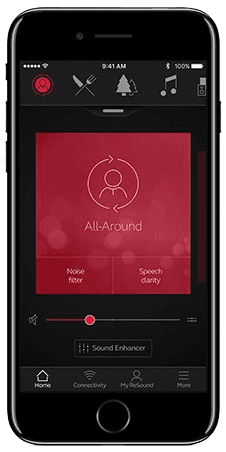
ReSound Smart 3D
GN Resound A/S
Controls ReSound hearing aids from LiNX 3D to Vivia, plus Jabra Enhance Pro 30 and Enhance Select. Includes tinnitus sound controls and remote adjustments.
Features
Listening assistance
- Conditional: Audio equalizer10
Device companion
- Conditional: Mute hearing devices10
- Conditional: Directional focus control11
- Conditional: Hearing-device tinnitus controls12
- Conditional: Hearing-device control13
- Conditional: Listening-program selection10
- Conditional: Hearing-device volume10
- Conditional: Device battery status14
- Conditional: Find a hearing device15
- Conditional: Remote professional support16
- Conditional: Remote fitting adjustments16
- Conditional: Personalized hearing programs10
- Conditional: Auracast assistant19
- Conditional: Accessory control10
- Conditional: Device firmware updates16
Compatibility
- Conditional: Required hardware20ReSound ONE · ReSound Key · ReSound LiNX Quattro · ReSound ENZO Q · ReSound LiNX 3D · ReSound ENZO 3D
Availability & access
Privacy & data
Research & evidence
- Supported: App-specific study
- Supported: Randomized app study
- Applies to the ReSound Assist remote-help service only: the hearing care professional must enable it, and it is offered in select markets. Basic hearing-aid control needs only compatible hearing aids.
- Only for ReSound Assist (remote help, new settings) and the Tinnitus Manager: the hearing care professional must enable these. Direct volume/program control works with paired compatible hearing aids.
- Evidence: Introduction > Intended purpose (p. 3).
- Required for ReSound Assist (requests, receiving new settings) and hearing-aid software updates; ReSound does not state that direct local control needs a connection.
- App data is held on the phone; GN cloud services store access attempts, crashes, erroneous usage and firmware downloads/updates. Cloud communication happens only with user consent and when hearing aids are paired. Evidence: Cybersecurity (pp. 12-13).
- Only during a ReSound Assist Live session with the hearing care professional (live audio/video call); ReSound Assist Live is documented for iOS and in selected countries. Evidence: Tinnitus management > Intended purpose (p. 8); ReSound Assist Live (p. 11).
- When sending a ReSound Assist request (optional personal message) or chatting during ReSound Assist Live; requires the service to be enabled by the hearing care professional and available in the country. Evidence: ReSound Assist Live > How to fill in your information / How to send your request (p. 10).
- By request to GN's Data Protection Officer under GN's general privacy policy; portability depends on applicable law and circumstances. No in-app export is documented. Evidence: 13. Your rights.
- GN states the system communicates with its cloud only if the user consents; cloud-dependent services such as ReSound Assist and remote updates need a network connection. Evidence: Cybersecurity (p. 13).
- Requires compatible hearing devices and a supported phone. Functions vary with model, firmware and professional configuration.
- Sound Enhancer speech focus requires a hearing-aid model and professional fitting that expose the control.
- Tinnitus Sound Generator must be supported and enabled by the hearing-care professional. Only where the hearing-care professional has enabled this feature.
- Compatible GN hearing aids and phone; adjustments depend on professional fitting. Remote services and updates require supported models and provider/market availability.
- Battery status is documented for compatible rechargeable hearing aids only.
- Requires compatible hearing devices and a supported phone. Functions vary with model, firmware and professional configuration. Location permissions and a previous connection may be required; last-known location is not live GPS in the hearing aid.
- Requires supported hearing aids, an enabled participating hearing-care provider, and service availability in the market.
- Requires Made-for-iPhone (MFi) ReSound hearing aids paired in iOS accessibility settings; otherwise a ReSound Phone Clip+ is needed. Streaming is handled by iOS, not by an in-app player.
- Direct Android streaming needs Android 10 or later, a phone model whose manufacturer implemented Android Streaming to Hearing Aids, supported hearing-aid firmware (e.g. LiNX Quattro 1.0.43+) and Smart 3D 1.5.0+, with pairing done through the app; otherwise use a Phone Clip+.
- Auracast-enabled ReSound Vivia, Enzo IA, Savi or Nexia; supported phone, hearing-aid firmware and app version are required. A local broadcast must be available.
- Models named in ReSound's Smart 3D FAQ; ReSound directs users to resound.com/compatibility for the current list, which also lists newer smartphone-compatible families (Sensia, Vivia, Enzo IA, Savi, Nexia, OMNIA).
- Remote support and remote fine-tuning (ReSound Assist) depend on the hearing-aid model, the professional enabling them and country availability; ReSound Assist Live is documented for iOS only. Evidence: Introduction > Intended purpose (p. 3).
- Direct streaming needs MFi hearing aids on iOS, or Android 10+ phones with Android Streaming to Hearing Aids plus supported firmware; a Phone Clip+ is the alternative.
App Store ratings & reviews
Praise
- Reviewers value streaming controls; one reports that later iOS updates resolved earlier connection trouble.
Complaints
- Sampled complaints describe reconnection workarounds and watch battery drain, mostly in older software versions.
Google Play ratings & reviews
Complaints
- Streaming, unwanted audio and notifications cause frustration for some users.
- Recent reports include lost programs, launch problems and difficult controls.
Mixed reports
- Useful, sometimes intuitive controls coexist with pairing and reconnection problems.
Hearing devices
Includes documented compatible products and models linked in our catalog. Features can depend on your model, phone and firmware; check the compatibility information for any restrictions.
16 models & families
- Jabra Enhance Pro 30
- Jabra Enhance Select 50R
- Jabra Enhance Select M1
- ReSound Custom Made by ReSound ITC
- ReSound ENZO 3D
- ReSound Enzo IA BTE
- ReSound ENZO Q
- ReSound Enzo Q BTE 88
- ReSound Enzo Q BTE 98
- ReSound Key
- ReSound LiNX 3D
- ReSound LiNX 3D RIE 61
- ReSound LiNX 3D RIE 62
- ReSound LiNX Quattro
- ReSound LiNX Quattro RIE 61
- ReSound LiNX Quattro RIE 62
- ReSound Nexia
- ReSound OMNIA
- ReSound OMNIA BTE/PBTE
- ReSound OMNIA ITC
- ReSound OMNIA miniRIE
- ReSound OMNIA RU61-DRW
- ReSound OMNIA RU61-DRWC
- ReSound Omnia RU62-DRW
- ReSound ONE
- ReSound One RT61-DRW
- ReSound One RT61-DRWC
- ReSound One RT62-DRW
- ReSound Savi
- ReSound Sensia
- ReSound Vivia
- Models named in ReSound's Smart 3D FAQ; ReSound directs users to resound.com/compatibility for the current list, which also lists newer smartphone-compatible families (Sensia, Vivia, Enzo IA, Savi, Nexia, OMNIA).