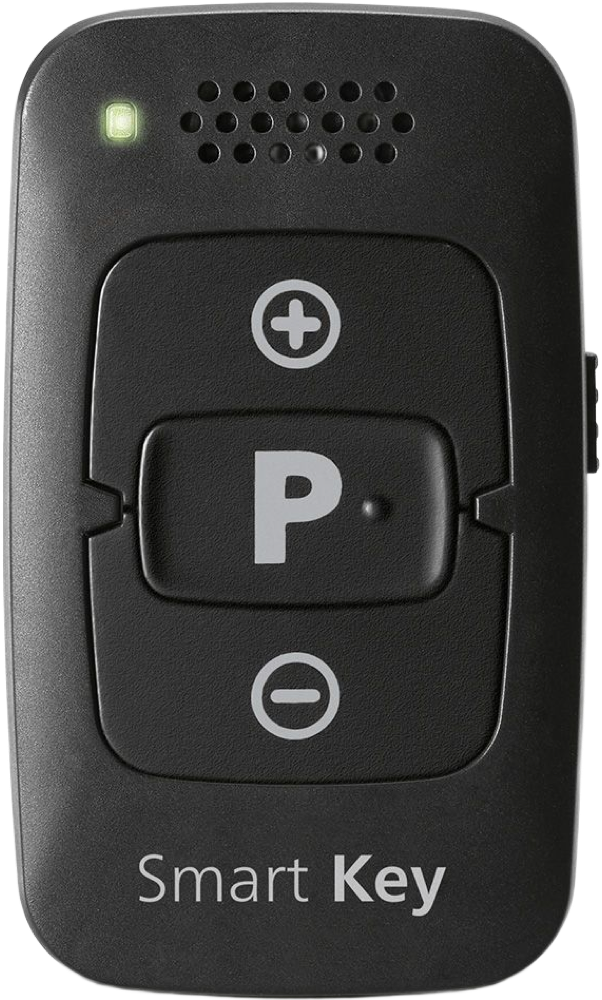
Rexton Smart Key
Change hearing-aid volume and listening programs with a pocket-size remote.
What Smart Key does
Smart Key sends commands to compatible Rexton hearing aids using a high-frequency sound signal. It has two volume buttons, a program button and a physical lock. You can use it without a phone.
Which hearing aids work with Rexton Smart Key?
Remote control
- Rexton Reach R Plus
Pair the exact Smart Key to your compatible aids and unlock it for use. Rexton advises against pairing its app to the same aids.
- Rexton Reach R-LI T
The standard Reach R-Li T appears separately in Rexton’s fit documentation. Pair the exact Smart Key to your compatible aids and unlock it for use. Rexton advises against pairing its app to the same aids.
Choose the exact model printed on your hearing aids or paperwork. A family match does not establish support for every model in that family.
View documented devices and setups
- Rexton Reach R Plus · Exact model
Acoustic remote control · remote_control
Pair the exact Smart Key to your compatible aids and unlock it for use. Rexton advises against pairing its app to the same aids.
Requires additional setupSource · 2026-11-18Pair the exact Smart Key to your compatible aids and unlock it for use. Rexton advises against pairing its app to the same aids.
- Pair the exact Smart Key to your compatible aids and unlock it for use. Rexton advises against pairing its app to the same aids.
- Rexton Reach R-LI T · Exact model
Acoustic remote control · remote_control
The standard Reach R-Li T appears separately in Rexton’s fit documentation. Pair the exact Smart Key to your compatible aids and unlock it for use. Rexton advises against pairing its app to the same aids.
Requires additional setupSource · 2026-11-18The standard Reach R-Li T appears separately in Rexton’s fit documentation. Pair the exact Smart Key to your compatible aids and unlock it for use. Rexton advises against pairing its app to the same aids.
- The standard Reach R-Li T appears separately in Rexton’s fit documentation. Pair the exact Smart Key to your compatible aids and unlock it for use. Rexton advises against pairing its app to the same aids.
Documented features
Listening and control
- Remote carry options
- Key ring, Pocket, BagDocumentation · 2026-11-18
- Control confirmation
- Status light during remote setup and confirmation tones in the hearing aids.Documentation · 2026-11-18
- No control lock
- Documentation · 2026-11-18
- Return to default settings
- Hold the program button for two seconds to return to program 1 and the default volume.Documentation · 2026-11-18
- Volume step behavior
- One press changes volume by one level. Press and hold to keep adjusting.Documentation · 2026-11-18
- Change hearing-aid programs
- SupportedDocumentation · 2026-11-18
- Volume control
- SupportedDocumentation · 2026-11-18
Connections
- Companion app control
- The Smart Key is a standalone remote. Rexton advises avoiding pairing the app and remote to the same hearing aids.Documentation · 2026-11-18
- Bilateral and unilateral use
- The manual describes pairing and confirming each aid in a bilateral fitting. Independent left/right volume is not documented.Documentation · 2026-11-18
- Connection priority
- Pairing Rexton App to the same aids may erase the Smart Key pairing.Documentation · 2026-11-18
- Link to hearing aids
- High-frequency acoustic control signalDocumentation · 2026-11-18
- Hearing-aid pairing method
- Lock the remote and restart the aids. Within three minutes, put the aids in your ears and hold P while unlocking the remote. Release P, then hold it again until the confirmation tone and release it immediately. Confirm the tone in each aid.Documentation · 2026-11-18
- Professional setup
- Ask the hearing care provider whether the aids are compatible. Standard remote pairing is user-operated.Documentation · 2026-11-18
- Receiver requirements
- A compatible hearing aid decodes acoustic control commands. No separate receiver is shown.Documentation · 2026-11-18
- Reconnection behavior
- Pairing is remembered when aids are switched back on and after replacing the remote battery.Documentation · 2026-11-18
Power and charging
- Replaceable accessory battery
- SupportedDocumentation · 2026-11-18
- Accessory battery type
- Replaceable CR2450 coin cell.Documentation · 2026-11-18
- No rechargeable accessory battery
- Documentation · 2026-11-18
- Battery status reporting
- If the indicator fails after unlocking the keys, check the cell orientation and replace a depleted cell. No remaining-charge display is described.Documentation · 2026-11-18
Design and everyday use
- Control accessibility
- Labels identify volume up, volume down and program. The hearing aids play a confirmation tone during pairing.Documentation · 2026-11-18
- Routine maintenance
- Use a dry or slightly damp soft cloth. Use distilled water if dampening. Do not immerse or use cleaning agents.Documentation · 2026-11-18
- Operating conditions
- 32–113 °F (0–45 °C), 5–93% relative humidity.Documentation · 2026-11-18
- Physical controls
- Volume up, Volume down, Program button, Key-lock switchDocumentation · 2026-11-18
- Regional variants
- New Zealand retailer identifies item 10939875. Rexton U.S. lists a separate newer Remote Control as the successor.Documentation · 2026-11-18
- Replacement parts
- CR2450 coin cellDocumentation · 2026-11-18
- Required extras
- Compatible paired hearing aids, CR2450 replacement cell when neededDocumentation · 2026-11-18
- Repair and service options
- Contact the hearing care provider for technical service. The user can replace the coin cell.Documentation · 2026-11-18
- Status indicators
- Status LED, Confirmation tone in each aid, Red and green switch positionsDocumentation · 2026-11-18
- Storage conditions
- Storage 50–104 °F (10–40 °C) at 10–80% relative humidity. Transport −4–140 °F (−20–60 °C) at 5–90%.Documentation · 2026-11-18
- Wearing and placement options
- Key ring or pocketDocumentation · 2026-11-18
How to set up Rexton Smart Key
Lock the remote, restart your hearing aids and put them in your ears. Within three minutes, hold the P button while sliding the lock to green, then release the button. Hold P again until you hear a confirmation tone and release it. Check for a tone in each aid and wait 30 seconds to exit setup.
What to check before buying
Rexton advises against pairing the Smart Key and Rexton App with the same hearing aids. The app connection can erase the remote’s pairing. Keep the path between the remote and aids clear.
Lock the buttons before pocketing the remote
Slide the side switch so the red marking is visible. This disables all three buttons until you slide the switch back to green.
SourceNeeds a clear path from remote to hearing aids
To change a setting with the Smart Key, take it out of your pocket so its high-frequency sound commands can reach your compatible Rexton aids. For comparison, the Widex RC-DEX uses radio and can stay in a pocket or bag close to compatible Widex aids.
SourceRelated accessories
Other devices named in the documentation
These names have not been matched to an exact device in our catalog. They do not create verified matches in the finder.
Checking current offers…
Documentation checked Nov 18, 2026