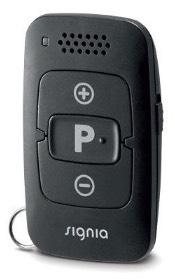
Signia miniPocket
Adjust volume or cycle through fitted hearing programs without taking out your phone. The small remote attaches to a key ring.
What miniPocket does
The miniPocket is a keychain remote for changing the volume and listening program on compatible hearing aids. The side lock disables its buttons while it is in a pocket or bag. Hold P to return to program 1 and the fitted default volume, or hold P and minus to put the aids in standby or wake them. It sends short-range acoustic control signals to the aids and can be used without a smartphone.
Which hearing aids work with Signia miniPocket?
Remote control
- Signia Active
The model is listed as Active separately from Active Pro.
- Signia Active Mini IX
Active Mini IX is listed in its own connectivity table.
- Signia Cellion primax
The Cellion primax guide lists the miniPocket for volume and program changes.
- Signia Motion Nx 13 Nx
The Motion 13 Nx column marks miniPocket compatibility.
- Signia Motion Nx 13P Nx
The Motion 13P Nx column marks miniPocket compatibility.
- Signia Pure AX 312
The manufacturer model sheet lists miniPocket in the App and Accessory Compatibility row.
Choose the exact model printed on your hearing aids or paperwork. A family match does not establish support for every model in that family.
View documented devices and setups
- Signia Active · Exact model
miniPocket paired directly with the hearing aids · remote_control
The model is listed as Active separately from Active Pro.
Documented supportSource · 2026-11-18The model is listed as Active separately from Active Pro.
- Signia Active Mini IX · Exact model
miniPocket paired directly with the hearing aids · remote_control
Active Mini IX is listed in its own connectivity table.
Documented supportSource · 2026-11-18Active Mini IX is listed in its own connectivity table.
- Signia Cellion primax · Exact model
miniPocket paired directly with the hearing aids · remote_control
The Cellion primax guide lists the miniPocket for volume and program changes.
Documented supportSource · 2026-11-18The Cellion primax guide lists the miniPocket for volume and program changes.
- Signia Motion Nx 13 Nx · Exact model
miniPocket paired directly with the hearing aids · remote_control
The Motion 13 Nx column marks miniPocket compatibility.
Documented supportSource · 2026-11-18The Motion 13 Nx column marks miniPocket compatibility.
- Signia Motion Nx 13P Nx · Exact model
miniPocket paired directly with the hearing aids · remote_control
The Motion 13P Nx column marks miniPocket compatibility.
Documented supportSource · 2026-11-18The Motion 13P Nx column marks miniPocket compatibility.
- Signia Pure AX 312 · Exact model
miniPocket paired directly with the hearing aids · remote_control
The manufacturer model sheet lists miniPocket in the App and Accessory Compatibility row.
Documented supportSource · 2026-11-18The manufacturer model sheet lists miniPocket in the App and Accessory Compatibility row.
- Signia Pure AX Charge&Go AX · Exact model
miniPocket paired directly with the hearing aids · remote_control
The US form lists C&G AX, with miniPocket in its app and accessory table.
Documented supportSource · 2026-11-18The US form lists C&G AX, with miniPocket in its app and accessory table.
- Signia Pure AX Charge&Go T AX · Exact model
miniPocket paired directly with the hearing aids · remote_control
The same US document explicitly labels C&G T AX alongside C&G AX.
Documented supportSource · 2026-11-18The same US document explicitly labels C&G T AX alongside C&G AX.
- Signia Pure Charge&Go BCT IX · Exact model
miniPocket paired directly with the hearing aids · remote_control
BCT IX is included in the group with a miniPocket dot. Footnote K excludes BCT IX from StreamLine Mic only.
Documented supportSource · 2026-11-18BCT IX is included in the group with a miniPocket dot. Footnote K excludes BCT IX from StreamLine Mic only.
- Signia Pure Charge&Go IX · Exact model
miniPocket paired directly with the hearing aids · remote_control
The Pure Charge&Go IX group has a miniPocket dot.
Documented supportSource · 2026-11-18The Pure Charge&Go IX group has a miniPocket dot.
- Signia Pure Charge&Go T IX · Exact model
miniPocket paired directly with the hearing aids · remote_control
The Pure Charge&Go T IX group has a miniPocket dot.
Documented supportSource · 2026-11-18The Pure Charge&Go T IX group has a miniPocket dot.
- Signia Pure Nx 10 Nx · Exact model
miniPocket paired directly with the hearing aids · remote_control
Pure 10 Nx has miniPocket despite no direct streaming in this chart.
Documented supportSource · 2026-11-18Pure 10 Nx has miniPocket despite no direct streaming in this chart.
- Signia Pure Nx 13 Nx · Exact model
miniPocket paired directly with the hearing aids · remote_control
The Pure 13 Nx column marks miniPocket compatibility.
Documented supportSource · 2026-11-18The Pure 13 Nx column marks miniPocket compatibility.
- Signia Pure Nx 312 Nx · Exact model
miniPocket paired directly with the hearing aids · remote_control
The Pure 312 Nx column marks miniPocket compatibility.
Documented supportSource · 2026-11-18The Pure 312 Nx column marks miniPocket compatibility.
- Signia Pure Nx Charge&Go · Exact model
miniPocket paired directly with the hearing aids · remote_control
The Pure Charge&Go Nx column marks miniPocket compatibility.
Documented supportSource · 2026-11-18The Pure Charge&Go Nx column marks miniPocket compatibility.
- Signia Pure X Pure 312 X · Exact model
miniPocket paired directly with the hearing aids · remote_control
The Pure 312 X column marks miniPocket compatibility.
Documented supportSource · 2026-11-18The Pure 312 X column marks miniPocket compatibility.
- Signia Pure X Pure Charge&Go X · Exact model
miniPocket paired directly with the hearing aids · remote_control
The Pure Charge&Go X column marks miniPocket compatibility.
Documented supportSource · 2026-11-18The Pure Charge&Go X column marks miniPocket compatibility.
- Signia Silk IX · Exact model
miniPocket paired directly with the hearing aids · remote_control
Chart labels the catalog Silk IX as Silk Charge&Go IX and marks miniPocket support.
Documented supportSource · 2026-11-18Chart labels the catalog Silk IX as Silk Charge&Go IX and marks miniPocket support.
- Signia Silk Nx · Exact model
miniPocket paired directly with the hearing aids · remote_control
The Silk Nx Click CIC column marks miniPocket compatibility.
Documented supportSource · 2026-11-18The Silk Nx Click CIC column marks miniPocket compatibility.
- Signia Silk X · Exact model
miniPocket paired directly with the hearing aids · remote_control
The manufacturer model FAQ identifies the miniPocket. Twin Phone is a separate fitted aid feature.
Documented supportSource · 2026-11-18The manufacturer model FAQ identifies the miniPocket. Twin Phone is a separate fitted aid feature.
- Signia Styletto · Exact model
miniPocket paired directly with the hearing aids · remote_control
The original Styletto column is distinct from Connect and X and marks miniPocket compatibility.
Documented supportSource · 2026-11-18The original Styletto column is distinct from Connect and X and marks miniPocket compatibility.
- Signia Styletto AX · Exact model
miniPocket paired directly with the hearing aids · remote_control
The Styletto AX order-form column has program and volume control via the app or miniPocket.
Documented supportSource · 2026-11-18The Styletto AX order-form column has program and volume control via the app or miniPocket.
- Signia Styletto Connect · Exact model
miniPocket paired directly with the hearing aids · remote_control
The Styletto Connect column marks miniPocket compatibility.
Documented supportSource · 2026-11-18The Styletto Connect column marks miniPocket compatibility.
- Signia Styletto IX · Exact model
miniPocket paired directly with the hearing aids · remote_control
The Styletto IX row marks miniPocket compatibility.
Documented supportSource · 2026-11-18The Styletto IX row marks miniPocket compatibility.
- Signia Styletto X · Exact model
miniPocket paired directly with the hearing aids · remote_control
The Styletto X column marks miniPocket compatibility.
Documented supportSource · 2026-11-18The Styletto X column marks miniPocket compatibility.
- Signia Pure primax · Exact model
miniPocket paired directly with the hearing aids · remote_control
The regular Pure primax description explicitly identifies miniPocket remote control.
Documented supportSource · 2026-11-18The regular Pure primax description explicitly identifies miniPocket remote control.
- Signia Motion X Charge&Go X · Exact model
miniPocket paired directly with the hearing aids · remote_control
Motion Charge&Go X miniPocket column checked.
Documented supportSource · 2026-11-18Motion Charge&Go X miniPocket column checked.
- Signia Motion X Charge&Go P X · Exact model
miniPocket paired directly with the hearing aids · remote_control
Motion Charge&Go P X miniPocket column checked.
Documented supportSource · 2026-11-18Motion Charge&Go P X miniPocket column checked.
- Signia Motion X Charge&Go SP X · Exact model
miniPocket paired directly with the hearing aids · remote_control
Motion Charge&Go SP X miniPocket column checked.
Documented supportSource · 2026-11-18Motion Charge&Go SP X miniPocket column checked.
- Signia Insio Charge&Go AX ITC · Exact model
miniPocket paired directly with the hearing aids · remote_control
US Insio Charge&Go AX literature names the miniPocket in the ITC and ITE portfolio.
Documented supportSource · 2026-11-18US Insio Charge&Go AX literature names the miniPocket in the ITC and ITE portfolio.
- Signia Insio IX CIC · Exact model
miniPocket paired directly with the hearing aids · remote_control
Pair the remote with the compatible hearing aid fitting and unlock its keys. Chart lists Insio IIC/CIC IX. Verify the actual fitted custom build with the provider.
Requires additional setupSource · 2026-11-18Pair the remote with the compatible hearing aid fitting and unlock its keys. Chart lists Insio IIC/CIC IX. Verify the actual fitted custom build with the provider.
- Pair the miniPocket to your hearing aids
- Signia Insio IX IIC · Exact model
miniPocket paired directly with the hearing aids · remote_control
Pair the remote with the compatible hearing aid fitting and unlock its keys. Chart lists Insio IIC/CIC IX. Verify the actual fitted custom build with the provider.
Requires additional setupSource · 2026-11-18Pair the remote with the compatible hearing aid fitting and unlock its keys. Chart lists Insio IIC/CIC IX. Verify the actual fitted custom build with the provider.
- Pair the miniPocket to your hearing aids
- Signia Active Pro IX · Exact model
miniPocket paired directly with the hearing aids · remote_control
Active Pro IX is individually listed.
Documented supportSource · 2026-11-18Active Pro IX is individually listed.
- Signia Motion Charge&Go IX M · Exact model
miniPocket paired directly with the hearing aids · remote_control
Motion Charge&Go M IX is individually listed.
Documented supportSource · 2026-11-18Motion Charge&Go M IX is individually listed.
- Signia Motion Charge&Go IX P · Exact model
miniPocket paired directly with the hearing aids · remote_control
Motion Charge&Go P IX is individually listed.
Documented supportSource · 2026-11-18Motion Charge&Go P IX is individually listed.
- Signia Motion Charge&Go IX SP · Exact model
miniPocket paired directly with the hearing aids · remote_control
Motion Charge&Go SP IX is individually listed.
Documented supportSource · 2026-11-18Motion Charge&Go SP IX is individually listed.
- Signia Pure primax · Family
miniPocket paired directly with the hearing aids · remote_control
Pair the remote with the compatible hearing aid fitting and unlock its keys. Signia’s Pure primax family material supports the remote. Confirm the Pure 13 BT trim individually before buying.
Requires additional setupSource · 2026-11-18Family-level evidence. Confirm your exact hearing-aid model before buying.
Pair the remote with the compatible hearing aid fitting and unlock its keys. Signia’s Pure primax family material supports the remote. Confirm the Pure 13 BT trim individually before buying.
- Pair the miniPocket to your hearing aids
Documented features
Listening and control
- Remote carry options
- Key ring, Pocket or bagDocumentation · 2026-11-18
- Independent ear control
- Volume and program commands are applied to both aids in the documented bilateral fitting.Documentation · 2026-11-18
- Control confirmation
- A hearing-aid tone confirms pairing. Optional fitted tones may confirm program changes and volume steps or limits. The remote has an LED for setup and signal strength.Documentation · 2026-11-18
- Control lock
- SupportedDocumentation · 2026-11-18
- Return to default settings
- Hold P for two seconds to return the hearing aids to program 1 and default volume.Documentation · 2026-11-18
- Volume step behavior
- One configured level per tap. Hold + or − to change the volume through levels.Documentation · 2026-11-18
- Change hearing-aid programs
- Supported
Unlock the paired remote. Available programs depend on the hearing-aid fitting.
Documentation · 2026-11-18 - Remote control range
- 1 m
Nominal distance. Environment, the angle between the remote and hearing aids, and obstructions can shorten it.
Documentation · 2026-11-18 - Remote pairing capacity
- The user guide describes one wearer’s fitting and confirms pairing with two hearing aids in that fitting.Documentation · 2026-11-18
- Streaming controls
- Start TV Sound by selecting a fitted TV program, Stop TV Sound by leaving the fitted TV program · With conditions
Requires a compatible TV Sound setup, linked hearing aids and a TV program configured by a hearing care professional.
Setup: Compatible Signia hearing aids with TV Sound paired and a fitted TV program
Documentation · 2026-11-18 - Volume control
- Supported
Unlock the remote and pair it to compatible hearing aids. Tap for one fitted level or hold to move through levels.
Documentation · 2026-11-18
Connections
- Companion app control
- The miniPocket requires no app. Signia App is an alternative way to manage compatible hearing aids and may erase the remote pairing on the same aids.Documentation · 2026-11-18
- Bilateral and unilateral use
- Both aids are adjusted together when worn as a pair. Confirm the pairing tone in both aids during setup.Documentation · 2026-11-18
- Connection priority
- The Signia App may erase the miniPocket pairing when connected to the same aids. Signia recommends against pairing both to the same set.Documentation · 2026-11-18
- Link to hearing aids
- High-frequency acoustic control signal (14.6–16.1 kHz)Documentation · 2026-11-18
- Accessory-to-hearing-aid range
- 1 m
Nominal distance. Environment, the angle between the remote and hearing aids, and obstructions can shorten it.
Documentation · 2026-11-18 - Hearing-aid pairing method
- Lock remote, restart the aids, then within 3 minutes hold P while unlocking the remote. Release P, then hold it again until the aids play the confirmation tone. Wait 30 seconds or lock to exit setup.Documentation · 2026-11-18
- Professional setup
- Standard pairing can be done with the aids and remote. Ask a hearing care professional about exact model fit, fitted programs, notification tones or persistent pairing issues.Documentation · 2026-11-18
- Receiver requirements
- Pairs directly with a compatible hearing aid. The standard setup uses the remote and hearing aids.Documentation · 2026-11-18
- Reconnection behavior
- Hearing aids remember the pairing at restart and the remote retains it after a coin-cell change. Re-pair if a fitting or app connection clears it.Documentation · 2026-11-18
Power and charging
- Replaceable accessory battery
- SupportedDocumentation · 2026-11-18
- Accessory battery type
- One 3.0 V CR2450 lithium coin cell.Documentation · 2026-11-18
- No rechargeable accessory battery
- Documentation · 2026-11-18
- Battery status reporting
- If the LED stops responding when the keys are unlocked, the cell may be low and need replacement.Documentation · 2026-11-18
Design and everyday use
- Control accessibility
- Labeled +, P and − buttons, a physical side lock and an audible confirmation in the hearing aids when paired.Documentation · 2026-11-18
- Dimensions
- 34 × 57.5 × 12.8 mm
Remote body, in width × height × depth order. No separate outer measurement for the attached key ring.
Documentation · 2026-11-18 - Included items
- miniPocket remote, Printed instructions, CR2450 coin cell, Battery-door remover tool for the SAFE version
For the child-lock package described by WSAUD; confirm local contents before ordering, especially with old stock.
Setup: miniPocket with the child-resistant battery door
Documentation · 2026-11-18 - Routine maintenance
- Wipe with a dry or slightly damp soft cloth. Use distilled water to dampen it. Keep the remote out of water and avoid cleaning agents.Documentation · 2026-11-18
- Operating conditions
- 0–45 °C and 5–93% RH in the English user guide. Keep dry, protect from heat and high humidity, and do not immerse.
User-guide operating limits. Technical Data quotes 700–1060 hPa and a broader 0–50 °C; follow the guide supplied with the remote.
Documentation · 2026-11-18 - Physical controls
- Plus key, Minus key, P program key, Side key-lock switchDocumentation · 2026-11-18
- Regional variants
- 10939860 is documented as miniPocket in Denmark and miniPocket (SAFE) in Japan. The 2019 Canadian manual depicts a slide-off battery cover; the newer English and Japanese SAFE manuals depict a tool-release cover.Documentation · 2026-11-18
- Replacement parts
- CR2450 coin cell, SAFE battery-door tool 10991205 (Japan)Documentation · 2026-11-18
- Required extras
- Compatible hearing aids, Replacement CR2450 coin cell when neededDocumentation · 2026-11-18
- Repair and service options
- See a hearing care professional for technical service. The owner can replace the coin cell. The Japan guide describes dealer-assisted repair.Documentation · 2026-11-18
- Status indicators
- Setup LED, Slow/fast signal-setting LED flashes, Red/green lock markings, Hearing-aid pairing toneDocumentation · 2026-11-18
- Storage conditions
- Store at 10–40 °C and 10–80% RH. Transport at −20 to 60 °C and 5–90% RH.
Extended periods per English user guide. Battery-specific limits may differ.
Documentation · 2026-11-18 - Warranty terms
- Japan: two years from purchase on the remote body, through the selling dealer. Excludes battery, accidental damage, modification and other listed exclusions.
Japan only. Present the purchase documentation and warranty certificate; terms vary by market.
Setup: Japanese miniPocket package and service terms
Documentation · 2026-11-18 - Wearing and placement options
- Key ring, Pocket or bagDocumentation · 2026-11-18
- Weight
- 21 g
Includes battery per Signia Technical Data. Key ring inclusion is unspecified.
Documentation · 2026-11-18
How to set up Signia miniPocket
Lock the remote, switch your hearing aids off and back on using the instructions for your model, and complete pairing within three minutes. Put the aids in your ears, hold P while you unlock the remote, then release P. Hold P again until you hear the pairing tone in your aids. For a pair, check that both play the tone. Wait 30 seconds or lock the remote to exit setup, then leave it unlocked to use it.
What to check before buying
Keep the remote within about 1 m of the aids and avoid obstructions. Signia advises against pairing the Signia App and miniPocket to the same aids because the app may erase the remote pairing. For Pure Charge&Go MaX, ask for the newer Signia Remote Control specified by Signia. The original miniPocket uses a CR2450 coin cell.
Pair the remote with your hearing aids
Lock the remote, switch your hearing aids off and back on using the instructions for your model, and complete pairing within three minutes. Put the aids in your ears, hold P while you unlock the remote, then release P. Hold P again until you hear the pairing tone in your aids. For a pair, check that both play the tone. Wait 30 seconds or lock the remote to exit setup, then leave it unlocked to use it.
SourceChange programs, adjust volume and return to your defaults
Press + or − to adjust volume one step, or hold the button to keep changing it. Press P briefly to move to the next fitted program. Hold P for two seconds to return to program 1 and the default volume. Holding P and − together for two seconds toggles standby.
SourceReplace the coin cell
Use a CR2450 cell with the + side facing up. For units with a child-resistant battery cover, insert the supplied opener into the hole while sliding the cover off. Consult the guide supplied with your unit if the cover differs. Changing the battery retains pairing.
SourceRecover a lost pairing
Check that the lock shows green, the battery is correctly installed and there is a clear path to the hearing aids. Pair again if necessary. Signia offers a lower signal setting for times when the control tone is audible to others, but that setting may reduce reliability.
SourceChoose how you will adjust your hearing aids
Signia warns that connecting the Signia App can erase the miniPocket pairing on the same aids. If you need both controls, verify the behavior with your exact hearing aids before buying the remote.
SourceTV control depends on your hearing-aid setup
A fitted TV Sound program can start streaming when you select it and stop streaming when you leave it. The remote sends the program command to the hearing aids. The separately paired TV Sound provides the audio.
SourceTwin Phone uses an aid feature
For Silk X, Signia lists the miniPocket as an option for activating Twin Phone. The phone is held close to one hearing aid and the hearing aids handle the audio in both ears.
SourceFits on a key ring and confirms presses with a light
If you wear Signia Cellion primax or UK NHS Contrast R hearing aids, you can choose how you check a setting. The miniPocket clips to a key ring and flashes a status light. For a screen that shows what you changed, the larger Siemens easyPocket is also documented for those aids.
SourceNeeds to stay within about three feet
Keep the miniPocket within about three feet of your compatible Signia aids when you press a button. That’s about half the stated range of the Oticon Remote Control 3.0 for compatible Oticon aids, a difference you might notice if you leave the remote on a nearby table.
SourceRelated accessories
Other devices named in the documentation
These names have not been matched to an exact device in our catalog. They do not create verified matches in the finder.
Checking current offers…
Documentation checked Nov 18, 2026