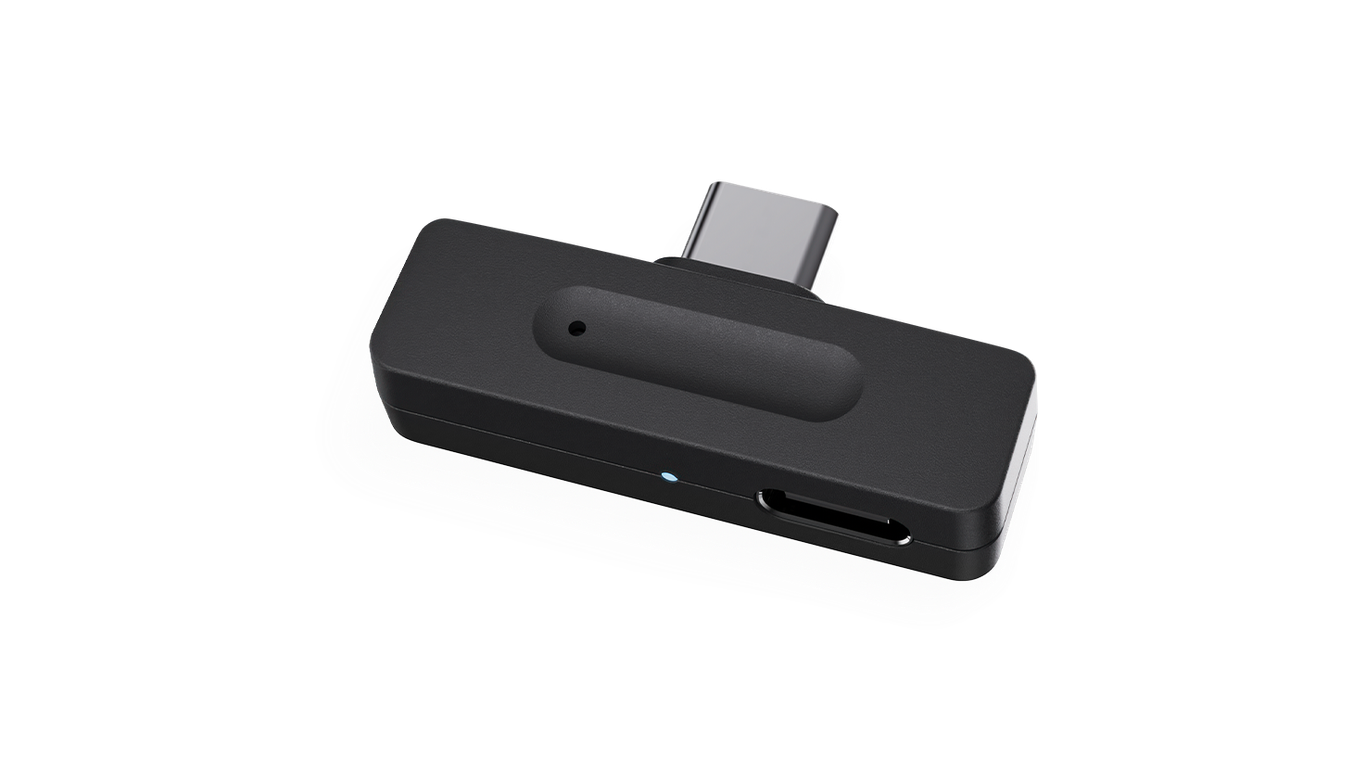
Starkey StarLink Edge LE Adapter
Hear audio and make hands-free calls through compatible Starkey hearing aids connected to a supported phone, tablet or PC.
What StarLink Edge LE Adapter does
The StarLink Edge LE Adapter plugs into a compatible source and sends its audio by Bluetooth LE Audio to your hearing aids. On supported calls, your hearing-aid microphones send your voice back to the source. The adapter remembers one set of aids and can move between compatible devices without pairing the aids again.
Which hearing aids work with Starkey StarLink Edge LE Adapter?
USB audio
- Starkey Omega AI+ CIC
Starkey Omega AI+ CIC is listed in the exact StarkeyPro accessory section. Pair a supported wireless LE Audio hearing aid to the adapter. Use a compatible USB-audio Android phone, tablet or PC. Pair a supported wireless LE Audio hearing aid to the adapter. Use a compatible USB-audio Android phone, tablet or PC.
- Starkey Omega AI+ ITC R
Starkey Omega AI+ ITC R is listed in the exact StarkeyPro accessory section. Pair a supported wireless LE Audio hearing aid to the adapter. Use a compatible USB-audio Android phone, tablet or PC. Pair a supported wireless LE Audio hearing aid to the adapter. Use a compatible USB-audio Android phone, tablet or PC.
- Starkey Omega AI+ ITE R
Starkey Omega AI+ ITE R is listed in the exact StarkeyPro accessory section. Pair a supported wireless LE Audio hearing aid to the adapter. Use a compatible USB-audio Android phone, tablet or PC. Pair a supported wireless LE Audio hearing aid to the adapter. Use a compatible USB-audio Android phone, tablet or PC.
- Starkey Omega AI+ mRIC R
Starkey Omega AI+ mRIC R is listed in the exact StarkeyPro accessory section. Pair a supported wireless LE Audio hearing aid to the adapter. Use a compatible USB-audio Android phone, tablet or PC. Pair a supported wireless LE Audio hearing aid to the adapter. Use a compatible USB-audio Android phone, tablet or PC.
- Starkey Omega AI+ RIC 312
Starkey Omega AI+ RIC 312 is listed in the exact StarkeyPro accessory section. Pair a supported wireless LE Audio hearing aid to the adapter. Use a compatible USB-audio Android phone, tablet or PC. Pair a supported wireless LE Audio hearing aid to the adapter. Use a compatible USB-audio Android phone, tablet or PC.
- Starkey Omega AI+ RIC RT
Starkey Omega AI+ RIC RT is listed in the exact StarkeyPro accessory section. Pair a supported wireless LE Audio hearing aid to the adapter. Use a compatible USB-audio Android phone, tablet or PC. Pair a supported wireless LE Audio hearing aid to the adapter. Use a compatible USB-audio Android phone, tablet or PC.
Choose the exact model printed on your hearing aids or paperwork. A family match does not establish support for every model in that family.
View documented devices and setups
- Starkey Omega AI+ CIC · Exact model
USB audio playback on a supported Android phone, tablet or PC · usb_audio
Starkey Omega AI+ CIC is listed in the exact StarkeyPro accessory section. Pair a supported wireless LE Audio hearing aid to the adapter. Use a compatible USB-audio Android phone, tablet or PC.
Requires additional setupSource · 2026-11-18Starkey Omega AI+ CIC is listed in the exact StarkeyPro accessory section. Pair a supported wireless LE Audio hearing aid to the adapter. Use a compatible USB-audio Android phone, tablet or PC.
- Pair a supported wireless LE Audio hearing aid to the adapter. Use a compatible USB-audio Android phone, tablet or PC.
- Starkey Omega AI+ ITC R · Exact model
USB audio playback on a supported Android phone, tablet or PC · usb_audio
Starkey Omega AI+ ITC R is listed in the exact StarkeyPro accessory section. Pair a supported wireless LE Audio hearing aid to the adapter. Use a compatible USB-audio Android phone, tablet or PC.
Requires additional setupSource · 2026-11-18Starkey Omega AI+ ITC R is listed in the exact StarkeyPro accessory section. Pair a supported wireless LE Audio hearing aid to the adapter. Use a compatible USB-audio Android phone, tablet or PC.
- Pair a supported wireless LE Audio hearing aid to the adapter. Use a compatible USB-audio Android phone, tablet or PC.
- Starkey Omega AI+ ITE R · Exact model
USB audio playback on a supported Android phone, tablet or PC · usb_audio
Starkey Omega AI+ ITE R is listed in the exact StarkeyPro accessory section. Pair a supported wireless LE Audio hearing aid to the adapter. Use a compatible USB-audio Android phone, tablet or PC.
Requires additional setupSource · 2026-11-18Starkey Omega AI+ ITE R is listed in the exact StarkeyPro accessory section. Pair a supported wireless LE Audio hearing aid to the adapter. Use a compatible USB-audio Android phone, tablet or PC.
- Pair a supported wireless LE Audio hearing aid to the adapter. Use a compatible USB-audio Android phone, tablet or PC.
- Starkey Omega AI+ mRIC R · Exact model
USB audio playback on a supported Android phone, tablet or PC · usb_audio
Starkey Omega AI+ mRIC R is listed in the exact StarkeyPro accessory section. Pair a supported wireless LE Audio hearing aid to the adapter. Use a compatible USB-audio Android phone, tablet or PC.
Requires additional setupSource · 2026-11-18Starkey Omega AI+ mRIC R is listed in the exact StarkeyPro accessory section. Pair a supported wireless LE Audio hearing aid to the adapter. Use a compatible USB-audio Android phone, tablet or PC.
- Pair a supported wireless LE Audio hearing aid to the adapter. Use a compatible USB-audio Android phone, tablet or PC.
- Starkey Omega AI+ RIC 312 · Exact model
USB audio playback on a supported Android phone, tablet or PC · usb_audio
Starkey Omega AI+ RIC 312 is listed in the exact StarkeyPro accessory section. Pair a supported wireless LE Audio hearing aid to the adapter. Use a compatible USB-audio Android phone, tablet or PC.
Requires additional setupSource · 2026-11-18Starkey Omega AI+ RIC 312 is listed in the exact StarkeyPro accessory section. Pair a supported wireless LE Audio hearing aid to the adapter. Use a compatible USB-audio Android phone, tablet or PC.
- Pair a supported wireless LE Audio hearing aid to the adapter. Use a compatible USB-audio Android phone, tablet or PC.
- Starkey Omega AI+ RIC RT · Exact model
USB audio playback on a supported Android phone, tablet or PC · usb_audio
Starkey Omega AI+ RIC RT is listed in the exact StarkeyPro accessory section. Pair a supported wireless LE Audio hearing aid to the adapter. Use a compatible USB-audio Android phone, tablet or PC.
Requires additional setupSource · 2026-11-18Starkey Omega AI+ RIC RT is listed in the exact StarkeyPro accessory section. Pair a supported wireless LE Audio hearing aid to the adapter. Use a compatible USB-audio Android phone, tablet or PC.
- Pair a supported wireless LE Audio hearing aid to the adapter. Use a compatible USB-audio Android phone, tablet or PC.
- Starkey Edge AI · Family
USB audio playback on a supported Android phone, tablet or PC · usb_audio
Starkey lists Edge AI as a family. Confirm the specific wireless LE Audio aid and USB host.
Requires additional setupSource · 2026-11-18Family-level evidence. Confirm your exact hearing-aid model before buying.
Starkey lists Edge AI as a family. Confirm the specific wireless LE Audio aid and USB host.
- Pair a supported wireless LE Audio hearing aid to the adapter. Use a compatible USB-audio Android phone, tablet or PC.
- Starkey Omega AI · Family
USB audio playback on a supported Android phone, tablet or PC · usb_audio
Starkey’s November 2026 U.S. Government Services guide lists the original Omega AI family for P00018678. Confirm the specific wireless LE Audio aid and USB host.
Requires additional setupSource · 2026-11-18Family-level evidence. Confirm your exact hearing-aid model before buying.
Starkey’s November 2026 U.S. Government Services guide lists the original Omega AI family for P00018678. Confirm the specific wireless LE Audio aid and USB host.
- Pair a supported wireless LE Audio hearing aid to the adapter. Use a compatible USB-audio Android phone, tablet or PC.
- Starkey Omega AI+ IIC NW · Exact model
USB audio playback on a supported Android phone, tablet or PC · usb_audio
This exact Omega AI+ model is non-wireless. The LE Adapter requires LE Audio.
Documented as incompatibleSource · 2026-11-18 - Starkey Omega AI+ CIC NW · Exact model
USB audio playback on a supported Android phone, tablet or PC · usb_audio
This exact Omega AI+ model is non-wireless. The LE Adapter requires LE Audio.
Documented as incompatibleSource · 2026-11-18 - Starkey Omega AI+ CIC R NW · Exact model
USB audio playback on a supported Android phone, tablet or PC · usb_audio
This exact Omega AI+ model is non-wireless. The LE Adapter requires LE Audio.
Documented as incompatibleSource · 2026-11-18
Documented features
Listening and control
- Return to default settings
- With the adapter plugged into a powered host, use a pointed tool to press the reset pinhole until the blue light flashes. This clears the paired set and starts pairing.Documentation · 2026-11-18
Connections
- Companion app control
- The documented workflow uses the connected device and paired hearing aids. No separate accessory app is required by the setup instructions.Documentation · 2026-11-18
- Bilateral and unilateral use
- Can pair an aid or pair of aids. In a two-aid setup each hearing aid indicates successful pairing separately.Documentation · 2026-11-18
- Call controls
- Accept and end calls on the phone, tablet or PC, Hearing-aid buttons and taps do not accept or end calls through the adapterDocumentation · 2026-11-18
- Call microphone path
- Your hearing-aid microphones send your voice through the adapter to the host. The adapter remains plugged into the host, whether you use a phone or PC. · With conditions
Requires a compatible hearing-aid and USB host setup with two-way audio.
Setup: Two-way calls on a compatible USB host
Documentation · 2026-11-18 - Computer audio
- The adapter plugs into a compatible PC’s USB-C port. Select StarLink Edge LE Adapter for playback. On compatible calls it sends hearing-aid microphone audio back to the computer.Documentation · 2026-11-18
- Connection priority
- Some phones and tablets with 3.5 mm headphone jacks favor that audio output over USB-C. A separate call and stream interruption priority is not documented.Documentation · 2026-11-18
- Link to hearing aids
- Bluetooth LE Audio from the adapter to compatible Starkey hearing aids, Microphone audio returns from the aids for supported callsDocumentation · 2026-11-18
- Hearing-aid pairing method
- Plug into a compatible powered host. When the light flashes blue, restart the hearing aids. A steady blue light for five seconds confirms pairing.Documentation · 2026-11-18
- Hands-free phone calls
- Supported · With conditions
Use a compatible USB host that routes both call audio and microphone input. The hearing aid microphones send your voice. Answer or end the call on the host.
Setup: Two-way calls on a compatible USB host
Documentation · 2026-11-18 - Professional setup
- Pairing is user-operated. A hearing care professional can configure supported hearing-aid buttons to adjust stream volume.Documentation · 2026-11-18
- Receiver requirements
- Uses the LE Audio receiver built into a supported wireless hearing aid. There is no separate hearing-aid receiver in the documented setup.Documentation · 2026-11-18
- Reconnection behavior
- The adapter retains the paired hearing aids when moved between compatible hosts. If it loses connection, unplug and reconnect it.Documentation · 2026-11-18
- Remembered hearing-aid pairings
- 1 devices
One retained hearing-aid set at a time. The set may have one aid or a pair.
Documentation · 2026-11-18 - Simultaneous listeners
- The guide limits the paired setup to one set of hearing aids at a time. There is no documented multi-listener mode.Documentation · 2026-11-18
- USB audio input
- Supported
The separate charging port carries power only.
Documentation · 2026-11-18 - Compatible USB host devices
- Compatible Android phones and tablets and PCs with USB-C. Starkey excludes Apple devices and advises against phones or tablets with a 3.5 mm audio jack that takes priority. A compatible USB-C to USB-A adapter may work.
USB audio routing is required. No TV-native, Apple, or exhaustive OS and model support is documented.
Setup: USB audio playback on a supported Android phone, tablet or PC
Documentation · 2026-11-18
Power and charging
- No rechargeable accessory battery
The adapter has no built-in battery and gets its power from the connected host.
Documentation · 2026-11-18- Electrical input requirements
- Host-powered. An LE01 Spanish-language label states USB input 5 V at 3 A and output 5 V at 2 A.
These are labeled port ratings, not measured throughput, minimum host requirements or support for a fast-charge profile.
Documentation · 2026-11-18 - Power connector
- USB-C plug for the phone, tablet or PC. Separate USB-C port for phone or tablet charging.Documentation · 2026-11-18
- USB-C power input
- Supported
The USB-C plug draws power from its host. The separate USB-C charging receptacle can pass power to a compatible phone or tablet.
Documentation · 2026-11-18 - USB charging pass-through
- The second USB-C port accepts a charging cable to charge the connected phone or tablet while using the adapter. It does not support fast charging or USB data transfer.
Applies to supported phone or tablet hosts with a compatible charger and cable. PC charging and exact delivered charge power are not documented.
Setup: Phone or tablet charging while the adapter is in use
Documentation · 2026-11-18
Design and everyday use
- Control accessibility
- Blue light confirms adapter pairing. Compatible hearing aids can indicate successful pairing themselves. Answer and end calls using the connected host device.Documentation · 2026-11-18
- Routine maintenance
- Clean with a soft, dry cloth. Keep away from water, extreme temperatures, and chemicals such as cosmetics. Clean the host port only as its own manufacturer directs.Documentation · 2026-11-18
- Operating conditions
- Keep the adapter dry and away from extreme temperatures or prolonged sun. Use with a compliant host where wireless transmission is permitted.Documentation · 2026-11-18
- Physical controls
- Recessed reset pinhole, Host USB-C plug, Separate USB-C charging receptacleDocumentation · 2026-11-18
- Regional variants
- Hardware model LE01 and Starkey order code P00018678. Global Safety Guide includes regional certification and a Spanish-language electrical label. Starkey says features can vary by country.Documentation · 2026-11-18
- Required extras
- Compatible Starkey LE Audio hearing aids, Compatible Android phone, tablet or PC, Suitable charger and cable for optional phone or tablet charging, Compatible USB-C to USB-A adapter only if neededDocumentation · 2026-11-18
- Status indicators
- Flashing blue in pairing mode, Solid blue for five seconds after successful pairing, then offDocumentation · 2026-11-18
- Storage conditions
- Keep dry and away from heat and prolonged sunlight. Keep small parts out of reach of children and pets. No numerical storage temperature or humidity was published.Documentation · 2026-11-18
How to set up Starkey StarLink Edge LE Adapter
Plug the adapter into a compatible device’s USB-C port. When the blue light flashes, restart your hearing aids. A steady blue light for five seconds confirms pairing. If sound still comes from the computer speakers, choose StarLink Edge LE Adapter as the audio output. Accept and end calls on the phone, tablet or PC.
What to check before buying
Starkey specifies compatible Android phones and tablets and PCs, and excludes Apple devices. On a phone or tablet with a headphone jack, audio may go to that jack. A thick case can keep the plug from seating fully. The spare USB-C port can charge a phone or tablet during use, without fast charging or data transfer.
Charge a phone or tablet while listening
Leave the adapter plugged into your phone or tablet and connect your charging cable to the spare USB-C port. That port supplies charging power only. For the first connection, pair the hearing aids before opening your audio or calling app.
SourceSends your voice back during a call
Choose the connection based on what you want to hear through your compatible Starkey aids. For a TV, the StarLink Edge TV Streamer takes optical or analog audio and sends it to the aids. For a call on a compatible USB device, the Edge LE Adapter also carries sound in the other direction, sending your voice from the hearing-aid microphones back to the caller.
SourceLacks a microphone for in-person meetings
The LE Adapter carries sound from your device and uses your hearing-aid microphones for your voice on calls. If you need to hear people sitting around you, the StarLink Edge Table Microphone picks up voices from the table and sends them to compatible Starkey hearing aids.
SourceRelated accessories
Checking current offers…
Documentation checked Nov 19, 2026