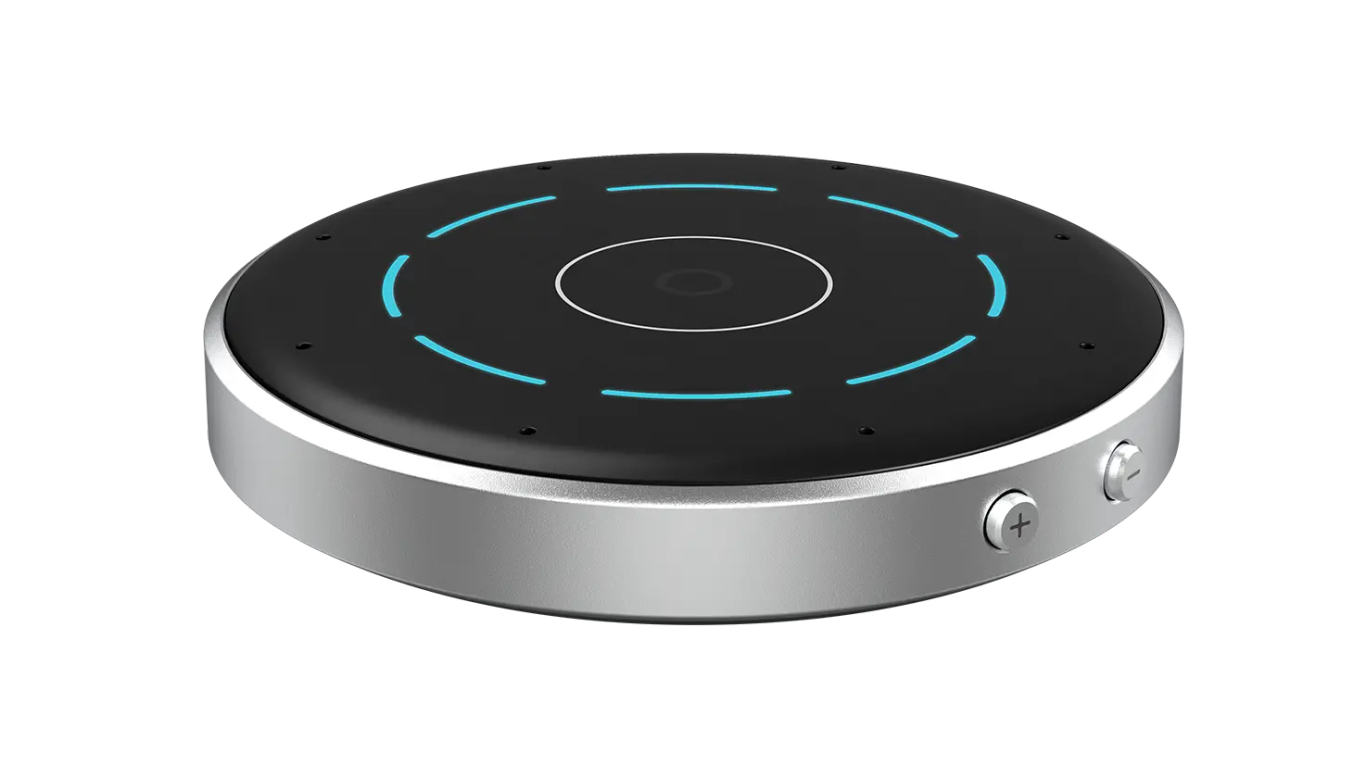
Starkey StarLink Edge Table Microphone
Stream nearby conversation or USB computer audio to paired hearing aids.
What StarLink Edge Table Microphone does
Place the StarLink Edge Table Microphone in the middle of a table so its eight microphones can pick up people around it and stream their voices to compatible hearing aids. Automatic mode follows the main speaker. Tap one or more segments to choose directions yourself, or use all eight for a quiet group. A speaker can also wear the microphone on the included lanyard. With the included USB cable, the microphone can relay computer audio to the aids and send your voice back to a computer meeting.
Which hearing aids work with Starkey StarLink Edge Table Microphone?
Microphone audio
- Starkey Omega AI · Family-level evidence. Confirm your exact hearing-aid model before buying.
Starkey lists wireless Omega AI aids for this accessory. Verify the exact wireless option and pair the aid or set. Pair the Table Microphone with your wireless hearing aid or its left/right set.
- Starkey Omega AI+ · Family-level evidence. Confirm your exact hearing-aid model before buying.
Starkey lists the wireless Omega AI+ family. A non-wireless NW option cannot pair. Pair the Table Microphone with your wireless hearing aid or its left/right set.
- Starkey Edge AI · Family-level evidence. Confirm your exact hearing-aid model before buying.
Starkey lists wireless Edge AI aids. Check the exact regional style and enabled wireless option. Pair the Table Microphone with your wireless hearing aid or its left/right set.
- Starkey Omega AI CIC
Pair the compatible wireless hearing aid or left/right set to the Table Microphone.
- Starkey Omega AI mRIC R
The model’s wireless specification lists StarLink Edge accessories. Starkey’s Omega AI portfolio names this microphone. Pair the wireless model.
- Starkey Omega AI RIC RT
The model’s wireless specification lists StarLink Edge accessories. Starkey’s Omega AI portfolio names this microphone. Pair the wireless model.
Choose the exact model printed on your hearing aids or paperwork. A family match does not establish support for every model in that family.
View documented devices and setups
- Starkey Omega AI · Family
Tabletop group listening with paired hearing aids · microphone_audio
Starkey lists wireless Omega AI aids for this accessory. Verify the exact wireless option and pair the aid or set.
Requires additional setupSource · 2026-11-18Family-level evidence. Confirm your exact hearing-aid model before buying.
Starkey lists wireless Omega AI aids for this accessory. Verify the exact wireless option and pair the aid or set.
- Pair the Table Microphone with your wireless hearing aid or its left/right set.
- Starkey Omega AI+ · Family
Tabletop group listening with paired hearing aids · microphone_audio
Starkey lists the wireless Omega AI+ family. A non-wireless NW option cannot pair.
Requires additional setupSource · 2026-11-18Family-level evidence. Confirm your exact hearing-aid model before buying.
Starkey lists the wireless Omega AI+ family. A non-wireless NW option cannot pair.
- Pair the Table Microphone with your wireless hearing aid or its left/right set.
- Starkey Edge AI · Family
Tabletop group listening with paired hearing aids · microphone_audio
Starkey lists wireless Edge AI aids. Check the exact regional style and enabled wireless option.
Requires additional setupSource · 2026-11-18Family-level evidence. Confirm your exact hearing-aid model before buying.
Starkey lists wireless Edge AI aids. Check the exact regional style and enabled wireless option.
- Pair the Table Microphone with your wireless hearing aid or its left/right set.
- Starkey Omega AI CIC · Exact model
Tabletop group listening with paired hearing aids · microphone_audio
Pair the compatible wireless hearing aid or left/right set to the Table Microphone.
Documented supportSource · 2026-11-18Pair the compatible wireless hearing aid or left/right set to the Table Microphone.
- Starkey Omega AI mRIC R · Exact model
Tabletop group listening with paired hearing aids · microphone_audio
The model’s wireless specification lists StarLink Edge accessories. Starkey’s Omega AI portfolio names this microphone. Pair the wireless model.
Documented supportSource · 2026-11-18The model’s wireless specification lists StarLink Edge accessories. Starkey’s Omega AI portfolio names this microphone. Pair the wireless model.
- Starkey Omega AI RIC RT · Exact model
Tabletop group listening with paired hearing aids · microphone_audio
The model’s wireless specification lists StarLink Edge accessories. Starkey’s Omega AI portfolio names this microphone. Pair the wireless model.
Documented supportSource · 2026-11-18The model’s wireless specification lists StarLink Edge accessories. Starkey’s Omega AI portfolio names this microphone. Pair the wireless model.
- Starkey Omega AI RIC 312 · Exact model
Tabletop group listening with paired hearing aids · microphone_audio
Pair the compatible wireless hearing aid or left/right set to the Table Microphone.
Documented supportSource · 2026-11-18Pair the compatible wireless hearing aid or left/right set to the Table Microphone.
- Starkey Omega AI ITC R · Exact model
Tabletop group listening with paired hearing aids · microphone_audio
The model’s wireless specification lists StarLink Edge accessories. Starkey’s Omega AI portfolio names this microphone. Pair the wireless model.
Documented supportSource · 2026-11-18The model’s wireless specification lists StarLink Edge accessories. Starkey’s Omega AI portfolio names this microphone. Pair the wireless model.
- Starkey Omega AI ITE R · Exact model
Tabletop group listening with paired hearing aids · microphone_audio
The model’s wireless specification lists StarLink Edge accessories. Starkey’s Omega AI portfolio names this microphone. Pair the wireless model.
Documented supportSource · 2026-11-18The model’s wireless specification lists StarLink Edge accessories. Starkey’s Omega AI portfolio names this microphone. Pair the wireless model.
- Starkey Omega AI+ mRIC R · Exact model
Tabletop group listening with paired hearing aids · microphone_audio
Pair the compatible wireless hearing aid or left/right set to the Table Microphone.
Documented supportSource · 2026-11-18Pair the compatible wireless hearing aid or left/right set to the Table Microphone.
- Starkey Omega AI+ RIC RT · Exact model
Tabletop group listening with paired hearing aids · microphone_audio
Pair the compatible wireless hearing aid or left/right set to the Table Microphone.
Documented supportSource · 2026-11-18Pair the compatible wireless hearing aid or left/right set to the Table Microphone.
- Starkey Omega AI+ RIC 312 · Exact model
Tabletop group listening with paired hearing aids · microphone_audio
Pair the compatible wireless hearing aid or left/right set to the Table Microphone.
Documented supportSource · 2026-11-18Pair the compatible wireless hearing aid or left/right set to the Table Microphone.
- Starkey Omega AI+ CIC · Exact model
Tabletop group listening with paired hearing aids · microphone_audio
Pair the compatible wireless hearing aid or left/right set to the Table Microphone.
Documented supportSource · 2026-11-18Pair the compatible wireless hearing aid or left/right set to the Table Microphone.
- Starkey Omega AI+ ITC R · Exact model
Tabletop group listening with paired hearing aids · microphone_audio
Pair the compatible wireless hearing aid or left/right set to the Table Microphone.
Documented supportSource · 2026-11-18Pair the compatible wireless hearing aid or left/right set to the Table Microphone.
- Starkey Omega AI+ ITE R · Exact model
Tabletop group listening with paired hearing aids · microphone_audio
Pair the compatible wireless hearing aid or left/right set to the Table Microphone.
Documented supportSource · 2026-11-18Pair the compatible wireless hearing aid or left/right set to the Table Microphone.
- Starkey Edge AI RIC RT · Exact model
Tabletop group listening with paired hearing aids · microphone_audio
Pair the compatible wireless hearing aid or left/right set to the Table Microphone.
Documented supportSource · 2026-11-18Pair the compatible wireless hearing aid or left/right set to the Table Microphone.
- Starkey Edge AI RIC 312 · Exact model
Tabletop group listening with paired hearing aids · microphone_audio
Pair the compatible wireless hearing aid or left/right set to the Table Microphone.
Documented supportSource · 2026-11-18Pair the compatible wireless hearing aid or left/right set to the Table Microphone.
- Starkey Edge AI mRIC R · Exact model
Tabletop group listening with paired hearing aids · microphone_audio
Pair the compatible wireless hearing aid or left/right set to the Table Microphone.
Documented supportSource · 2026-11-18Pair the compatible wireless hearing aid or left/right set to the Table Microphone.
- Starkey Omega AI+ IIC NW · Exact model
Tabletop group listening with paired hearing aids · microphone_audio
The NW model lacks the wireless hearing-aid link required for Table Microphone streaming.
Documented as incompatibleSource · 2026-11-18 - Starkey Omega AI+ CIC NW · Exact model
Tabletop group listening with paired hearing aids · microphone_audio
The NW model lacks the wireless hearing-aid link required for Table Microphone streaming.
Documented as incompatibleSource · 2026-11-18 - Starkey Omega AI+ CIC R NW · Exact model
Tabletop group listening with paired hearing aids · microphone_audio
The NW model lacks the wireless hearing-aid link required for Table Microphone streaming.
Documented as incompatibleSource · 2026-11-18
Documented features
Listening and control
- Mute accessory microphone
- Supported
The mute control applies to the built-in microphones in tabletop mode.
Setup: Tabletop group listening with paired hearing aids
Documentation · 2026-11-18 - Automatic mode switching
- Automatic mode follows the main speaker and marks the focus with a brighter blue segment. Tap directions to choose manually or tap the center to return to automatic.
Setup: Tabletop group listening with paired hearing aids
Documentation · 2026-11-18 - Automatic mode switching
- Pro Fit says body-worn orientation prioritizes sound from above. The manual documents a top light for three seconds after the speaker puts it on.
Setup: One speaker wearing the microphone on its magnetic hanger and lanyard
Documentation · 2026-11-18 - Directional microphone
- SupportedDocumentation · 2026-11-18
- Mute hearing-aid microphones
- Supported · With conditions
Hearing care professional selects streaming-only behavior for the hearing-aid microphones.
Setup: Hearing-aid microphone settings configured by a hearing professional in Pro Fit
Documentation · 2026-11-18 - Manual listening direction
- Supported
In manual tabletop mode, touch the segments for the directions you want to hear.
Documentation · 2026-11-18 - Remote-microphone runtime
- Up to 10 hours of streaming per full chargeDocumentation · 2026-11-18
- Built-in microphone count
- 8
The manufacturer documents 8 built-in microphones.
Documentation · 2026-11-18 - Microphone modes
- Automatic speaker tracking, Manual single direction, Manual multiple directions, Surround for quiet groups, Lanyard use for one speakerDocumentation · 2026-11-18
- Noise management
- An eight-microphone array with automatic main-speaker focus and manual direction selection; the manual recommends surround for quiet groups.Documentation · 2026-11-18
- Microphone placement
- Put the microphone in the middle of the table, near conversation partners, with the volume and power buttons facing you.
Setup: Tabletop group listening with paired hearing aids
Documentation · 2026-11-18 - Microphone placement
- Attach the magnetic hanger securely and keep the microphone within 20 cm (8 in) of the speaker's mouth and uncovered.
Setup: One speaker wearing the microphone on its magnetic hanger and lanyard
Documentation · 2026-11-18 - Remote microphone
- SupportedDocumentation · 2026-11-18
- Stream/environment balance
- Stream volume can be adjusted on the microphone or in My Starkey. Pro Fit configures the hearing-aid microphones separately during streaming.
Setup: Hearing-aid microphone settings configured by a hearing professional in Pro Fit
Documentation · 2026-11-18 - Stream volume control
- The +/- buttons and Accessories slider adjust the audio stream to the hearing aids. Assigned aid controls can adjust it too.Documentation · 2026-11-18
- Table microphone mode
- SupportedDocumentation · 2026-11-18
- Volume control
- SupportedDocumentation · 2026-11-18
Connections
- Companion app control
- Optional My Starkey Accessories screen stream-volume slider. Pairing and start/stop by microphone power can be done in hardware.Documentation · 2026-11-18
- Bilateral and unilateral use
- Supports either a single hearing aid or one left/right pair with independent status brackets. Pair the compatible receiving aid with the CROS transmitter off; mixed-model pairing is unverified.Documentation · 2026-11-18
- Call microphone path
- For a computer meeting the Table Mic sends the user's voice back over USB. Use the computer to control the meeting.
Setup: Computer playback or two-way meeting audio over the supplied USB cable
Documentation · 2026-11-18 - Computer audio
- Connect the included USB cable for playback to paired hearing aids. In a computer meeting, the Table Mic can also transmit your voice back via USB.
Setup: Computer playback or two-way meeting audio over the supplied USB cable
Documentation · 2026-11-18 - Connection priority
- A phone call or media stream from the phone pauses the Table Microphone. It resumes when that stream ends.Documentation · 2026-11-18
- Link to hearing aids
- Paired Bluetooth LE Audio to supported hearing aidsDocumentation · 2026-11-18
- Accessory-to-hearing-aid range
- Up to 15 m typical (July 2026 user guide) · With conditions
July 2026 manual's typical figure. The December 2024 technical sheet lists up to 10 m.
Documentation · 2026-11-18 - Audio input selection
- Connect USB and play audio to switch to the computer. Pausing or stopping playback stops the stream, and unplugging USB returns the microphone to automatic conversation mode.
Setup: Computer playback or two-way meeting audio over the supplied USB cable
Documentation · 2026-11-18 - Hearing-aid pairing method
- Power on the mic, temporarily disable other paired wireless devices, restart the aids, place them within 15 cm and press the underside pairing button. Aids remain in pairing mode for 3 min. QuickTIP specifies a 2-second button hold.Documentation · 2026-11-18
- No hands-free calling through this accessory
- Phone calls interrupt the microphone streamDocumentation · 2026-11-18
- Professional setup
- Home pairing is documented. A professional can also pair in Pro Fit, configure hearing-aid controls for accessory volume, and set hearing-aid mic and stream equalizer behavior.Documentation · 2026-11-18
- Receiver requirements
- The user pairs the microphone to built-in wireless functionality in a documented hearing aid. The hearing aid receiver is the direct endpoint.Documentation · 2026-11-18
- Reconnection behavior
- After pairing, power-on starts the stream. If a link is lost, restart the stream and power-cycle an out-of-sync aid. During USB idle the audio stream resumes when playback resumes.Documentation · 2026-11-18
- Remembered hearing-aid pairings
- One set, up to two individual aidsDocumentation · 2026-11-18
- Microphone/call concurrency
- An incoming call or phone media pauses the Table Mic stream and the stream resumes afterward.Documentation · 2026-11-18
- Simultaneous listeners
- One listener with one hearing aid or a left/right pairDocumentation · 2026-11-18
- Simultaneous source connections
- A single wired computer path can carry playback to the aids and the microphone back to the meeting. Normal conversation pickup to the hearing aids resumes after disconnecting USB.
Setup: Computer playback or two-way meeting audio over the supplied USB cable
Documentation · 2026-11-18 - USB audio input
- Supported
Use the supplied data cable for computer audio.
Documentation · 2026-11-18
Power and charging
- Accessory battery is not user-replaceable
- Documentation · 2026-11-18
- Accessory battery type
- Built-in lithium-ion polymer; cell size and capacity are unverified.Documentation · 2026-11-18
- Accessory charge time
- About 2 hoursDocumentation · 2026-11-18
- Rechargeable accessory battery
- SupportedDocumentation · 2026-11-18
- Automatic power-off
- After 60 seconds without audio on a connected computer the microphone enters idle, with a white center ring. Playing computer audio again resumes streaming.
Setup: Computer playback or two-way meeting audio over the supplied USB cable
Documentation · 2026-11-18 - Battery status reporting
- Green segments visualize charge level; orange means under two hours, red under one hour and flashing red means depleted.Documentation · 2026-11-18
- Electrical input requirements
- Use the supplied adapter or a supported computer USB connection. Starkey specifies 5 V DC at 1 A for USB-C recharging. The current manual lists a maximum power supply rating of 15 W.Documentation · 2026-11-18
- Power adapter included
- SupportedDocumentation · 2026-11-18
- Power connector
- USB-C jack on the Table Mic with a supplied USB-to-USB-C cable.Documentation · 2026-11-18
- Use while charging
- Supported · With conditions
Verified for the computer USB connection; wall-adapter operation during active microphone use is unverified.
Setup: Computer playback or two-way meeting audio over the supplied USB cable
Documentation · 2026-11-18
Design and everyday use
- Control accessibility
- Physical side volume buttons are labeled +/−; the top direction controls are touch segments. The underside pairing button and LED brackets provide pairing feedback.Documentation · 2026-11-18
- Dimensions
- 72 × 12.5 × 72 mm (width × height × depth)Documentation · 2026-11-18
- Included items
- Table Microphone, Wall power adapter, USB-to-USB-C cable, Pouch, Magnetic hanger with lanyard, Silicone case, User manualDocumentation · 2026-11-18
- Ingress protection rating
- Tested to IP52 (IEC 60529), with no formal IP certification statedDocumentation · 2026-11-18
- Routine maintenance
- Wipe with a cloth dampened with soapy water, keep the device dry and consult the hearing care provider if faults persist.Documentation · 2026-11-18
- Physical controls
- Side power button, Side stream volume + and − buttons, Eight directional touch segments, Center automatic mode button, Underside hearing-aid pairing buttonDocumentation · 2026-11-18
- Regional variants
- Group 1 leaflet warns that radio approvals are country-specific. It lists US FCC 2AS2V-LE10 and Canadian IC 24964-LE10 and includes an EU conformity statement.Documentation · 2026-11-18
- Required extras
- Compatible wireless hearing aidsDocumentation · 2026-11-18
- Required extras
- Compatible wireless hearing aids, Computer with a USB audio-capable port
Setup: Computer playback or two-way meeting audio over the supplied USB cable
Documentation · 2026-11-18 - Repair and service options
- The manual directs unresolved issues to a hearing care professional. The accessory and battery have no user-serviceable parts. Manufacturer expected service life is three years.Documentation · 2026-11-18
- Status indicators
- Green segments show battery level and volume changes, Blue brackets show linking or pairing in progress, Green or red pairing result by ear, Blue tabletop segments show listening directions, Center light shows mute, White center ring shows computer idle, Orange and red segments show low batteryDocumentation · 2026-11-18
- Wearing and placement options
- Tabletop placement, Included magnetic hanger and adjustable lanyardDocumentation · 2026-11-18
- Weight
- 60 gDocumentation · 2026-11-18
How to set up Starkey StarLink Edge Table Microphone
Charge the microphone and turn it on. Switch off phone Bluetooth and other paired accessories during setup. Restart your hearing aids and place them within 15 cm (6 in) of the microphone, out of your ears. Press the pairing button on the underside, turn the microphone face up, and check for a green bracket for each aid. The microphone starts streaming when powered on after pairing. Change stream volume with the side buttons or the Accessories screen in My Starkey. A hearing professional can assign the function to your hearing-aid controls.
What to check before buying
The microphone pairs to one set of compatible wireless hearing aids. Phone calls and media streamed from your phone pause the microphone stream. The current user guide gives a typical range of up to 15 m (50 ft), with obstacles and interference reducing it. An earlier technical sheet gives up to 10 m. Starkey documents USB computer audio for this version. If you need to connect a 3.5 mm source, check the product code and input before buying.
Lets you choose where to listen around a table
The StarLink Edge Table Microphone lets you select which directions to hear or have it track the main speaker. That gives you more control over which voices you hear around the table than the clip-on StarLink Edge Remote Microphone. The table microphone can also be worn on a lanyard to hear one speaker. Starkey lists both for compatible wireless Omega AI+, Omega AI, and Edge AI models.
SourceConnects to a computer for two-way meetings
If you’re comparing Starkey table microphones for use with a computer, check the generation. The earlier StarLink Table Microphone takes sound through a 3.5 mm analog cable and fits compatible G Series AI and Genesis AI aids. The Edge model takes USB-C audio and can send your voice back to a meeting when used with compatible wireless Omega AI+, Omega AI or Edge AI aids.
SourceSet up a computer meeting
Use the included USB cable to connect your computer and the microphone. Once audio is playing on the computer, it streams to your paired hearing aids. Speak into the table microphone to be heard in the meeting. It charges as you use it. When you unplug the cable, it returns to automatic conversation mode.
SourcePair again or recover a lost stream
If a green bracket is missing for either hearing aid, repeat setup with the aids close to the microphone and other connections off. If the stream drops later, move within line of sight, check the hearing-aid and microphone batteries and restart the stream. Switch off a CROS transmitter while pairing its compatible receiving aid.
SourcePhone calls and media pause the stream
A phone call or media from your phone takes priority over the table microphone stream. The microphone resumes streaming when the call or phone media ends.
SourcePicks up your voice at the table during computer calls
For a computer meeting, plug the table microphone into USB and speak into it. If you prefer to use your hearing-aid microphones for your voice, the StarLink Edge LE Adapter plugs directly into a compatible computer and carries your voice back from the aids.
SourceCompanion apps
Related accessories
Other devices named in the documentation
These names have not been matched to an exact device in our catalog. They do not create verified matches in the finder.
Checking current offers…
Documentation checked Nov 18, 2026