App directory
Fortell App
Fortell Research Inc.
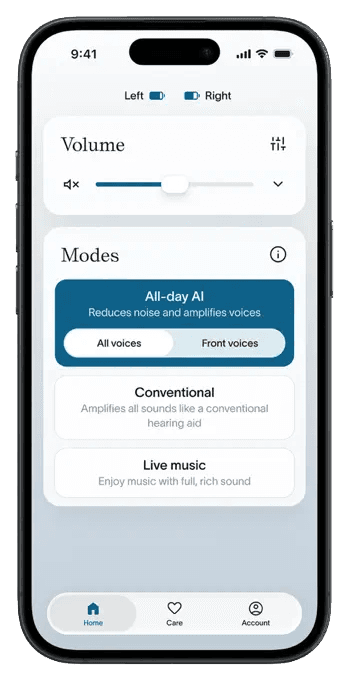
Controls Fortell AI hearing aids: volume, programs, remote care and joining Auracast broadcasts.
Features
Audio input & output
- Conditional: Live outputs14Hearing device audio
Device companion
- Conditional: Mute hearing devices17
- Conditional: Directional focus control18
- Conditional: Hearing-device control19iPhone only · United States
- Conditional: Listening-program selection20iPhone only · United States
- Conditional: Hearing-device volume19iPhone only · United States
- Conditional: Device battery status21
- Conditional: Remote professional support22iPhone only · United States
- Conditional: Remote fitting adjustments22iPhone only · United States
- Conditional: Personalized hearing programs23iPhone only · United States · iOS 26 or later
- Conditional: Media streaming24iOS 26 or later
- Conditional: Microphone streaming25
- Conditional: Auracast assistant19iPhone only · United States
- Conditional: Device firmware updates28
Compatibility
- Supported: Required hardwareFortell AI Hearing Aids · iPhone with iOS 26 or later, or iPad with iPadOS 26 or lateriOS 26 or later
Availability & access
Accessibility
- Supported: System text scalingiPhone only · iOS 26 or later
Privacy & data
- Evidence: The Fortell app > Logging in (p. 40).
- Users must be 18+ (or under 18 with a parent or guardian agreeing and supervising) and the app is intended for United States residents. Evidence: 2. Eligibility.
- The app account is created by Fortell at the first audiology appointment. Evidence: The Fortell app > Logging in (p. 40).
- The hearing aids the app controls are prescription devices for adults with hearing loss, sold in the U.S. only.
- The app is free and included with the hearing-aid purchase; it only works with purchased Fortell AI Hearing Aids.
- Evidence: The Fortell app (p. 39).
- The Mobile App Terms require users to maintain an internet and Bluetooth connection for proper functionality; login uses an SMS code. Which individual controls work offline is not documented. Evidence: 7. User Responsibilities.
- Sound processing (Fortell AI) runs on the custom chip in the hearing aids themselves, not in the app or the cloud; the app adjusts settings.
- Applies to device-usage data (mode, duration, volume, streaming status) that Fortell collects through its services; the hosting provider is not named.
- Evidence: 12. Termination.
- A portable copy is offered depending on the user's state privacy rights; requests go to privacy@fortell.com or by phone, not through an in-app tool.
- Auracast broadcasts are joined from the app's Account tab; requires an Auracast transmitter or venue broadcast and current hearing-aid firmware. Evidence: Listening to Auracast broadcasts (p. 44).
- GN Multi-Mic+ remote microphone, set up first in the separate GN Auracast+ app, then joined as an Auracast broadcast in the Fortell app.
- Audio is delivered through paired Fortell AI Hearing Aids (Made for iPhone streaming or Auracast).
- Fortell AI Hearing Aids paired to the app; left/right volume and mute via the split button on the Home tab. Evidence: Adjusting volume (p. 42).
- Fortell AI Hearing Aids paired to the app; bass/mid/treble equalizer applies to all modes, with a separate streaming equalizer while streaming. Evidence: Equalizer (pp. 43–44).
- Fortell AI Hearing Aids paired to the app; both or one side at a time. Evidence: Adjusting volume (p. 42).
- Selecting the All-day AI Front voices mode (in the app or with the right hearing-aid button) suppresses voices behind the wearer; there is no documented control of beam direction or width.
- Fortell app and compatible hearing aids. Auracast must be selected from the app and requires an available broadcast; the app Home screen adjusts the stream volume.
- Fortell hearing aids configured by the audiologist; modes include All-Day AI, Front Voices, Conventional and Live Music.
- Shown per hearing aid on the Home tab when each aid is connected. Evidence: Checking battery (pp. 41–42).
- Requires compatible Fortell hearing aids and participating professional. The current listing restricts use to the United States.
- Wearer adjusts clarity, comfort and background noise on Fortell AI Hearing Aids; the base prescription is set by the Fortell audiologist.
- Made for iPhone streaming from a compatible iPhone (iOS 26+) or iPad (iPadOS 26+) via iOS hearing-device audio routing; the app adds a streaming volume control and streaming equalizer. Evidence: Device compatibility; Streaming phone calls and other media (pp. 37–39).
- Route is the GN Multi-Mic+ remote microphone over Auracast, paired in the GN Auracast+ app and joined from the Fortell app; telecoil, line-in and FM inputs go through the Multi-Mic+.
- On by default for paired Fortell AI Hearing Aids; can be turned off in the app under Account > Preferences to use the phone microphone.
- Direct Bluetooth hearing-aid use with a Mac running macOS Sequoia or later; this is not done through the Fortell app, which is iPhone/iPad only. Minimum OS: macOS Sequoia.
- Hearing aids paired and nearby; most updates install in the background, while critical updates may be required before certain features (e.g. Auracast) appear. A manual 'Firmware update available' prompt appears under Account. Evidence: Over-The-Air (OTA) updates (p. 47).
- Fortell AI Hearing Aids with a compatible iPhone (iOS 26+) or iPad (iPadOS 26+).
- Realtime remote fitting sessions and remote adjustments are initiated by the Fortell audiologist. Evidence: Remote fittings (p. 46).
- Made for iPhone streaming from a compatible iPhone or iPad. Evidence: Device compatibility (p. 37).
- Auracast menu requires current app and hearing-aid firmware; remote-microphone use is via the GN Multi-Mic+ joined as an Auracast broadcast.
App Store ratings & reviews
Praise
- Two reviewers describe an intuitive app and straightforward setup.
Complaints
- One reviewer asks for saved profiles for different situations.
Hearing devices
Includes documented compatible products and models linked in our catalog. Features can depend on your model, phone and firmware; check the compatibility information for any restrictions.