App directory
Signia App
Sivantos Pte. Ltd.
Controls Signia Pure, Styletto, Silk, Insio and Active hearing aids. Includes tinnitus sound controls and remote support.
Features
Audio input & output
Listening assistance
Device companion
- Conditional: Mute hearing devices13Also on iPad
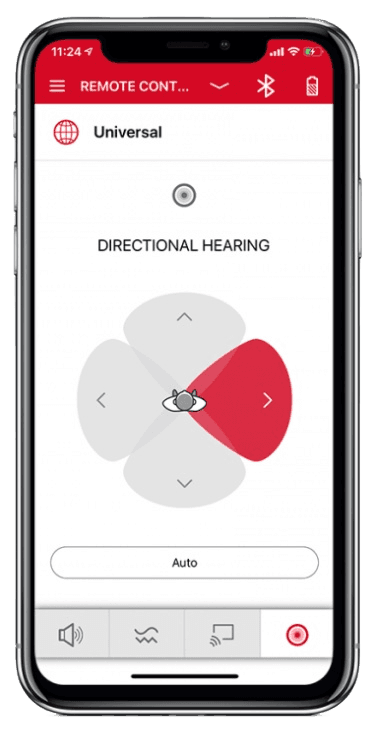
- Conditional: Directional focus control15
- Conditional: Hearing-device tinnitus controls16Also on iPad
- Conditional: Hearing-device control17Also on iPad
- Conditional: Listening-program selection17Also on iPad
- Conditional: Hearing-device volume17Also on iPad
- Conditional: Device battery status18
- Conditional: Remote professional support19iPhone · iPad only
- Conditional: Remote fitting adjustments20
- Conditional: Personalized hearing programs21
- Conditional: Device-usage tracking19iPhone · iPad only
- Conditional: Media streaming22
- Conditional: Microphone streaming23
- Conditional: Accessory control24
- Not supported: Watch-based device control25Apple Watch only
Compatibility
Availability & access
Privacy & data
- Applies to TeleCare only: the hearing care professional must activate the TeleCare account. The remote-control functions are documented as usable without TeleCare; no separate app account is described for them. Evidence: Connect to TeleCare, p. 48.
- Evidence: Important safety information - Intended purpose / Intended user, p. 61.
- Signia Assistant only: its neural network is cloud-based, so it does not work without an internet connection.
- TeleCare workflows (contacting the hearing care professional, hearing lessons, satisfaction rating) require an internet connection. Evidence: Contact your hearing care professional, p. 50.
- Height and weight entered for My WellBeing calorie calculation are stored only in the app. Requires My WellBeing-capable Bluetooth hearing aids. Evidence: Personalize calorie calculation, p. 46.
- Signia Assistant: data made available to the hearing care professional (configuration changes and the described problem) is stored by WSA for 5 years; other Assistant data is not stored. Research and development data (only with consent) is also stored for 5 years. TeleCare data is stated as not stored by WSA. Evidence: 11. Data retention - 11.3 Signia Assistant/Rexton Assist.
- TeleCare audio/video calls and chat: WSA states it transmits these between the user and the hearing care professional and does not store them. The professional's own handling is outside this notice. Evidence: 11. Data retention - 11.2 Telecare.
- Only during TeleCare audio/video sessions with a hearing care professional (requires TeleCare activation, user consent and availability for the hearing-aid type and country). Evidence: 4. Data processed if you use the Telecare feature - 4.2.1.
- TeleCare chat messages are transmitted to the hearing care professional (requires TeleCare activation and consent). Evidence: 4. Data processed if you use the Telecare feature - 4.2.1.
- By request to WSA (privacy@wsa.com or the DPO) under GDPR access and portability rights; no in-app export is documented. Portability applies where the legal requirements are met. Evidence: 12. Your rights.
- The phone microphone and camera are used only for TeleCare contact with a hearing care professional. Evidence: Open Signia app (permissions), p. 10.
- Bluetooth hearing aids only, with phone Bluetooth on. On Android, direct streaming uses LE Audio (Android 13+) or ASHA (Android 10+) on compatible phones. Evidence: Stream to hearing aids, p. 34.
- Requires compatible hearing devices and a supported phone. Functions vary with model, firmware and professional configuration.
- Sound balance (bass/treble) slider; applies to environment audio and, when connected via Bluetooth, streaming audio. Depends on hearing-aid model and fitting.
- Only for hearing-aid models that support directional hearing; also available over the manual (acoustic) connection. Evidence: Change the hearing direction, p. 32.
- Requires compatible hearing devices and a supported phone. Functions vary with model, firmware and professional configuration. Only where the hearing-care professional has enabled this feature.
- Signia app 2.7.30+ instructions: available controls depend on hearing-aid family, fitting and connection method.
- Bluetooth hearing aids show low/medium/high in the app; non-Bluetooth hearing aids report the level as beeps from the hearing aids. Evidence: Check battery status, p. 25.
- TeleCare and My WellBeing depend on hearing-aid model, firmware, participating provider and country availability.
- Through TeleCare only: the hearing care professional must use and activate TeleCare; availability depends on hearing-aid type and country. Evidence: Connect to TeleCare, p. 48.
- Via Signia Assistant: Bluetooth Signia X, AX or IX hearing aids (not CROS/BiCROS), enabled by the hearing care professional, internet connection required. Changes apply to the Universal program. Evidence: Fine-tune hearing aids with Signia Assistant, p. 38.
- Bluetooth hearing aids only. Android direct streaming needs a compatible phone: LE Audio on Android 13+ or ASHA on Android 10+. Evidence: Smartphone compatibility, p. 7.
- Streaming from an external StreamLine Mic accessory to Bluetooth hearing aids, managed from the app's Stream tab; the phone's own microphone is not documented as a source. Evidence: Stream to hearing aids, p. 34.
- Streaming level of accessories such as StreamLine TV, StreamLine Mic and CROS devices; shown only when the app is connected via Bluetooth. Accessories cannot be paired through the app.
- Evidence: Smartphone compatibility, p. 7.
- Evidence: Hearing aid compatibility and functionality, p. 6-7.
- Streaming requires Bluetooth hearing aids; remote support (TeleCare) needs separate activation by the hearing care professional. Features depend on hearing-aid type. Evidence: The Signia app, p. 2.
App Store ratings & reviews
Complaints
- The recent sampled reviews describe slow loading or lost controls after updates, limited customization and difficult in-app help.
Google Play ratings & reviews
Praise
- Some users value sound adjustments when working.
Complaints
- Connections, persistent settings and adjustment controls cause recurring problems.
- Newer reports describe internet errors in the assistant; one also reports overlapping text.
Hearing devices
Includes documented compatible products and models linked in our catalog. Features can depend on your model, phone and firmware; check the compatibility information for any restrictions.
17 models & families
- Hear.com Horizon Go IX
- Signia Active
- Signia Active Mini IX
- Signia AX
- Signia binax
- Signia Insio Charge&Go AX ITC
- Signia IX
- Signia Nx
- Signia primax
- Signia Pure AX
- Signia Pure Charge&Go IX
- Signia Pure X
- Signia Pure X Pure 312 X
- Signia Pure X Pure Charge&Go X
- Signia Silk IX
- Signia Silk X
- Signia Styletto AX
- Signia Styletto X
- Signia X