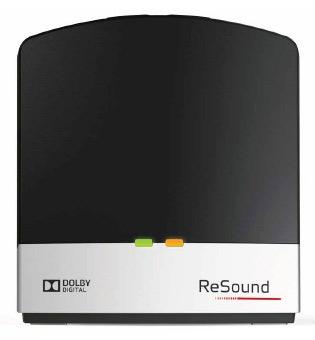
ReSound Unite TV Streamer 2
Listen to a TV or other wired audio source through compatible hearing devices while others use the room speakers when the source supports both outputs.
What Unite TV Streamer 2 does
The ReSound Unite TV Streamer 2 sends audio from a TV, stereo or computer to compatible hearing aids and select Cochlear sound processors. Plug the source into the separate optical, coaxial or analog input, then start streaming from your hearing aids or their controls. There’s a mono setting for one aid and a stereo setting for a matched pair. The hearing aids use a direct 2.4 GHz connection to the streamer, so the TV needs a suitable audio output and does not have to pair with the aids itself.
Which hearing aids work with ReSound Unite TV Streamer 2?
TV audio
- ReSound LiNX · Family-level evidence. Confirm your exact hearing-aid model before buying.
Cochlear’s chart names supported wireless LiNX RIC and BTE styles. Pair the powered TV Streamer 2 directly with the compatible hearing device. Connect a supported optical, coaxial, or analog audio output and select a compatible output format.
- ReSound LiNX2 · Family-level evidence. Confirm your exact hearing-aid model before buying.
The Cochlear chart names the 61 and 62 RIC and 77 and 88 BTE styles. Use a compatible wireless style. Pair the powered TV Streamer 2 directly with the compatible hearing device. Connect a supported optical, coaxial, or analog audio output and select a compatible output format.
- ReSound ENZO · Family-level evidence. Confirm your exact hearing-aid model before buying.
The Cochlear chart names wireless ENZO 88 high-power and 98 super-power BTE styles. Pair the powered TV Streamer 2 directly with the compatible hearing device. Connect a supported optical, coaxial, or analog audio output and select a compatible output format.
- ReSound ENZO2 · Family-level evidence. Confirm your exact hearing-aid model before buying.
The Cochlear chart names wireless ENZO² 88 high-power and 98 super-power BTE styles. Pair the powered TV Streamer 2 directly with the compatible hearing device. Connect a supported optical, coaxial, or analog audio output and select a compatible output format.
- ReSound LiNX 3D · Family-level evidence. Confirm your exact hearing-aid model before buying.
The US RIE guide names this streamer. Choose a wireless LiNX 3D model. Pair the powered TV Streamer 2 directly with the compatible hearing device. Connect a supported optical, coaxial, or analog audio output and select a compatible output format.
- ReSound LiNX Quattro · Family-level evidence. Confirm your exact hearing-aid model before buying.
Cochlear names the wireless LiNX Quattro family. Verify model-specific controls and the combination for bimodal listening. Pair the powered TV Streamer 2 directly with the compatible hearing device. Connect a supported optical, coaxial, or analog audio output and select a compatible output format.
Choose the exact model printed on your hearing aids or paperwork. A family match does not establish support for every model in that family.
View documented devices and setups
- ReSound LiNX · Family
Direct 2.4 GHz pairing · tv_audio
Cochlear’s chart names supported wireless LiNX RIC and BTE styles.
Requires additional setupSource · 2026-11-18Family-level evidence. Confirm your exact hearing-aid model before buying.
Cochlear’s chart names supported wireless LiNX RIC and BTE styles.
- Pair the powered TV Streamer 2 directly with the compatible hearing device.
- Connect a supported optical, coaxial, or analog audio output and select a compatible output format.
- ReSound LiNX2 · Family
Direct 2.4 GHz pairing · tv_audio
The Cochlear chart names the 61 and 62 RIC and 77 and 88 BTE styles. Use a compatible wireless style.
Requires additional setupSource · 2026-11-18Family-level evidence. Confirm your exact hearing-aid model before buying.
The Cochlear chart names the 61 and 62 RIC and 77 and 88 BTE styles. Use a compatible wireless style.
- Pair the powered TV Streamer 2 directly with the compatible hearing device.
- Connect a supported optical, coaxial, or analog audio output and select a compatible output format.
- ReSound ENZO · Family
Direct 2.4 GHz pairing · tv_audio
The Cochlear chart names wireless ENZO 88 high-power and 98 super-power BTE styles.
Requires additional setupSource · 2026-11-18Family-level evidence. Confirm your exact hearing-aid model before buying.
The Cochlear chart names wireless ENZO 88 high-power and 98 super-power BTE styles.
- Pair the powered TV Streamer 2 directly with the compatible hearing device.
- Connect a supported optical, coaxial, or analog audio output and select a compatible output format.
- ReSound ENZO2 · Family
Direct 2.4 GHz pairing · tv_audio
The Cochlear chart names wireless ENZO² 88 high-power and 98 super-power BTE styles.
Requires additional setupSource · 2026-11-18Family-level evidence. Confirm your exact hearing-aid model before buying.
The Cochlear chart names wireless ENZO² 88 high-power and 98 super-power BTE styles.
- Pair the powered TV Streamer 2 directly with the compatible hearing device.
- Connect a supported optical, coaxial, or analog audio output and select a compatible output format.
- ReSound LiNX 3D · Family
Direct 2.4 GHz pairing · tv_audio
The US RIE guide names this streamer. Choose a wireless LiNX 3D model.
Requires additional setupSource · 2026-11-18Family-level evidence. Confirm your exact hearing-aid model before buying.
The US RIE guide names this streamer. Choose a wireless LiNX 3D model.
- Pair the powered TV Streamer 2 directly with the compatible hearing device.
- Connect a supported optical, coaxial, or analog audio output and select a compatible output format.
- ReSound LiNX Quattro · Family
Direct 2.4 GHz pairing · tv_audio
Cochlear names the wireless LiNX Quattro family. Verify model-specific controls and the combination for bimodal listening.
Requires additional setupSource · 2026-11-18Family-level evidence. Confirm your exact hearing-aid model before buying.
Cochlear names the wireless LiNX Quattro family. Verify model-specific controls and the combination for bimodal listening.
- Pair the powered TV Streamer 2 directly with the compatible hearing device.
- Connect a supported optical, coaxial, or analog audio output and select a compatible output format.
- ReSound Enzo Q · Family
Direct 2.4 GHz pairing · tv_audio
Cochlear names the wireless ENZO Q family. Verify the exact style and controls.
Requires additional setupSource · 2026-11-18Family-level evidence. Confirm your exact hearing-aid model before buying.
Cochlear names the wireless ENZO Q family. Verify the exact style and controls.
- Pair the powered TV Streamer 2 directly with the compatible hearing device.
- Connect a supported optical, coaxial, or analog audio output and select a compatible output format.
- ReSound Key · Family
Direct 2.4 GHz pairing · tv_audio
Cochlear includes wireless Key. The guide describes Key 2 bimodal streaming through wireless accessories.
Requires additional setupSource · 2026-11-18Family-level evidence. Confirm your exact hearing-aid model before buying.
Cochlear includes wireless Key. The guide describes Key 2 bimodal streaming through wireless accessories.
- Pair the powered TV Streamer 2 directly with the compatible hearing device.
- Connect a supported optical, coaxial, or analog audio output and select a compatible output format.
- ReSound One · Family
Direct 2.4 GHz pairing · tv_audio
Cochlear names ONE for the TV Streamer 2. A separate regional chart names RT961 and RT962.
Requires additional setupSource · 2026-11-18Family-level evidence. Confirm your exact hearing-aid model before buying.
Cochlear names ONE for the TV Streamer 2. A separate regional chart names RT961 and RT962.
- Pair the powered TV Streamer 2 directly with the compatible hearing device.
- Connect a supported optical, coaxial, or analog audio output and select a compatible output format.
- ReSound OMNIA · Family
Direct 2.4 GHz pairing · tv_audio
Cochlear names wireless OMNIA. Verify the fitted wireless configuration for custom models.
Requires additional setupSource · 2026-11-18Family-level evidence. Confirm your exact hearing-aid model before buying.
Cochlear names wireless OMNIA. Verify the fitted wireless configuration for custom models.
- Pair the powered TV Streamer 2 directly with the compatible hearing device.
- Connect a supported optical, coaxial, or analog audio output and select a compatible output format.
- ReSound Custom Made by ReSound · Family
Direct 2.4 GHz pairing · tv_audio
GN’s portfolio includes the Streamer 2 in its Customs accessory list. Confirm the specific wireless custom build.
Requires additional setupSource · 2026-11-18Family-level evidence. Confirm your exact hearing-aid model before buying.
GN’s portfolio includes the Streamer 2 in its Customs accessory list. Confirm the specific wireless custom build.
- Pair the powered TV Streamer 2 directly with the compatible hearing device.
- Connect a supported optical, coaxial, or analog audio output and select a compatible output format.
- ReSound Nexia · Family
Direct 2.4 GHz pairing · tv_audio
GN lists TV Streamer 2 for Nexia wireless configurations. Confirm the fitted custom build. See the non-wireless CIC exception.
Requires additional setupSource · 2026-11-18Family-level evidence. Confirm your exact hearing-aid model before buying.
GN lists TV Streamer 2 for Nexia wireless configurations. Confirm the fitted custom build. See the non-wireless CIC exception.
- Pair the powered TV Streamer 2 directly with the compatible hearing device.
- Connect a supported optical, coaxial, or analog audio output and select a compatible output format.
- Cochlear Baha® 4 · Exact model
Direct 2.4 GHz pairing · tv_audio
Pair directly to the Baha 4. Cochlear also describes bimodal use with certain older ReSound models and provider setup.
Requires additional setupSource · 2026-11-18Pair directly to the Baha 4. Cochlear also describes bimodal use with certain older ReSound models and provider setup.
- Pair the powered TV Streamer 2 directly with the compatible hearing device.
- Connect a supported optical, coaxial, or analog audio output and select a compatible output format.
- Cochlear Baha® 5 · Exact model
Direct 2.4 GHz pairing · tv_audio
Cochlear lists Baha 5. Follow the processor’s pairing and streaming instructions. Confirm exact hearing-aid pairing with a provider for bimodal use.
Requires additional setupSource · 2026-11-18Cochlear lists Baha 5. Follow the processor’s pairing and streaming instructions. Confirm exact hearing-aid pairing with a provider for bimodal use.
- Pair the powered TV Streamer 2 directly with the compatible hearing device.
- Connect a supported optical, coaxial, or analog audio output and select a compatible output format.
- Cochlear Baha® 5 SuperPower · Exact model
Direct 2.4 GHz pairing · tv_audio
Cochlear lists Baha 5 SuperPower. Follow the processor’s pairing and streaming instructions. Confirm exact hearing-aid pairing with a provider for bimodal use.
Requires additional setupSource · 2026-11-18Cochlear lists Baha 5 SuperPower. Follow the processor’s pairing and streaming instructions. Confirm exact hearing-aid pairing with a provider for bimodal use.
- Pair the powered TV Streamer 2 directly with the compatible hearing device.
- Connect a supported optical, coaxial, or analog audio output and select a compatible output format.
- Cochlear Baha® 5 Power · Exact model
Direct 2.4 GHz pairing · tv_audio
Cochlear lists Baha 5 Power. Follow the processor’s pairing and streaming instructions. Confirm exact hearing-aid pairing with a provider for bimodal use.
Requires additional setupSource · 2026-11-18Cochlear lists Baha 5 Power. Follow the processor’s pairing and streaming instructions. Confirm exact hearing-aid pairing with a provider for bimodal use.
- Pair the powered TV Streamer 2 directly with the compatible hearing device.
- Connect a supported optical, coaxial, or analog audio output and select a compatible output format.
- Cochlear Nucleus® 6 Sound Processor · Exact model
Direct 2.4 GHz pairing · tv_audio
Cochlear lists Nucleus 6. Follow the processor’s pairing and streaming instructions. Confirm exact hearing-aid pairing with a provider for bimodal use.
Requires additional setupSource · 2026-11-18Cochlear lists Nucleus 6. Follow the processor’s pairing and streaming instructions. Confirm exact hearing-aid pairing with a provider for bimodal use.
- Pair the powered TV Streamer 2 directly with the compatible hearing device.
- Connect a supported optical, coaxial, or analog audio output and select a compatible output format.
- Cochlear Nucleus Kanso · Exact model
Direct 2.4 GHz pairing · tv_audio
Cochlear lists Kanso. Follow the processor’s pairing and streaming instructions. Confirm exact hearing-aid pairing with a provider for bimodal use.
Requires additional setupSource · 2026-11-18Cochlear lists Kanso. Follow the processor’s pairing and streaming instructions. Confirm exact hearing-aid pairing with a provider for bimodal use.
- Pair the powered TV Streamer 2 directly with the compatible hearing device.
- Connect a supported optical, coaxial, or analog audio output and select a compatible output format.
- Cochlear Nucleus® 7 · Exact model
Direct 2.4 GHz pairing · tv_audio
Cochlear lists Nucleus 7. Follow the processor’s pairing and streaming instructions. Confirm exact hearing-aid pairing with a provider for bimodal use.
Requires additional setupSource · 2026-11-18Cochlear lists Nucleus 7. Follow the processor’s pairing and streaming instructions. Confirm exact hearing-aid pairing with a provider for bimodal use.
- Pair the powered TV Streamer 2 directly with the compatible hearing device.
- Connect a supported optical, coaxial, or analog audio output and select a compatible output format.
- Cochlear Kanso® 2 · Exact model
Direct 2.4 GHz pairing · tv_audio
Cochlear lists Kanso 2. Follow the processor’s pairing and streaming instructions. Confirm exact hearing-aid pairing with a provider for bimodal use.
Requires additional setupSource · 2026-11-18Cochlear lists Kanso 2. Follow the processor’s pairing and streaming instructions. Confirm exact hearing-aid pairing with a provider for bimodal use.
- Pair the powered TV Streamer 2 directly with the compatible hearing device.
- Connect a supported optical, coaxial, or analog audio output and select a compatible output format.
- Cochlear Baha® 6 Max · Exact model
Direct 2.4 GHz pairing · tv_audio
Cochlear lists Baha 6 Max. Follow the processor’s pairing and streaming instructions. Confirm exact hearing-aid pairing with a provider for bimodal use.
Requires additional setupSource · 2026-11-18Cochlear lists Baha 6 Max. Follow the processor’s pairing and streaming instructions. Confirm exact hearing-aid pairing with a provider for bimodal use.
- Pair the powered TV Streamer 2 directly with the compatible hearing device.
- Connect a supported optical, coaxial, or analog audio output and select a compatible output format.
- Cochlear Nucleus® 8 · Exact model
Direct 2.4 GHz pairing · tv_audio
Cochlear lists Nucleus 8. Follow the processor’s pairing and streaming instructions. Confirm exact hearing-aid pairing with a provider for bimodal use.
Requires additional setupSource · 2026-11-18Cochlear lists Nucleus 8. Follow the processor’s pairing and streaming instructions. Confirm exact hearing-aid pairing with a provider for bimodal use.
- Pair the powered TV Streamer 2 directly with the compatible hearing device.
- Connect a supported optical, coaxial, or analog audio output and select a compatible output format.
- Cochlear Osia® 2 · Exact model
Direct 2.4 GHz pairing · tv_audio
Cochlear lists Osia 2. Follow the processor’s pairing and streaming instructions. Confirm exact hearing-aid pairing with a provider for bimodal use.
Requires additional setupSource · 2026-11-18Cochlear lists Osia 2. Follow the processor’s pairing and streaming instructions. Confirm exact hearing-aid pairing with a provider for bimodal use.
- Pair the powered TV Streamer 2 directly with the compatible hearing device.
- Connect a supported optical, coaxial, or analog audio output and select a compatible output format.
- ReSound LiNX 61 · Exact model
Direct 2.4 GHz pairing · tv_audio
LiNX 61. The chart names the 61 RIC in its LiNX group.
Requires additional setupSource · 2026-11-18LiNX 61. The chart names the 61 RIC in its LiNX group.
- Pair the powered TV Streamer 2 directly with the compatible hearing device.
- Connect a supported optical, coaxial, or analog audio output and select a compatible output format.
- ReSound ENZO 98-DW · Exact model
Direct 2.4 GHz pairing · tv_audio
ENZO 98-DW. The chart specifies the 98 super-power BTE.
Requires additional setupSource · 2026-11-18ENZO 98-DW. The chart specifies the 98 super-power BTE.
- Pair the powered TV Streamer 2 directly with the compatible hearing device.
- Connect a supported optical, coaxial, or analog audio output and select a compatible output format.
- ReSound ENZO 88-DW · Exact model
Direct 2.4 GHz pairing · tv_audio
ENZO 88-DW. The chart specifies the 88 high-power BTE.
Requires additional setupSource · 2026-11-18ENZO 88-DW. The chart specifies the 88 high-power BTE.
- Pair the powered TV Streamer 2 directly with the compatible hearing device.
- Connect a supported optical, coaxial, or analog audio output and select a compatible output format.
- ReSound ENZO2 98-DW · Exact model
Direct 2.4 GHz pairing · tv_audio
ENZO² 98-DW. The chart specifies the 98 super-power BTE.
Requires additional setupSource · 2026-11-18ENZO² 98-DW. The chart specifies the 98 super-power BTE.
- Pair the powered TV Streamer 2 directly with the compatible hearing device.
- Connect a supported optical, coaxial, or analog audio output and select a compatible output format.
- ReSound LiNX2 RIE 62 · Exact model
Direct 2.4 GHz pairing · tv_audio
LiNX² 62. The chart specifically names the 62 RIC.
Requires additional setupSource · 2026-11-18LiNX² 62. The chart specifically names the 62 RIC.
- Pair the powered TV Streamer 2 directly with the compatible hearing device.
- Connect a supported optical, coaxial, or analog audio output and select a compatible output format.
- ReSound LiNX2 RIE 61 · Exact model
Direct 2.4 GHz pairing · tv_audio
LiNX² 61. The chart specifies the 61 RIC in the LiNX² group.
Requires additional setupSource · 2026-11-18LiNX² 61. The chart specifies the 61 RIC in the LiNX² group.
- Pair the powered TV Streamer 2 directly with the compatible hearing device.
- Connect a supported optical, coaxial, or analog audio output and select a compatible output format.
- ReSound LiNX2 BTE 77 · Exact model
Direct 2.4 GHz pairing · tv_audio
LiNX² BTE 77. The chart specifies the 77 BTE.
Requires additional setupSource · 2026-11-18LiNX² BTE 77. The chart specifies the 77 BTE.
- Pair the powered TV Streamer 2 directly with the compatible hearing device.
- Connect a supported optical, coaxial, or analog audio output and select a compatible output format.
- ReSound LiNX2 BTE 88 · Exact model
Direct 2.4 GHz pairing · tv_audio
LiNX² BTE 88. The chart specifies the 88 power BTE.
Requires additional setupSource · 2026-11-18LiNX² BTE 88. The chart specifies the 88 power BTE.
- Pair the powered TV Streamer 2 directly with the compatible hearing device.
- Connect a supported optical, coaxial, or analog audio output and select a compatible output format.
- ReSound LiNX 3D RIE 61 · Exact model
Direct 2.4 GHz pairing · tv_audio
LiNX 3D 61. The US/Canada guide covers LT961/761/561-DRW variants.
Requires additional setupSource · 2026-11-18LiNX 3D 61. The US/Canada guide covers LT961/761/561-DRW variants.
- Pair the powered TV Streamer 2 directly with the compatible hearing device.
- Connect a supported optical, coaxial, or analog audio output and select a compatible output format.
- ReSound LiNX 3D RIE 62 · Exact model
Direct 2.4 GHz pairing · tv_audio
LiNX 3D 62. The US/Canada guide covers LT962/762/562-DRW variants.
Requires additional setupSource · 2026-11-18LiNX 3D 62. The US/Canada guide covers LT962/762/562-DRW variants.
- Pair the powered TV Streamer 2 directly with the compatible hearing device.
- Connect a supported optical, coaxial, or analog audio output and select a compatible output format.
- ReSound Nexia Wireless ITC · Exact model
Direct 2.4 GHz pairing · tv_audio
wireless Nexia ITC. GN’s US/Canada datasheet names NX9ITC-DW, NX7ITC-DW and NX5ITC-DW.
Requires additional setupSource · 2026-11-18wireless Nexia ITC. GN’s US/Canada datasheet names NX9ITC-DW, NX7ITC-DW and NX5ITC-DW.
- Pair the powered TV Streamer 2 directly with the compatible hearing device.
- Connect a supported optical, coaxial, or analog audio output and select a compatible output format.
- ReSound One RT61-DRW · Exact model
Direct 2.4 GHz pairing · tv_audio
GN’s Norway chart includes the model line corresponding to RT61-DRW for regional TV Streamer 2 kit 18057600. Use a compatible wireless configuration and the appropriate regional power adapter.
Requires additional setupSource · 2026-11-18GN’s Norway chart includes the model line corresponding to RT61-DRW for regional TV Streamer 2 kit 18057600. Use a compatible wireless configuration and the appropriate regional power adapter.
- Pair the powered TV Streamer 2 directly with the compatible hearing device.
- Connect a supported optical, coaxial, or analog audio output and select a compatible output format.
- ReSound One RT61-DRWC · Exact model
Direct 2.4 GHz pairing · tv_audio
GN’s Norway chart includes the model line corresponding to RT61-DRWC for regional TV Streamer 2 kit 18057600. Use a compatible wireless configuration and the appropriate regional power adapter.
Requires additional setupSource · 2026-11-18GN’s Norway chart includes the model line corresponding to RT61-DRWC for regional TV Streamer 2 kit 18057600. Use a compatible wireless configuration and the appropriate regional power adapter.
- Pair the powered TV Streamer 2 directly with the compatible hearing device.
- Connect a supported optical, coaxial, or analog audio output and select a compatible output format.
- ReSound One RT62-DRW · Exact model
Direct 2.4 GHz pairing · tv_audio
GN’s Norway chart includes the model line corresponding to RT62-DRW for regional TV Streamer 2 kit 18057600. Use a compatible wireless configuration and the appropriate regional power adapter.
Requires additional setupSource · 2026-11-18GN’s Norway chart includes the model line corresponding to RT62-DRW for regional TV Streamer 2 kit 18057600. Use a compatible wireless configuration and the appropriate regional power adapter.
- Pair the powered TV Streamer 2 directly with the compatible hearing device.
- Connect a supported optical, coaxial, or analog audio output and select a compatible output format.
- ReSound Omnia RU62-DRW · Exact model
Direct 2.4 GHz pairing · tv_audio
GN’s Norway chart includes the model line corresponding to RU62-DRW for regional TV Streamer 2 kit 18057600. Use a compatible wireless configuration and the appropriate regional power adapter.
Requires additional setupSource · 2026-11-18GN’s Norway chart includes the model line corresponding to RU62-DRW for regional TV Streamer 2 kit 18057600. Use a compatible wireless configuration and the appropriate regional power adapter.
- Pair the powered TV Streamer 2 directly with the compatible hearing device.
- Connect a supported optical, coaxial, or analog audio output and select a compatible output format.
- ReSound OMNIA RU61-DRWC · Exact model
Direct 2.4 GHz pairing · tv_audio
GN’s Norway chart includes the model line corresponding to RU61-DRWC for regional TV Streamer 2 kit 18057600. Use a compatible wireless configuration and the appropriate regional power adapter.
Requires additional setupSource · 2026-11-18GN’s Norway chart includes the model line corresponding to RU61-DRWC for regional TV Streamer 2 kit 18057600. Use a compatible wireless configuration and the appropriate regional power adapter.
- Pair the powered TV Streamer 2 directly with the compatible hearing device.
- Connect a supported optical, coaxial, or analog audio output and select a compatible output format.
- ReSound OMNIA RU61-DRW · Exact model
Direct 2.4 GHz pairing · tv_audio
GN’s Norway chart includes the model line corresponding to RU61-DRW for regional TV Streamer 2 kit 18057600. Use a compatible wireless configuration and the appropriate regional power adapter.
Requires additional setupSource · 2026-11-18GN’s Norway chart includes the model line corresponding to RU61-DRW for regional TV Streamer 2 kit 18057600. Use a compatible wireless configuration and the appropriate regional power adapter.
- Pair the powered TV Streamer 2 directly with the compatible hearing device.
- Connect a supported optical, coaxial, or analog audio output and select a compatible output format.
- ReSound OMNIA miniRIE · Exact model
Direct 2.4 GHz pairing · tv_audio
GN’s Norway chart includes the model line corresponding to RU960 for regional TV Streamer 2 kit 18057600. Use a compatible wireless configuration and the appropriate regional power adapter.
Requires additional setupSource · 2026-11-18GN’s Norway chart includes the model line corresponding to RU960 for regional TV Streamer 2 kit 18057600. Use a compatible wireless configuration and the appropriate regional power adapter.
- Pair the powered TV Streamer 2 directly with the compatible hearing device.
- Connect a supported optical, coaxial, or analog audio output and select a compatible output format.
- ReSound Nexia 61 · Exact model
Direct 2.4 GHz pairing · tv_audio
GN’s Norway chart includes the model line corresponding to NX961 for regional TV Streamer 2 kit 18057600. Use a compatible wireless configuration and the appropriate regional power adapter.
Requires additional setupSource · 2026-11-18GN’s Norway chart includes the model line corresponding to NX961 for regional TV Streamer 2 kit 18057600. Use a compatible wireless configuration and the appropriate regional power adapter.
- Pair the powered TV Streamer 2 directly with the compatible hearing device.
- Connect a supported optical, coaxial, or analog audio output and select a compatible output format.
- ReSound Nexia 62 · Exact model
Direct 2.4 GHz pairing · tv_audio
GN’s Norway chart includes the model line corresponding to NX962 for regional TV Streamer 2 kit 18057600. Use a compatible wireless configuration and the appropriate regional power adapter.
Requires additional setupSource · 2026-11-18GN’s Norway chart includes the model line corresponding to NX962 for regional TV Streamer 2 kit 18057600. Use a compatible wireless configuration and the appropriate regional power adapter.
- Pair the powered TV Streamer 2 directly with the compatible hearing device.
- Connect a supported optical, coaxial, or analog audio output and select a compatible output format.
- ReSound Nexia microRIE · Exact model
Direct 2.4 GHz pairing · tv_audio
GN’s Norway chart includes the model line corresponding to NX960S for regional TV Streamer 2 kit 18057600. Use a compatible wireless configuration and the appropriate regional power adapter.
Requires additional setupSource · 2026-11-18GN’s Norway chart includes the model line corresponding to NX960S for regional TV Streamer 2 kit 18057600. Use a compatible wireless configuration and the appropriate regional power adapter.
- Pair the powered TV Streamer 2 directly with the compatible hearing device.
- Connect a supported optical, coaxial, or analog audio output and select a compatible output format.
- ReSound Nexia BTE 77 · Exact model
Direct 2.4 GHz pairing · tv_audio
GN’s Norway chart includes the model line corresponding to NX977 for regional TV Streamer 2 kit 18057600. Use a compatible wireless configuration and the appropriate regional power adapter.
Requires additional setupSource · 2026-11-18GN’s Norway chart includes the model line corresponding to NX977 for regional TV Streamer 2 kit 18057600. Use a compatible wireless configuration and the appropriate regional power adapter.
- Pair the powered TV Streamer 2 directly with the compatible hearing device.
- Connect a supported optical, coaxial, or analog audio output and select a compatible output format.
- ReSound Nexia BTE 88 · Exact model
Direct 2.4 GHz pairing · tv_audio
GN’s Norway chart includes the model line corresponding to NX988 for regional TV Streamer 2 kit 18057600. Use a compatible wireless configuration and the appropriate regional power adapter.
Requires additional setupSource · 2026-11-18GN’s Norway chart includes the model line corresponding to NX988 for regional TV Streamer 2 kit 18057600. Use a compatible wireless configuration and the appropriate regional power adapter.
- Pair the powered TV Streamer 2 directly with the compatible hearing device.
- Connect a supported optical, coaxial, or analog audio output and select a compatible output format.
- ReSound Nexia CIC · Exact model
Direct 2.4 GHz pairing · tv_audio
The non-wireless CIC lacks the required hearing-aid radio.
Documented as incompatibleSource · 2026-11-18 - ReSound Sensia CIC · Exact model
Direct 2.4 GHz pairing · tv_audio
The non-wireless CIC lacks the required hearing-aid radio.
Documented as incompatibleSource · 2026-11-18 - ReSound Enzo IA BTE · Exact model
Direct 2.4 GHz pairing · tv_audio
GN Hearing Norway lists ENZO IA EI998 for its Streamer 2 kit 18057600. Match the fitted aid’s model code and confirm the regional kit before purchasing.
Requires additional setupSource · 2026-11-18GN Hearing Norway lists ENZO IA EI998 for its Streamer 2 kit 18057600. Match the fitted aid’s model code and confirm the regional kit before purchasing.
- Pair the powered TV Streamer 2 directly with the compatible hearing device.
- Connect a supported optical, coaxial, or analog audio output and select a compatible output format.
Documented features
Connections
- Analog audio input
- Supported
Use the stereo mini-jack with a compatible line or headphone output.
Documentation · 2026-11-18 - Companion app control
- ReSound Smart 3D can select the paired streamer program, start or stop the stream, and adjust stream volume on supported aids. · With conditions
The hearing-aid controls and compatible remote also work without a phone. Older hearing aids may use ReSound Smart or a different controller.
Setup: Direct 2.4 GHz pairing
Documentation · 2026-11-18 - Supported codecs
- Stereo PCM, Dolby Digital (AC-3) up to 5.1 input channels · With conditions
TOSLINK or coaxial digital input. GN does not identify the codec used by the proprietary hearing-aid link. Stereo or mono is selected at the streamer.
Setup: Optical TOSLINK connection
Documentation · 2026-11-18 - Supported codecs
- Stereo PCM, Dolby Digital (AC-3) up to 5.1 input channels · With conditions
Same selection documented under digital audio input for coax and TOSLINK.
Setup: Coaxial digital connection
Documentation · 2026-11-18 - Manufacturer-stated audio latency
- 20 ms
The 20 ms figure covers the streamer. TV processing and the adjustable offset can add delay.
Documentation · 2026-11-18 - No audio passthrough
The rear port diagram documents only audio inputs and power, with no audio output jack.
Documentation · 2026-11-18- No Auracast broadcasting
Streamer 2 uses GN’s directly paired 2.4 GHz link. GN identifies Auracast broadcasting on the separate TV Streamer+.
Documentation · 2026-11-18- Automatic streaming start
- With a powered source and paired aids, start with an aid button, compatible remote, or the streamer bar in Smart 3D. · With conditions
Automatic reconnection relates to an active stream after range loss.
Setup: Direct 2.4 GHz pairing
Documentation · 2026-11-18 - Bilateral and unilateral use
- Set the switch to stereo for two compatible aids. Aid-button commands may affect one ear or both depending on device-to-device synchronization. · With conditions
Use the same verified model family or a specifically documented bimodal pairing.
Setup: Bilateral hearing aids in stereo mode
Documentation · 2026-11-18 - Bilateral and unilateral use
- Set the switch to mono when using one compatible hearing aid.
Setup: One hearing aid in mono mode
Documentation · 2026-11-18 - Coaxial digital input
- Supported
Use the dedicated coaxial digital audio input with a supported PCM or Dolby Digital source.
Documentation · 2026-11-18 - Computer audio
- Connect the computer’s analog audio output using a 3.5 mm adapter or compatible cable. The documented path is playback to the hearing aids. · With conditions
The streamer has no documented computer microphone return or USB audio mode.
Setup: Analog headphone or computer audio output
Documentation · 2026-11-18 - Connection priority
- A call via the paired Phone Clip+ or Auto Phone temporarily interrupts TV streaming, which resumes after the call. · With conditions
Applies to the call routes named in the guide. Priorities for modern phone streaming and mixed microphones were not specified.
Setup: Direct 2.4 GHz pairing
Documentation · 2026-11-18 - No HDMI ARC input
The available inputs are analog mini-jack, optical and coaxial digital.
Documentation · 2026-11-18- No HDMI eARC input
The available inputs are analog mini-jack, optical and coaxial digital.
Documentation · 2026-11-18- Link to hearing aids
- GN 2.4 GHz direct streamingDocumentation · 2026-11-18
- Accessory-to-hearing-aid range
- 7 m · With conditions
Manufacturer claim with clear line of sight. Walls, metal, distance and electrical interference can reduce range.
Setup: Direct 2.4 GHz pairing
Documentation · 2026-11-18 - Analog input details
- Stereo 3.5 mm mini-jack, with rated 750 mV RMS sensitivity. Connect the TV’s red/white RCA line outputs with an adapter cable.
Setup: Analog RCA line output
Documentation · 2026-11-18 - Analog input details
- Use the mini-jack connection with a compatible headphone or computer audio output. · With conditions
The source volume may change stream loudness and the source may mute its speakers.
Setup: Analog headphone or computer audio output
Documentation · 2026-11-18 - Analog input details
- Use a SCART-to-RCA audio-output adapter and cable where the source offers compatible SCART output. · With conditions
Check the source’s output configuration. The adapter may be separate.
Setup: Analog SCART connection
Documentation · 2026-11-18 - Multiple TV adapters
- A compatible binaural pair can remember three streaming accessories in total, including up to three TV Streamer 2 units. · With conditions
Pair to channels 1–3. Use repeated long presses on configured hearing aids or repeated presses on a compatible remote to switch A/B/C.
Setup: Direct 2.4 GHz pairing
Documentation · 2026-11-18 - Optical audio formats
- Stereo PCM up to 192 kHz and 32 bit, Dolby Digital (AC-3) up to 5.1 input channels, 32–640 kbps at 32, 44.1 or 48 kHz · With conditions
The guide excludes Dolby Digital Plus, Dolby TrueHD, Dolby Pro Logic, Dolby Digital EX/Surround EX and AAC. The 5.1 limit is for decoding input, with mono or stereo output.
Setup: Optical TOSLINK connection
Documentation · 2026-11-18 - Optical audio input
- Supported
Dedicated TOSLINK input. Use the TV’s optical digital audio output and remove the cable caps.
Documentation · 2026-11-18 - Hearing-aid pairing method
- Power the streamer. Press its pairing button once, twice or three times for an available channel. Turn both compatible aids on within 20 seconds. A melody confirms pairing.
Rechargeable hearing aids have model-specific restart instructions.
Documentation · 2026-11-18 - Professional setup
- Most users can pair directly. A hearing care provider can pre-pair the aids, configure linked buttons or streaming programs, and check bimodal compatibility.
GN lists Aventa 3 in its historical documentation. Confirm the current fitting tools for the aids.
Documentation · 2026-11-18 - Receiver requirements
- Built-in compatible GN wireless receiver, or a Cochlear processor approved for the exact accessory. No separate receiver is listed for these direct-pairing setups.
Use the processor’s own guide for accessory selection and mixed-device fitting.
Setup: Direct 2.4 GHz pairing
Documentation · 2026-11-18 - Reconnection behavior
- Streaming resumes automatically if the aids come back into range within five minutes. After a longer loss, restart streaming from the aid or optional remote.Documentation · 2026-11-18
- Simultaneous listeners
- Multiple paired compatible hearing-aid users can listen to the same source at once. GN gives no tested numeric limit.Documentation · 2026-11-18
- Soundbar/receiver setup
- Use a source output that can feed the streamer while the TV or receiver supplies the speakers. The guide also documents connecting via a set-top box or auxiliary unit and adjusting streaming delay if needed. · With conditions
A specific HDMI soundbar routing or splitter installation is not documented by GN. Check the TV and soundbar’s own audio-output documentation.
Setup: Hearing aids and room speakers
Documentation · 2026-11-18 - Stereo streaming
- Supported · With conditions
Stereo mode uses two channels when the source supplies stereo and the connected hearing aids are a compatible binaural pair.
Setup: Bilateral hearing aids in stereo mode
Documentation · 2026-11-18 - No stereo streaming
Mono mode uses a single channel for monaural fitting.
Setup: One hearing aid in mono mode
Documentation · 2026-11-18- Stopping TV streaming
- Briefly press the configured aid button to return to the previous program. Remote Control 2 can also exit streaming or return to the default program. · With conditions
A single aid press affects both sides only if synchronization is active. Smart 3D can stop the stream on supported aids.
Setup: Direct 2.4 GHz pairing
Documentation · 2026-11-18 - TV audio streaming
- SupportedDocumentation · 2026-11-18
- Required TV settings
- Enable optical digital audio output and choose stereo PCM or compatible Dolby Digital. If a source sends Dolby Digital Plus or another unsupported format, try stereo PCM. · With conditions
The TV menu and whether it can send sound to two outputs vary by model.
Setup: Optical TOSLINK connection
Documentation · 2026-11-18 - Independent TV stream volume
- Adjust stream volume on the streamer, compatible hearing-aid controls or app. Adjusting a variable output on the TV can also change the stream’s volume. · With conditions
With an independently controlled source output, changing the stream does not change the TV’s room volume.
Setup: Hearing aids and room speakers
Documentation · 2026-11-18 - TV speakers alongside streaming
- A source with analog line output can often feed the streamer and connected room speakers at the same time. A headphone jack usually mutes internal speakers unless the TV can enable both outputs. · With conditions
Check the TV’s output settings and volume behavior.
Setup: Hearing aids and room speakers
Documentation · 2026-11-18 - TV/environment balance
- The optional Remote Control 2 can adjust the streamed sound and hearing-aid microphone levels separately. · With conditions
The default microphone mix can depend on the hearing-aid fitting. The streamer’s own buttons change only the transmitted sound.
Setup: Direct 2.4 GHz pairing
Documentation · 2026-11-18 - No USB audio input
The USB socket is labeled as power. All audio inputs are dedicated analog, optical or coaxial connectors.
Documentation · 2026-11-18
Power and charging
- Electrical input requirements
- 5 V DC via the supplied external wall adapter. Maximum device draw 150 mA.Documentation · 2026-11-18
- Power adapter included
- Supported
For the US kit 18057300.
Documentation · 2026-11-18 - Power bank use is not supported
GN specifies the supplied mains adapter and says the unit needs an external AC power source. Portable battery power is outside the documented setup.
Documentation · 2026-11-18- Power connector
- Micro-USB power socket with the manufacturer-supplied wall adapter.
The rear diagram and numbered installation instructions identify Micro-USB. The adapter illustration caption says “Mini-USB”.
Documentation · 2026-11-18 - No USB-C power input
The power socket is Micro-USB.
Documentation · 2026-11-18
Design and everyday use
- Control accessibility
- A melody plays in the paired hearing aids to confirm pairing or stream activation. Optional Remote Control 2 shows the active streamer as A, B or C.
No tactile or one-handed usability specification was found.
Documentation · 2026-11-18 - Dimensions
- 91 × 83 × 47 mm
GN lists the dimensions in this order without labeling the axes or specifying separate base measurements.
Documentation · 2026-11-18 - Included items
- TV Streamer 2 unit, Micro-USB wall power adapter and lead, TOSLINK optical cable, RCA-to-3.5 mm analog cable, Setup guide
US kit 18057300. Check the package for other adapters or a coaxial cable.
Documentation · 2026-11-18 - Routine maintenance
- Wipe the unit with a damp cloth. Avoid alcohol or household cleaners. Unplug the power adapter during long periods of disuse.Documentation · 2026-11-18
- Operating conditions
- 0–55 °C (32–131 °F). Keep the unit away from water and excessive moisture. Use the supplied adapter indoors in a dry location.Documentation · 2026-11-18
- Physical controls
- Rear pairing button, Rear mono/stereo switch, Top volume plus and minus buttons
Hold the pairing button to enter or exit delay adjustment while streaming. Use the top volume keys to adjust the delay in that mode.
Documentation · 2026-11-18 - Regional variants
- US retail kit 18057300; GN Hearing Norway lists kit 18057600. The guide lists US and Canadian radio certifications.
Match the plug and cable kit to the seller’s region. Region-to-region firmware equivalence was not documented.
Documentation · 2026-11-18 - Replacement parts
- Coaxial cable 18202000, TOSLINK cable 18201900, 3.5 mm male-to-male cable 17774800, RCA-to-3.5 mm cable 18201800, SCART-to-RCA adapter 17295300, Micro-USB lead 18201750, Micro-USB lead and adapter 18864000
These GN part numbers are listed in Norway. Confirm local part numbers and wall plug before ordering a replacement.
Documentation · 2026-11-18 - Required extras
- Compatible hearing aids or sound processor, TV, stereo, computer or other source with a supported output, Wall outlet, Digital audio coaxial cable if needed, 3.5 mm adapter or SCART adapter if needed
The coaxial and alternate analog connections may need separately sourced cables or adapters. Confirm the contents of the actual kit.
Documentation · 2026-11-18 - Repair and service options
- Consult the hearing care provider or seller. GN authorizes repairs only through an authorized service center.
The warranty allows an equivalent replacement if repair is impractical and the provider and customer agree.
Documentation · 2026-11-18 - Status indicators
- Green power light, Yellow activity and pairing light, Hearing-aid pairing and streaming melodies
Yellow flashes once, twice or three times every two seconds for the pairing channel. The green light flashes in delay mode. A melody indicates pairing or stream activation.
Documentation · 2026-11-18 - Storage conditions
- −20 to 60 °C (−4 to 140 °F). Unplug it before long periods of disuse.Documentation · 2026-11-18
- Warranty terms
- 12-month limited manufacturer warranty from the original purchase. Covered electrical defects are repaired or replaced through the seller.
Misuse, accidents, unauthorized service, corrosion and damage from foreign objects are excluded. Local rights or seller terms may add coverage.
Documentation · 2026-11-18 - Wearing and placement options
- Upright on its base
The streamer sits upright near the source with clear line of sight to the listener. The support FAQ describes a stand.
Documentation · 2026-11-18 - Weight
- 93 g
The datasheet lists the mains-powered streamer at 93 g and gives no packaged or adapter weight.
Documentation · 2026-11-18
How to set up ReSound Unite TV Streamer 2
1. Set the streamer upright where it has a clear path to where you sit. Plug its supplied power adapter into a wall outlet and the Micro-USB lead into the streamer. Check that the green light is on. 2. Connect the TV’s optical, coaxial or analog audio output. Remove any protective caps from the optical cable. If the TV uses a digital connection and you hear no sound, enable the chosen output and try stereo PCM. 3. Turn the hearing aids off. Press the streamer’s pairing button once for the first channel, then turn the aids on within 20 seconds. A melody confirms pairing. Check the hearing-aid guide for how to restart rechargeable models. 4. Start playback, then hold the assigned button on the hearing aid for about three seconds, or start from a compatible remote or the streamer bar in ReSound Smart 3D. Set the rear switch to mono for one aid or stereo for a compatible pair.
What to check before buying
Check the exact hearing-aid model and variant first. The streamer takes wired audio and uses a dedicated 2.4 GHz connection. It has no HDMI input or Auracast transmitter. Use stereo PCM or supported Dolby Digital on the digital inputs. The guide excludes Dolby Digital Plus and several other surround formats. Some TVs mute their speakers or soundbar when an external output is selected. GN claims up to 7 meters (23 feet) with a clear line of sight.
Connects directly to a coaxial TV output
If your TV’s audio output is coaxial, the Unite TV Streamer 2 has a socket for that cable. That’s a reason to check the ports before upgrading to the ReSound TV Streamer+, which has a shared optical and analog input. Your hearing aids must also support the streamer you choose.
SourceA soundbar needs its own audio connection
To hear the TV through both the Unite TV Streamer 2 and a soundbar, your TV or receiver must feed them separately. Some streamers can pass the signal on. For example, the Oticon TV Adapter 3.0 has an optical output for a soundbar and streams to compatible Oticon hearing aids.
SourceUse a TV output that keeps the speakers available
On TVs that have red and white line outputs, the speakers can often play while you stream. Headphone outputs commonly mute the speakers. On optical or coaxial connections, use stereo PCM or supported Dolby Digital. TV settings and soundbar routing depend on the specific source.
SourceFine-tune audio timing
If the streamed sound comes before the picture or room speakers, hold the pairing button on the powered streamer for three seconds while streaming. Adjust the added delay using the top volume buttons in 10 ms steps from 0 to 250 ms. Hold the pairing button again for three seconds to finish. The streamer saves the setting.
SourceReconnect an interrupted stream
Move closer and make sure the streamer has a clear path to your hearing aids. Streaming resumes automatically if you return within five minutes. After a longer interruption, start it again from the hearing aid, remote, or supported app. Check that the TV is on, the source is unmuted and the audio cable is seated.
SourceCheck the equipment before buying
A TV with only HDMI ARC or eARC needs an appropriate external audio device or converter to provide one of the streamer’s supported inputs. The unit receives neither TV audio over USB nor an Auracast signal. Confirm your exact hearing aids before buying a used or region-specific kit.
SourceCompanion apps
Related accessories
Other devices named in the documentation
These names have not been matched to an exact device in our catalog. They do not create verified matches in the finder.
Checking current offers…
Documentation checked Nov 18, 2026