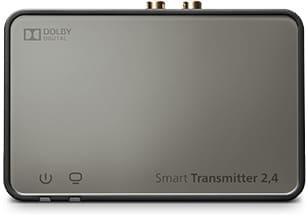
The Rexton Smart Transmitter 2.4 sends TV or stereo sound straight to compatible Rexton hearing aids. A second listener with compatible aids can listen to the same program. The box accepts optical or red-and-white RCA audio and has a separate optical output for a soundbar or surround receiver.
How it compares
Keep your soundbar on the TV’s optical connection
The Smart Transmitter 2.4 has separate optical IN and OUT sockets. If your soundbar already uses the TV’s only optical output, you can put the transmitter between them with a second optical cable. Rexton TV Sound can also pass the signal through, but its output needs a separate 3.5 mm optical adapter.
Plan for a wall outlet near the TV
Rexton specifies its supplied wall plug for the Smart Transmitter 2.4. Some TV streamers, including Phonak’s TV Connector, can draw power from a TV USB socket. With the Rexton box, check for a spare outlet where you plan to put it.
Forum research
Features
Connections
Supported: TV audio streaming1Direct TV sound for compatible hearing aids.
Supported: Analog audio input3Left and right analog RCA inputs.
Supported: Link to hearing aids4Direct 2.4 GHz wireless link to paired compatible hearing aids
Supported: Receiver requirements5Compatible hearing aids pair directly to the box. A separate worn receiver is unnecessary for the documented setup.
Supported: Hearing-aid pairing method6Restart the hearing aids and place them on or next to the powered transmitter. Both lights turn blue for about 30 seconds after pairing.
Supported: Simultaneous listeners7Several paired wearers can listen to the same audio at once. Rexton gives no maximum number of people.
Supported: Bilateral and unilateral use8The guide pairs both hearing aids together. It does not give a separate procedure for a single aid.
Supported: Reconnection behavior9Each aid remembers its pairing after restart. Select the transmitter mode or hearing program to listen.
Supported: Companion app control10The optional Rexton App can connect to a previously paired transmitter, change the streaming volume and disconnect.
Supported: Professional setup11A hearing care professional can adjust the balance of streamed and surrounding sound and configure available program and volume controls.
Supported: Simultaneous source connections12The box streams one input at a time. If optical and RCA are both connected, the optical device takes priority.
Supported: Stereo streaming13Direct stereo audio from a TV or stereo system.
Supported: Analog input details16Red and white RCA audio inputs. A supplied mini-jack or SCART adapter can accept a compatible TV output. A SCART socket may send only certain TV sources.
Supported: Audio input selection17Optical has priority over RCA. Unplug the optical cable to use the analog source.
Supported: Optical audio formats21PCM, Dolby Digital
Supported: Required TV settings22Set the optical output to PCM or Dolby Digital. For an analog output, select analog or uncompressed audio.
Supported: TV speakers alongside streaming23Whether the built-in speakers keep playing depends on the television and output. Using a headphone jack may mute the speakers.
Supported: Audio passthrough24The dedicated TOSLINK OUT can feed another optical device, such as a surround receiver.
Supported: Soundbar/receiver setup25Run optical audio from the TV to IN, then connect OUT to the sound system’s optical input with a second TOSLINK cable.
Supported: Automatic streaming start26Start listening by choosing the transmitter mode or dedicated hearing program on the hearing aids.
Supported: Stopping TV streaming27Leave transmitter mode or switch to a different hearing program. In the Rexton App, choose Disconnect.
Supported: TV/environment balance28Your hearing care professional can change how much room sound is mixed with the streamed TV audio.
Supported: Independent TV stream volume29Adjust streaming volume with your configured hearing aid controls or the app. The TV remote normally leaves the streamed level unchanged.
Supported: Wall mounting30Rexton recommends horizontal placement near the TV with line of sight to the listener. The guide shows a tabletop setup.
Supported: Power connector32Micro-USB power inlet. Rexton instructs owners to use the supplied cable and wall plug.
Supported: Electrical input requirements33The supplied adapter accepts 100–240 V AC at 47–63 Hz and supplies 5 V DC at up to 1 A.
Supported: Power adapter included34The manufacturer’s kit includes a wall adapter.
Supported: Power bank use35Rexton specifies the supplied power cable and wall plug. It provides no portable-power setup.
Design and everyday use
Supported: Operating conditions3641–104°F (5–40°C), 15–93% relative humidity without condensation, and 700–1,060 hPa.
Supported: Storage conditions37For extended transport or storage, keep the transmitter between −13 and 158°F (−25–70°C) at 15–93% relative humidity without condensation.
Supported: Status indicators38Both lights turn blue after pairing. A flashing red TV light with green power means the optical format is unsupported.
Supported: Physical controls39The rear setup button resets all pairings when held for more than five seconds. The rear mode button has no assigned function.
Supported: Included items40The US guide lists a region-specific wall plug and both optical and analog connection accessories. Check the contents of a used kit.
With conditions: Required extras41One optical cable is supplied. A separate cable connects the optical OUT to a soundbar or surround receiver.
Supported: Repair and service options42Contact your hearing care professional if both lights flash red or return a damaged unit to the point of sale.
Supported: Replacement parts43Replace a defective TOSLINK cable. Use approved parts and consult your hearing care professional for help.
Supported: Routine maintenance44Clean with a soft tissue. Keep the transmitter out of water and avoid alcohol, benzine and abrasive cleaning liquids.
Supported: Regional variants45The power plug uses a country-specific adapter. Costco’s US ordering number is 1230845.
Set the box flat near the TV, within sight of your seat. Plug in its supplied power adapter. Connect the TV’s optical output to the transmitter’s IN socket, or connect the left and right RCA outputs. Restart the hearing aids and set them on or next to the transmitter. Both lights turn blue for about 30 seconds when pairing finishes. Select the transmitter program to start listening.
Connect or disconnect a paired transmitter and adjust streaming volume (Rexton App).
If the TV is silent in your hearing aids
First select the transmitter program on your hearing aids. If the power light is green and the TV light flashes red on an optical connection, change the TV’s digital audio output to PCM or Dolby Digital. For RCA, check that the plugs are in Audio Out and that the source volume is high enough.