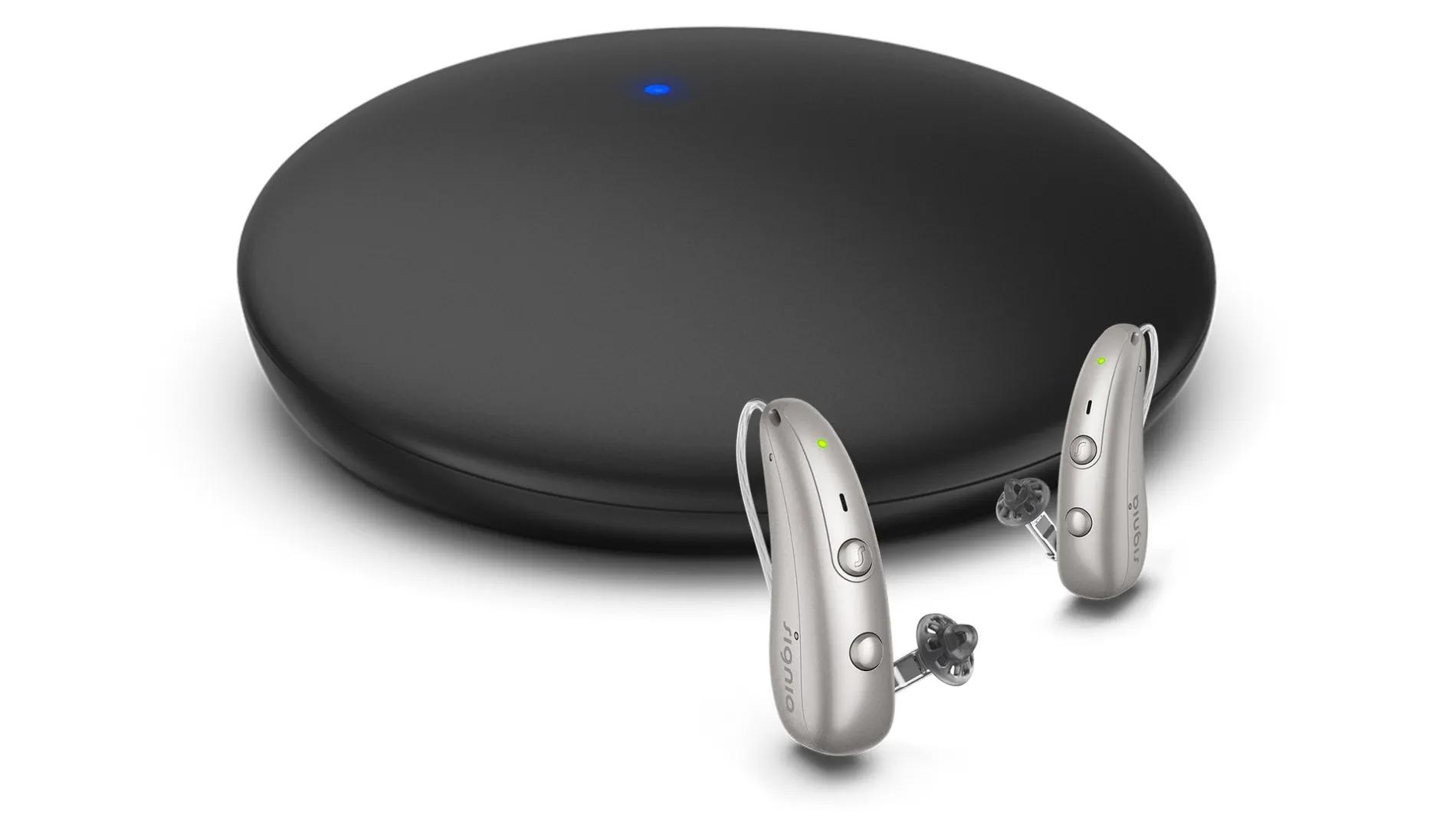
Signia TV Sound
Listen to TV audio through compatible Signia hearing aids, with a separate volume control in the app on supported setups.
What TV Sound does
TV Sound takes audio from a TV’s optical or analog output and sends it wirelessly to compatible Signia hearing aids. A switch underneath selects one hearing aid for mono or two for stereo. With optical input, the purple jack can instead feed the same signal to a soundbar using a separate mini-TOSLINK cable. The available playback controls depend on your hearing aids and their fitting.
Which hearing aids work with Signia TV Sound?
TV audio
- Signia Active Mini IX
Signia documents Bluetooth-enabled hearing aids in this exact model or variant.
- Signia Motion Charge&Go IX M
Signia documents Bluetooth-enabled hearing aids in this exact model or variant.
- Signia Motion Charge&Go IX P
Signia documents Bluetooth-enabled hearing aids in this exact model or variant.
- Signia Motion Charge&Go IX SP
Signia documents Bluetooth-enabled hearing aids in this exact model or variant.
- Signia Pure Charge&Go IX
Signia documents Bluetooth-enabled hearing aids in this exact model or variant.
- Signia Pure Charge&Go T IX
Signia documents Bluetooth-enabled hearing aids in this exact model or variant.
Choose the exact model printed on your hearing aids or paperwork. A family match does not establish support for every model in that family.
View documented devices and setups
- Signia Active Mini IX · Exact model
TV Sound with supported non-BCT Signia hearing aids · tv_audio
Signia documents Bluetooth-enabled hearing aids in this exact model or variant.
Documented supportSource · 2026-11-18Signia documents Bluetooth-enabled hearing aids in this exact model or variant.
- Signia Motion Charge&Go IX M · Exact model
TV Sound with supported non-BCT Signia hearing aids · tv_audio
Signia documents Bluetooth-enabled hearing aids in this exact model or variant.
Documented supportSource · 2026-11-18Signia documents Bluetooth-enabled hearing aids in this exact model or variant.
- Signia Motion Charge&Go IX P · Exact model
TV Sound with supported non-BCT Signia hearing aids · tv_audio
Signia documents Bluetooth-enabled hearing aids in this exact model or variant.
Documented supportSource · 2026-11-18Signia documents Bluetooth-enabled hearing aids in this exact model or variant.
- Signia Motion Charge&Go IX SP · Exact model
TV Sound with supported non-BCT Signia hearing aids · tv_audio
Signia documents Bluetooth-enabled hearing aids in this exact model or variant.
Documented supportSource · 2026-11-18Signia documents Bluetooth-enabled hearing aids in this exact model or variant.
- Signia Pure Charge&Go IX · Exact model
TV Sound with supported non-BCT Signia hearing aids · tv_audio
Signia documents Bluetooth-enabled hearing aids in this exact model or variant.
Documented supportSource · 2026-11-18Signia documents Bluetooth-enabled hearing aids in this exact model or variant.
- Signia Pure Charge&Go T IX · Exact model
TV Sound with supported non-BCT Signia hearing aids · tv_audio
Signia documents Bluetooth-enabled hearing aids in this exact model or variant.
Documented supportSource · 2026-11-18Signia documents Bluetooth-enabled hearing aids in this exact model or variant.
- Signia Styletto IX · Exact model
TV Sound with supported non-BCT Signia hearing aids · tv_audio
Signia documents Bluetooth-enabled hearing aids in this exact model or variant.
Documented supportSource · 2026-11-18Signia documents Bluetooth-enabled hearing aids in this exact model or variant.
- Signia Pure Charge&Go BCT IX · Exact model
TV Sound with Pure Charge&Go BCT IX · tv_audio
Signia documents Bluetooth-enabled hearing aids in this exact model or variant.
Documented supportSource · 2026-11-18Signia documents Bluetooth-enabled hearing aids in this exact model or variant.
- Signia Pure Charge&Go MaX · Exact model
TV Sound with Pure Charge&Go MaX · tv_audio
Signia documents Bluetooth-enabled hearing aids in this exact model or variant.
Documented supportSource · 2026-11-18Signia documents Bluetooth-enabled hearing aids in this exact model or variant.
- Signia Pure AX Charge&Go AX · Exact model
TV Sound with supported non-BCT Signia hearing aids · tv_audio
August 2025 global exact-model TV Sound chart. Use the supported Bluetooth-enabled configuration.
Documented supportSource · 2026-11-18August 2025 global exact-model TV Sound chart. Use the supported Bluetooth-enabled configuration.
- Signia Pure AX Charge&Go T AX · Exact model
TV Sound with supported non-BCT Signia hearing aids · tv_audio
August 2025 global exact-model TV Sound chart. Use the supported Bluetooth-enabled configuration.
Documented supportSource · 2026-11-18August 2025 global exact-model TV Sound chart. Use the supported Bluetooth-enabled configuration.
- Signia Pure AX 312 · Exact model
TV Sound with supported non-BCT Signia hearing aids · tv_audio
August 2025 global exact-model TV Sound chart. Use the supported Bluetooth-enabled configuration.
Documented supportSource · 2026-11-18August 2025 global exact-model TV Sound chart. Use the supported Bluetooth-enabled configuration.
- Signia Styletto AX · Exact model
TV Sound with supported non-BCT Signia hearing aids · tv_audio
August 2025 global exact-model TV Sound chart. Use the supported Bluetooth-enabled configuration.
Documented supportSource · 2026-11-18August 2025 global exact-model TV Sound chart. Use the supported Bluetooth-enabled configuration.
- Signia Motion X Charge&Go X · Exact model
TV Sound with supported non-BCT Signia hearing aids · tv_audio
August 2025 global exact-model TV Sound chart. Use the supported Bluetooth-enabled configuration.
Documented supportSource · 2026-11-18August 2025 global exact-model TV Sound chart. Use the supported Bluetooth-enabled configuration.
- Signia Motion X Charge&Go P X · Exact model
TV Sound with supported non-BCT Signia hearing aids · tv_audio
August 2025 global exact-model TV Sound chart. Use the supported Bluetooth-enabled configuration.
Documented supportSource · 2026-11-18August 2025 global exact-model TV Sound chart. Use the supported Bluetooth-enabled configuration.
- Signia Motion X Charge&Go SP X · Exact model
TV Sound with supported non-BCT Signia hearing aids · tv_audio
August 2025 global exact-model TV Sound chart. Use the supported Bluetooth-enabled configuration.
Documented supportSource · 2026-11-18August 2025 global exact-model TV Sound chart. Use the supported Bluetooth-enabled configuration.
- Signia Pure X Pure 312 X · Exact model
TV Sound with supported non-BCT Signia hearing aids · tv_audio
August 2025 global exact-model TV Sound chart. Use the supported Bluetooth-enabled configuration.
Documented supportSource · 2026-11-18August 2025 global exact-model TV Sound chart. Use the supported Bluetooth-enabled configuration.
- Signia Insio Charge&Go AX · Family
TV Sound with supported non-BCT Signia hearing aids · tv_audio
The chart names the Insio Charge&Go AX family without distinguishing shell styles.
Documented supportSource · 2026-11-18Family-level evidence. Confirm your exact hearing-aid model before buying.
The chart names the Insio Charge&Go AX family without distinguishing shell styles.
- Signia Active Pro IX · Exact model
TV Sound with supported non-BCT Signia hearing aids · tv_audio
Documented supportSource · 2026-11-18
Documented features
Connections
- Analog audio input
- Supported
Purple 3.5 mm input connects to compatible analog audio outputs on the television.
Documentation · 2026-11-18 - Companion app control
- Signia app Stream tab for supported IX and earlier settings. Signia One app TV Sound Play/Pause and volume for MaX.
Optional. App choice follows the hearing-aid platform.
Documentation · 2026-11-18 - Audio passthrough
- Optical input can pass to mini-TOSLINK output through the purple 3.5 mm socket
This uses the purple socket as digital output while the blue socket receives optical audio.
Documentation · 2026-11-18 - Automatic streaming start
- Begin playback using the app, configured TV program or installed hearing-aid button shortcut
Automatic pairing and reconnection do not replace the initial playback selection in these instructions.
Documentation · 2026-11-18 - Bilateral and unilateral use
- One aid uses mono, two use stereo
Set the matching switch position on the underside. Mixed-model pairs are unverified.
Documentation · 2026-11-18 - No coaxial digital input
The digital input is optical TOSLINK. The purple socket is analog input or optical output.
Documentation · 2026-11-18- No HDMI ARC input
The complete port diagram shows optical and analog inputs only.
Documentation · 2026-11-18- No HDMI eARC input
The complete port diagram shows optical and analog inputs only.
Documentation · 2026-11-18- Link to hearing aids
- Bluetooth to supported Signia hearing aids
The exact hearing-aid implementation depends on the model. Generic Bluetooth compatibility is insufficient.
Documentation · 2026-11-18 - Audio input selection
- Optical has priority when it carries a signal, with analog used when the optical source has no signal
Applies when both optical and analog inputs are connected.
Documentation · 2026-11-18 - Analog input details
- Purple 3.5 mm analog input and supplied stereo cable to the TV’s analog output
The guide illustrates red and white RCA output jacks on the TV. A headphone output may silence the speakers.
Documentation · 2026-11-18 - Multiple TV adapters
- Restart the hearing aids and place them on the desired TV Sound to switch
The procedure is documented for two transmitters. A capacity for saved transmitters is not specified.
Documentation · 2026-11-18 - Optical audio formats
- Stereo PCM, Dolby Digital
Use a supported optical format on the TV. The manuals do not document Dolby Digital Plus or DTS.
Documentation · 2026-11-18 - Optical audio input
- Supported
Blue socket accepts optical TOSLINK.
Documentation · 2026-11-18 - Hearing-aid pairing method
- Power the TV Sound, restart aids and place within 20 cm. Blue pulses while pairing and turns solid when paired.
Turn Bluetooth off on another already paired Bluetooth device during initial setup.
Documentation · 2026-11-18 - Professional setup
- A provider can assign a TV program or change the hearing-aid control used to start playback
The US guide identifies the dedicated-program path. The MaX guide documents an adjustable lower-button shortcut.
Documentation · 2026-11-18 - Receiver requirements
- Pairs to supported hearing aids directly
Signia does not specify an external receiver or neckloop for this TV Sound use.
Documentation · 2026-11-18 - Reconnection behavior
- Pairing is retained. Use the documented stream control after pairing.
Auto-connect is distinct from automatically starting sound.
Documentation · 2026-11-18 - Simultaneous listeners
- Multiple compatible pairs can be connected in the same protocol group
The US guide gives either supported non-BCT IX/AX/X/Nx or only BCT IX examples. MaX instructions separately describe pairing more than one set.
Documentation · 2026-11-18 - Simultaneous source connections
- Two wired inputs can be connected, with one selected audio stream at a time
Optical takes priority while it has a signal. The analog signal plays when optical input is absent.
Documentation · 2026-11-18 - Soundbar/receiver setup
- TV optical out to blue TV Sound input. Purple TV Sound port to soundbar optical in.
Use a mini-TOSLINK-to-TOSLINK cable, sold separately.
Documentation · 2026-11-18 - Stereo streaming
- Supported
Choose the two-hearing-aid setting. One hearing aid receives mono.
Documentation · 2026-11-18 - Stopping TV streaming
- Pause through the app or leave the TV program. A brief reset-button press pauses the device for 30 seconds.
Press reset again or wait to resume. The MaX app uses its own Pause button.
Documentation · 2026-11-18 - TV audio streaming
- Supported
TV audio is sent wirelessly after pairing to supported aids.
Documentation · 2026-11-18 - Required TV settings
- Enable the optical audio output and select a supported format if no signal is recognized
On analog, check the TV jacks are outputs. The red LED can indicate an unsupported format.
Documentation · 2026-11-18 - Independent TV stream volume
- Adjust the streamed level in the hearing-aid app
The TV’s output configuration governs speaker volume and whether a headphone output follows TV volume.
Documentation · 2026-11-18 - TV speakers alongside streaming
- Depends on the TV and selected output
Use rear optical or analog line output and enable simultaneous speaker output if the TV offers it. TV headphone outputs may mute the speakers.
Documentation · 2026-11-18 - TV/environment balance
- Adjust stream and hearing-aid microphone volume in the hearing-aid app where supported
The manual illustrates separate microphone and streaming controls.
Documentation · 2026-11-18 - No USB audio input
The rear micro-USB socket is the power connection. Audio inputs are the two separately labeled and illustrated sockets.
Documentation · 2026-11-18
Power and charging
- Electrical input requirements
- 5 V DC, minimum 500 mA wall adapter
July 2025 US Signia guide for the non-MaX setup. The adapter is optional if the TV has suitable USB power.
Setup: TV Sound with supported non-BCT Signia hearing aids
Documentation · 2026-11-18 - Electrical input requirements
- Minimum 150 mA / 0.75 W wall adapter
July 2026 global instructions for the MaX setup. Use the guide appropriate to the unit and region.
Setup: TV Sound with Pure Charge&Go MaX
Documentation · 2026-11-18 - Power adapter not included
The July 2025 US Signia kit specifies its optional wall plug separately. Retailer bundles can differ.
Documentation · 2026-11-18- Power connector
- Micro-USB
TV USB port or suitable adapter supplies power.
Documentation · 2026-11-18 - No USB-C power input
The power jack and supplied cable are micro-USB.
Documentation · 2026-11-18
Design and everyday use
- Control accessibility
- Color-coded sockets, one- and two-aid switch symbols and a pairing tone through the hearing aids
The manufacturer illustrates identifiable controls but does not test ease of use.
Documentation · 2026-11-18 - Included items
- TV Sound unit, Micro-USB cable, Analog audio cable, Optical TOSLINK cable
US Connexx user-guide inventory.
Documentation · 2026-11-18 - Routine maintenance
- Avoid water and liquids. Clean the housing as needed with a soft tissue.
Keep open sockets clear and use only approved parts.
Documentation · 2026-11-18 - Physical controls
- Mono/stereo switch underneath, Recessed reset and temporary stop control underneath
One switch chooses one or two aids. A short reset press suspends streaming, a five-second hold clears all pairings.
Documentation · 2026-11-18 - Required extras
- USB wall power adapter if necessary, Mini-TOSLINK-to-TOSLINK cable for soundbar passthrough
The extra cable requires a soundbar with optical input. No adapter is required if the TV powers the device.
Documentation · 2026-11-18 - Repair and service options
- Contact your hearing care professional for repair
WSAUD instructs owners to leave repair and disassembly to an authorized route.
Documentation · 2026-11-18 - Status indicators
- Solid green for incoming audio, Pulsing green for no input, Solid blue after pairing, Pulsing blue during pairing, Flashing orange during temporary stop, Red patterns for errors, overheating or unrecognized format
US quick-start LED chart.
Documentation · 2026-11-18
How to set up Signia TV Sound
Plug in the supplied micro-USB power cable and connect either the TV’s optical output or its red and white analog audio outputs. Choose the mono or stereo position underneath. Restart the hearing aids, place them within 8 inches of the powered streamer and watch for the blue pairing light. Open Stream in the Signia app, use Signia One with MaX, or use the hearing-aid control your provider has configured.
What to check before buying
Check the hearing-aid model before buying. The US instructions pair Pure Charge&Go BCT IX separately from supported non-BCT IX, AX, X and Nx hearing aids when several people share one streamer. Whether the TV speakers keep playing depends on the TV and the output you use.
Keep a soundbar on the optical connection
Connect the TV’s optical output to the blue socket. Use a separate mini-TOSLINK-to-TOSLINK cable from the purple jack to the soundbar’s optical input. The purple jack serves as an output in this setup.
SourceHas documented support for BCT IX and MaX
If you wear Pure Charge&Go BCT IX or MaX, Signia lists TV Sound for those models. Take care with used listings for the older Signia StreamLine TV. Its documentation covers other models such as the standard Pure Charge&Go IX and Styletto IX, so the similar Pure name alone does not establish a fit.
SourceNeeds a smaller plug to connect a soundbar
If you’re moving from the original Signia StreamLine TV to TV Sound, check the cable going to your optical soundbar. The older streamer takes a full-size optical plug. TV Sound needs a separately sold cable with a mini-TOSLINK plug at the streamer end.
SourceCompanion apps
Related accessories
Other devices named in the documentation
These names have not been matched to an exact device in our catalog. They do not create verified matches in the finder.
Checking current offers…
Documentation checked Nov 18, 2026