App directory
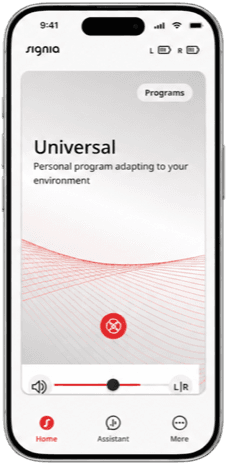
Signia One App
Sivantos Pte. Ltd.
The app for Signia MaX hearing aids only: volume, programs, remote adjustments and Apple Watch control.
Features
Listening assistance
- Conditional: Separate ear adjustments10
Device companion
- Conditional: Mute hearing devices11
- Conditional: Directional focus control12
- Conditional: Hearing-device tinnitus controls13
- Conditional: Hearing-device control14
- Conditional: Remote professional support14
- Conditional: Remote fitting adjustments14
- Conditional: Personalized hearing programs16
- Conditional: Accessory control14
- Conditional: Watch-based device control14Apple Watch only
Compatibility
Availability & access
Privacy & data
- Evidence: p. 9, TeleCare - Setup.
- Applies to the AI Assistant (chat and fine-tuning), which relies on external services and needs operational consent; offline behaviour of the basic Bluetooth remote controls is not documented. Evidence: p. 15, Consenting to operational data use.
- Developer statement in the store description; Apple's accessibility label for the app is not filled in.
- Developer statement in the store description.
- Evidence: p. 31, Display settings.
- Only data collected under the optional research & development (data collection) consent, stored by WSA for 5 years; data shared with the hearing care professional is held for 80 days. Storage medium (cloud) is inferred from 'stored' by WSA, not named. Evidence: 7. How long do we keep your personal data.
- Applies to app, hearing-aid and Assistant chat data collected under the optional data collection (research & development) consent, which can be declined or withdrawn in Privacy settings. Evidence: 4.5 Personal data processed for research and development purposes.
- Assistant chat messages are processed by WSA when operational consent is given; TeleCare chat goes to the hearing care professional when TeleCare is enabled. Evidence: 4.3 Personal data processed when you use the Assistant.
- By written request to WSA (privacy@wsa.com); identity verification may be required. Not an in-app export. Evidence: 8. Your rights.
- Signia MaX hearing aids only (user guide lists Pure C&G MaX). Covers left/right volume only. Evidence: p. 25, Adjusting and muting the volume.
- Signia MaX hearing aids only (user guide lists Pure C&G MaX). Evidence: p. 25, Adjusting and muting the volume.
- Signia MaX hearing aids only (user guide lists Pure C&G MaX). Only in the Universal program and only on certain hearing-aid models and performance/technology levels. Evidence: p. 6, App controls: Directional focus.
- Signia MaX hearing aids only (user guide lists Pure C&G MaX). Only when a tinnitus therapy program is set up and active; controls tinnitus therapy volume and mute. Evidence: pp. 25-26, Adjusting and muting the volume.
- Signia MaX hearing aids only. Signia One: supported hearing aids; watchOS 9+ with paired iPhone/iOS 17+. Assistant and TeleCare depend on professional enablement and regional/service availability. Separate watch context before import.
- Signia MaX hearing aids only. Requires supported Apple Watch, paired compatible iPhone and hearing devices. Other phone-app features are not established on the watch.
- Signia MaX hearing aids only (user guide lists Pure C&G MaX). Assistant fine-tuning of the Universal program requires the hearing care professional to enable Assistant, regional availability and operational consent. Evidence: p. 38, Assistant: fine-tuning.
- Signia MaX hearing aids only (user guide lists Pure C&G MaX). Depends on phone and OS; the app shows and controls available streams (e.g. Connexx TV Sound).
- Signia MaX hearing aids only (user guide lists Pure C&G MaX). Direct streaming from Android uses LE Audio (Android 14+) or ASHA (Android 11+) on compatible phones. Evidence: p. 7, Compatibility - Devices that support LE Audio and ASHA.
- Evidence: p. 7, Compatibility - Hearing aids.
- Signia MaX hearing aids only (user guide lists Pure C&G MaX). TeleCare remote support and remote fitting require the hearing care professional to enable TeleCare and regional availability; streaming depends on phone/OS. Evidence: p. 41, TeleCare.
App Store ratings & reviews
Praise
- One reviewer values streaming, volume adjustments and directional listening.
Complaints
- Reviewers describe frequent disconnections, repeated restarts and limited sound controls; one reports large text hiding program choices.
Google Play ratings & reviews
Complaints
- Some want more control over streaming, tone and assistant functions.
- A recent reviewer objects to repeated data-consent prompts.
Mixed reports
- Ease of use and connectivity vary substantially between reviewers.
Hearing devices
Includes documented compatible products and models linked in our catalog. Features can depend on your model, phone and firmware; check the compatibility information for any restrictions.