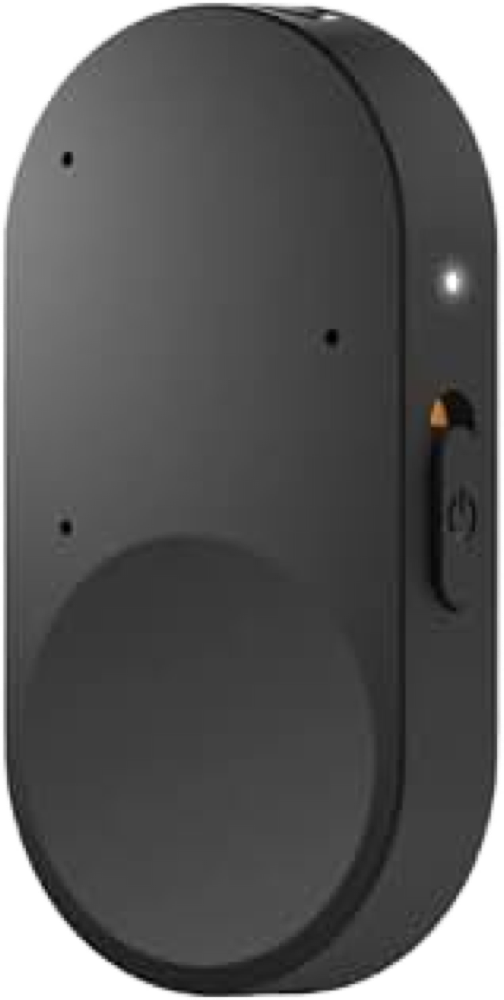
Starkey StarLink Edge Remote Microphone
Hear a conversation partner from farther away or in background noise, with the added option to change hearing-aid volume and programs.
What StarLink Edge Remote Microphone does
Clip the StarLink Edge Remote Microphone to the person you want to hear. It sends their voice directly to a compatible paired hearing aid or fitted pair. The three microphones focus directionally when the device is worn and change to all-around pickup when it is lying flat. The rocker adjusts the live stream while the microphone is on, adjusts hearing-aid volume when it is off, and changes fitted hearing-aid programs with a long press.
Which hearing aids work with Starkey StarLink Edge Remote Microphone?
Remote control
- Starkey Edge AI RIC RT
Exact wireless hearing-aid style’s StarkeyPro accessory listing. The Edge Remote Microphone’s control mode requires compatible paired aids and fitted programs for program cycling.
- Starkey Edge AI RIC 312
Exact wireless hearing-aid style’s StarkeyPro accessory listing. The Edge Remote Microphone’s control mode requires compatible paired aids and fitted programs for program cycling.
- Starkey Edge AI mRIC R
Exact wireless hearing-aid style’s StarkeyPro accessory listing. The Edge Remote Microphone’s control mode requires compatible paired aids and fitted programs for program cycling.
- Starkey Omega AI+ mRIC R
Exact wireless hearing-aid style’s StarkeyPro accessory listing. The Edge Remote Microphone’s control mode requires compatible paired aids and fitted programs for program cycling.
- Starkey Omega AI+ RIC RT
Exact wireless hearing-aid style’s StarkeyPro accessory listing. The Edge Remote Microphone’s control mode requires compatible paired aids and fitted programs for program cycling.
- Starkey Omega AI+ RIC 312
Exact wireless hearing-aid style’s StarkeyPro accessory listing. The Edge Remote Microphone’s control mode requires compatible paired aids and fitted programs for program cycling.
Choose the exact model printed on your hearing aids or paperwork. A family match does not establish support for every model in that family.
View documented devices and setups
- Starkey Edge AI RIC RT · Exact model
Worn by one speaker for directional streaming · remote_microphone
Exact wireless hearing-aid style’s StarkeyPro accessory listing. Pair to a compatible aid or fitted pair.
Documented supportSource · 2026-11-18Exact wireless hearing-aid style’s StarkeyPro accessory listing. Pair to a compatible aid or fitted pair.
- Starkey Edge AI RIC RT · Exact model
Laid flat for all-around pickup · remote_microphone
Exact wireless hearing-aid style’s StarkeyPro accessory listing. Pair to a compatible aid or fitted pair.
Documented supportSource · 2026-11-18Exact wireless hearing-aid style’s StarkeyPro accessory listing. Pair to a compatible aid or fitted pair.
- Starkey Edge AI RIC RT · Exact model
Hearing-aid control with the microphone switched off · remote_control
Exact wireless hearing-aid style’s StarkeyPro accessory listing. The Edge Remote Microphone’s control mode requires compatible paired aids and fitted programs for program cycling.
Documented supportSource · 2026-11-18Exact wireless hearing-aid style’s StarkeyPro accessory listing. The Edge Remote Microphone’s control mode requires compatible paired aids and fitted programs for program cycling.
- Starkey Edge AI RIC 312 · Exact model
Worn by one speaker for directional streaming · remote_microphone
Exact wireless hearing-aid style’s StarkeyPro accessory listing. Pair to a compatible aid or fitted pair.
Documented supportSource · 2026-11-18Exact wireless hearing-aid style’s StarkeyPro accessory listing. Pair to a compatible aid or fitted pair.
- Starkey Edge AI RIC 312 · Exact model
Laid flat for all-around pickup · remote_microphone
Exact wireless hearing-aid style’s StarkeyPro accessory listing. Pair to a compatible aid or fitted pair.
Documented supportSource · 2026-11-18Exact wireless hearing-aid style’s StarkeyPro accessory listing. Pair to a compatible aid or fitted pair.
- Starkey Edge AI RIC 312 · Exact model
Hearing-aid control with the microphone switched off · remote_control
Exact wireless hearing-aid style’s StarkeyPro accessory listing. The Edge Remote Microphone’s control mode requires compatible paired aids and fitted programs for program cycling.
Documented supportSource · 2026-11-18Exact wireless hearing-aid style’s StarkeyPro accessory listing. The Edge Remote Microphone’s control mode requires compatible paired aids and fitted programs for program cycling.
- Starkey Edge AI mRIC R · Exact model
Worn by one speaker for directional streaming · remote_microphone
Exact wireless hearing-aid style’s StarkeyPro accessory listing. Pair to a compatible aid or fitted pair.
Documented supportSource · 2026-11-18Exact wireless hearing-aid style’s StarkeyPro accessory listing. Pair to a compatible aid or fitted pair.
- Starkey Edge AI mRIC R · Exact model
Laid flat for all-around pickup · remote_microphone
Exact wireless hearing-aid style’s StarkeyPro accessory listing. Pair to a compatible aid or fitted pair.
Documented supportSource · 2026-11-18Exact wireless hearing-aid style’s StarkeyPro accessory listing. Pair to a compatible aid or fitted pair.
- Starkey Edge AI mRIC R · Exact model
Hearing-aid control with the microphone switched off · remote_control
Exact wireless hearing-aid style’s StarkeyPro accessory listing. The Edge Remote Microphone’s control mode requires compatible paired aids and fitted programs for program cycling.
Documented supportSource · 2026-11-18Exact wireless hearing-aid style’s StarkeyPro accessory listing. The Edge Remote Microphone’s control mode requires compatible paired aids and fitted programs for program cycling.
- Starkey Omega AI+ mRIC R · Exact model
Worn by one speaker for directional streaming · remote_microphone
Exact wireless hearing-aid style’s StarkeyPro accessory listing. Pair to a compatible aid or fitted pair.
Documented supportSource · 2026-11-18Exact wireless hearing-aid style’s StarkeyPro accessory listing. Pair to a compatible aid or fitted pair.
- Starkey Omega AI+ mRIC R · Exact model
Laid flat for all-around pickup · remote_microphone
Exact wireless hearing-aid style’s StarkeyPro accessory listing. Pair to a compatible aid or fitted pair.
Documented supportSource · 2026-11-18Exact wireless hearing-aid style’s StarkeyPro accessory listing. Pair to a compatible aid or fitted pair.
- Starkey Omega AI+ mRIC R · Exact model
Hearing-aid control with the microphone switched off · remote_control
Exact wireless hearing-aid style’s StarkeyPro accessory listing. The Edge Remote Microphone’s control mode requires compatible paired aids and fitted programs for program cycling.
Documented supportSource · 2026-11-18Exact wireless hearing-aid style’s StarkeyPro accessory listing. The Edge Remote Microphone’s control mode requires compatible paired aids and fitted programs for program cycling.
- Starkey Omega AI+ RIC RT · Exact model
Worn by one speaker for directional streaming · remote_microphone
Exact wireless hearing-aid style’s StarkeyPro accessory listing. Pair to a compatible aid or fitted pair.
Documented supportSource · 2026-11-18Exact wireless hearing-aid style’s StarkeyPro accessory listing. Pair to a compatible aid or fitted pair.
- Starkey Omega AI+ RIC RT · Exact model
Laid flat for all-around pickup · remote_microphone
Exact wireless hearing-aid style’s StarkeyPro accessory listing. Pair to a compatible aid or fitted pair.
Documented supportSource · 2026-11-18Exact wireless hearing-aid style’s StarkeyPro accessory listing. Pair to a compatible aid or fitted pair.
- Starkey Omega AI+ RIC RT · Exact model
Hearing-aid control with the microphone switched off · remote_control
Exact wireless hearing-aid style’s StarkeyPro accessory listing. The Edge Remote Microphone’s control mode requires compatible paired aids and fitted programs for program cycling.
Documented supportSource · 2026-11-18Exact wireless hearing-aid style’s StarkeyPro accessory listing. The Edge Remote Microphone’s control mode requires compatible paired aids and fitted programs for program cycling.
- Starkey Omega AI+ RIC 312 · Exact model
Worn by one speaker for directional streaming · remote_microphone
Exact wireless hearing-aid style’s StarkeyPro accessory listing. Pair to a compatible aid or fitted pair.
Documented supportSource · 2026-11-18Exact wireless hearing-aid style’s StarkeyPro accessory listing. Pair to a compatible aid or fitted pair.
- Starkey Omega AI+ RIC 312 · Exact model
Laid flat for all-around pickup · remote_microphone
Exact wireless hearing-aid style’s StarkeyPro accessory listing. Pair to a compatible aid or fitted pair.
Documented supportSource · 2026-11-18Exact wireless hearing-aid style’s StarkeyPro accessory listing. Pair to a compatible aid or fitted pair.
- Starkey Omega AI+ RIC 312 · Exact model
Hearing-aid control with the microphone switched off · remote_control
Exact wireless hearing-aid style’s StarkeyPro accessory listing. The Edge Remote Microphone’s control mode requires compatible paired aids and fitted programs for program cycling.
Documented supportSource · 2026-11-18Exact wireless hearing-aid style’s StarkeyPro accessory listing. The Edge Remote Microphone’s control mode requires compatible paired aids and fitted programs for program cycling.
- Starkey Omega AI+ CIC · Exact model
Worn by one speaker for directional streaming · remote_microphone
Exact wireless hearing-aid style’s StarkeyPro accessory listing. Pair to a compatible aid or fitted pair. This applies to the wireless CIC. Independent models marked NW are excluded.
Documented supportSource · 2026-11-18Exact wireless hearing-aid style’s StarkeyPro accessory listing. Pair to a compatible aid or fitted pair. This applies to the wireless CIC. Independent models marked NW are excluded.
- Starkey Omega AI+ CIC · Exact model
Laid flat for all-around pickup · remote_microphone
Exact wireless hearing-aid style’s StarkeyPro accessory listing. Pair to a compatible aid or fitted pair. This applies to the wireless CIC. Independent models marked NW are excluded.
Documented supportSource · 2026-11-18Exact wireless hearing-aid style’s StarkeyPro accessory listing. Pair to a compatible aid or fitted pair. This applies to the wireless CIC. Independent models marked NW are excluded.
- Starkey Omega AI+ CIC · Exact model
Hearing-aid control with the microphone switched off · remote_control
Exact wireless hearing-aid style’s StarkeyPro accessory listing. The Edge Remote Microphone’s control mode requires compatible paired aids and fitted programs for program cycling.
Documented supportSource · 2026-11-18Exact wireless hearing-aid style’s StarkeyPro accessory listing. The Edge Remote Microphone’s control mode requires compatible paired aids and fitted programs for program cycling.
- Starkey Omega AI+ ITC R · Exact model
Worn by one speaker for directional streaming · remote_microphone
Exact wireless hearing-aid style’s StarkeyPro accessory listing. Pair to a compatible aid or fitted pair.
Documented supportSource · 2026-11-18Exact wireless hearing-aid style’s StarkeyPro accessory listing. Pair to a compatible aid or fitted pair.
- Starkey Omega AI+ ITC R · Exact model
Laid flat for all-around pickup · remote_microphone
Exact wireless hearing-aid style’s StarkeyPro accessory listing. Pair to a compatible aid or fitted pair.
Documented supportSource · 2026-11-18Exact wireless hearing-aid style’s StarkeyPro accessory listing. Pair to a compatible aid or fitted pair.
- Starkey Omega AI+ ITC R · Exact model
Hearing-aid control with the microphone switched off · remote_control
Exact wireless hearing-aid style’s StarkeyPro accessory listing. The Edge Remote Microphone’s control mode requires compatible paired aids and fitted programs for program cycling.
Documented supportSource · 2026-11-18Exact wireless hearing-aid style’s StarkeyPro accessory listing. The Edge Remote Microphone’s control mode requires compatible paired aids and fitted programs for program cycling.
- Starkey Omega AI+ ITE R · Exact model
Worn by one speaker for directional streaming · remote_microphone
Exact wireless hearing-aid style’s StarkeyPro accessory listing. Pair to a compatible aid or fitted pair.
Documented supportSource · 2026-11-18Exact wireless hearing-aid style’s StarkeyPro accessory listing. Pair to a compatible aid or fitted pair.
- Starkey Omega AI+ ITE R · Exact model
Laid flat for all-around pickup · remote_microphone
Exact wireless hearing-aid style’s StarkeyPro accessory listing. Pair to a compatible aid or fitted pair.
Documented supportSource · 2026-11-18Exact wireless hearing-aid style’s StarkeyPro accessory listing. Pair to a compatible aid or fitted pair.
- Starkey Omega AI+ ITE R · Exact model
Hearing-aid control with the microphone switched off · remote_control
Exact wireless hearing-aid style’s StarkeyPro accessory listing. The Edge Remote Microphone’s control mode requires compatible paired aids and fitted programs for program cycling.
Documented supportSource · 2026-11-18Exact wireless hearing-aid style’s StarkeyPro accessory listing. The Edge Remote Microphone’s control mode requires compatible paired aids and fitted programs for program cycling.
- Starkey Omega AI mRIC R · Exact model
Worn by one speaker for directional streaming · remote_microphone
Starkey’s lab study documents the Edge Remote Microphone in worn directional mode with original Omega AI 24 mRIC R. Pair to a compatible aid or fitted pair.
Requires additional setupSource · 2026-11-18Starkey’s lab study documents the Edge Remote Microphone in worn directional mode with original Omega AI 24 mRIC R. Pair to a compatible aid or fitted pair.
- Original Omega AI 24 mRIC R fitting used by Starkey’s worn-mode study
- Starkey Omega AI RIC 312 · Exact model
Worn by one speaker for directional streaming · remote_microphone
Exact manufacturer technical sheet names this Edge accessory for original Omega AI RIC 312. Pair to a compatible aid or fitted pair.
Documented supportSource · 2026-11-18Exact manufacturer technical sheet names this Edge accessory for original Omega AI RIC 312. Pair to a compatible aid or fitted pair.
- Starkey Omega AI RIC 312 · Exact model
Laid flat for all-around pickup · remote_microphone
Exact manufacturer technical sheet names this Edge accessory for original Omega AI RIC 312. Pair to a compatible aid or fitted pair.
Documented supportSource · 2026-11-18Exact manufacturer technical sheet names this Edge accessory for original Omega AI RIC 312. Pair to a compatible aid or fitted pair.
- Starkey Omega AI RIC 312 · Exact model
Hearing-aid control with the microphone switched off · remote_control
Exact manufacturer technical sheet names this Edge accessory for original Omega AI RIC 312. The Edge Remote Microphone’s control mode requires compatible paired aids and fitted programs for program cycling.
Documented supportSource · 2026-11-18Exact manufacturer technical sheet names this Edge accessory for original Omega AI RIC 312. The Edge Remote Microphone’s control mode requires compatible paired aids and fitted programs for program cycling.
- Starkey Edge AI · Family
Worn by one speaker for directional streaming · remote_microphone
Fall 2026 matrix lists the Edge AI wireless family. Pair to a compatible aid or fitted pair.
Documented supportSource · 2026-11-18Family-level evidence. Confirm your exact hearing-aid model before buying.
Fall 2026 matrix lists the Edge AI wireless family. Pair to a compatible aid or fitted pair.
- Starkey Edge AI · Family
Laid flat for all-around pickup · remote_microphone
Fall 2026 matrix lists the Edge AI wireless family. Pair to a compatible aid or fitted pair.
Documented supportSource · 2026-11-18Family-level evidence. Confirm your exact hearing-aid model before buying.
Fall 2026 matrix lists the Edge AI wireless family. Pair to a compatible aid or fitted pair.
- Starkey Edge AI · Family
Hearing-aid control with the microphone switched off · remote_control
Fall 2026 matrix lists the Edge AI wireless family. The Edge Remote Microphone’s control mode requires compatible paired aids and fitted programs for program cycling.
Documented supportSource · 2026-11-18Family-level evidence. Confirm your exact hearing-aid model before buying.
Fall 2026 matrix lists the Edge AI wireless family. The Edge Remote Microphone’s control mode requires compatible paired aids and fitted programs for program cycling.
- Starkey Omega AI · Family
Worn by one speaker for directional streaming · remote_microphone
July 2025 manufacturer chart and government guide list the original Omega AI wireless family. Pair to a compatible aid or fitted pair.
Documented supportSource · 2026-11-18Family-level evidence. Confirm your exact hearing-aid model before buying.
July 2025 manufacturer chart and government guide list the original Omega AI wireless family. Pair to a compatible aid or fitted pair.
- Starkey Omega AI · Family
Laid flat for all-around pickup · remote_microphone
July 2025 manufacturer chart and government guide list the original Omega AI wireless family. Pair to a compatible aid or fitted pair.
Documented supportSource · 2026-11-18Family-level evidence. Confirm your exact hearing-aid model before buying.
July 2025 manufacturer chart and government guide list the original Omega AI wireless family. Pair to a compatible aid or fitted pair.
- Starkey Omega AI · Family
Hearing-aid control with the microphone switched off · remote_control
July 2025 manufacturer chart and government guide list the original Omega AI wireless family. The Edge Remote Microphone’s control mode requires compatible paired aids and fitted programs for program cycling.
Documented supportSource · 2026-11-18Family-level evidence. Confirm your exact hearing-aid model before buying.
July 2025 manufacturer chart and government guide list the original Omega AI wireless family. The Edge Remote Microphone’s control mode requires compatible paired aids and fitted programs for program cycling.
Documented features
Listening and control
- Mute accessory microphone
- Supported · With conditions
The QuickTIP documents momentary automatic muting if the microphone is dropped. The stream resumes once the microphone stabilizes. The powered switch starts and stops the stream.
Setup: Microphone on and streaming
Documentation · 2026-11-18 - Automatic mode switching
- Orientation switches pickup from directional when worn to omnidirectional when laid flat
Starkey’s white paper documents orientation-based switching. No manual override for the microphone pickup pattern is described.
Documentation · 2026-11-18 - Customizable controls
- A provider assigns the hearing-aid programs cycled by the rocker and may assign compatible in-ear controls
The rocker’s hardware roles are documented as volume and program cycling. A hardware button reassignment workflow is unpublished.
Documentation · 2026-11-18 - Remote carry options
- Built-in clothing clip, Supports a lanyard
The QuickTIP documents both ways to wear the accessory. Lanyard inclusion for the U.S. retail package remains unverified.
Documentation · 2026-11-18 - Independent ear control
- Rocker controls the paired hearing-aid fitting
Starkey documents one fitting and the physical rocker. Separate ear selection is not exposed on the microphone itself.
Documentation · 2026-11-18 - Control confirmation
- White indicator on a button push, with pairing and stream state shown separately
A white light marks a button push. The three-tone indicator concerns the accessory’s low battery.
Documentation · 2026-11-18 - Directional microphone
- Supported
Wearing the microphone switches it to directional pickup.
Documentation · 2026-11-18 - Mute hearing-aid microphones
- Supported · With conditions
In Pro Fit a provider can set Hearing Aid Mic While Streaming to Mic Off so the wearer hears the accessory stream alone. This is a fitted option for the receiving aids.
Setup: Microphone on and streaming
Documentation · 2026-11-18 - Remote-microphone runtime
- 10 hours
Approximately ten hours of microphone streaming. Actual time varies with volume and background noise.
Setup: Microphone on and streaming
Documentation · 2026-11-18 - Microphone modes
- Directional when worn, Omnidirectional when laid flat
The three microphones adapt pickup according to physical orientation.
Documentation · 2026-11-18 - Noise management
- Worn directional pickup, with omnidirectional pickup when laid flat
The manufacturer describes an adaptive array of three directional microphones for the two placement modes. A separate wind or active noise cancellation setting on the accessory is unpublished.
Documentation · 2026-11-18 - Microphone placement
- Wear the microphone within 8 inches (20 cm) of the speaker’s mouth or lay it flat between speakers
A built-in clip keeps the microphone near a speaker. The flat position activates all-around pickup.
Documentation · 2026-11-18 - Change hearing-aid programs
- Supported
Hold plus or minus for two seconds to cycle forward or backward through hearing-aid programs assigned by the provider. The manufacturer documents off-state operation too.
Documentation · 2026-11-18 - Remote microphone
- SupportedDocumentation · 2026-11-18
- Remote pairing capacity
- One compatible fitting, up to two aids
The QuickTIP describes one pair and home or software re-pairing. It gives no controls for switching among stored fittings.
Documentation · 2026-11-18 - Stream/environment balance
- Separate hearing-aid microphone behavior can be set in Pro Fit
Hearing Aid Mic While Streaming is a fitting control separate from the user’s stream-volume rocker. The white paper documents Mic Off for this exact accessory.
Setup: Microphone on and streaming
Documentation · 2026-11-18 - Stream volume control
- On-device plus/minus, compatible app or configured hearing-aid controls
Short presses adjust the live stream when the microphone is on, while fitted controls and the Remote Control 2.0 may also adjust the stream.
Setup: Microphone on and streaming
Documentation · 2026-11-18 - Streaming controls
- Switch on to start this microphone’s audio stream, Switch off to stop it
This is an automatic start or stop for its own microphone. It is separate from the aid-volume and program controls.
Setup: Microphone on and streaming
Documentation · 2026-11-18 - Table microphone mode
- Supported
Laying the microphone flat switches it to group pickup.
Documentation · 2026-11-18 - Volume control
- Supported
Short presses change stream volume when the microphone is on and streaming.
Setup: Microphone on and streaming
Documentation · 2026-11-18 - Volume control
- Supported
Short presses adjust hearing-aid volume with the microphone switched off.
Setup: Hearing-aid control with the microphone switched off
Documentation · 2026-11-18
Connections
- No analog audio input
Starkey identifies the USB-C jack as a power supply jack and the microphone array as the acoustic input. The approved connections do not include an analog audio lead.
Documentation · 2026-11-18- Companion app control
- Optional My Starkey stream-volume adjustment through the hearing aids
Starkey documents stream adjustment in a compatible mobile app’s accessories screen and pairing without it.
Documentation · 2026-11-18 - Bilateral and unilateral use
- One compatible hearing aid or one compatible left/right fitting
The manual describes pairing one or both aids. The status indicator confirms each aid individually. For CROS, pair the receiving hearing aid while the transmitter is off.
Documentation · 2026-11-18 - Connection priority
- Direct phone calls and media playback can pause the mic stream
The manual identifies direct phone calls and media as examples of higher-priority streams. The QuickTIP specifies restart after a direct phone call. Exact TV-versus-mic stream priority is unpublished.
Documentation · 2026-11-18 - Link to hearing aids
- Direct 2.4 GHz wireless LE Audio to compatible hearing aids
The manufacturer lists the accessory for wireless LE Audio-enabled aids. Pairing is device-specific and applies only to documented hearing-aid models or families.
Documentation · 2026-11-18 - Accessory-to-hearing-aid range
- 15 m
Typical audio streaming range up to 50 feet (15 m), subject to interference, obstacles and body position.
Documentation · 2026-11-18 - Hearing-aid pairing method
- Restart aids, place within 6 inches (15 cm), hold the powered microphone’s pairing button for two seconds
Turn off phone Bluetooth and already paired accessories first. For CROS leave the transmitter off. The LED eventually glows solid green for two seconds per aid.
Documentation · 2026-11-18 - No hands-free calling through this accessory
The documented call path streams from a compatible mobile phone directly to the hearing aids and pauses the clip-on microphone. The accessory’s control diagram identifies volume and program functions.
Documentation · 2026-11-18- Professional setup
- Optional pairing in Pro Fit. Provider fits listening programs and can adjust microphone mix and streaming sound.
Home pairing is documented. Controls that use hearing-aid taps or buttons depend on professional fitting. Pro Fit offers bass, treble, overall boost and equalized stream sound.
Documentation · 2026-11-18 - Receiver requirements
- Compatible hearing aid’s built-in wireless LE Audio hardware
Pair directly to compatible aids. The documented setup needs no separate receiver, streamer or app.
Documentation · 2026-11-18 - Reconnection behavior
- Automatic stream restart after a brief range loss or the end of a compatible direct phone call
The QuickTIP documents automatic restart on return to range and after a call. After 30 minutes without a connection, wake with a button press or power cycle. A power cycle also helps recover a lost stream.
Documentation · 2026-11-18 - Remembered hearing-aid pairings
- 2 devices
QuickTIP specifies one pair, up to two hearing aids. Manual also describes operation with one aid. Additional independent saved fittings are undocumented.
Documentation · 2026-11-18 - Microphone/call concurrency
- Direct calls and media into the hearing aids pause the mic stream
A direct call takes priority and the mic automatically resumes after the call according to the QuickTIP. The manual also identifies direct phone media as higher priority.
Documentation · 2026-11-18 - Simultaneous listeners
- One listener with one compatible aid or one fitted pair
The direct pairing and streaming path supports one fitting. Two hearing aids correspond to two ears of the same listener.
Documentation · 2026-11-18 - No USB audio input
The only USB port is identified as a charging-power jack. The manual instructs against connecting the mic to devices outside its documented paths.
Documentation · 2026-11-18
Power and charging
- Accessory battery is not user-replaceable
The manual states the battery is nonreplaceable and there are no user-serviceable parts.
Documentation · 2026-11-18- Accessory battery type
- Internal 3.7 V lithium-ion polymer battery
The manual identifies lithium-ion polymer chemistry. The filing identifies the internal test battery at 3.7 V. Capacity is unpublished.
Documentation · 2026-11-18 - Accessory charge time
- 3 hours
Starkey reports approximately three hours to fully charge. Streaming during charging can slow it, and charging is typically faster with the microphone off.
Setup: USB-C charging
Documentation · 2026-11-18 - Rechargeable accessory battery
- Supported
The accessory battery recharges over USB-C. This power path charges the microphone itself.
Documentation · 2026-11-18 - Automatic power-off
- Sleeps after 30 minutes without a hearing-aid connection
A two-second red light marks sleep. Any button push or cycling the switch wakes the device.
Documentation · 2026-11-18 - Battery status reporting
- Low battery pulses red and plays three tones in the hearing aids
Charging is a steady white indicator, and the charging light goes out when full. A fully depleted microphone does not show its usual white power-up light.
Documentation · 2026-11-18 - Electrical input requirements
- 5 V DC, 400 mA marked on the FCC model 960 sample
The FCC filing photo shows the input marking on the clip. The manual specifies a USB AC adapter certified for electrical safety. The internal battery’s voltage in the test report is separate.
Setup: USB-C charging
Documentation · 2026-11-18 - Power connector
- USB-C charging jack on the microphone
Connect the USB-C end to the microphone and the other end to a suitable USB power adapter.
Documentation · 2026-11-18 - Use while charging
- Supported
The manual describes audio streaming while charging, with a potentially longer charge time.
Setup: USB-C charging
Documentation · 2026-11-18
Design and everyday use
- Control accessibility
- Separate power slider and pairing button, plus/minus labels, visual feedback and audible low-battery alert
Manual diagrams and control instructions establish these cues. Tactile differentiation and one-handed use were not tested.
Documentation · 2026-11-18 - Routine maintenance
- Clean with a damp cloth moistened with soapy water. Keep dry.
Follow the manual’s cleaning guidance. Leave the housing and battery sealed.
Documentation · 2026-11-18 - Operating conditions
- −10 to 45 °C, 10% to 95% RH, 70 to 106 kPa. Charge at 0 to 40 °C.
The device manual gives the common operating and transport range and separately gives a charging window. Keep it dry.
Documentation · 2026-11-18 - Physical controls
- Power switch, Pairing button, Volume and program rocker, Built-in clothing clip
The side switch powers the speech stream, the pairing button links the aids and the rocker changes volume or fitted program.
Documentation · 2026-11-18 - Required extras
- Compatible wireless LE Audio hearing aid or fitted pair, USB-C charging cable and safety-certified USB power adapter for charging
A matching hearing aid is required. The manual describes a compatible cable and certified AC power adapter to charge. Confirm what is included with the seller.
Documentation · 2026-11-18 - Repair and service options
- Contact your hearing care professional
The battery is sealed and there are no user-serviceable parts. Starkey lists three years of expected device service life.
Documentation · 2026-11-18 - Status indicators
- White power and streaming status, Green pairing and red failure indication, Pulsing red low-battery warning, Three low-battery tones in the hearing aids, White charging indicator
Two white pulses mean streaming. Pairing blinks green and becomes steady green for two seconds per paired aid. Low battery pulses red and plays three tones in the aids. A steady white light during charging goes out when full.
Documentation · 2026-11-18 - Storage conditions
- Transport −10 to 45 °C, 10% to 95% RH, 70 to 106 kPa
Starkey gives transport and operating limits jointly. A separate long-term storage range is unpublished.
Documentation · 2026-11-18 - Wearing and placement options
- Built-in clothing clip, Lanyard supported
Use the built-in clip or a lanyard. Inclusion of a lanyard in the US box was not established.
Documentation · 2026-11-18
How to set up Starkey StarLink Edge Remote Microphone
Power on the microphone. Temporarily turn off phone Bluetooth and other wireless accessories. Restart the receiving hearing aids, leaving any CROS transmitter off during pairing. Place the aids within 6 inches of the microphone and hold the pairing button for two seconds. A blinking green light becomes steady for two seconds as each aid pairs. Clip the microphone within 8 inches of the speaker’s mouth, or lay it flat for pickup around a table. Turning the microphone on starts its stream automatically.
What to check before buying
Works with a single compatible fitting, including a pair. Obstructions and interference can shorten the typical range of up to 50 feet. Calls and media streamed directly from the phone to the hearing aids can interrupt the microphone. USB-C supplies charging power. For a wired TV or computer audio source, use a compatible audio accessory.
Changes where it listens when you set it down
Lay the clip flat to hear voices around a table, or clip it on one speaker to focus on their voice. If you want to pick which side of the table to hear, the StarLink Edge Table Microphone lets you select the direction by touch or have it follow the main speaker. Both need compatible wireless Starkey hearing aids.
SourceTakes sound from the clip’s microphone
If you used a hearing loop, wired audio, FM receiver or Bluetooth phone with the earlier StarLink Remote Microphone +, check the inputs before switching generations. The Edge model picks up a nearby speaker for compatible Starkey LE Audio aids, and its USB-C port supplies charging power. The earlier inputs belong to the model for fittings such as Genesis AI and Evolv AI.
SourceWear it close to a speaker or set it flat
Clip the microphone to the speaker’s shirt within 8 inches of their mouth for directional pickup. Set it flat for all-around pickup. The power switch starts and stops the microphone stream, and the rocker changes the level while the stream is active.
SourceUse the buttons with the microphone off
With the microphone off, tap plus or minus to change hearing-aid volume. Hold plus or minus for two seconds to move forward or backward through fitted hearing-aid programs. A provider can configure the receiving aids’ microphones and stream equalizer in Pro Fit.
SourcePhone audio can interrupt a conversation stream
A call that goes directly to your hearing aids pauses the microphone. The QuickTIP says it resumes afterward. If a stream drops when you leave range, come closer. After 30 minutes without a connection, wake the microphone with a button press or restart it.
SourceConnect only for charging
The USB-C connection is for charging. You can keep listening while it charges, although a full charge may take longer. Starkey describes placing the microphone near a TV for acoustic pickup and recommends a compatible TV streamer for direct audio.
SourceCompanion apps
Related accessories
Other devices named in the documentation
These names have not been matched to an exact device in our catalog. They do not create verified matches in the finder.
Checking current offers…
Documentation checked Nov 18, 2026