App directory
Cochlear Nucleus Smart
Cochlear Limited
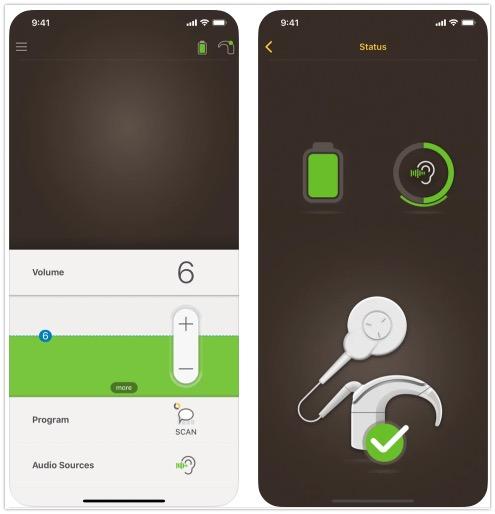
Controls Cochlear Nucleus 7, Nucleus 8 and Kanso 2 sound processors: programs, volume, battery status, usage tracking and a lost-processor finder.
Features
Listening assistance
Device companion
- Conditional: Directional focus control17
- Conditional: Hearing-device control18Android only
- Conditional: Find a hearing device19iPhone only
- Conditional: Remote professional support18Android only
- Conditional: Remote fitting adjustments18Android only
- Conditional: Device-usage tracking16iPhone only
- Conditional: Media streaming18Android only
- Conditional: Accessory control16iPhone only
- Conditional: Device firmware updates18Android only
- Conditional: Watch-based device control20Apple Watch only
Compatibility
Availability & access
Privacy & data
Research & evidence
- Conditional: App-specific study14iPhone only · Australia
- A Cochlear account and paired supported processor are required for full functions; demo mode does not provide device control.
- Intended for recipients of a Cochlear Nucleus implant who use a compatible sound processor, and their carers.
- Only for the Remote Check and Remote Assist remote-care workflows, which a clinician must enable; not documented as required for basic processor control.
- Only for the Remote Check and Remote Assist remote-care workflows, which a clinician must enable.
- Required for remote firmware updates; firmware updates may not be available in all areas.
- Required for Remote Check and Remote Assist; Remote Check on an Apple device needs Wi-Fi.
- Hearing Tracker usage data stays on the phone unless the user enables Data Sync, which synchronises it to the Cochlear Cloud.
- Sound Check microphone recordings (up to 30 seconds); only with Kanso 2 Sound Processors and compatible phones.
- Last-known processor location for the lost-processor finder; depends on phone location-services settings.
- Only during a clinician-scheduled Remote Assist video call, which requires microphone and camera access; Remote Assist must be enabled by the clinician and is not available in all countries.
- Only during a clinician-scheduled Remote Assist video call, which requires microphone and camera access; Remote Assist must be enabled by the clinician.
- In-call chat messages to the clinician during a Remote Assist session.
- By request under Cochlear's Global Privacy Notice; access and portability rights depend on the country of residence. No in-app export is documented.
- Evaluates the Remote Check feature of the Nucleus Smart App only: single-site prospective repeated-measures cohort, 32 experienced CI users (28 adults, 4 children), Sydney, on study-provided iPhones; manufacturer-affiliated authors.
- For recipients with two paired sound processors; together/separate control is set under Bilateral control, which may not be available in every app version.
- Compatible Nucleus processor and iPhone; sensitivity and tone controls require clinician enablement, and wireless accessory volume requires the accessory.
- ForwardFocus on/off toggle only (reduces noise from behind); no choice of direction or beam width. Must be enabled by the clinician; Nucleus 8, Nucleus 7 and Kanso 2 Sound Processors.
- Nucleus Smart Android guide version 6.0: functions depend on processor and paired Android phone; Remote Assist requires an enabled clinical service. The current registry also lists v7.0, which remains to be archived.
- Compatible Nucleus processor and iPhone; sensitivity and tone controls require clinician enablement, and wireless accessory volume requires the accessory. Location permissions and a previous connection may be required; last-known location is not live GPS in the hearing aid.
- Apple Watch paired with an iPhone running the Nucleus Smart App, kept close to the iPhone; only a subset of functions is available, and Watch functions are unavailable in some areas.
- Exact phone/OS compatibility is listed at www.cochlear.com/compatibility; the Nucleus 7 S Sound Processor is not compatible with Apple products.
- Android phones only; the app is not designed for Android tablets. Exact phone compatibility is listed at www.cochlear.com/compatibility.
- App control with Nucleus 8, Nucleus 7, Nucleus 7 SE or Kanso 2; Remote Check (remote_support) and Remote Assist remote adjustment (fitting) need clinician enrolment, a compatible implant and are not available in all countries.
- App control with Nucleus 8, Nucleus 7 or Kanso 2; Remote Check and Remote Assist need clinician enablement. Phone-call and music streaming on Android is handled by the OS (ASHA), not the app.
App Store ratings & reviews
Praise
- Reviewers value discreet program, volume and accessory controls.
Complaints
- Sampled complaints concern online access, switching between paired devices, saving settings and finding lost processors.
Google Play ratings & reviews
Praise
- Phone controls and monitoring are useful; some newer reviewers report improvements.
Complaints
- Processor detection and connection failures interrupt access to controls.
- Reviewers request clearer battery information or more persistent and accessible settings.
Hearing devices
Includes documented compatible products and models linked in our catalog. Features can depend on your model, phone and firmware; check the compatibility information for any restrictions.
5 models & families
- Cochlear Kanso 3
- Cochlear Kanso® 2
- Cochlear Nucleus 7 SE
- Cochlear Nucleus® 7
- Cochlear Nucleus® 8
- Kanso 3 is documented as a Nucleus Smart App processor on Cochlear's Australian Kanso 3 support page; processor availability varies by country.
- Exact phone/OS compatibility is listed at www.cochlear.com/compatibility; the Nucleus 7 S Sound Processor is not compatible with Apple products.
- Android phones only; the app is not designed for Android tablets. Exact phone compatibility is listed at www.cochlear.com/compatibility.